![[BunsenLabs Logo]](/img/bl.svg)
You are not logged in.
- Topics: Active | Unanswered
#2621 2026-03-10 16:29:56
- unklar
- Back to the roots 1.9

- From: #! BL
- Registered: 2015-10-31
- Posts: 3,108
Re: Show us your conky
done 

Offline
#2622 2026-03-10 21:29:18
- ceeslans
- Member

- Registered: 2015-09-30
- Posts: 231
Re: Show us your conky
^An attempt.
It works well with all three.>snip< https://i.postimg.cc/8fvLdY0F/20260309-17h12m51s-grim.png >snip<
>snip<
@unklar: lately I've been searching my conky backup folder for the conkyrc that belongs to above widget (which uses rings-v1.3.1.lua, right?) but to no avail...
I'd be very grateful if you could share your conky configuration.
Thanks a lot in advance!
Offline
#2623 2026-03-11 04:14:33
- Sector11
- Mod Squid Tpyo Knig

- From: Upstairs
- Registered: 2015-08-20
- Posts: 8,432
Re: Show us your conky
^An attempt.
It works well with all three.
Awesome stuff unklar.
I'm still a conky 1.9er on Debian Old Stable.
Must upgrade someday.
But it seems to me that newer these days doesn't necessarily mean better.
Debian 13 Beardog hosted by SoxDog
Still a Conky 1.9er at heart.
Offline
#2624 2026-03-11 12:47:06
- unklar
- Back to the roots 1.9
- From: #! BL
- Registered: 2015-10-31
- Posts: 3,108
Re: Show us your conky
unklar wrote:^An attempt.
It works well with all three.>snip< https://i.postimg.cc/8fvLdY0F/20260309-17h12m51s-grim.png >snip<
>snip<@unklar: lately I've been searching my conky backup folder for the conkyrc that belongs to above widget (which uses rings-v1.3.1.lua, right?) but to no avail...
I'd be very grateful if you could share your conky configuration.
Thanks a lot in advance!
Yes, it is v1.3.1.lua.
This is one of the Conky's that I found on the internet at some point, saved and forgot about.
I don't even know who the author is. 
You can find the files here: https://workupload.com/file/Y4k7cSbadVA
Offline
#2625 2026-03-11 13:03:24
- unklar
- Back to the roots 1.9
- From: #! BL
- Registered: 2015-10-31
- Posts: 3,108
Re: Show us your conky
unklar wrote:^An attempt.
It works well with all three.Awesome stuff unklar.
I'm still a conky 1.9er on Debian Old Stable.
Must upgrade someday.
But it seems to me that newer these days doesn't necessarily mean better.
Yes, I know my friend...
Stick with the 1.9's. Knowing you, you would be outraged by this nonsense
* old configuration syntaxannoy.
It doesn't correspond to the facts. 1.10 cannot handle the syntax of 1.9. It still refuses to serve.
Offline
#2626 2026-03-13 12:55:20
- Sector11
- Mod Squid Tpyo Knig
- From: Upstairs
- Registered: 2015-08-20
- Posts: 8,432
Re: Show us your conky
Stick with the 1.9's. Knowing you, you would be outraged by this nonsense
* old configuration syntaxannoy.
It doesn't correspond to the facts. 1.10 cannot handle the syntax of 1.9. It still refuses to serve.
OH I will .... as long as I can and that will be as long as it can get it's "depends"
Debian 13 Beardog hosted by SoxDog
Still a Conky 1.9er at heart.
Offline
#2627 2026-03-14 08:32:02
- unklar
- Back to the roots 1.9
- From: #! BL
- Registered: 2015-10-31
- Posts: 3,108
Re: Show us your conky
^^+1
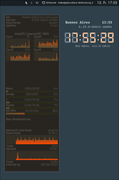
I dug up another Conky with text.lua from the archive. This is from @molnar based on the 'conky-system-lua-v3'.
I had never used it before. It uses 8 CPU's. I only have 4.
It's amazing how easy it is to configure text.lua once you get the hang of it. (conky -v1.22.3) 
Offline
#2628 2026-03-14 15:52:41
- marens
- Member

- From: World without M$
- Registered: 2023-02-02
- Posts: 1,303
Re: Show us your conky
Audacious-stream-conky
Majestic Jukebox Radio ( Oldies )
The Mamas & The Papas - Dream a little dream of me
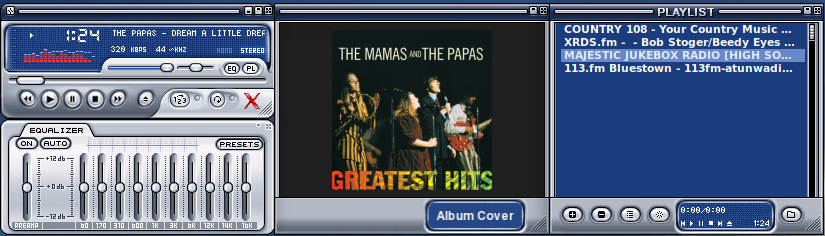
I completely forgot about this conky because I mostly listen to RadioTray-NG.
Audacious has a customized skin, and conky is in the middle.
First I created a background (with mtpaint) that looks like Audacious, and then thanks to a modified radiotray-ng script I got the album cover.
If people would know how little brain is ruling the world, they would die of fear.
Offline
#2629 2026-03-14 17:14:03
- loutch
- Member
- Registered: 2015-12-12
- Posts: 1,075
Re: Show us your conky
Hello
I've got a working Audacious Conky again when you click on it
It's been a while
conkyrc
conky.config = {
    background = true,
    use_xft = true,
    font = 'Liberation Sans:size=7',
    xftalpha = 1,
    update_interval = 0.5,
    total_run_times = 0,
    own_window = true,
    own_window_transparent = true,
    own_window_argb_visual = true,
    own_window_type = 'normal',
    own_window_hints = 'undecorated,below,skip_taskbar,skip_pager',
    own_window_title = 'audacious_conky',
    double_buffer = true,
    minimum_width = 400,
    minimum_height = 100,
    text_buffer_size = 2048,
    draw_shades = false,
    draw_outline = false,
    draw_borders = false,
    draw_graph_borders = false,
    default_color = 'white',
    alignment = 'bottom_middle',
    gap_x = 0,
    gap_y = 138,
    no_buffers = true,
    uppercase = false,
    cpu_avg_samples = 2,
    override_utf8_locale = true,
    imlib_cache_flush_interval = 60,
    imlib_cache_size = 10000,
    out_to_stderr = false,
    lua_load = '~/.conky/lua/image.lua',
};

conky.text = [[${execi 0.2 bash /home/romuald/.conky/audacious/scripts/click_audacious.sh > /dev/null 2>&1}\
${execi 3 ~/.conky/audacious/scripts/cover.sh}
${goto 160}${execi 1 audtool current-song-output-length}  ${goto 358}${color ff8000}${execi 1 audtool current-song-length}\
${goto 188}${color ff8000}${execbar 2, 164 expr 100 \* $(audtool --current-song-output-length-seconds) \/ $(audtool --current-song-length-seconds)}$color\
${goto 188}${color 000000}${execbar 2, 164 echo 0}$color

${lua fDrawImage ~/.conky/audacious/audacious.png 24 14 68 70}\
${lua fDrawImage ~/.conky/audacious/case.png 0 0 410 108}\
${if_existing /tmp/audacious_click}${image /home/romuald/.conky/audacious/images/Orange.png -p 102,00 -s 30x30}${endif}\

${voffset -20}${font GE Inspira :size=10}\
${goto 160}${execi 3 audtool current-song-tuple-data artist}${font}
${goto 160}${execi 3 audtool current-song-tuple-data title}
${goto 160}${execi 3 audtool current-song-tuple-data album}

# AFFICHAGE DES ICÔNES (Configuration 4 boutons)
${lua fDrawImage ~/.conky/audacious/stop.png 115 31 13 13}
${lua fDrawImage ~/.conky/audacious/rew.png 100 45 13 13}
${lua fDrawImage ~/.conky/audacious/play.png 115 45 13 13}
${lua fDrawImage ~/.conky/audacious/fwd.png 130 45 13 13}
${voffset -250}
]];
the script for clic & for the light
#!/bin/bash

# 1. Récupération de la fenêtre
WINDOW_UNDER_MOUSE=$(xdotool getmouselocation --shell | grep WINDOW | cut -d= -f2)
WIN_NAME=$(xprop -id $WINDOW_UNDER_MOUSE WM_NAME 2>/dev/null | cut -d'"' -f2)

if [ "$WIN_NAME" != "audacious_conky" ]; then
    exit 0
fi

# 2. Coordonnées relatives
WID=$(xdotool search --name "audacious_conky" | tail -1)
WX=$(xwininfo -id $WID | grep "Absolute upper-left X" | awk '{print $4}')
WY=$(xwininfo -id $WID | grep "Absolute upper-left Y" | awk '{print $4}')

eval $(xdotool getmouselocation --shell 2>/dev/null)
IS_DOWN=$(xinput query-state 16 | grep -o "button\[1\]=down")

REL_X=$((X - WX))
REL_Y=$((Y - WY))

if [ ! -z "$IS_DOWN" ]; then

    # On vérifie si on clique sur l'un des boutons
    # REW | PLAY | STOP | FWD
    if [[ $REL_X -ge 100 && $REL_X -le 113 && $REL_Y -ge 45 && $REL_Y -le 58 ]] || \
       [[ $REL_X -ge 115 && $REL_X -le 128 && $REL_Y -ge 45 && $REL_Y -le 58 ]] || \
       [[ $REL_X -ge 115 && $REL_X -le 128 && $REL_Y -ge 31 && $REL_Y -le 44 ]] || \
       [[ $REL_X -ge 130 && $REL_X -le 143 && $REL_Y -ge 45 && $REL_Y -le 58 ]]; then

        # Création du témoin lumineux
        touch /tmp/audacious_click

        # Exécution des commandes selon la zone
        [[ $REL_X -ge 100 && $REL_X -le 113 && $REL_Y -ge 45 && $REL_Y -le 58 ]] && audacious --rew
        [[ $REL_X -ge 115 && $REL_X -le 128 && $REL_Y -ge 45 && $REL_Y -le 58 ]] && audacious --play-pause
        [[ $REL_X -ge 115 && $REL_X -le 128 && $REL_Y -ge 31 && $REL_Y -le 44 ]] && audacious --stop
        [[ $REL_X -ge 130 && $REL_X -le 143 && $REL_Y -ge 45 && $REL_Y -le 58 ]] && audacious --fwd

        sleep 0.4
        rm -f /tmp/audacious_click
    fi
fi
@+
Last edited by loutch (2026-03-14 17:41:34)
Linuxmint 22.1 Xia xfce & mageia 9 XFCE on ssd hp pavilion g7
Xubuntu 18.04 lts & 24.04 lts on ASUS Rog STRIX
Offline
#2630 2026-03-15 00:08:40
- marens
- Member
- From: World without M$
- Registered: 2023-02-02
- Posts: 1,303
Re: Show us your conky
^ I'm glad you finally found a version of Conky that supports mouse events.
I'm using Audacious with a changed skin and all buttons are clickable.
I made audacious conky in the same style (Winamp) and inserted it in the middle.
Most would think it was an original piece of Audacious.
It really looks very convincing.
P.S.
If anyone wants more details about Audacious skins, they can find them here:
https://forums.bunsenlabs.org/viewtopic … 12#p143312
If people would know how little brain is ruling the world, they would die of fear.
Offline
#2631 2026-03-15 10:46:12
- unklar
- Back to the roots 1.9
- From: #! BL
- Registered: 2015-10-31
- Posts: 3,108
Re: Show us your conky
^Very nice!
However, this is all too small for me.
On all systems, Audacious is now my favorite in this configuration.

Offline
#2632 2026-03-16 12:52:37
- Sector11
- Mod Squid Tpyo Knig
- From: Upstairs
- Registered: 2015-08-20
- Posts: 8,432
Re: Show us your conky
^^+1
Keeping track:
conky-legacy-all
  Depends: libaudclient2
  Depends: libc6
  Depends: libcairo2
  Depends: libcurl3-gnutls
  Depends: libdbus-glib-1-2
  Depends: libglib2.0-0
  Depends: libimlib2
  Depends: libiw30
  Depends: liblua5.1-0
  Depends: libncurses5
  Depends: libtinfo5
  Depends: libx11-6
  Depends: libxdamage1
  Depends: libxext6
  Depends: libxfixes3
  Depends: libxft2
  Depends: libxml2
  Depends: libxmmsclient6
  Depends: libxnvctrl0
Do the depends for the latest conky-all at least have those?
apt-cache depends YOUR VERSIONI dug up another Conky with text.lua from the archive. This is from @molnar based on the 'conky-system-lua-v3'.
I had never used it before. It uses 8 CPU's. I only have 4.
It's amazing how easy it is to configure text.lua once you get the hang of it. (conky -v1.22.3)
Nice looking conky.
Debian 13 Beardog hosted by SoxDog
Still a Conky 1.9er at heart.
Offline
#2633 2026-03-16 15:18:59
- unklar
- Back to the roots 1.9
- From: #! BL
- Registered: 2015-10-31
- Posts: 3,108
Re: Show us your conky
Do the depends for the latest conky-all at least have those?
^
LANG=C apt-cache depends conky-all
conky-all
  Depends: libaudclient2
  Depends: libc6
  Depends: libcairo2
  Depends: libcurl3t64-gnutls
  Depends: libdbus-glib-1-2
  Depends: libfontconfig1
  Depends: libfreetype6
  Depends: libgcc-s1
  Depends: libglib2.0-0t64
  Depends: libharfbuzz0b
  Depends: libical3t64
  Depends: libimlib2t64
  Depends: libircclient1
  Depends: libiw30t64
  Depends: liblua5.3-0
  Depends: libncurses6
  Depends: libpango-1.0-0
  Depends: libpangocairo-1.0-0
  Depends: libpangoft2-1.0-0
  Depends: libpulse0
  Depends: librsvg2-2
  Depends: libstdc++6
  Depends: libtinfo6
  Depends: libwayland-client0
  Depends: libx11-6
  Depends: libxdamage1
  Depends: libxext6
  Depends: libxfixes3
  Depends: libxft2
  Depends: libxinerama1
  Depends: libxml2-16
  Depends: libxnvctrl0
  Conflicts: conky-cli
  Conflicts: conky-std
  Suggests: apcupsd
  Suggests: audacious
  Suggests: moc
  Suggests: mpd
  Replaces: conky-cli
  Replaces: conky-std
conky-all:
Installed: 1.22.3-1
Candidate: 1.22.3-1
Version table:
*** 1.22.3-1 500
500 https://deb.debian.org/debian unstable/main amd64 Packages
100 /var/lib/dpkg/statusOffline
#2634 2026-03-17 09:19:45
- loutch
- Member
- Registered: 2015-12-12
- Posts: 1,075
Re: Show us your conky
Hello
^ I'm glad you finally found a version of Conky that supports mouse events.
No mouse event for my version of Conky , workaround using xdotool & xinput.
@+
Linuxmint 22.1 Xia xfce & mageia 9 XFCE on ssd hp pavilion g7
Xubuntu 18.04 lts & 24.04 lts on ASUS Rog STRIX
Offline
#2635 2026-03-17 11:26:28
- Sector11
- Mod Squid Tpyo Knig
- From: Upstairs
- Registered: 2015-08-20
- Posts: 8,432
Re: Show us your conky
Sector11 wrote:Do the depends for the latest conky-all at least have those?
^
LANG=C apt-cache depends conky-all
conky-all
  Depends: libaudclient2
{snip}
NICE! Thank you my friend.
Debian 13 Beardog hosted by SoxDog
Still a Conky 1.9er at heart.
Offline
#2636 2026-03-17 13:30:20
- marens
- Member
- From: World without M$
- Registered: 2023-02-02
- Posts: 1,303
Re: Show us your conky
Hello
marens wrote:^ I'm glad you finally found a version of Conky that supports mouse events.
No mouse event for my version of Conky , workaround using xdotool & xinput.
@+
^ Yes.
I see now.
Only the coordinates of the buttons inside conky relative to the top left corner of the window (audacious_conky) are needed (WX, WY and REL_X, REL_Y).
Great job as always.
If people would know how little brain is ruling the world, they would die of fear.
Offline
#2637 2026-03-18 13:47:22
- loutch
- Member
- Registered: 2015-12-12
- Posts: 1,075
Re: Show us your conky
Hello
conky look like fastfetch config

@+
Last edited by loutch (2026-03-18 16:52:04)
Linuxmint 22.1 Xia xfce & mageia 9 XFCE on ssd hp pavilion g7
Xubuntu 18.04 lts & 24.04 lts on ASUS Rog STRIX
Offline
#2638 2026-03-20 10:45:20
- unklar
- Back to the roots 1.9
- From: #! BL
- Registered: 2015-10-31
- Posts: 3,108
Re: Show us your conky
+1 superp
Offline
#2639 2026-03-20 11:18:53
- unklar
- Back to the roots 1.9
- From: #! BL
- Registered: 2015-10-31
- Posts: 3,108
Re: Show us your conky
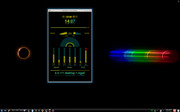
^In the archive I found two more Conky with text.lua. They are from 2010 by @wlourf.
Here are the original files and my attempts at the time under mageia5.

https://workupload.com/file/h2NRtJKwYjA
https://workupload.com/file/8tDRJ3Urc82
Both Conky bring lots of lua errors under conkyV1.22.3 and don't run.
That's why I decided to try the configuration with lua similar to the one used with the box here.
The result is positive.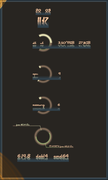 https://workupload.com/file/Y3BcaYt7XNA
  https://workupload.com/file/tfzJGfm5V6J
The trick here is that you call the different lua scripts in conkyrc using a lua start script (luaload; lua-box, launcher etc). Then there will be no errors. 
I will also publish the configurations on workupload. Please note that I have not fully configured the bargraph because I am using a fanless PC and some device files for hwmon are missing here.
------------------------
Edit:
Short conclusion
My impression is that Conky 1.22.3 is the best version so far with Syntax1.10.
Thanks for reading.
Last edited by unklar (2026-03-20 12:45:11)
Offline
#2640 2026-03-20 16:53:19
- Sector11
- Mod Squid Tpyo Knig
- From: Upstairs
- Registered: 2015-08-20
- Posts: 8,432
Re: Show us your conky
^In the archive I found two more Conky with text.lua. They are from 2010 by @wlourf.
Here are the original files and my attempts at the time under mageia5.
wlourf wrote some AWESOME scripts.
I have them all.
Debian 13 Beardog hosted by SoxDog
Still a Conky 1.9er at heart.
Offline