![[BunsenLabs Logo]](/img/bl.svg)
You are not logged in.
- Topics: Active | Unanswered
#41 2026-05-01 15:04:39
- marens
- Member

- From: World without M$
- Registered: 2023-02-02
- Posts: 1,314
Re: MyForecast Script
It's not great where I live as I get lots of thunderstorms, and the icons for that weather condition have black coloured clouds. The black doesn't stand out against the desktop background.
I did a simulation and can confirm: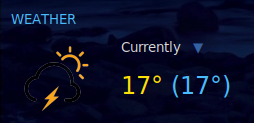
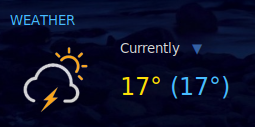
If I use the icons above it looks fine:
https://forums.bunsenlabs.org/viewtopic … 98#p150498
Last edited by marens (2026-05-01 18:54:28)
If people would know how little brain is ruling the world, they would die of fear.
Offline
#42 2026-05-02 03:42:39
- asqwerth
- Member
- Registered: 2015-10-08
- Posts: 86
Re: MyForecast Script
@marens
Thanks for the recoloured icons. The icon set works great now.
Offline
#43 2026-05-06 17:40:20
- marens
- Member
- From: World without M$
- Registered: 2023-02-02
- Posts: 1,314
Re: MyForecast Script
Info
The MyForecast script with all changes/improvements is at the end of this post:
https://forums.bunsenlabs.org/viewtopic … 80#p150180
Last edited by marens (2026-05-07 23:50:40)
If people would know how little brain is ruling the world, they would die of fear.
Offline
#44 2026-05-10 01:05:40
- marens
- Member
- From: World without M$
- Registered: 2023-02-02
- Posts: 1,314
Re: MyForecast Script
Please, be sure to read this:
https://forums.bunsenlabs.org/viewtopic … 39#p150739
Thanks!
If people would know how little brain is ruling the world, they would die of fear.
Offline
#45 2026-05-14 13:55:20
- marens
- Member
- From: World without M$
- Registered: 2023-02-02
- Posts: 1,314
Re: MyForecast Script
Last night the MyForecast website was down for about an hour:

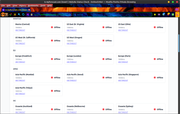
All files needed by mf-conky were empty.
If necessary, you can always check here:
https://onlineornot.com/website-down-checker
P.S.
If this happens more often, I can easily prevent the myforecast script from generating empty files as done here:
https://forums.bunsenlabs.org/viewtopic … 02#p150702
If people would know how little brain is ruling the world, they would die of fear.
Offline
#46 2026-05-16 01:18:40
- marens
- Member
- From: World without M$
- Registered: 2023-02-02
- Posts: 1,314
Re: MyForecast Script
^ OK.
If you want, you can test together with me.
This is what the beginning of the myforecast script where the curl commands are located should look like:
---

curl -H 'User-Agent: Mozilla/5.0 (X11; Linux x86_64; rv:80.0) Gecko/20100101 Firefox/80.0' -s "$address_daily" > $HOME/MyForecast/weather_raw

    check1=$(cat $HOME/MyForecast/weather_raw)

sleep 1.4

curl -H 'User-Agent: Mozilla/5.0 (X11; Linux x86_64; rv:80.0) Gecko/20100101 Firefox/80.0' -s "$address_hourly" > $HOME/MyForecast/hourly/hourly_raw

    check2=$(cat $HOME/MyForecast/hourly/hourly_raw)

    if [[ $check1 =~ "Internal Server Error" || $check2 =~ "Internal Server Error" ]]; then

      echo '* Server Error' > $HOME/MyForecast/server_error

       exit 0

    fi


#### NOW FORECAST

> $HOME/MyForecast/server_error

---
Then open the ~/MyForecast folder and create a server_error file inside.
The myforecast script will generate a "* Server Error" line in the server_error file if the website is offline.
Done.
Now it needs to be displayed in mf-conky (if it happens).
It was easy for me because I have the word Weather in the title.
${voffset 8}${goto 10}${color 48bcff}WEATHER${color}\
${font :size=9}${color ff8080}${goto 120}${texeci 90 sed -n '1p' $HOME/MyForecast/server_error}${color}${font}\
${texeci 1800 bash $HOME/MyForecast/myforecast}   ...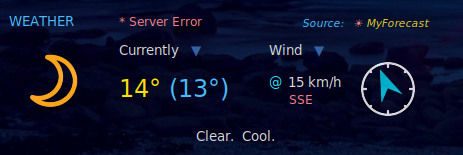
The screenshot above is of course a simulation.
I opened the file ~/MyForecast/server_error using a text editor and entered the line: * Server Error.
After that I just waited for the warning to appear in mf-conky.
The warning disappeared the next time mf-conky ran the myforecast script. 
If people would know how little brain is ruling the world, they would die of fear.
Offline
#47 2026-06-10 19:12:50
- marens
- Member
- From: World without M$
- Registered: 2023-02-02
- Posts: 1,314
Re: MyForecast Script
MF Conky - Show Update
Unlike the TAD script, which executes in about a second, it takes a little longer here because the hourly forecast is very large (7 days x 24 hours).
I played around a bit and decided to show the update in mf-conky.
When the update starts, the image update.png will appear as 0.png (now icon).
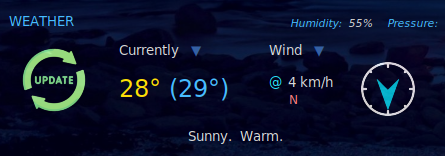
After downloading (a few seconds), a new image 0.png is returned.
I found a suitable image (update.png), modified it a bit and now it looks like this:
https://i.postimg.cc/wjqMb0KC/update.png

Just copy/paste the image into the ~/MyForecast folder.
All that remains is to edit mf-conky by adding the cp command before running the myforecast script.
The interval must of course be the same (in my case 1800 seconds):
${texeci 1800 cp $HOME/MyForecast/update.png $HOME/MyForecast/0.png}\
${texeci 1800 bash $HOME/MyForecast/myforecast}
If people would know how little brain is ruling the world, they would die of fear.
Offline
#48 2026-06-11 18:08:40
- marens
- Member
- From: World without M$
- Registered: 2023-02-02
- Posts: 1,314
Re: MyForecast Script
^ Oh.
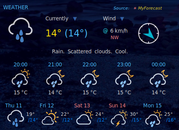
I'm starting to like this effect.
It looks much better than the weather conditions in the next few hours.
Start of update: After a few seconds: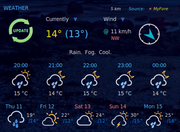
If people would know how little brain is ruling the world, they would die of fear.
Offline
#49 2026-07-04 15:40:50
- marens
- Member
- From: World without M$
- Registered: 2023-02-02
- Posts: 1,314
Re: MyForecast Script
Hourly Forecast (Time Format)
The myforecast script already includes the file ~/MyForecast/hourly/time, which displays the next eight hours.
However, most people here (myself included) do not use that file for mf-conky.
@ceeslans has shown here what the only correct way looks like:
https://forums.bunsenlabs.org/viewtopic … 14#p150214
So why don't we use the best way?
We mostly use date or similar commands for the next hours.
That is fine because the website is updated regularly, but it is still not the most accurate.
Probably due to the time format, since we generally prefer HH:MM.
If that is the reason, let's convert time into the desired format.
Open the myforecast script and add this to the end:
## Convert Time (HH:MM)

#function: convert_time_h
	convert_time_h ()
	{
		hours=$(echo $1|awk -F ":| " '{print $1}')
		am_or_pm=$(echo $1|awk -F ":| " '{print $2}')
		if [[ $am_or_pm == "" ]]; then
			echo $1
			return 0
		elif [[ $am_or_pm == AM ]]; then
			if (( $hours < 10 )); then
				hours_24=0$hours
			fi
			if (( $hours == 10 || $hours == 11 )); then
				hours_24=$hours
			fi
			if (( $hours == 12 )); then
				hours_24=00
			fi
		elif [[ $am_or_pm == PM ]]; then
			if (( $hours != 12 )); then
				hours_24=$((hours+12))
			fi
			if (( $hours == 12 )); then
				hours_24=12
			fi
		fi
		time_24=$hours_24:00
		echo $time_24
	}


	# Convert time
	for (( i=1; i<=8; i+=1 ))
		  do
		   h=$(sed -n ${i}p $HOME/MyForecast/hourly/time)
			  sed -i ${i}s/^.*$/$(convert_time_h "$h")/ $HOME/MyForecast/hourly/time
		  done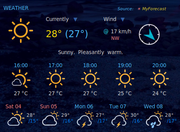
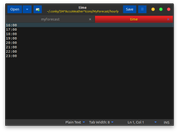
Now we can use the most accurate way to display the next hours in mf-conky.
Enjoy.
If people would know how little brain is ruling the world, they would die of fear.
Offline
#50 Yesterday 16:14:10
- asqwerth
- Member
- Registered: 2015-10-08
- Posts: 86
Re: MyForecast Script
@marens, for roughly the past 1 week, both the MF and the TAD scripts haven't been able to pull in any weather data. So all the generated data files that should have text are empty.
Offline
#51 Yesterday 17:05:19
- unklar
- Back to the roots 1.9

- From: #! BL
- Registered: 2015-10-31
- Posts: 3,139
Re: MyForecast Script
@asqwert, no problems here (except that something has been postponed again). It must be due to your location...

Offline
#52 Yesterday 18:35:40
- marens
- Member
- From: World without M$
- Registered: 2023-02-02
- Posts: 1,314
Re: MyForecast Script
@marens, for roughly the past 1 week, both the MF and the TAD scripts haven't been able to pull in any weather data. So all the generated data files that should have text are empty.
Both scripts work here.
MF Conky: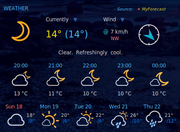
Did you change anything?
Are the folders in the same location (HOME)?
The best way to check is from the terminal.
Run the script once (for MF):
bash $HOME/MyForecast/myforecastAre there any errors?
If people would know how little brain is ruling the world, they would die of fear.
Offline
#53 Today 08:32:10
- asqwerth
- Member
- Registered: 2015-10-08
- Posts: 86
Re: MyForecast Script
I had not changed anything in the script or its file location all this while. It's still in $HOME/MyForecast under the same name. It just stopped pulling data about a week ago even though when I visit the myforecast.com webpage for my location, all the weather data is there. Running the script in terminal gives me this:
$ bash myforecast
cp: -r not specified; omitting directory '/home/tuaz/MyForecast/myforecast-icons/'
cp: cannot stat '/home/tuaz/MyForecast/wind/.png': No such file or directory
cp: -r not specified; omitting directory '/home/tuaz/MyForecast/myforecast-icons/'
cp: -r not specified; omitting directory '/home/tuaz/MyForecast/myforecast-icons/'
cp: -r not specified; omitting directory '/home/tuaz/MyForecast/myforecast-icons/'
cp: -r not specified; omitting directory '/home/tuaz/MyForecast/myforecast-icons/'
cp: -r not specified; omitting directory '/home/tuaz/MyForecast/myforecast-icons/'
cp: -r not specified; omitting directory '/home/tuaz/MyForecast/myforecast-icons/'
cp: -r not specified; omitting directory '/home/tuaz/MyForecast/myforecast-icons/'
cp: -r not specified; omitting directory '/home/tuaz/MyForecast/myforecast-icons/'
cp: -r not specified; omitting directory '/home/tuaz/MyForecast/myforecast-icons/'
cp: -r not specified; omitting directory '/home/tuaz/MyForecast/myforecast-icons/'
cp: -r not specified; omitting directory '/home/tuaz/MyForecast/myforecast-icons/'
cp: -r not specified; omitting directory '/home/tuaz/MyForecast/myforecast-icons/'
cp: -r not specified; omitting directory '/home/tuaz/MyForecast/myforecast-icons/'
cp: -r not specified; omitting directory '/home/tuaz/MyForecast/myforecast-icons/'
cp: -r not specified; omitting directory '/home/tuaz/MyForecast/myforecast-icons/'
Like I said, all the data files in the $HOME/MyForecast folder are empty.
I haven't suddenly started using a different firewall or vpn or whatever.
Last edited by asqwerth (Today 08:33:07)
Offline
#54 Today 13:06:35
- marens
- Member
- From: World without M$
- Registered: 2023-02-02
- Posts: 1,314
Re: MyForecast Script
Like I said, all the data files in the $HOME/MyForecast folder are empty.
1) Run these two commands (for Paris,FR) from the terminal and check if the files weather_raw and hourly_raw are empty?
Daily:
curl -H 'User-Agent: Mozilla/5.0 (X11; Linux x86_64; rv:80.0) Gecko/20100101 Firefox/80.0' "https://www.myforecast.com/index.php?cwid=gn2968815&metric=true&city_count=&zip_code=&condition=act&data=216802302&lang=english" > $HOME/MyForecast/weather_rawHourly:
curl -H 'User-Agent: Mozilla/5.0 (X11; Linux x86_64; rv:80.0) Gecko/20100101 Firefox/80.0' "https://www.myforecast.com/hourly-forecast.php?cwid=gn2968815&metric=true&city_count=&zip_code=&condition=act&data=450162476&lang=english" > $HOME/MyForecast/hourly/hourly_raw2) Check the folder /home/tuaz/MyForecast/myforecast-icons.
I know you often change icons; perhaps you didn't rename them correctly (as the script expects).
If people would know how little brain is ruling the world, they would die of fear.
Offline
#55 Today 14:35:45
- asqwerth
- Member
- Registered: 2015-10-08
- Posts: 86
Re: MyForecast Script
@marens, running those 2 commands worked, so I re-ran the commands with my city code instead, and those worked, too. I examined the address_daily and address_hourly strings defined in the script, and noted that they were different.
From what I can see, previously when I first accessed the website to search for my city's weather page in order to obtain the URL for the script, the URL was "http://myforecast...." without the "www." in front.
Now however, searching for my city leads to a URL with the "www." in front. Once I added that into the script, everything works again.
Thanks for providing the clue that led to the solution.
[ADDED] currently only data related to today's weather is present in all text files. All data related to forecast of subsequent days is absent.
Last edited by asqwerth (Today 17:40:05)
Offline
#56 Today 18:04:26
- marens
- Member
- From: World without M$
- Registered: 2023-02-02
- Posts: 1,314
Re: MyForecast Script
^ Please go back to the first (#1) post here:
https://forums.bunsenlabs.org/viewtopic … 80#p150180
Pay attention to the lines below 'HOW?'.
I explained in detail how to find addresses (daily+hourly) in the correct way.
They are probably very different from the ones you are currently using.
Good luck!
If people would know how little brain is ruling the world, they would die of fear.
Offline