![[BunsenLabs Logo]](/img/bl.svg)
You are not logged in.
- Topics: Active | Unanswered
#1 2026-04-17 00:54:20
- marens
- Member

- From: World without M$
- Registered: 2023-02-02
- Posts: 1,296
MyForecast Script
The TAD script works great.
However, there is a problem with locations.
Some locations are redirected to the nearest airport even though it is usually far from the city.
Some locations are updated very rarely on the website (every three hours at my place).
I did a little research and found the source that is used.
Updates are regular here and there is a lot more data for conky.
You can download MyForecast here:
https://www.mediafire.com/file/c9qquyyo … ar.xz/file
1) Extract MyForecast.tar.xz and get the MyForecast folder
2) Copy/Paste MyForecast folder in HOME
3) Open the folder and you will see the myforecast script (file)
4) Open it with a text editor
5) At the beginning of the script you will see that it is set to ## Paris, France as an example and you need to change the addresses (daily and hourly)
HOW?
1) Visit https://www.myforecast.com website
2) Type your location in the search field
3) Once you find your location (not the airport), click More Forecasts > Hourly
4) Right-click in the URL bar > Copy
5) Paste in address_hourly (it must be in the same format as for Paris, FR)
6) Click on the 'hamburger menu' (top right) > Current conditions
7) Right-click in the URL bar > Copy
8) Paste in address_daily (it must be in the same format as for Paris, FR)
Done.
Finally, open a terminal and run the myforecast script once:
bash $HOME/MyForecast/myforecastOpen the MyForecat folder and check if you get this:
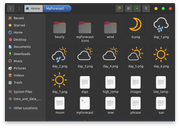
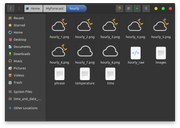
Beautiful weather icons and lots of data for conky.
There is also information about the sun and moon.
--------
Now you need the latest version of the myforecast script at the end of this post.
There have been several changes/improvements.
ANNOUNCEMENTS
18/04/2026
1) Remove 'phantom' empty box
https://forums.bunsenlabs.org/viewtopic … 35#p150235
21/04/2026
1) Hourly Images Bug
https://forums.bunsenlabs.org/viewtopic … 94#p150294
23/04/2026
1) No Wind (Calm)
2) Missing image for current weather conditions
https://forums.bunsenlabs.org/viewtopic … 18#p150318
Note *
Add image 36.png to myforecat-icons folder
29/04/2026
1) Replace moon icon (13.png)
https://forums.bunsenlabs.org/viewtopic … 58#p150458
Note *
Only if you like the new icon
01/05/2026
1) Replace the "thunder" icons
https://forums.bunsenlabs.org/viewtopic … 98#p150498
Note *
Only if you like the new icons
10/06/2026
1) Show Update
https://forums.bunsenlabs.org/viewtopic … 09#p151309
Note *
Only if you like
04/07/2026
1) Hourly Forecast (Time Format)
https://forums.bunsenlabs.org/viewtopic … 56#p151756
Note *
Only if you like
**** This is a fully updated myforecast script ****
Note *
Don't forget to save your addresses (address_daily and address_hourly)
#!/bin/bash
## Paris, France
address_daily="https://www.myforecast.com/index.php?cwid=gn2968815&metric=true&city_count=&zip_code=&condition=act&data=216802302&lang=english"
address_hourly="https://www.myforecast.com/hourly-forecast.php?cwid=gn2968815&metric=true&city_count=&zip_code=&condition=act&data=450162476&lang=english"
curl -H 'User-Agent: Mozilla/5.0 (X11; Linux x86_64; rv:80.0) Gecko/20100101 Firefox/80.0' -s "$address_daily" > $HOME/MyForecast/weather_raw
sleep 0.4
curl -H 'User-Agent: Mozilla/5.0 (X11; Linux x86_64; rv:80.0) Gecko/20100101 Firefox/80.0' -s "$address_hourly" > $HOME/MyForecast/hourly/hourly_raw
sleep 0.2
#### NOW FORECAST
## Image
cat $HOME/MyForecast/weather_raw | grep 'src="assets/img/icons' | sed -n '1p' | sed -e 's/^[ \t]*//' -e 's/<img src="assets\/img\/icons\///' -e 's/"//' | awk '{print $1}' | sed 's/cw_no_report_icon/36/' > $HOME/MyForecast/now
## Temperature
cat $HOME/MyForecast/weather_raw | grep 'mt-2 primary-txt">' | awk -F'</' '{print $1}' | sed -e 's/<h1 class="display-2 roboto-condensed-700 m-lg-0 mt-2 primary-txt">//' -e 's/^[ \t]*//' -e "s/<span class='csuper'>//" >> $HOME/MyForecast/now
## Comfort Level
cat $HOME/MyForecast/weather_raw | grep -A 2 'Comfort Level' | grep 'class' | sed -e 's/^[ \t]*//' -e 's/<p class="my-2">//' -e "s/<span class='csuper'>//" -e 's/<\/span><\/p>//' >> $HOME/MyForecast/now
## Phrase
cat $HOME/MyForecast/weather_raw | grep '<small class="primary-txt">' | sed -e 's/^[ \t]*//' -e 's/<small class="primary-txt">//' -e 's/<\/small>//' >> $HOME/MyForecast/now
## Wind Direction
cat $HOME/MyForecast/weather_raw | grep -A 2 'Wind:' | sed -e 's/.* //' -e 's/<sup>//' -e 's/<\/sup>//' -e '/Wind:/d' -e '/fill/d' | awk '{print $1}' >> $HOME/MyForecast/now
## Wind Speed
cat $HOME/MyForecast/weather_raw | grep -A 2 'Wind:' | grep 'km/h' | sed -e 's/ [^ ]*$//' -e 's/^[ \t]*//' -e 's/.$//' >> $HOME/MyForecast/now
## Dew Point
cat $HOME/MyForecast/weather_raw | grep -A 2 'Dew Point' | grep 'class' | sed -e 's/^[ \t]*//' -e 's/<p class="my-2">//' -e "s/<span class='csuper'>//" -e 's/<\/span><\/p>//' >> $HOME/MyForecast/now
## Visibility
cat $HOME/MyForecast/weather_raw | grep -A 2 'Visibility' | grep 'km' | sed -e 's/^[ \t]*//' -e 's/<p class="my-2">//' -e 's/<span class=downcase>//' -e 's/<\/span><\/p>//' >> $HOME/MyForecast/now
## Humidity
cat $HOME/MyForecast/weather_raw | grep -A 2 'Humidity' | grep 'class="my-2">' | sed -e 's/^[ \t]*//' -e 's/<p class="my-2">//' -e 's/<\/p>//' >> $HOME/MyForecast/now
## Pressure
cat $HOME/MyForecast/weather_raw | grep -A 2 'Pressure' | grep 'class' | sed -e 's/^[ \t]*//' -e 's/<p class="my-2"> //' -e 's/ <span class="downcase">//' -e 's/<\/span><\/p>//' >> $HOME/MyForecast/now
## Tendency
cat $HOME/MyForecast/weather_raw | grep -A 2 'Tendency' | grep 'class' | sed -e 's/^[ \t]*//' -e 's/<p class="my-2">//' -e 's/<\/p>//' >> $HOME/MyForecast/now
## Now Icon
sed -i 's/[[:blank:]]*$//' $HOME/MyForecast/now
cp $HOME/MyForecast/myforecast-icons/$(sed -n '1p' $HOME/MyForecast/now) $HOME/MyForecast/0.png
## Wind Icon
ws=$(sed -n '6p' $HOME/MyForecast/now | sed 's/ .*//')
wd=$(cat $HOME/MyForecast/weather_raw | grep '<sup>' | sed -n '1p' | sed 's/.*<sup>/<sup>/' | sed 's/<\/sup>.*//' | sed 's/<sup>//')
if [[ "$ws" == "0" ]]; then
cp $HOME/MyForecast/wind/CLM.png $HOME/MyForecast/wind_0.png
sed -i '5d' $HOME/MyForecast/now
sed -i "5s/^/N\/A\n/" $HOME/MyForecast/now
sed -i '6d' $HOME/MyForecast/now
sed -i "6s/^/Calm\n/" $HOME/MyForecast/now
else
cp $HOME/MyForecast/wind/$wd.png $HOME/MyForecast/wind_0.png
fi
#### SUNRISE/SUNSET/DURATION
cat $HOME/MyForecast/weather_raw | grep 'class="bi bi-brightness-high-fill fs-5"></i><br>' | sed -e 's/^[ \t]*//' -e 's/<i class="bi bi-brightness-high-fill fs-5"><\/i><br>Rise: //' -e 's/|/\n/g' -e 's/ Set: //' -e 's/<br>//' -e 's/AM/ AM/' -e 's/PM/ PM/' > $HOME/MyForecast/sun
cat $HOME/MyForecast/weather_raw | grep -A 1 'class="bi bi-brightness-high-fill fs-5"></i><br>' | sed -e 's/^[ \t]*//' -e '1d' -e 's/hrs /:/' -e 's/mins//' -e 's/ .*//' >> $HOME/MyForecast/sun
#### MOONRISE/MOONSET/PHASE
cat $HOME/MyForecast/weather_raw | grep -A 2 'class="bi bi-moon-fill"' | sed -e 's/^[ \t]*//' -e '1d' -e 's/Rise: //' -e 's/Set: //' -e 's/ | //' -e 's/<br>//' -e 's/AM/ AM/' -e 's/PM/ PM/' > $HOME/MyForecast/moon
cat $HOME/MyForecast/weather_raw | grep -A 3 'class="bi bi-moon-fill">' | sed 's/^[ \t]*//' | sed -n '$p' | sed 's/ <\/p>//' >> $HOME/MyForecast/moon
#### DAILY FORECAST
## Days
cat $HOME/MyForecast/weather_raw | grep 'class="text-red fw-bold text-uppercase">' | sed -e 's/^[ \t]*//' -e 's/<p class="small mb-0 mt-1"><span class="text-red fw-bold text-uppercase">//' -e 's/<\/span><\/p>//' > $HOME/MyForecast/days
## Images
cat $HOME/MyForecast/weather_raw | grep 'src="assets/img/icons' | sed -e 's/^[ \t]*//' -e 's/<img src="assets\/img\/icons\///' -e 's/" //' -e 's/width="72"\/>//' -e 's/width="36"\/>//' | sed -n '2,9p' | sed 's/\(.png\).*/\1/' > $HOME/MyForecast/images
## High Temerature
cat $HOME/MyForecast/weather_raw | grep -A 1 '<h2 class="roboto-condensed-700 me-2 primary-txt">' | sed -e 's/^[ \t]*//' -e '/--/d' -e '/class/d' -e 's/<\/h2>//' -e 's/ .*//' > $HOME/MyForecast/high_temp
## Low Temerature
cat $HOME/MyForecast/weather_raw | grep -A 1 '<h4 class="roboto-condensed-400 mt-lg-2 text-body-tertiary" style="margin-top:3px;">' | sed -e 's/^[ \t]*//' -e '/--/d' -e '/class/d' -e 's/<\/h4>//' -e 's/ .*//' > $HOME/MyForecast/low_temp
## Phrase
cat $HOME/MyForecast/weather_raw | grep -A 1 '<p class="small primary-txt text-start mb-0">' | sed -e 's/^[ \t]*//' -e '/--/d' -e '/class/d' -e 's/<br>//' > $HOME/MyForecast/phrase
## Icons (Next 7 Days)
j=1
for (( i=1; i<=7; i+=1 ))
do
cp $HOME/MyForecast/myforecast-icons/$(sed -n ${i}p $HOME/MyForecast/images) $HOME/MyForecast/day_$j.png
((j++))
done
#### HOURLY FORECAST
## Images
cat $HOME/MyForecast/hourly/hourly_raw | grep 'src="assets/img/icons/' | sed -n '2,10p' | sed -e 's/^[ \t]*//' -e 's/<td> <img src="assets\/img\/icons\///' -e 's/<img src="assets\/img\/icons\///' -e 's/" style="width:30px;"\/><\/td>//' -e '/36px/d'| sed 's/\(.png\).*/\1/' > $HOME/MyForecast/hourly/images
## TIME
cat $HOME/MyForecast/hourly/hourly_raw | grep '<th scope="row">' | sed -n '1,8p' | sed -e 's/^[ \t]*//' -e 's/<th scope="row">//' -e 's/<\/th>//' | sed -e 's/:00//' -e 's/am/AM/' -e 's/pm/PM/' > $HOME/MyForecast/hourly/time
## Temperature
cat $HOME/MyForecast/hourly/hourly_raw | grep -A 1 '<th scope="row">' | grep '<td>'| sed -n '1,8p' | sed -e 's/^[ \t]*//' -e 's/<td>//' -e's/<\/td>//' > $HOME/MyForecast/hourly/temperature
## Phrase
cat $HOME/MyForecast/hourly/hourly_raw | grep "\.</td>" | sed -n '1,8p' | sed -e 's/^[ \t]*//' -e 's/<td>//' -e's/<\/td>//' > $HOME/MyForecast/hourly/phrase
## Icons
j=1
for (( i=1; i<=8; i+=1 ))
do
cp $HOME/MyForecast/myforecast-icons/$(sed -n ${i}p $HOME/MyForecast/hourly/images) $HOME/MyForecast/hourly/hourly_$j.png
((j++))
done
#### REMOVE ALL NON-PRINTABLE CHARACTERS
## Now
sed -i 's/[^[:print:]]//g' $HOME/MyForecast/now
## Days
sed -i 's/[^[:print:]]//g' $HOME/MyForecast/days
## Phrase (Daily)
sed -i 's/[^[:print:]]//g' $HOME/MyForecast/phrase
## Sun
sed -i 's/[^[:print:]]//g' $HOME/MyForecast/sun
## Moon
sed -i 's/[^[:print:]]//g' $HOME/MyForecast/moon
## Temperature (Hourly)
sed -i 's/[^[:print:]]//g' $HOME/MyForecast/hourly/temperature
## Phrase (Hourly)
sed -i 's/[^[:print:]]//g' $HOME/MyForecast/hourly/phrase
## Time (Hourly)
sed -i 's/[^[:print:]]//g' $HOME/MyForecast/hourly/time It will take time for the new weather conky, but once you have it, share screenshots and code with others.
Enjoy. 
Last edited by marens (2026-07-04 15:52:40)
If people would know how little brain is ruling the world, they would die of fear.
Offline
#2 2026-04-17 09:02:08
- unklar
- Back to the roots 1.9

- From: #! BL
- Registered: 2015-10-31
- Posts: 3,081
Re: MyForecast Script
my mistake, I wrote 'dayli' and 'horly' 
done
Last edited by unklar (2026-04-17 09:09:56)
Offline
#3 2026-04-17 10:56:50
- loutch
- Member
- Registered: 2015-12-12
- Posts: 1,073
Re: MyForecast Script
hello
great but possible to have it in french
@
+
Linuxmint 22.1 Xia xfce & mageia 9 XFCE on ssd hp pavilion g7
Xubuntu 18.04 lts & 24.04 lts on ASUS Rog STRIX
Offline
#4 2026-04-17 12:38:50
- marens
- Member
- From: World without M$
- Registered: 2023-02-02
- Posts: 1,296
Re: MyForecast Script
More details
Spanish (instead of English) and °F (instead of °C) are available.
I haven't tried it, but I think it's only necessary to adjust the addresses (daily and hourly) with:
lang=spanish

and

metric=false
If people would know how little brain is ruling the world, they would die of fear.
Offline
#5 2026-04-17 16:41:17
- asqwerth
- Member
- Registered: 2015-10-08
- Posts: 82
Re: MyForecast Script
@marens
I can't seem to access the https://www.myforecast.com/ site. I get a '403 forbidden' message.
TAD script works well for me, but I'm certainly curious to test this new one out.
Offline
#6 2026-04-17 17:07:12
- marens
- Member
- From: World without M$
- Registered: 2023-02-02
- Posts: 1,296
Re: MyForecast Script
^ Try running the script with the default location (Paris, France).
If it works, give me your location so I can set up the correct addresses (hourly + daily) for you.
If people would know how little brain is ruling the world, they would die of fear.
Offline
#7 2026-04-18 09:48:15
- unklar
- Back to the roots 1.9
- From: #! BL
- Registered: 2015-10-31
- Posts: 3,081
Re: MyForecast Script
myForecast above, accuweather below
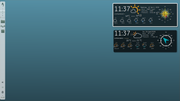
I don't yet know where the 'boxes' in Writing come from, apparently there are still a few things going wrong...
Offline
#8 2026-04-18 10:02:58
- asqwerth
- Member
- Registered: 2015-10-08
- Posts: 82
Re: MyForecast Script
^ Try running the script with the default location (Paris, France).
If it works, give me your location so I can set up the correct addresses (hourly + daily) for you.
Nope, running script with default location does not work either. I get lots of empty text files being generated, and no weather icons. Similar to the old TAD script during the weekend changeover of data.
Even doing a web search of "myforecast" in the browser and then clicking on the relevant myforecast links brought up by the search results, leads to 403 Forbidden.
It appears that my location is geoblocked. I enabled VPN and chose a Europe location -- website can be accessed. When I switched the VPN location back to my own country, access was forbidden.
Don't worry about it. I'll continue with TAD.
Offline
#9 2026-04-18 11:00:15
- ceeslans
- Member

- Registered: 2015-09-30
- Posts: 227
Re: MyForecast Script
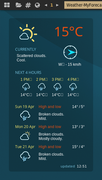
I don't yet know where the 'boxes' in Writing come from, apparently there are still a few things going wrong...
Yep, also seeing these annoying 'box' glyphs - and haven't got a clue what's causing it too.
Hopefully, @marens to-the-rescue ...
Offline
#10 2026-04-18 13:01:10
- marens
- Member
- From: World without M$
- Registered: 2023-02-02
- Posts: 1,296
Re: MyForecast Script
^ I haven't made a conky yet, but I can guess what's going on.
While writing the script, I had a problem getting the images.
Everything looked fine in the text editor (terminal), but I realized that a 'phantom' blank space appeared at the end.
Try to avoid this by using the awk command in conky and printing only the first word.
Example for wind direction:
Instead:
$ sed -n '5p' $HOME/MyForecast/now
N
Use in conky:
$ sed -n '5p' $HOME/MyForecast/now | awk '{print $1}'
N
The first two words are required for the file time (hourly forecat):
Instead:
$ sed -n '1p' $HOME/MyForecast/hourly/time
7 AM
Use in conky:
sed -n '1p' $HOME/MyForecast/hourly/time | awk '{print $1, $2}'
7 AM
The result is the same in the terminal but this should remove the 'phantom' blank space at the end of the line.
If people would know how little brain is ruling the world, they would die of fear.
Offline
#11 2026-04-18 13:09:38
- marens
- Member
- From: World without M$
- Registered: 2023-02-02
- Posts: 1,296
Re: MyForecast Script
Don't worry about it. I'll continue with TAD.
If your location is updated regularly on the website, everything stays the same.
If you like the MyForecast icons just copy and paste them into TAD.
You just need to rename them by adding 'wt-' to the beginning of each one.
If people would know how little brain is ruling the world, they would die of fear.
Offline
#12 2026-04-18 17:16:33
- unklar
- Back to the roots 1.9
- From: #! BL
- Registered: 2015-10-31
- Posts: 3,081
Re: MyForecast Script
^^Unfortunately awk doesn't help here, although it's ok in the terminal.
I actually only know this from fonts that cannot display an arrow for a trend.
But I don't see an arrow either. The same font is used in accuweather.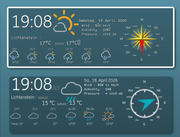
Offline
#13 2026-04-18 17:19:24
- marens
- Member
- From: World without M$
- Registered: 2023-02-02
- Posts: 1,296
Re: MyForecast Script
Remove 'phantom' empty box
I really don't know why it appears.
If you open the 'now' file and place the cursor at the end of line 5 (wind direction) and then use the right arrow, the cursor goes down to the beginning of line 6.
There is no such empty box in the text editor.
I found the solution in test conky.
Wind direction example:
${texeci 600 sed -n '5p' $HOME/MyForecast/now | sed 's/.$//'}Wherever you have an empty box, use the sed 's/.$//' command in MyForecast conky as in the example above.
P.S.
When I have time I will try to find a solution in the script that will remove all the 'phantom' characters.
If people would know how little brain is ruling the world, they would die of fear.
Offline
#14 2026-04-18 17:43:21
- unklar
- Back to the roots 1.9
- From: #! BL
- Registered: 2015-10-31
- Posts: 3,081
Re: MyForecast Script
^Thanks!
With the font 'FiraMono' there is a question mark in the box. 
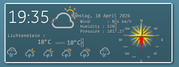
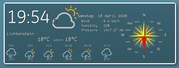
Edit:
BINGO, Master! 
Last edited by unklar (2026-04-18 17:57:57)
Offline
#15 2026-04-18 23:04:40
- marens
- Member
- From: World without M$
- Registered: 2023-02-02
- Posts: 1,296
Re: MyForecast Script
Remove 'phantom' empty box
OK.
First of all, thank you guys for finding the bug.
Everything worked as expected in the text editor and terminal, but a empty box appears in conky.
When I have time I will try to find a solution in the script that will remove all the 'phantom' characters.
I think a solution has been found.
Add this to the end of the myforecast script:
#### REMOVE ALL NON-PRINTABLE CHARACTERS

## Now
sed -i 's/[^[:print:]]//g' $HOME/MyForecast/now

## Days
sed -i 's/[^[:print:]]//g' $HOME/MyForecast/days

## Phrase (Daily)
sed -i 's/[^[:print:]]//g' $HOME/MyForecast/phrase

## Sun
sed -i 's/[^[:print:]]//g' $HOME/MyForecast/sun

## Moon
sed -i 's/[^[:print:]]//g' $HOME/MyForecast/moon

## Temperature (Hourly)
sed -i 's/[^[:print:]]//g' $HOME/MyForecast/hourly/temperature

## Phrase (Hourly)
sed -i 's/[^[:print:]]//g' $HOME/MyForecast/hourly/phrase

## Time (Hourly)
sed -i 's/[^[:print:]]//g' $HOME/MyForecast/hourly/time
I checked all the above files in a test conky and the unexpected character was removed.
Note *
Those using my temporary solution with sed 's/.$//' must remove that command from conky
Thanks again and...
Enjoy.
Last edited by marens (2026-04-19 00:50:40)
If people would know how little brain is ruling the world, they would die of fear.
Offline
#16 2026-04-19 08:17:33
- unklar
- Back to the roots 1.9
- From: #! BL
- Registered: 2015-10-31
- Posts: 3,081
Re: MyForecast Script
^^Thanks for your work, it works.
https://forums.bunsenlabs.org/viewtopic … 49#p150249
------------------------------
https://workupload.com/file/ZNrf2FHDRez
Last edited by unklar (2026-04-19 08:36:29)
Offline
#17 2026-04-19 11:07:43
- unklar
- Back to the roots 1.9
- From: #! BL
- Registered: 2015-10-31
- Posts: 3,081
Re: MyForecast Script
I personally like the wind symbol better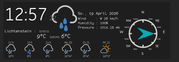
Offline
#18 2026-04-19 12:58:40
- marens
- Member
- From: World without M$
- Registered: 2023-02-02
- Posts: 1,296
Re: MyForecast Script
Info
A couple of things I noticed in the screenshots:
Date and Time
It's okay to use the date command to display this data in the format you want because the website is updated regularly.
You should know that hourly_1.png, hourly_2.png... are images for the NEXT hours.
The image day_1.png shows today's forecast, day_2.png is tomorrow's...
Everything must be the same in conky as on the website, including phrases, temperature, sun, moon, images... for now, daily and hourly forecasts.
Just visit the website and check.
Last edited by marens (2026-04-19 14:32:50)
If people would know how little brain is ruling the world, they would die of fear.
Offline
#19 2026-04-19 16:21:40
- loutch
- Member
- Registered: 2015-12-12
- Posts: 1,073
Re: MyForecast Script
Hello
I think by me it work great

@+
Linuxmint 22.1 Xia xfce & mageia 9 XFCE on ssd hp pavilion g7
Xubuntu 18.04 lts & 24.04 lts on ASUS Rog STRIX
Offline
#20 2026-04-19 17:24:19
- marens
- Member
- From: World without M$
- Registered: 2023-02-02
- Posts: 1,296
Re: MyForecast Script
^ Is the French translation good enough?
$ cat ~/MyForecast/phrase
Scattered clouds. Mild.
Drizzle. Overcast. Mild.
Sprinkles late. Overcast. Cool.
Overcast. Cool.
Afternoon clouds. Mild.
Afternoon clouds. Cool.
Cloudy. Cool.
Translate:
$ cat ~/MyForecast/phrase | trans -b :fr | sed 's/u200b//g'
Nuages épars. Bénin.
Bruine. Couvert. Bénin.
Arrose tard. Couvert. Cool.
Couvert. Cool.
Nuages de l'après-midi. Bénin.
Nuages de l'après-midi. Cool.
Nuageux. Cool.
Or shorter:
$ cat ~/MyForecast/phrase | trans -b :fr | sed 's/u200b//g' | awk -F'.' '{print $1}'
Nuages épars
Bruine
Arrose tard
Couvert
Nuages de l'après-midi
Nuages de l'après-midi
Nuageux
If people would know how little brain is ruling the world, they would die of fear.
Offline