![[BunsenLabs Logo]](/img/bl.svg)
You are not logged in.
- Topics: Active | Unanswered
#21 2026-08-28 20:42:34
- hhh
- Hercule Poirot

- From: Belgium
- Registered: 2015-09-17
- Posts: 17,576
- Website
Re: Conky on Wayland - collecting hints
I've never tries wayland or xwayland and I'm liking it less each day.
X works - why fix it?
Counterpoint, I just setup forky with labwc and stuff on a VM and it's glorious. So easy to get working, Wayland runs great (on my Intel laptop).
Why why why why?!!???
Online
#22 2026-08-29 06:32:23
- johnraff
- nullglob

- From: Nagoya, Japan
- Registered: 2015-09-09
- Posts: 13,502
- Website
Re: Conky on Wayland - collecting hints
^Yes I think both labwc and conky have had a lot of improvements between Trixie and Forky. I'm tempted to try some backporting but don't want to break my main machine.
...elevator in the Brain Hotel, broken down but just as well...
( a boring Japan blog (currently paused), now on Bluesky and Mastodon, there's also some GitStuff )
Offline
#23 2026-09-01 07:44:27
- unklar
- Back to the roots 1.9

- From: #! BL
- Registered: 2015-10-31
- Posts: 3,123
Re: Conky on Wayland - collecting hints
apt policy conky-all
conky-all:
  Installiert:           1.24.2+dfsg-1
  Installationskandidat: 1.24.2+dfsg-1
  Versionstabelle:
 *** 1.24.2+dfsg-1 500
        500 https://deb.debian.org/debian unstable/main amd64 Packages
        100 /var/lib/dpkg/status
There is news from the terminal when running this version of Conky:
[2026-09-01 09:04:30.042] [info ] [src/conky.cc:2038] 'TESTwayland' modified, reloading
[2026-09-01 09:04:31.050] [warn ] [src/lua/setting.cc:218] 'own_window_transparent' is deprecated and will be removed in a future release: Use own_window_colour with alpha instead (e.g. '#00000000').
[2026-09-01 09:04:31.053] [info ] [src/output/x11.cc:695] window type - utility
[2026-09-01 09:04:31.053] [info ] [src/output/x11.cc:814] drawing to created window 0x400002
[2026-09-01 09:04:31.058] [info ] [src/lua/x11-settings.cc:67] drawing to double buffer
[2026-09-01 09:04:31.059] [warn ] [src/lua/setting.cc:218] 'own_window_argb_value' is deprecated and will be removed in a future release: Use own_window_colour with alpha instead (e.g. '#80000000').
[2026-09-01 09:04:31.059] [warn ] [src/lua/setting.cc:74] setting 'own_window_argb_visual' has been removed: ARGB is now always enabled when available. Control opacity with `own_window_colour` (e.g. '#8000').
ARGB is now always enabled when available.
Sorry, forget, on
labwc -v
labwc 0.20.2 (+xwayland +nls +rsvg +libsfdo) wlroots-0.20.2
Last edited by unklar (2026-09-01 07:52:23)
Offline
#24 2026-09-01 08:21:12
- johnraff
- nullglob
- From: Nagoya, Japan
- Registered: 2015-09-09
- Posts: 13,502
- Website
Re: Conky on Wayland - collecting hints
^Many thanks!
This confirms some of the things I was reading on the conky github about transparency.
Do you get any new problems with this conky?
Any nice improvements?
...elevator in the Brain Hotel, broken down but just as well...
( a boring Japan blog (currently paused), now on Bluesky and Mastodon, there's also some GitStuff )
Offline
#25 2026-09-01 16:17:08
- unklar
- Back to the roots 1.9
- From: #! BL
- Registered: 2015-10-31
- Posts: 3,123
Re: Conky on Wayland - collecting hints
^Many thanks!
This confirms some of the things I was reading on the conky github about transparency.Do you get any new problems with this conky?
Any nice improvements?
I can't put it that simply.
- In previous posts, I've already mentioned that version 1.22.1 was the best version so far (regarding xwayland with images/graphics and Lua, because it wasn't possible before).
- Native Wayland still doesn't display the above and I have to disable it in Conky.
- With the current version 1.24.2, I'm no longer so sure about "the best". 
I've tried a few things. See for yourself. The changes and announcements of version 1.24.2 have been applied.
conky.config = {

--Begin Window Settings
	out_to_x = false,  --<----
	out_to_wayland = true,
	own_window = true,
	own_window_type = 'desktop',--normal',  --<----
--own_window_transparent = true,
--own_window_argb_visual = true,
	own_window_hints = 'undecorated',  --<----
	own_window_colour = '#886721',--13310123',--18413411',--000000',
	own_window_class = 'conky',
--own_window_title = 'Bunsen Labs Branding Conky',
--own_window_argb_value = 0,

	minimum_width = 440, minimum_height = 100,
	maximum_width = 00, --454,

	gap_x = 10,-- l|r
	gap_y = 50,-- u|d

	alignment = 'bottom_right',

--  End Window Settings
--  Font Settings

	use_xft = true,
	font = 'Monospace:size=10',
	xftalpha = 1,
	override_utf8_locale = true,

--  End Font Settings
--  Colour Settings
	draw_shades = false,
	default_shade_color = '000000',
	draw_outline = false,
	default_outline_color = '000000',

	default_color = '#ffffff',--678b8b',-- Beam green
	color0 = 'B0E0E6',-- PowderBlue
	color1 = '778899',-- LightSlateGray
	color2 = 'D8BFD8',-- Thistle
	color3 = 'ed2323',-- bunsenred --9ACD32',-- YellowGreen
	color4 = 'FFA07A',-- LightSalmon
	color5 = 'FFDEAD',-- NavajoWhite
	color6 = '00BFFF',-- DeepSkyBlue
	color7 = '5F9EA0',-- CadetBlue
	color8 = 'BDB76B',-- DarkKhaki
	color9 = 'C0C0C0',-- Silver

--  End Colour Settings
--  Borders Section
	draw_blended = true, --or false --<====
	draw_borders = false,
	stippled_borders = 5,
	border_inner_margin = 5,
	border_outer_margin = 0,
	border_width = 2,

--  End Borders Section
--  Miscellaneous Section

	background = true,
	use_spacer = 'none',
	no_buffers = true,
	imlib_cache_size = 0,
	double_buffer = true,

--  End Miscellaneous Section

	update_interval = 2,

};

conky.text = [[
${color3}${font birdman:bold:size=13}F E E D${color}${font}
${rss http://forums.bunsenlabs.org/extern.php?action=feed&type=rss 1 item_titles 6}
#${image $HOME/.config/conky/images/bunsenlabs-text-flame-grey.png}
#${color0}${execpi 360 .config/conky/scripts/BL-atomfeed.py -col1 color0 -col2 blue -bullet »  -lines 15}
#${execpi 600 $HOME/.config/conky/scripts/BL-atomfeed.py -col1 color0 -col2 color3 -bullet ø  -lines 6}
#${voffset 20}${color black}${execpi 360 .config/conky/scripts/BL-atomfeed.py -col1 black -col2 color2 -bullet « -lines 12 -wrap 80}
]];
I got the alpha values from here: https://encycolorpedia.de/584315
 previous/old configuration
Finally, your observation regarding the position in labwc and the variables 'normal' and 'desktop'.

Offline
#26 2026-09-02 04:17:11
- johnraff
- nullglob
- From: Nagoya, Japan
- Registered: 2015-09-09
- Posts: 13,502
- Website
Re: Conky on Wayland - collecting hints
^more good data!
BTW does conky 1.24.2 still output its window id to the terminal like this?
drawing to created window 0x12345678Even though (I think) that id has no meaning on Wayland, conky reports it whether running on xwayland or native wayland.
On xwayland it's useful though, because you can do some operations on an xwayland conky with wmctrl, like raise it to the top. Get it to the top with focus, and then labwc actions like SendToDesktop can be invoked using wtype or wlrctl to emulate a keypress. This works in bl-conky-session to launch an xwayland conky on a specified desktop. https://github.com/BunsenLabs/bunsen-ut … ssion#L191
Those screenshots - sorry, but I'm not quite sure which one is telling me what. Are they all using conky 2.24.2? What exactly changed beween "previous/old configuration"? I see the right-hand one has transparency.
And also I'm not clear what the 'normal' and 'desktop' own_window_type configs are doing. Again, both shots on 2.24.2?
...elevator in the Brain Hotel, broken down but just as well...
( a boring Japan blog (currently paused), now on Bluesky and Mastodon, there's also some GitStuff )
Offline
#27 2026-09-02 08:45:43
- unklar
- Back to the roots 1.9
- From: #! BL
- Registered: 2015-10-31
- Posts: 3,123
Re: Conky on Wayland - collecting hints
BTW does conky 1.24.2 still output its window id to the terminal like this?
drawing to created window 0x12345678
Yes.
But only in x11 (xwayland) mode.
Up Version 1.23.2 xwayland
conky: 'testconkyrc' modified, reloading...
conky: desktop window (0x400) is root window
conky: window type - utility
conky: drawing to created window (0x400002)
conky: drawing to double buffer     <------
conky: FOUND: wayland
conky: FOUND: x11
conky: FOUND: file
wayland
conky: 'testconkyrc' modified, reloading...
conky: drawing to single buffer     <----
conky: FOUND: wayland
conky: FOUND: x11
conky: FOUND: file
Version 1.24.2 xwayland
[2026-09-02 10:03:30.415] [info ] [src/output/x11.cc:582] window type - override
[2026-09-02 10:03:30.415] [info ] [src/output/x11.cc:814] drawing to created window 0x400002
[2026-09-02 10:03:30.428] [info ] [src/lua/x11-settings.cc:67] drawing to double buffer    <-----
[2026-09-02 10:03:30.465] [info ] [src/conky.cc:1898] 'unknown' wayland session running
wayland
[2026-09-02 10:06:44.713] [info ] [src/lua/x11-settings.cc:67] drawing to single buffer    <-----
[2026-09-02 10:06:44.742] [info ] [src/conky.cc:1898] 'unknown' wayland session running
Those screenshots - sorry, but I'm not quite sure which one is telling me what. Are they all using conky 2.24.2? What exactly changed beween "previous/old configuration"? I see the right-hand one has transparency.
And also I'm not clear what the 'normal' and 'desktop' own_window_type configs are doing. Again, both shots on 2.24.2?
Sorry, I should have made that clearer.
All images are from version 1.24.2
The excerpts on the left = Wayland with the changed notes
--Begin Window Settings
	out_to_x = false,  --<----
	out_to_wayland = true,
	own_window = true,
	own_window_type = 'desktop',--normal',  --<----
--own_window_transparent = true,
--own_window_argb_visual = true,
	own_window_hints = 'undecorated',  --<----
	own_window_colour = '#886721',--13310123',--18413411',--000000',
	own_window_class = 'conky',
--own_window_title = 'Bunsen Labs Branding Conky',
--own_window_argb_value = 0,
I thought it was clear in the configuration visible in mousepad.
The right image, "previous/old configuration", shows xwayland as before. So, in xwayland (probably) only for transparency
--out_to_wayland = true,
	own_window = true,
--own_window_transparent = false, --true,
	own_window_type = 'override',--desktop',
--own_window_argb_visual = true,
--own_window_argb_value = 80,
The two complete desktops below confirm your experience with "desktop" in Wayland, which only adheres to the "alignment" with this variable. 
Last edited by unklar (2026-09-02 09:00:27)
Offline
#28 2026-09-02 09:55:35
- johnraff
- nullglob
- From: Nagoya, Japan
- Registered: 2015-09-09
- Posts: 13,502
- Website
Re: Conky on Wayland - collecting hints
OK now I get it, thanks.
No output ID on native Wayland makes sense, and having it would serve no useful purpose anyway.
BTW I found that with 1.22.1 on xwayland sometimes even "alignment" isn't correct. On native wayland positioning seems OK though.
...elevator in the Brain Hotel, broken down but just as well...
( a boring Japan blog (currently paused), now on Bluesky and Mastodon, there's also some GitStuff )
Offline
#29 2026-09-03 08:02:00
- unklar
- Back to the roots 1.9
- From: #! BL
- Registered: 2015-10-31
- Posts: 3,123
Re: Conky on Wayland - collecting hints
^A few more (illogical) tests with version 1.24.2 on labwc/siduction.

I used a slightly stripped-down configuration of the Carbon-Default-Conky.
-- BL-Carbon-x11.conf

conky.config = {

-- wayland or X
-- out_to_x = true,
--out_to_wayland = true,

--  Window Settings
    own_window = true,
    own_window_type = 'desktop',--utility',
--own_window_transparent = true,
    own_window_hints = 'undecorated',
--own_window_colour = '#000000',
    own_window_class = 'Conky',
    own_window_title = 'BunsenLabs Default Conky',

    alignment = 'top_right',
--    minimum_width = 0,
--    minimum_height = 0,
--    maximum_width = 0,

    gap_x = 350,-- left | right
    gap_y = 80,-- up | down

--  End Window Settings

--  Font Settings
-- Use Xft (anti-aliased font and stuff)
    use_xft = true,

--font = 'Liberation Mono:bold:size=10',
--font = 'Liberation Sans:size=10',
    font = 'Sans-serif:size=10',

-- Alpha of Xft font. Must be a value at or between 1 and 0
    xftalpha = 1,

-- Force UTF8? requires XFT
    override_utf8_locale = true,
    uppercase = false,
--  End Font Settings

--  Color Settings
-- Drawing shades affects visibility, depending on the background image.
-- Set to 'draw_shades = false' if you prefer.
    draw_shades = true,
    default_shade_color = '#171F1B',

    draw_outline = false,-- amplifies text if true
    default_outline_color = '#555555',

    default_color = 'BFBFC2',-- Carbon Dark and Light foreground
--default_color = 'ABB8B8',-- Boron Dark and Light foreground
--default_color = 'BECFCF',-- Dragon Dark foreground
--default_color = '4b8bad', -- Lithium blue
--default_color = '678b8b', -- Helium Beam green
--default_color = '656667', -- Waldorf original colour
--default_color = '7a7a7a', -- Flame  & BunsenLabs Grey
--default_color = '929292', -- BunsenLabs Grey
--default_color = 'C0C0C0', -- BunsenLabs Silver
    color0 = '#B0E0E6',-- PowderBlue
    color1 = '#778899',-- LightSlateGray
    color2 = '#D8BFD8',-- Thistle
    color3 = '#9ACD32',-- YellowGreen
    color4 = '#FFA07A',-- LightSalmon
    color5 = '#FFDEAD',-- NavajoWhite
    color6 = '#00BFFF',-- DeepSkyBlue
    color7 = '#5F9EA0',-- CadetBlue
    color8 = '#BDB76B',-- DarkKhaki
    color9 = '#C0C0C0',-- Silver
--  End Color Settings

--  Borders Section
    draw_borders = true,--false,
-- Stippled borders?
    stippled_borders = 0,
-- border margins
    border_inner_margin = 5,
    border_outer_margin = 0,
-- border width
    border_width = 2,
-- graph borders
    draw_graph_borders = false,
--default_graph_height = 15,
--default_graph_width = 40,
--  End Borders Section

--  Miscellaneous Section
-- Boolean value, if true, Conky will be forked to background when started.
    background = true,

-- Adds spaces around certain objects to stop them from moving other things
-- around, this only helps if you are using a mono font
-- Options: right, left or none
    use_spacer = 'none',

-- Default and Minimum size is 256 - needs more for single commands that
-- "call" a lot of text IE: bash scripts
--text_buffer_size = 6144,

-- Subtract (file system) buffers from used memory?
    no_buffers = true,

-- change GiB to G and MiB to M
    short_units = true,

-- Imlib2 image cache size, in bytes. Default 4MiB Increase this value if you use
-- $image lots. Set to 0 to disable the image cache.
    imlib_cache_size = 0,

    double_buffer = true,

-- Update interval in seconds
    update_interval = 1,

};

conky.text = [[
S Y S T E M-x11 ${alignr}${font Sans-serif:size=9}conky v${conky_version}${font}    ${execpi 600 inxi -S | tail -n 1 | head -n 3 | awk '{print $2}'}
${hr}
#Host:${alignr}${nodename}
LINUX:${alignr}${kernel}
RAM:${alignr}${legacymem} / ${memmax}
# This version reports the same (incorrect) lower RAM usage as neofetch or htop:
#RAM:${alignr}${legacymem} / ${memmax}
#Swap usage:${alignr}${swap} / ${swapmax}
#Disk usage:${alignr}${fs_used /} / ${fs_size /}
#Root usage:${alignr}${fs_used /} / ${fs_size /}
#Home usage:${alignr}${fs_used /home} / ${fs_size /home}
CPU:${alignr}${cpu cpu0}%

${image ~/.config/conky/images/flame-256-2b454f.png -p 170,70 -s 70x70}${goto 60}

S H O R T C U T    K E Y S
${hr}
Alt + F2${alignr}Run Dialog
Alt + F3${alignr}Alt Menu
Super${alignr}Main Menu
Super + Tab${alignr}Client Menu
Super + t${alignr}Terminal
Super + w${alignr}Web Browser
Super + f${alignr}File Manager
Super + e${alignr}Editor
Super + m${alignr}Media Player
Super + v${alignr}Volume Control
Super + h${alignr}Task Manager
Super + l${alignr}Lock Screen
Super + x${alignr}Logout
PrtSc${alignr}Screenshot

W I N D O W S
${hr}
Alt + Tab${alignr}Switch
Alt + F4${alignr}Close
Alt + F5${alignr}Minimize
Alt + F6${alignr}Toggle Maximize
Super + arrow${alignr}Tile half-screen
Super + Alt + arrow     ${alignr}Tile quarter-screen

]];
Please note that in the way-config only 'out-to-wayland = true,' is NOT commented out and the image/icon/logo below is commented out (otherwise the conky will not appear).
It is illogical that the terminal output also indicates x11 for way-config:
unklar@debian-lab:~/.config/conky$ conky -c BL-Carbon-way.conf &
[1] 3659
unklar@debian-lab:~/.config/conky$ [2026-09-03 09:26:10.713] [info ] [src/output/x11.cc:683] window type - desktop
[2026-09-03 09:26:10.713] [info ] [src/output/x11.cc:814] drawing to created window 0x600002
[2026-09-03 09:26:10.724] [info ] [src/lua/x11-settings.cc:67] drawing to double buffer
[2026-09-03 09:26:10.726] [info ] [src/conky.cc:2496] forked to background, pid is 3661

[2026-09-03 09:26:10.785] [info ] [src/conky.cc:1898] 'unknown' wayland session running
And no, there is no mix-up. This was tested against other configs not from BL. That's correct:
[2026-09-02 10:06:44.713] [info ] [src/lua/x11-settings.cc:67] drawing to single buffer
[2026-09-02 10:06:44.742] [info ] [src/conky.cc:1898] 'unknown' wayland session running
Otherwise, it's correct; 'way' appears on ALL desktops in the specified position and cannot be moved with the mouse.
'x11' with the logo appears only on the currently active desktop in the set position and can be moved with the mouse.
Last edited by unklar (2026-09-03 08:40:54)
Offline
#30 2026-09-03 08:35:58
- unklar
- Back to the roots 1.9
- From: #! BL
- Registered: 2015-10-31
- Posts: 3,123
Re: Conky on Wayland - collecting hints
Last test with Lua scripts for now. I used this one:

There is another warning:
conky: WARNING: cairo_xlib_surface_create is deprecated and will be removed in a future release. Use conky_surface() instead.See: https://github.com/brndnmtthws/conky/wiki/Lua:-Evaluation [2026-09-03 10:08:44.101] [info ] [src/output/x11.cc:683] window type - desktop
[2026-09-03 10:08:44.102] [info ] [src/output/x11.cc:814] drawing to created window 0x600002
[2026-09-03 10:08:44.112] [info ] [src/lua/x11-settings.cc:67] drawing to double buffer
[2026-09-03 10:08:44.123] [warn ] [src/core.cc:459] invalid CPU number 'cpu0', falling back to CPU 1
[2026-09-03 10:08:44.145] [info ] [src/conky.cc:1898] 'unknown' wayland session running
conky: WARNING: cairo_xlib_surface_create is deprecated and will be removed in a future release. Use conky_surface() instead.See: https://github.com/brndnmtthws/conky/wiki/Lua:-EvaluationAnd now it gets interesting. A visit to the wiki-Lua-Evaluation page makes it clear that in the future, ALL known Lua-scripts that use "cairo_xlib_surface_create" will no longer work.
It's a good thing I'm as old as @Sector11.
That's equivalent to the syntax change from 1.9 to 1.10.
Thanks, brndnmtthws, for this strategically excellent work.
Offline
#31 2026-09-03 15:36:50
- Sector11
- Mod Squid Tpyo Knig

- From: Upstairs
- Registered: 2015-08-20
- Posts: 8,448
Re: Conky on Wayland - collecting hints
OFF TOPIC (sort of) - but still with conky.
It's a good thing I'm as old as @Sector11.
That's equivalent to the syntax change from 1.9 to 1.10.
Thanks, brndnmtthws, for this strategically excellent work.
YUP! It's a good thing I'm as old as @unklar
[2026-09-03 10:08:44.123] [warn ] [src/core.cc:459] invalid CPU number 'cpu0', falling back to CPU 1NO! He did away with "CPU Average"?
Intel 4 core: Core0 Core1 Core2 Core3
AMD 4 core: CPU1 CPU2 CPU3 CPU4
conky always used: CPU 0 for the average:
INTEL: CPU0(A) CPU1 CPU2 CPU3 CPU4
AMD: CPU0(A) CPU1 CPU2 CPU3 CPU4
And then this:
And now it gets interesting. A visit to the wiki-Lua-Evaluation page makes it clear that in the future, ALL known Lua-scripts that use "cairo_xlib_surface_create" will no longer work.
So I ran: ftxt (find text script)
$ ftxt cairo_xlib_surface_create /media/5/Conky/LUA/it starts:
/media/5/Conky/LUA/vcal-txt.lua
17:

/media/5/Conky/LUA/clock-mod-2.lua
365:

/media/5/Conky/LUA/bazinga.lua
72:
1759:
and the file ends with this, the last line being #1122
/media/5/Conky/LUA/SunMoon-a.lua
24:

/media/5/Conky/LUA/vcal-txt3.lua
25:

/media/5/Conky/LUA/Chronograph-mclovin-12-60.lua
68:
The #:'s are the line #'s in the LUA scripts. They are all followed by:
local cs = cairo_xlib_surface_create(conky_window.display, conky_window.drawable, conky_window.visual, conky_window.width, conky_window.height)I stripped them out for simplicity
And that's not all the LUA scripts I have.
Yeah, I'll stay with conky v.1.9 as long as I can.
And, for me at least, this is not true:
Lua File Placement
Lua script files should be placed in a directory where Conky can access them. Most commonly, people place Conky scripts alongside the config file because that makes them easier to edit, copy and store on git.
As seen above I store most LUA scripts in /media/5/Conky/LUA/ because I have been known to use the same lua script in various conkys.
OK: I'm different, old and set in my ways. I also believe: if it ain't broke: don't fix it.
OH and the two conky's unklar posted - manually converted to v1.9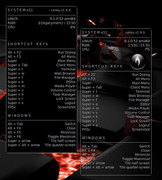
Second one on the left and a little lower has 2 changes:
own_window_type normal #desktop ##utility"normal" making the transparency work AND moveable
    gap_x 350 ## left | right
    gap_y 80 ## up | down
exists in both
and I added an image as I didn't have the one unklar used handy.
Back to Conky on Wayland
Debian 13 Beardog hosted by SoxDog
Still a Conky 1.9er at heart.
Offline
#32 2026-09-04 09:35:48
- unklar
- Back to the roots 1.9
- From: #! BL
- Registered: 2015-10-31
- Posts: 3,123
Re: Conky on Wayland - collecting hints
$ ftxt cairo_xlib_surface_create /media/5/Conky/LUA/
^I can't even come up with that enormous number of scripts... 
Offline
#33 2026-09-05 02:59:35
- Sector11
- Mod Squid Tpyo Knig
- From: Upstairs
- Registered: 2015-08-20
- Posts: 8,448
Re: Conky on Wayland - collecting hints
Ahhh maybe created after I ZIPPED everything I had for you.
That was a long time ago.
Debian 13 Beardog hosted by SoxDog
Still a Conky 1.9er at heart.
Offline
#34 Today 12:49:58
- unklar
- Back to the roots 1.9
- From: #! BL
- Registered: 2015-10-31
- Posts: 3,123
Re: Conky on Wayland - collecting hints
https://forums.bunsenlabs.org/viewtopic … 63#p152363
By the way, there is light at the end of the tunnel with conky-wlr, and that after a development period of 5–6 months. big_smile
https://github.com/n4zz/Conky-wlr
Conky-wlr
Today I finally wasn't distracted by niri/noctalia-shell and could actually work on it.
conky_v1.24.2 - siduction/labwc (the packages specified in @n4zz configuration are installed)
I'm surprised that with the usual adjustments (Wi-Fi, etc.), it works right out of the box.


Offline
#35 Today 13:01:41
- Sector11
- Mod Squid Tpyo Knig
- From: Upstairs
- Registered: 2015-08-20
- Posts: 8,448
Re: Conky on Wayland - collecting hints
Well that's interesting.
Debian 13 Beardog hosted by SoxDog
Still a Conky 1.9er at heart.
Offline
#36 Today 13:12:55
- unklar
- Back to the roots 1.9
- From: #! BL
- Registered: 2015-10-31
- Posts: 3,123
Re: Conky on Wayland - collecting hints
^^and, I didn't use a .conkyrc file... (according to name)
Offline
#37 Today 16:30:18
- Sector11
- Mod Squid Tpyo Knig
- From: Upstairs
- Registered: 2015-08-20
- Posts: 8,448
Re: Conky on Wayland - collecting hints
^^and, I didn't use a .conkyrc file... (according to name)
A conky file can be called anything an put anywhere.
And I'm discovering some really neat things .... Like:
» Here's very OLD conky, you can tell by the Distro LOGO
» » with "old v1.9 and new v1.22" syntax combined, and
» » it's working with minor errors; ie: yes = true: and true = assumed error
» Decorated or "undecorated" an [Alt]+left mouse button - will allow you to drag it
» Still dead space though - cannot get the OB menu
/media/5/Conky/test.konky.txt
-- pkill -xf "conky -c /media/5/Conky/test.konky.txt" &

own_window yes
own_window_type normal
own_window_transparent false
own_window_hints skip_taskbar,skip_pager
own_window_colour 000000
own_window_class Conky
own_window_title test.konky.txt

own_window_argb_visual true
own_window_argb_value 150

gap_x 250
gap_y 90

minimum_size 380 200
#maximum_width 300

alignment tl
override_utf8_locale yes
use_xft yes
#xftfont Fantasque Sans Mono:bold:size=12
#xftfont Monofur:bold:size=14
#xftfont DejaVu Sans Mono:bold:size=10
xftfont Fira Mono:medium:size=12
-- Alpha of Xft font. Must be a value at or between 1 and 0
xftalpha 1.0

draw_shades yes
default_shade_color 000000
draw_outline no
default_outline_color 000000

default_color  FFDEAD
color0 C0C0C0
color1 778899
color2 FAEBD7
color3 87CEFA
color4 48D1CC
color5 DCDCDC
color6 00BFFF
color7 B0E0E6
color8 FFD700
color9 CD5C5C


draw_borders no
stippled_borders 0
border_inner_margin 0
border_outer_margin 0
border_width 0
draw_graph_borders yes -- no
-- default_graph_size 15 40


background true
use_spacer none
text_buffer_size 3328
no_buffers yes
short_units yes
pad_percents 2
imlib_cache_size 0
double_buffer yes
max_user_text 48000

update_interval 1
TEXT
${alignc}${color9}${swapbar 0,30}${color} ↓ v${conky_version} test code ↓ ${color9}${swapbar 0,30}${color}
${color9}${swapbar 0}${color}

${alignc}${time %T on %A}
${alignc}the ${if_match ${time %d} == 01}${time %dst} ${else}\
${if_match ${time %d} == 21}${time %dst} ${else}\
${if_match ${time %d} == 31}${time %dst} ${else}\
${if_match ${time %d} == 02}${time %dnd} ${else}\
${if_match ${time %d} == 22}${time %dnd} ${else}\
${if_match ${time %d} == 03}${time %drd} ${else}\
${if_match ${time %d} == 23}${time %drd} ${else}${time %dth} \
${endif}${endif}${endif}${endif}${endif}${endif}${endif}\
day of ${time %b %Y}
${goto 110}${color7}Week Number:${color2} ${time %U}
${goto 120}${color7}Boot:${color2} ${execi 86400 who -b | cut -c23-}
${goto 120}${color7}Up:${color2} ${uptime_short}
${goto 120}${color7}UTC:${color2} ${utime %H:%M}
${goto 110}${color7}Swatch Time: ${color2}${execi 60 /media/5/Conky/scripts/swatch.sh}${color}

${alignc}${color7}Core Usage: Avg:${color} ${if_match ${cpu cpu0}<10}··${cpu cpu0}\
${else}${if_match ${cpu cpu0}<100}·${cpu cpu0}\
${else}${color9}${cpu cpu0}${endif}${endif}${color}% \
${color9}MAX 3.9 GHz
${alignc}${color7}1${color} ${if_match ${cpu cpu1}<10}··${cpu cpu1}\
${else}${if_match ${cpu cpu1}<100}·${cpu cpu1}\
${else}${color9}${cpu cpu1}${endif}${endif}${color}%\
 | ${color7}2${color} ${if_match ${cpu cpu2}<10}··${cpu cpu2}\
${else}${if_match ${cpu cpu2}<100}·${cpu cpu2}\
${else}${color9}${cpu cpu2}${endif}${endif}${color}%\
 | ${color7}3${color} ${if_match ${cpu cpu3}<10}··${cpu cpu3}\
${else}${if_match ${cpu cpu3}<100}·${cpu cpu3}\
${else}${color9}${cpu cpu3}${endif}${endif}${color}%\
 | ${color7}4${color} ${if_match ${cpu cpu4}<10}··${cpu cpu4}\
${else}${if_match ${cpu cpu4}<100}·${cpu cpu4}\
${else}${color9}${cpu cpu4}${endif}${endif}${color}%
${alignc}${color9}1 ${color}${freq_g 1} |${color9} 2 ${color}${freq_g 2} \
|${color9} 3 ${color}${freq_g 3} |${color9} 4 ${color}${freq_g 3}

${alignc}${color7}OS${color2} ${execi 86400 lsb_release -is} ${color7}Version ${color2}${execi 86400 cat /etc/debian_version}
${alignc}${kernel}
${alignc}${color7}Display ${color2}${execi 86400 xdpyinfo | sed -n -r "s/^\s*dimensions:.*\s([0-9]+x[0-9]+).*/\1/p"}
${alignc}${color7}CPU Temp: ${color2}${exec sensors | grep -n 'Tctl' | awk -F'+' '{print $2}' | awk -F'.' '{print $1}'}°
${image /media/5/Conky/images/SharpBang_WB.png -s 60x60 -p 15,310}\
${image /media/5/images/Alert.FC.png -p 310,310 -s 60x60}\
I have xwayland here so I'm only "x" off topic
Debian 13 Beardog hosted by SoxDog
Still a Conky 1.9er at heart.
Offline