![[BunsenLabs Logo]](/img/bl.svg)
You are not logged in.
- Topics: Active | Unanswered
#2761 2026-09-13 20:15:27
- Sector11
- Mod Squid Tpyo Knig

- From: Upstairs
- Registered: 2015-08-20
- Posts: 8,385
Re: Show us your conky
Döbbie03 wrote:MarkW wrote:Maybe a silly question, but has anyone ever tried to make a taskar and system tray with Conky? Would that even be feasible?
You can do it but I doubt you'd achieve much. I find conky rather fragile and awkward to use. Polybar or Lemonbar would be better.
@Dobbie03; you are correct; conky is not the application for a taskbar.
Polybar works well with X11.
Waybar, and Yambar for Wayland - although I don't know how well their system trays are working. Yambar also works in X11.
For X11 tint2 with some executors works well, but can get resource hungry.
Yeah, conky is a system monitor. Not a launch/start bar. Although mepeachy and falldown had a really good thing going at one time with interactive conkys that might have been the start of something that could have developed into a "task bar"
Best to use a tool made for the job.
Debian 12 Beardog, SoxDog and still a Conky 1.9er
Offline
#2762 2026-09-14 09:29:53
- unklar
- Back to the roots 1.9

- From: #! BL
- Registered: 2015-10-31
- Posts: 3,092
Re: Show us your conky
^^^Heee... BINGO you 'old fox'! 
It's because of the font! I spent hours using other people's time and changed the settings what felt like 100 times. 


I didn't have the typo with 'xftfont...' here.
Even in your 'old age', you are and will remain El Conkystador! Thank you my friend. 
Last edited by unklar (2026-09-14 09:30:41)
Offline
#2763 2026-09-15 16:04:52
- Sector11
- Mod Squid Tpyo Knig
- From: Upstairs
- Registered: 2015-08-20
- Posts: 8,385
Re: Show us your conky
^^^Heee... BINGO you 'old fox'!
{snip}
I didn't have the typo with 'xftfont...' here.Even in your 'old age', you are and will remain El Conkystador! Thank you my friend.
We toss things around enough, we usually find that "something" that caused the OOPS!
My OOPS! wasn't the same as your OOPS! but it did lead to finding it.
Today’s lesson brought to you by
Spaces Are Important!
And Helping Someone Because You can, Even More So!
and also The TpyoKnig's stubbornness.
Debian 12 Beardog, SoxDog and still a Conky 1.9er
Offline
#2764 2026-09-16 12:46:41
- unklar
- Back to the roots 1.9
- From: #! BL
- Registered: 2015-10-31
- Posts: 3,092
Re: Show us your conky
^^As @Döbbie03 recently put it: 
Words of a very white man!
Last edited by unklar (2026-09-16 12:47:29)
Offline
#2765 2026-09-16 14:02:57
- Sector11
- Mod Squid Tpyo Knig
- From: Upstairs
- Registered: 2015-08-20
- Posts: 8,385
Re: Show us your conky
^^As @Döbbie03 recently put it:
Words of a very white man!
Well, Döbbie03 is a very wise Māori.
Debian 12 Beardog, SoxDog and still a Conky 1.9er
Offline
#2766 Today 08:13:14
- unklar
- Back to the roots 1.9
- From: #! BL
- Registered: 2015-10-31
- Posts: 3,092
Re: Show us your conky
unklar wrote:^^As @Döbbie03 recently put it:
Words of a very white man!
Well, Döbbie03 is a very wise Māori.
lol old rascal(?) german: alter Schlingel
https://www.dict.cc/?s=Schlingel
https://de.wiktionary.org/wiki/Schlingel
Offline
#2767 Today 11:46:15
- unklar
- Back to the roots 1.9
- From: #! BL
- Registered: 2015-10-31
- Posts: 3,092
Re: Show us your conky
@ceeslans
this is the one we're talking about.

I don't know if you got it working...
DeepDayze's post on the siduction forum put me under pressure, so I started looking into it: https://github.com/brndnmtthws/conky/wi … Evaluation
The warning message from conky-V1.24.2 onwards reads:
conky: WARNING: cairo_xlib_surface_create is deprecated and will be removed in a future release. Use conky_surface() instead.See: https://github.com/brndnmtthws/conky/wiki/Lua:-EvaluationCould you modify lines 296-297 and 343-359 in the lua script and tell me if it works for you?
from
..
require("cairo")
require("cairo_xlib")
...
	if conky_window==nil then return end
	local cs=cairo_xlib_surface_create(conky_window.display,conky_window.drawable,conky_window.visual, conky_window.width,conky_window.height)

	local cr=cairo_create(cs)

	local updates=conky_parse('${updates}')
	update_num=tonumber(updates)

	if update_num>5 then
	    for i in pairs(settings_table) do
          display_temp=temp_watch()
		  setup_rings(cr,settings_table[i])
	    end
	end
    cairo_surface_destroy(cs)
    cairo_destroy(cr)
end
..
to
..
require("cairo")
--require("cairo_xlib")
...
    if conky_window==nil then return end
    local surface=conky_surface()

    local cr=cairo_create(surface)

    local updates=conky_parse('${updates}')
    update_num=tonumber(updates)

    if update_num>5 then
        for i in pairs(settings_table) do
          display_temp=temp_watch()
          setup_rings(cr,settings_table[i])
        end
    end
--    cairo_surface_destroy(cs)
    cairo_destroy(cr)
end
...
According to this Evaluation-page, this should work from ~conky-V1.18.3 onwards in the corresponding conky versions. I have version 1.24.2 here.
Offline
#2768 Today 15:15:49
- ceeslans
- Member

- Registered: 2015-09-30
- Posts: 229
Re: Show us your conky
@unklar : Note that I'm currently running conky version 1.22.3 - so unable to check the code on a higher version.
I made adjustments as you proposed, but the lua part fails to create any rings, mostly seeing error messages related to 'conky_surface', like:
conky: llua_do_call: function conky_main execution failed: /home/one/.conky/LUA/rings-galore.lua:350: attempt to call a nil value (global 'conky_surface')This conky is running without fail my my current setup. I remember making changes to the rings_v.1.3.1.lua script , when comparing it with similar lua scripts in MX.
Firstly with the main " cairo " call, which I changed to:
require 'cairo'
pcall(function() require('cairo_xlib') end)
and a number of adjustments in the 'surface' code (sorry, didn't record specific changes...) and many many changes in the settings table.
Ultimately, I renamed the adjusted lua script to 'rings-galore.lua' - which is running error-free on my Devuan setup.
Perhaps best if you check out this updated lua-script and the conkyrc file:
rings-galore.lua
--[[
Ring Meters by londonali1010 (2009)
modified by ceeslans to enable network traffic display on MXFlux (2026)
Also a color_table was added to simplify setting colors for the lua rings.
++++++++++++++++++

This script draws percentage meters as rings. It is fully customisable; all options are described in the script.

IMPORTANT: if you are using the 'cpu' function, it will cause a segmentation fault if it tries to draw a ring straight away. The if statement near the end of the script uses a delay to make sure that this doesn't happen. It calculates the length of the delay by the number of updates since Conky started. Generally, a value of 5s is long enough, so if you update Conky every 1s, use update_num > 5 in that if statement (the default). If you only update Conky every 2s, you should change it to update_num > 3; conversely if you update Conky every 0.5s, you should use update_num > 10. ALSO, if you change your Conky, is it best to use "killall conky; conky" to update it, otherwise the update_num will not be reset and you will get an error.

To call this script in Conky, use the following (assuming that you save this script to ~/scripts/rings.lua):
	lua_load ~/scripts/rings-v1.2.1.lua
	lua_draw_hook_pre ring_stats

Changelog:
+ v1.2.1 -- Fixed minor bug that caused script to crash if conky_parse() returns a nil value (20.10.2009)
+ v1.2 -- Added option for the ending angle of the rings (07.10.2009)
+ v1.1 -- Added options for the starting angle of the rings, and added the "max" variable, to allow for variables that output a numerical value rather than a percentage (29.09.2009)
+ v1.0 -- Original release (28.09.2009)

        arg=conky_parse("${if_up wlan0}wlan0${else}enp2s0${endif}"),
        fg_colour=0xf0651f,
        fg_colour=conky_parse("${if_up wlan0}wlan0${else}enp2s0${endif}"),
        conky_parse("${cpu}")
        name=conky_parse("${acpitemp}"),
]]

color_table = {

  --bg color
  --========
	--color0 = 0xCDCDCD,	-- #CDCDCD near-white
	--color0 = 0x454545,	-- #454545 grey
	color0 = 0x151515,	-- #151515 near-black

  --fg color
  --========
	--color2 = 0xFF2500,	-- #FE2500 red
	--color2 = 0x8FB36F,	-- #8FB36F lime
	--color2 = 0x209020,	-- #209020 green
	--color2 = 0x0F56D9,	-- #0F56D9 comfortblue
	color2 = 0x0ABFFF,	-- #0ABFFF lightblue
	--color2 = 0xFF8C00,	-- #FF8C00 orange

}

settings_table = {

    {
        name='acpitemp',
        arg='',
        max=110,
        bg_colour=color_table.color0,
        bg_alpha=0.8,
        fg_colour=color_table.color2,
        fg_alpha=0.8,
        x=155, y=130,
        radius=97,
        thickness=4,
        start_angle=0,
        end_angle=240
    },
    {
        name='cpu',
        arg='cpu0',
        max=100,
        bg_colour=color_table.color0,
        bg_alpha=0.8,
        fg_colour=color_table.color2,
        fg_alpha=0.8,
        x=155, y=130,
        radius=86,
        thickness=13,
        start_angle=0,
        end_angle=240
    },
    {
        name='cpu',
        arg='cpu1',
        max=100,
        bg_colour=color_table.color0,
        bg_alpha=0.7,
        fg_colour=color_table.color2,
        fg_alpha=0.8,
        x=155, y=130,
        radius=71,
        thickness=12,
        start_angle=0,
        end_angle=240
    },
    {
        name='cpu',
        arg='cpu2',
        max=100,
        bg_colour=color_table.color0,
        bg_alpha=0.6,
        fg_colour=color_table.color2,
        fg_alpha=0.8,
        x=155, y=130,
        radius=57,
        thickness=11,
        start_angle=0,
        end_angle=240
    },
    {
        name='cpu',
        arg='cpu3',
        max=100,
        bg_colour=color_table.color0,
        bg_alpha=0.5,
        fg_colour=color_table.color2,
        fg_alpha=0.8,
        x=155, y=130,
        radius=44,
        thickness=10,
        start_angle=0,
        end_angle=240
    },
    {
        name='memperc',
        arg='',
        max=100,
        bg_colour=color_table.color0,
        bg_alpha=0.8,
        fg_colour=color_table.color2,
        fg_alpha=0.8,
        x=295, y=245,
        radius=60,
        thickness=15,
        start_angle=160,
        end_angle=420
    },
    {
        name='swapperc',
        arg='',
        max=100,
        bg_colour=color_table.color0,
        bg_alpha=0.4,
        fg_colour=color_table.color2,
        fg_alpha=0.8,
        x=295, y=245,
        radius=45,
        thickness=10,
        start_angle=160,
        end_angle=420
    },
    {
        name='fs_used_perc',
        arg='/home',
        max=100,
        bg_colour=color_table.color0,
        bg_alpha=0.8,
        fg_colour=color_table.color2,
        fg_alpha=0.8,
        x=175, y=290,
        radius=40,
        thickness=10,
        start_angle=0,
        end_angle=240
    },
    {
        name='fs_used_perc',
        arg='/',
        max=100,
        bg_colour=color_table.color0,
        bg_alpha=0.6,
        fg_colour=color_table.color2,
        fg_alpha=0.8,
        x=175, y=290,
        radius=28,
        thickness=10,
        start_angle=0,
        end_angle=240
    },
    {
        name='fs_used_perc',
        arg='/mnt/DATA',
        max=100,
        bg_colour=color_table.color0,
        bg_alpha=0.4,
        fg_colour=color_table.color2,
        fg_alpha=0.8,
        x=175, y=290,
        radius=16,
        thickness=10,
        start_angle=0,
        end_angle=240
    },
    {
        name='downspeedf',
        arg='wlan0',
        max=2000,
        bg_colour=color_table.color0,
        bg_alpha=0.8,
        fg_colour=color_table.color2,
        fg_alpha=0.8,
        x=245, y=355,
        radius=30,
        thickness=12,
        start_angle=180,
        end_angle=420
    },
    {
        name='upspeedf',
        arg='wlan0',
        max=100,
        bg_colour=color_table.color0,
        bg_alpha=0.4,
        fg_colour=color_table.color2,
        fg_alpha=0.8,
        x=245, y=355,
        radius=18,
        thickness=8,
        start_angle=180,
        end_angle=420
    },
    {
        name='time',
        arg='%S',
        max=60,
        bg_colour=color_table.color0,
        bg_alpha=0.8,
        fg_colour=color_table.color2,
        fg_alpha=0.8,
        x=195, y=430,
        radius=30,
        thickness=12,
        start_angle=0,
        end_angle=240
    },
    {
        name='time',
        arg='%M',
        max=60,
        bg_colour=color_table.color0,
        bg_alpha=0.6,
        fg_colour=color_table.color2,
        fg_alpha=0.8,
        x=195, y=430,
        radius=18,
        thickness=8,
        start_angle=0,
        end_angle=240
    },
    {
        name='time',
        arg='%H',
        max=24,
        bg_colour=color_table.color0,
        bg_alpha=0.4,
        fg_colour=color_table.color2,
        fg_alpha=0.8,
        x=195, y=430,
        radius=10,
        thickness=4,
        start_angle=0,
        end_angle=240
    },
    {
        name='battery_percent',
        arg='BAT0',
        max=100,
        bg_colour=color_table.color0,
        bg_alpha=0.3,
        fg_colour=color_table.color2,
        fg_alpha=0.8,
        x=300, y=130,
        radius=16,
        thickness=8,
        start_angle=180,
        end_angle=420
    },
    {
		name='battery',
		arg='',
		max=0,
		bg_colour=color_table.color0,
		bg_alpha=0.8,
		fg_colour=color_table.color2,
		fg_alpha=0.8,
		x=300, y=130,
		radius=25,
		thickness=4,
		start_angle=180,
		end_angle=420
	}

}

require 'cairo'
pcall(function() require('cairo_xlib') end)

function rgb_to_r_g_b(colour,alpha)
	return ((colour / 0x10000) % 0x100) / 255., ((colour / 0x100) % 0x100) / 255., (colour % 0x100) / 255., alpha
end

function draw_ring(cr,t,pt)
	local w,h=conky_window.width,conky_window.height

	local
	xc,yc,ring_r,ring_w,sa,ea=pt['x'],pt['y'],pt['radius'],pt['thickness'],pt['start_angle'],pt['end_angle']
	local
	bgc, bga, fgc, fga=pt['bg_colour'], pt['bg_alpha'], pt['fg_colour'], pt['fg_alpha']

	local angle_0=sa*(2*math.pi/360)-math.pi/2
	local angle_f=ea*(2*math.pi/360)-math.pi/2
	local t_arc=t*(angle_f-angle_0)

	-- Draw background ring

	cairo_arc(cr,xc,yc,ring_r,angle_0,angle_f)
	cairo_set_source_rgba(cr,rgb_to_r_g_b(bgc,bga))
	cairo_set_line_width(cr,ring_w)
	cairo_stroke(cr)

	-- Draw indicator ring

	cairo_arc(cr,xc,yc,ring_r,angle_0,angle_0+t_arc)
	cairo_set_source_rgba(cr,rgb_to_r_g_b(fgc,fga))
	cairo_stroke(cr)
end

function conky_ring_stats()
	local function setup_rings(cr,pt)
		local str=''
		local value=0
		--local arg=pt['arg']

		if  pt['name'] == 'upspeedf' or pt['name'] == 'downspeedf' then
			if     tonumber(conky_parse('${if_up   eth0}1${else}0${endif}')) == 1 then arg='eth0'
			elseif tonumber(conky_parse('${if_up   eth1}1${else}0${endif}')) == 1 then arg='eth1'
			elseif tonumber(conky_parse('${if_up  wlan0}1${else}0${endif}')) == 1 then arg='wlan0'
			else   arg='wlan1'
			end
		end

		str=string.format('${%s %s}',pt['name'],pt['arg'])
		str=conky_parse(str)

		value=tonumber(str)
		if value == nil then value = 0 end
		pct=value/pt['max']

		draw_ring(cr,pct,pt)
	end

	if conky_window==nil then return end
	local cs=cairo_xlib_surface_create(conky_window.display,conky_window.drawable,conky_window.visual, conky_window.width,conky_window.height)

	local cr=cairo_create(cs)

	local updates=conky_parse('${updates}')
	update_num=tonumber(updates)

	if update_num>5 then
	    for i in pairs(settings_table) do
		  setup_rings(cr,settings_table[i])
	    end
	end
end

function conky_main()
    conky_ring_stats()
end
Ring-galore.conkyrc
----------------------------
-- conky_light_4core_work --
-- renamed 'ring-galore' ---
-- orig author unverified --
-- mod by ceeslans mar'26 --
----------------------------

conky.config = {

update_interval = 1,
cpu_avg_samples = 2,
net_avg_samples = 2,
double_buffer = true,
no_buffers = true,
text_buffer_size = 2048,
temperature_unit = 'celsius',
top_name_width = 11,
short_units = true,

background = false,
own_window = true,
own_window_type = 'normal',
own_window_colour = '#000000',
		--own_window_transparent = true,
own_window_argb_visual = true,
own_window_argb_value = 0,
own_window_hints = 'undecorated,sticky,skip_taskbar,skip_pager,below',
own_window_class = 'Conky',
own_window_title = '4coreWorkConky',

draw_shades = false,
draw_outline = false,
draw_borders = false,
draw_graph_borders = false,
default_color = 'gray',
		--default_shade_color = 'red',
		--default_outline_color = 'green',

border_inner_margin = 0,
border_outer_margin = 10,

use_xft = true,
override_utf8_locale = true,
font = 'DejaVu Sans:book:size=9',
xftalpha = 1.0,
uppercase = false,


minimum_width = 450,
maximum_width = 450,
minimum_height = 0,
gap_x = 0,
gap_y = 50,
alignment = 'top_right',

default_color = '#333333',

--### light TEXT-color
-----------
	--color0 = '#C8D8E8',
	--color1 = '#DEDEDE',

--### dark TEXT-color
-----------
color0 = '#090909',
color1 = '#181818',

--### RING colors (set in lua-script)
-----------
lua_load = '~/.conky/LUA/rings-galore.lua',
lua_draw_hook_pre = 'conky_main',

};

	--## Public IP${alignr 45}${execi 3600 wget -q -O - checkip.dyndns.org | sed -e 's/[^[:digit:]\|.]//g'}
	--## ${font}${voffset 3}${goto 255}Local IP${alignr 45}${addr $gw_iface}${endif}

conky.text = [[
### cpu
${voffset 10}\
${font}${voffset 1}${color1}${goto 50}${freq_g cpu0} Ghz${alignr 315}${hwmon coretemp temp 1}°C
#${font}${voffset 1}${color1}${goto 50}${freq_g cpu0} Ghz${alignr 315}${acpitemp}°C
${font}${voffset 0}${goto 75}${color1}CPU 1 ${alignr 315}${color1}${cpu cpu0}%
${font}${voffset -1}${goto 75}${color1}CPU 2 ${alignr 315}${color1}${cpu cpu1}%
${font}${voffset -1}${goto 75}${color1}CPU 3 ${alignr 315}${color1}${cpu cpu2}%
${font}${voffset -1}${goto 75}${color1}CPU 4 ${alignr 315}${color1}${cpu cpu3}%
${font}${voffset 8}${goto 35}${color1}${top name 1}${alignr 295}${top cpu 1}%
${font}${goto 35}${color1}${top name 2}${alignr 295}${top cpu 2}%
${font}${goto 35}${color1}${top name 3}${alignr 295}${top cpu 3}%
${voffset 10}${goto 23}${font Michroma:bold:size=10}${color0}CPU
### mem
${voffset 15}${goto 360}${font Michroma:bold:size=10}${color0}MEM
${font}${voffset 10}${color1}${goto 275}${top_mem mem 1}%${goto 350}${top_mem name 1}
${font}${color1}${goto 275}${top_mem mem 2}%${goto 350}${top_mem name 2}
${font}${color1}${goto 275}${top_mem mem 3}%${goto 350}${top_mem name 3}
${font}${voffset 10}${goto 325}${color1}Swap${alignr 15}${color1}${swap} / ${color1}${swapmax}
${font}${voffset 0}${goto 325}${color1}Ram ${alignr 15}${color1}${legacymem} / ${color1}${memmax}
### disk
${font}${voffset -70}${goto 35}Home ${color1}${goto 85}${fs_used /home} ${alignr 295} ${fs_used_perc /home}%
${font}${voffset -2}${goto 35}Root ${goto 85}${color1}${fs_used /} ${alignr 295} ${fs_used_perc /}%
${font}${voffset -2}${goto 35}Data ${goto 85}${color1}${fs_used /mnt/DATA} ${alignr 295} ${fs_used_perc /mnt/DATA}%
${voffset 10}${goto 85}${font Michroma:bold:size=10}${color0}DISK
### net
${voffset 15}${goto 285}${font Michroma:bold:size=10}${color0}NET
${if_gw}\
${font}${voffset 0}${goto 255}${color1}Interface ${alignr 45}${gw_iface}   [ ${wireless_link_qual_perc $gw_iface}% ]
${font}${voffset -1}${goto 255}${color1}Up ${alignr 45}${color1}${upspeed $gw_iface}  /  ${color1}${totalup $gw_iface}
${font}${voffset -1}${goto 255}${color1}Down ${alignr 45}${color1}${downspeed $gw_iface}  /  ${color1}${totaldown $gw_iface}\
${endif}
### time
${font Michroma:size=8}${voffset -3}${alignr 275}${color0}${time %a}  ${color0}${time %x}
${font Michroma:bold:size=11}${voffset 4}${alignr 290}${color1}${time %H}:${time %M}
### os/wm
${voffset -5}${alignc -100}${font Michroma:bold:size=9}${color0}${execi 86400 (. /etc/os-release; echo ${ID:?} ${VERSION:?})}
${voffset -1}${alignc -100}${font Michroma:size=9}${color1}${execi 86400 printenv XDG_SESSION_DESKTOP}
${font}${alignc -100}${color0}Uptime${color1}  ${uptime}${voffset -25}
### batt
${voffset -345}${goto 330}${font Michroma:bold:size=8}${color0}BATTERY ${font}${voffset 25}${font}${goto 310}${color1}${battery_percent BAT0}%
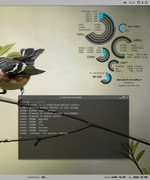
]];
Offline
#2769 Today 18:06:28
- unklar
- Back to the roots 1.9
- From: #! BL
- Registered: 2015-10-31
- Posts: 3,092
Re: Show us your conky
^^@ceeslans
Excellent! Thank you so much for your help.

This is on conky-V1.24.2.
I also tested it on 1.22.1 from carbon. There, the error '(global 'conky_surface')' exists (which seems fixable to me).
The modified code in Lua:
Line 291
require 'cairo'
--pcall(function() require('cairo_xlib') end)
Line 347 - 361
	if conky_window==nil then return end
	local surface=conky_surface()

	local cr=cairo_create(surface)

	local updates=conky_parse('${updates}')
	update_num=tonumber(updates)

	if update_num>5 then
	    for i in pairs(settings_table) do
		  setup_rings(cr,settings_table[i])
	    end
	end
	cairo_destroy(cr)
end
And, the terminal shows no errors.
BTW, thanks again for your absolutely clean code! +1
Offline