![[BunsenLabs Logo]](/img/bl.svg)
You are not logged in.
- Topics: Active | Unanswered
#281 2026-04-17 18:07:51
- hhh
- Hercule Poirot

- From: Belgium
- Registered: 2015-09-17
- Posts: 17,682
- Website
Re: 2026 Screenshot Thread
My main OS, GNOME on trixie. I'd love to know what this wallpaper's font is...

@chroot, if you try GNOME again, add this to /etc/environment and reboot...
GNOME_SHELL_SLOWDOWN_FACTOR=2I find that takes the jankiness (glitch) out of the animations and makes for a mellow desktop.
Why why why why?!!???
Offline
#282 2026-04-18 12:27:15
- chroot
- Member
- Registered: 2024-12-12
- Posts: 181
Re: 2026 Screenshot Thread
Thanks for the info. Will try it later
Offline
#283 2026-04-19 08:19:11
- unklar
- Back to the roots 1.9

- From: #! BL
- Registered: 2015-10-31
- Posts: 3,146
Re: 2026 Screenshot Thread
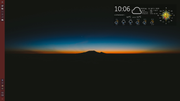
hatchery+hyprland+myForecast
Offline
#284 2026-04-20 19:22:27
- hhh
- Hercule Poirot
- From: Belgium
- Registered: 2015-09-17
- Posts: 17,682
- Website
Re: 2026 Screenshot Thread
^ Rainy. Same here, we need the rain.
Thanks to @malm, who took my request for more labwc scrots and made my scrot the first of the existing gallery...
https://labwc.github.io/screenshots.html
https://github.com/labwc/labwc/issues/3520
Why why why why?!!???
Offline
#285 2026-04-22 18:13:29
- unklar
- Back to the roots 1.9
- From: #! BL
- Registered: 2015-10-31
- Posts: 3,146
Re: 2026 Screenshot Thread
hatchery+mango+quickshell
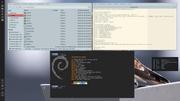
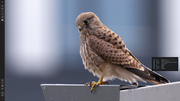
I've now spent hours changing the background image. 
As before, the desktop starts with the image of @cog (color and the svg logo)
Only the key combination AlT+Shift+r (for reload) brings up what you want.
@PackRat, have you done this yet?
Offline
#286 2026-04-22 19:11:32
- PackRat
- jgmenu user Numero Uno

- Registered: 2015-10-02
- Posts: 3,114
Re: 2026 Screenshot Thread
@unklar - been a while since I've done anything with hatchery. There is a line in one of the config files that calls the image; might actually be an environment variable. As I recall, change that line to change the default image.
Pretty sure it is in the quickshell configs.
Edit - Yes it is.
There is a logo section in the ~/.config/quickshell configuration file. You can change the default image there. I think you can also comment out that section and then use swaybg (or some other wayland wallpaper app) to set the wallpaper from the mango config file.
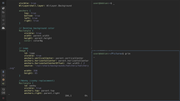
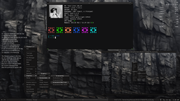
Hatchery live session. Debian stable, mangowc, quickshell:
Void, fluxbox, kitty terminal, feh
You must unlearn what you have learned.
-- yoda
Offline
#287 2026-04-24 11:17:03
- unklar
- Back to the roots 1.9
- From: #! BL
- Registered: 2015-10-31
- Posts: 3,146
Re: 2026 Screenshot Thread
^^Thank you, PackRat. 
I had already commented out the line, but it didn't work.
Now it's adjusted properly and OK. 
Some things often seem illogical.
e.g. these changes in two files. In Rofi I cannot change the theme (it is not saved).
Then I tried Fuzzel. It's ok in the bar upstairs. But not with Alt+p.
Keepassxc with the browser integration, on the other hand, works great. 
As the saying goes, 'you have nothing else to do'. 
Offline
#288 2026-04-25 00:33:28
- PackRat
- jgmenu user Numero Uno
- Registered: 2015-10-02
- Posts: 3,114
Re: 2026 Screenshot Thread
Tinkering around with xfce4 notification theme -

You must unlearn what you have learned.
-- yoda
Offline
#289 2026-04-25 06:00:42
- darknetmatrix
- Member

- From: /home/labs
- Registered: 2015-09-29
- Posts: 275
- Website
Re: 2026 Screenshot Thread

⢀⣴⠾⠻⢶⣦⠀
⣾⠁⢠⠒⠀⣿⡁ Debian - The universal operating system linux user # 527315
⢿⡄⠘⠷⠚⠋⠀ https://www.debian.org
⠈⠳⣄⠀
Offline
#290 2026-04-25 17:45:01
- ceeslans
- Member

- Registered: 2015-09-30
- Posts: 234
Re: 2026 Screenshot Thread
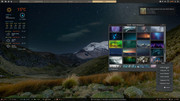
Fluxbox on Devuan6 excalibur
Offline
#291 2026-04-25 21:38:35
- Döbbie03
- Resident Metalhead

- From: New Zealand
- Registered: 2015-09-29
- Posts: 4,415
Re: 2026 Screenshot Thread
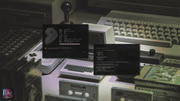
Yay, I finally go imgbox to behave with my browsers, so I can finally see your guys scrots. I still prefer postimg for hosting though.
"All we are is dust in the wind, dude"
- Theodore "Ted" Logan
"Led Zeppelin didn't write tunes that everybody liked, they left that to the Bee Gees."
- Wayne Campbell
Online
#292 2026-04-26 00:25:11
- PackRat
- jgmenu user Numero Uno
- Registered: 2015-10-02
- Posts: 3,114
Re: 2026 Screenshot Thread


You must unlearn what you have learned.
-- yoda
Offline
#293 2026-04-26 14:47:31
- chroot
- Member
- Registered: 2024-12-12
- Posts: 181
Re: 2026 Screenshot Thread
Light color theme

Offline
#294 2026-04-28 04:13:51
- brontosaurusrex
- Senior Associate, Middle Office

- Registered: 2015-09-29
- Posts: 2,830
- Website
Re: 2026 Screenshot Thread
Helix editor on raspberry pi5 (took long time to build from source)
Online
#295 2026-04-28 06:28:28
- chroot
- Member
- Registered: 2024-12-12
- Posts: 181
Re: 2026 Screenshot Thread
took long time to build from source)
Particular reason to build from src? The binary is available, https://github.com/helix-editor/helix/releases
Offline
#296 2026-04-28 07:46:03
- brontosaurusrex
- Senior Associate, Middle Office
- Registered: 2015-09-29
- Posts: 2,830
- Website
Re: 2026 Screenshot Thread
@chroot, I actually didn't even check, hoping that certain behavior was fixed in src (it isn't). Also wondered how hard would such a rust compile be on ARM (it isn't). You a helix user?
Online
#297 2026-04-28 21:49:15
- chroot
- Member
- Registered: 2024-12-12
- Posts: 181
Re: 2026 Screenshot Thread
@chroot, I actually didn't even check, hoping that certain behavior was fixed in src (it isn't). Also wondered how hard would such a rust compile be on ARM (it isn't). You a helix user?
I see. I had used Helix for a short period of time. At that time, some features, for example spell-checking were missing. I then switched back to neovim and have been using it as my main editor.
Offline
#298 2026-04-30 05:46:07
- Döbbie03
- Resident Metalhead
- From: New Zealand
- Registered: 2015-09-29
- Posts: 4,415
Re: 2026 Screenshot Thread
"All we are is dust in the wind, dude"
- Theodore "Ted" Logan
"Led Zeppelin didn't write tunes that everybody liked, they left that to the Bee Gees."
- Wayne Campbell
Online
#299 2026-04-30 17:11:33
- PackRat
- jgmenu user Numero Uno
- Registered: 2015-10-02
- Posts: 3,114
Re: 2026 Screenshot Thread

You must unlearn what you have learned.
-- yoda
Offline
#300 2026-04-30 19:50:02
- chroot
- Member
- Registered: 2024-12-12
- Posts: 181
Re: 2026 Screenshot Thread
Revisiting River

Offline