![[BunsenLabs Logo]](/img/bl.svg)
You are not logged in.
- Topics: Active | Unanswered
#2641 2026-03-20 17:54:01
- loutch
- Member
- Registered: 2015-12-12
- Posts: 1,075
Re: Show us your conky
Hello

@+
Linuxmint 22.1 Xia xfce & mageia 9 XFCE on ssd hp pavilion g7
Xubuntu 18.04 lts & 24.04 lts on ASUS Rog STRIX
Offline
#2642 2026-03-21 11:16:19
- Sector11
- Mod Squid Tpyo Knig

- From: Upstairs
- Registered: 2015-08-20
- Posts: 8,432
Re: Show us your conky
Now that's nice!
Debian 13 Beardog hosted by SoxDog
Still a Conky 1.9er at heart.
Offline
#2643 2026-03-23 02:54:20
- marens
- Member

- From: World without M$
- Registered: 2023-02-02
- Posts: 1,303
Re: Show us your conky
@loutch
I followed your participation in the discussion about sacad (Smart Automatic Cover Art Downloader) on another forum.
SACAD is a multi platform command line tool to download album covers without manual intervention, ideal for integration in scripts, audio players, etc.
Since version 3.0, this tool has been completely rewritten in Rust.
https://github.com/desbma/sacad
I didn't try to install it when I was making the radiotray-ng script because it has a lot of dependencies.
However, I now see that I only need the sacad file for integration.
The file can be downloaded here:
https://workupload.com/file/EfujBh3Kc7X
1) Right-click on ~/Downloads/sacad.tar.xz > Extract Here
2) Copy the ~/Downloads/sacad file and paste it into ~/.conky/RadioTray_NG folder
3) Right click on the radiotray_ng script > Copy > Paste
4) Rename the copy to radiotray-ng-sacad
5) open the file ~/.conky/RadioTray_NG/radiotray-ng-sacad and find the lines:
  echo $test1 > $HOME/.conky/RadioTray_NG/album_cover
  echo $test2 >> $HOME/.conky/RadioTray_NG/album_cover
6) Delete everything below to the end
7) Then add (it should look like this):
  echo $test1 > $HOME/.conky/RadioTray_NG/album_cover
  echo $test2 >> $HOME/.conky/RadioTray_NG/album_cover


  if [[ "$test1" == "" && "$test2" == ""  ]]; then

     cp $HOME/.conky/RadioTray_NG/headphone.png $HOME/.conky/RadioTray_NG/album_art.png

  else

    artist=$(sed -n '1p' $HOME/.conky/RadioTray_NG/album_cover | tr '[A-Z]' '[a-z]')

    title=$(sed -n '2p' $HOME/.conky/RadioTray_NG/album_cover | tr '[A-Z]' '[a-z]')

    cover=$($HOME/.conky/RadioTray_NG/sacad "$artist" "$title" 300 $HOME/.conky/RadioTray_NG/album_art.jpg &> /dev/null)

    echo $cover

       convert $HOME/.conky/RadioTray_NG/album_art.jpg $HOME/.conky/RadioTray_NG/album_art.png

  fi

#### Disable conky when you turn off Radiotray-NG

  sleep 2

  test3=$(pacmd list-sink-inputs | grep 'radiotray-ng')

  if [[ "$test3" == "" ]]; then

     > $HOME/.conky/RadioTray_NG/album_cover

     radiotray_conky=$(pgrep -a conky | awk '/RadioTray_NG/{print $1}')

     kill -SIGKILL $radiotray_conky

     cp $HOME/.conky/RadioTray_NG/headphone.png $HOME/.conky/RadioTray_NG/album_art.png

     > $HOME/.conky/RadioTray_NG/image

  fi
Done.
This is my RadioTray_NG conky (I just changed the script to radiotray-ng-sacad).
#${texeci 8 bash $HOME/.conky/RadioTray_NG/radiotray-ng}
${texeci 8 bash $HOME/.conky/RadioTray_NG/radiotray-ng-sacad}
#${texeci 8 bash $HOME/.conky/RadioTray_NG/radiotray-ng-swiss-pop}
#${texeci 20 bash $HOME/.conky/RadioTray_NG/radiotray-ng-getmeradio}
${image $HOME/.conky/RadioTray_NG/album_art.png -p 0,0 -s 128x128}
P.S.
I mostly listen to old, little-known blues masters and it's hard to find album covers from that era.
Although SACAD uses five different sources, I think the old radiotray-ng script works a little better in my case.
It takes time to check in more detail.
EDIT
Now I see that you already installed sacad.
You can replace the line:
cover=$($HOME/.conky/RadioTray_NG/sacad "$artist" "$title" 300 $HOME/.conky/RadioTray_NG/album_art.jpg &> /dev/null)With:
cover=$(sacad "$artist" "$title" 300 $HOME/.conky/RadioTray_NG/album_art.jpg &> /dev/null)I moved the sacad file to /usr/local/bin.
Last edited by marens (2026-03-23 18:50:40)
If people would know how little brain is ruling the world, they would die of fear.
Offline
#2644 2026-03-24 15:02:40
- marens
- Member
- From: World without M$
- Registered: 2023-02-02
- Posts: 1,303
Re: Show us your conky
^ The output of SACAD sometimes contains many warnings and errors because it searches five different sources.
In the version above, I prevented them from showing if you run conky from the terminal.
They are now redirected to the sacad.log file.
Why?
The radio works differently from the player (e.g. Audacious) and sometimes we get ads.
By analyzing the data from the sacad.log file, I can see when this happens and now the not_available.png image reappears instead of the album art.
This is what the part of the radiotray-ng-sacad script looks like from the line 'cover' to the section '#### Disable conky when...'
    cover=$(sacad "$artist" "$title" 300 $HOME/.conky/RadioTray_NG/album_art.jpg &> $HOME/.conky/RadioTray_NG/sacad.log)

    echo $cover

    check=$(cat $HOME/.conky/RadioTray_NG/sacad.log)

    if [[ $check =~ "No cover to download" ]]; then

       cp $HOME/.conky/RadioTray_NG/not_available.png $HOME/.conky/RadioTray_NG/album_art.png

     else

       convert $HOME/.conky/RadioTray_NG/album_art.jpg $HOME/.conky/RadioTray_NG/album_art.png

    fi

  fi


#### Disable conky when you turn off Radiotray-NG
The radiotray-ng-sacad script now works perfectly if you listen to classic Pop/Rock/Metal/Country... stations.
If you like old, little-known blues masters (like me) or the 'oldies' genre, the radiotray-ng script works better.
Although SACAD searches five different sources, album art is often missing.
The source I use has a large archive of such things and sometimes I myself am surprised by what it can find.
Anyway, enjoy the good music that you like. 
If people would know how little brain is ruling the world, they would die of fear.
Offline
#2645 2026-03-24 19:07:38
- loutch
- Member
- Registered: 2015-12-12
- Posts: 1,075
Re: Show us your conky
Hi guys,
It must be about twenty years since my Conky Oblivion stopped responding to mouse clicks.
Now that my click_audacious is working, I’ve started modifying Met30’s Conkys in version 1.10 and it’s working well.
Here I’ve made a bit of a start on desk1.
Well, as my version of Conky doesn’t support mouse clicks, I now need 2 Conkys + the search script.
Here are a few screenshots with the Conkys I’ve migrated.
1 Just the wallpaper
2 The first Conkys launched
3 The second Conkys launched with a click


Well, the weather isn't great, but just to have something in Conky
@+
Linuxmint 22.1 Xia xfce & mageia 9 XFCE on ssd hp pavilion g7
Xubuntu 18.04 lts & 24.04 lts on ASUS Rog STRIX
Offline
#2646 2026-03-24 20:26:20
- marens
- Member
- From: World without M$
- Registered: 2023-02-02
- Posts: 1,303
Re: Show us your conky
Tonight the radiotray-ng-sacad script was successfully tested.
I was listening to the station Classic Rock Hard Radio.
After about an hour and a half (or more), this is the result:





The image headphone.png appears when conky is started:

It only happened a few times that the script couldn't find the right album cover, but the image not_available.png appeared:

The sacad.log file works great.
Warnings and errors can be tracked if there are any.
It's interesting that sometimes there are many warnings (or errors) but SACAD uses five different sources and mostly finds the right album cover.
If not, my script has a solution.
If people would know how little brain is ruling the world, they would die of fear.
Offline
#2647 2026-03-26 14:04:20
- marens
- Member
- From: World without M$
- Registered: 2023-02-02
- Posts: 1,303
Re: Show us your conky
RadioTray-NG Conky - Now Playing
This is actually a radiotray-ng script with integrated SACAD (Smart Automatic Cover Art Downloader).
Lines test1 and test2 have also been improved (PulseAudio sound server).
radiotray-ng-sacad script:
#!/bin/bash


  test1=$(pactl list sink-inputs | grep media.title | awk -F' - ' '{print $1}' | sed 's/media.title = "//' | sed 's/^[ \t]*//')

  test2=$(pactl list sink-inputs | grep media.title | awk -F' - ' '{print $2}' | sed 's/.$//')


  if [[ "$test1" == "$(sed -n '1p' $HOME/.conky/RadioTray_NG/album_cover)" && "$test2" == "$(sed -n '2p' $HOME/.conky/RadioTray_NG/album_cover)" ]]; then

    exit 0

  fi

  echo $test1 > $HOME/.conky/RadioTray_NG/album_cover
  echo $test2 >> $HOME/.conky/RadioTray_NG/album_cover


  if [[ "$test1" == "" && "$test2" == ""  ]]; then

     cp $HOME/.conky/RadioTray_NG/headphone.png $HOME/.conky/RadioTray_NG/album_art.png

  else

    artist=$(sed -n '1p' $HOME/.conky/RadioTray_NG/album_cover | tr '[A-Z]' '[a-z]')

    title=$(sed -n '2p' $HOME/.conky/RadioTray_NG/album_cover | tr '[A-Z]' '[a-z]')

    cover=$(sacad "$artist" "$title" 300 $HOME/.conky/RadioTray_NG/album_art.jpg &> $HOME/.conky/RadioTray_NG/sacad.log)

    echo $cover

    check=$(cat $HOME/.conky/RadioTray_NG/sacad.log)

    if [[ $check =~ "No cover to download" ]]; then

       cp $HOME/.conky/RadioTray_NG/not_available.png $HOME/.conky/RadioTray_NG/album_art.png

     else

       convert $HOME/.conky/RadioTray_NG/album_art.jpg $HOME/.conky/RadioTray_NG/album_art.png

    fi

  fi


#### Disable conky when you turn off Radiotray-NG

  sleep 2

  test3=$(pacmd list-sink-inputs | grep 'radiotray-ng')

  if [[ "$test3" == "" ]]; then

     > $HOME/.conky/RadioTray_NG/album_cover

     radiotray_conky=$(pgrep -a conky | awk '/RadioTray_NG/{print $1}')

     kill -SIGKILL $radiotray_conky

     cp $HOME/.conky/RadioTray_NG/headphone.png $HOME/.conky/RadioTray_NG/album_art.png

  fi
Note *
Don't forget to make the script executable
If people would know how little brain is ruling the world, they would die of fear.
Offline
#2648 2026-03-28 15:08:20
- marens
- Member
- From: World without M$
- Registered: 2023-02-02
- Posts: 1,303
Re: Show us your conky
Audacious Stream Script - Now playing
I forgot again that most people use Audacious instead of RadioTray-NG.
The script above can easily be edited for that.
Only a couple of lines need to be replaced:
  test1=$(audtool current-song-tuple-data title | awk -F' - ' '{print $1}')

  test2=$(audtool current-song-tuple-data title | awk -F' - ' '{print $2}')
And of course a section that disables audacious-stream-conky when Audacious is turned off:
#### Disable audacious-stream-conky when turn off Audacious

  test3=$(ps -A | grep audacious)

  if [[ "$test3" == "" ]]; then

     audacious_conky=$(pgrep -a conky | awk '/audacious-stream-conky/{print $1}')

     kill -SIGKILL $audacious_conky

  fi
Note *
If you create the audacious-stream script in the same folder ($HOME/.conky/RadioTray_NG), you don't need to change the paths.
If people would know how little brain is ruling the world, they would die of fear.
Offline
#2649 2026-03-28 19:32:40
- marens
- Member
- From: World without M$
- Registered: 2023-02-02
- Posts: 1,303
Re: Show us your conky
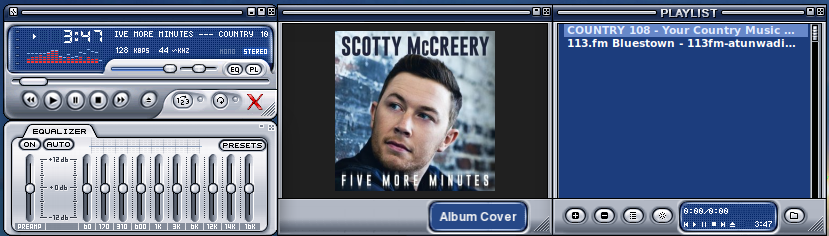
You can listen to the radio with Audacious and get album art:
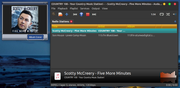
Winamp style:
If people would know how little brain is ruling the world, they would die of fear.
Offline
#2650 2026-03-31 14:44:20
- marens
- Member
- From: World without M$
- Registered: 2023-02-02
- Posts: 1,303
Re: Show us your conky
RadioTray-NG - Now Playing
Replaced the old image not_available.png:

with a refreshed one:

As you can see, I was very creative. 
If people would know how little brain is ruling the world, they would die of fear.
Offline
#2651 2026-04-04 05:01:55
- rwyarbrough
- Member
- From: Mesquite, Texas
- Registered: 2016-11-26
- Posts: 60
Re: Show us your conky
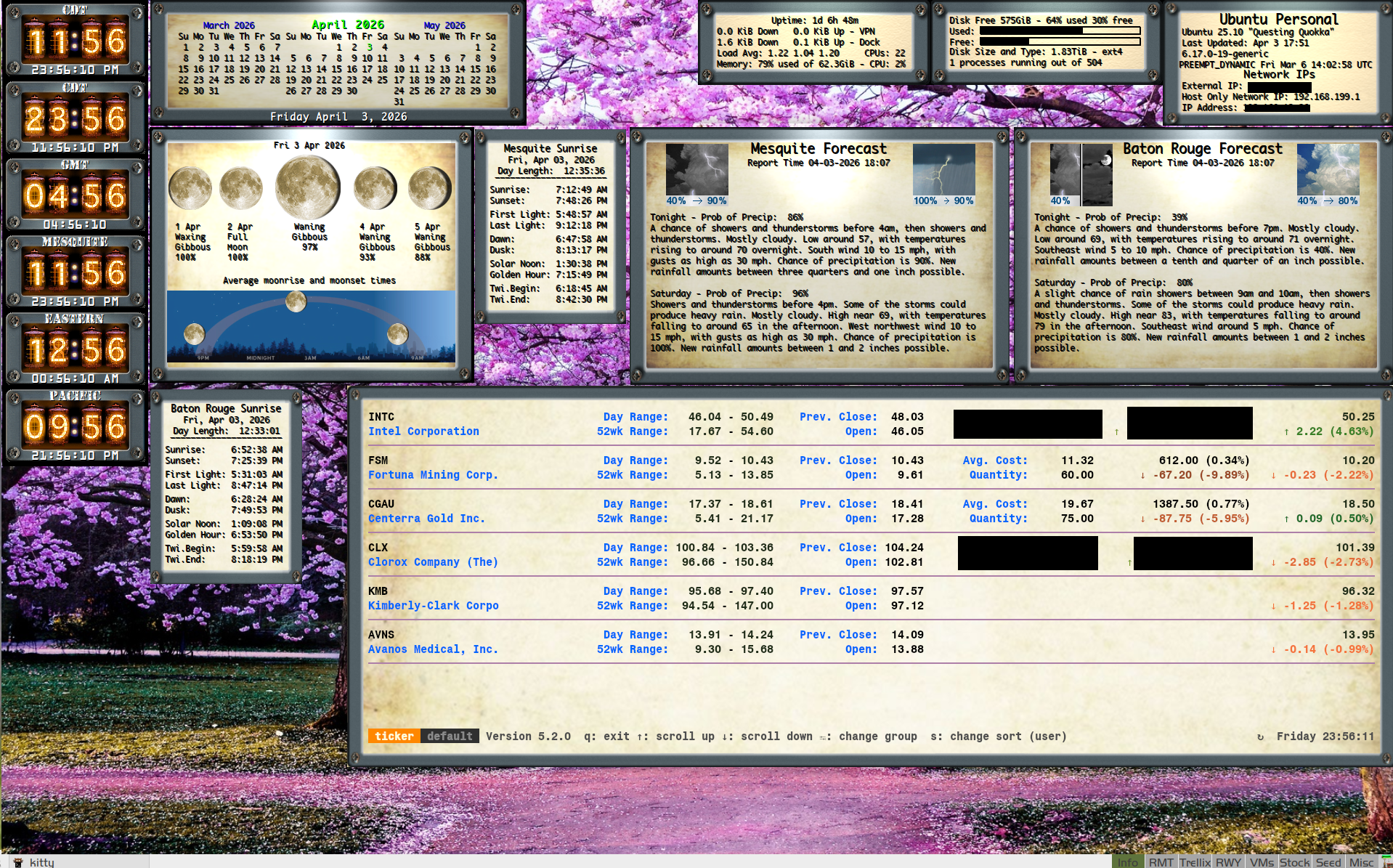
My version of an old Analog Machine/steampunk SuperKaramba widget I found long ago that I really liked.
Last edited by rwyarbrough (2026-04-05 03:30:31)
Offline
#2652 2026-04-04 22:19:50
- Sector11
- Mod Squid Tpyo Knig
- From: Upstairs
- Registered: 2015-08-20
- Posts: 8,432
Re: Show us your conky
OMG! Nostalgic! I recognize a LOT in there!
Thank you!
Debian 13 Beardog hosted by SoxDog
Still a Conky 1.9er at heart.
Offline
#2653 2026-04-05 02:52:19
- rwyarbrough
- Member
- From: Mesquite, Texas
- Registered: 2016-11-26
- Posts: 60
Re: Show us your conky
OMG! Nostalgic! I recognize a LOT in there!
Thank you!
Of course! You were a big help in getting me stated in conky... So Thank you!!!
Offline
#2654 2026-04-05 03:05:51
- rwyarbrough
- Member
- From: Mesquite, Texas
- Registered: 2016-11-26
- Posts: 60
Re: Show us your conky
Original Superkaramba Analog Machine Collection
Reminds me of Frankenstein Laboratory guages!
Analog Machine Collection NetVu Superkaramba widget
I love this depiction of network up and down throughput. I would love to figure out how to "conkytize" it
Last edited by rwyarbrough (2026-04-05 03:28:22)
Offline
#2655 2026-04-05 16:50:02
- Sector11
- Mod Squid Tpyo Knig
- From: Upstairs
- Registered: 2015-08-20
- Posts: 8,432
Re: Show us your conky
Analog Machine Collection NetVu Superkaramba widget
I love this depiction of network up and down throughput. I would love to figure out how to "conkytize" it
Best I can do it a LUA script, this is originally by wlourf, his blog is still up:
Useful and useless scripts
https://u-scripts.blogspot.com/2010/08/ … dgets.html
Notice what happens when I run
$ speedtestin a terminal.
https://streamable.com/ut0vei
EDIT: Video will disappear in 48 hours
You see Upand DNSpeed max out and CPU and Mem usage do up a bit as well.
I don't create LUA scripts, I just bend, fold and mutilate them into doing what I want done.
I might have something that works with pointers or hands.
/Conky/LUA/ = 14 subfdirs and 304 files (lus scripts) - I'll check.
Last edited by Sector11 (2026-04-05 16:52:18)
Debian 13 Beardog hosted by SoxDog
Still a Conky 1.9er at heart.
Offline
#2656 2026-04-08 10:39:38
- unklar
- Back to the roots 1.9

- From: #! BL
- Registered: 2015-10-31
- Posts: 3,108
Re: Show us your conky
@Sector11
Hello, my friend. 
Check this out on my 'fanless' computer and @Olgmen's Conky.
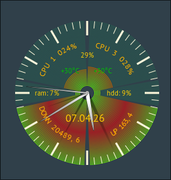
Error message in the terminal:
conky: obj->data.i 7 info.cpu_count 5
conky: attempting to use more CPUs than you have!
and, it crashes without comment.
sensors says:
 sensors
coretemp-isa-0000
Adapter: ISA adapter
Package id 0:  +30.0°C  (high = +100.0°C, crit = +100.0°C)
Core 0:        +25.0°C  (high = +100.0°C, crit = +100.0°C)
Core 8:        +28.0°C  (high = +100.0°C, crit = +100.0°C)
Core 9:        +28.0°C  (high = +100.0°C, crit = +100.0°C)
Core 10:       +29.0°C  (high = +100.0°C, crit = +100.0°C)
Core 11:       +29.0°C  (high = +100.0°C, crit = +100.0°C)

spd5118-i2c-0-50
Adapter: SMBus I801 adapter at 0000:00:1f.4
temp1:        +33.8°C  (low  =  +0.0°C, high = +55.0°C)
                       (crit low =  +0.0°C, crit = +85.0°C)

acpitz-acpi-0
Adapter: ACPI interface
temp1:        +27.8°C

iwlwifi_1-virtual-0
Adapter: Virtual device
temp1:        +37.0°C

nvme-pci-0100
Adapter: PCI adapter
Composite:    +29.9°C  (low  =  -0.1°C, high = +86.8°C)
                       (crit = +89.8°C)
Sensor 1:     +28.9°C  (low  = -273.1°C, high = +65261.8°C)
PC:
inxi -Cxxx
CPU:
  Info: 5-core model: Intel Celeron 7305 bits: 64 type: MCP smt: <unsupported>
    arch: Alder Lake rev: 4 cache: L1: 464 KiB L2: 3.2 MiB L3: 8 MiB
  Speed (MHz): avg: 400 min/max: 400/1100:900 cores: 1: 400 2: 400 3: 400
    4: 400 5: 400 bogomips: 11136
  Flags-basic: avx avx2 ht lm nx pae sse sse2 sse3 sse4_1 sse4_2 ssse3 vmx
At the moment I help myself with this (because I don't see any other solution):
${voffset 90}${goto 130}${color ffcc00}${cpu cpu}%
${voffset 10}${goto 100}${execpi 6 sensors | grep 'Core 0' | cut -c16-18 | xargs $HOME/.config/conky/Olgmen7/colorizecore0.sh}°C${color}${goto 150}${execpi 6 sensors | grep 'Core 1' | cut -c16-18 | xargs $HOME/.config/conky/Olgmen7/colorizecore0.sh}°C${color}
${voffset 20}${goto 60}${color ffcc00}ram: $memperc%${goto 170}hdd: ${fs_used_perc /}%
${voffset 20}${goto 107}${font PT Sans:size 14}${time %d.%m.%g}
${voffset 80}
and lua:
equalizer(cr, 'cpu', 'cpu0', 100, 50, CAIRO_LINE_CAP_SQUARE, 140, 160, 100, 1, 1, 0x00cc66, 0.2, 0x66ff00, 1, 0x00ccff, 1, 80, true, 1, true, 0xff0000, 1.0, 40, 10, 75)

equalizer(cr, 'cpu', 'cpu1', 100, 50, CAIRO_LINE_CAP_SQUARE, 140, 160, 100, 1, 1, 0x00cc66, 0.2, 0x66ff00, 1, 0x00ccff, 1, 80, true, 1, true, 0xff0000, 1.0, 320, 10, 75)
your Intel and AMD list: https://forums.bunsenlabs.org/viewtopic … 503#p50503
Last edited by unklar (2026-04-08 11:24:00)
Offline
#2657 2026-04-08 22:37:44
- Sector11
- Mod Squid Tpyo Knig
- From: Upstairs
- Registered: 2015-08-20
- Posts: 8,432
Re: Show us your conky
@Sector11
Hello, my friend.
Check this out on my 'fanless' computer and @Olgmen's Conky.
{snip}
Ooooooo I justy might have to try that! Good looking conky.
EDIT: Ummmmm "fanless" ?
sensors doesn't show anything about CPUs at all:
 2026·04·08 @ 19:38:48 ~
   $ sensors
amdgpu-pci-0100
Adapter: PCI adapter
vddgfx:        1.06 V
fan1:        1406 RPM  (min =  900 RPM, max = 4500 RPM)
edge:         +47.0°C  (crit = +94.0°C, hyst = -273.1°C)
PPT:          34.00 W  (cap = 130.00 W)

k10temp-pci-00c3
Adapter: PCI adapter
Tctl:         +42.2°C


 2026·04·08 @ 19:38:52 ~
   $
inxi on the other hand:
 2026·04·08 @ 19:38:52 ~
   $ cpu
CPU:
  Info: quad core model: AMD Ryzen 3 2200G with Radeon Vega Graphics bits: 64
    type: MCP arch: Zen rev: 0 cache: L1: 384 KiB L2: 2 MiB L3: 4 MiB
  Speed (MHz): avg: 2322 high: 2850 min/max: 1600/3500 boost: enabled cores:
    1: 2845 2: 2850 3: 1584 4: 2012 bogomips: 27946
  Flags: avx avx2 ht lm nx pae sse sse2 sse3 sse4_1 sse4_2 sse4a ssse3 svm

 2026·04·08 @ 19:41:32 ~
   $
Last edited by Sector11 (2026-04-08 22:38:30)
Debian 13 Beardog hosted by SoxDog
Still a Conky 1.9er at heart.
Offline
#2658 2026-04-08 23:37:46
- rwyarbrough
- Member
- From: Mesquite, Texas
- Registered: 2016-11-26
- Posts: 60
Re: Show us your conky
@Sector11
Hello, my friend.
Check this out on my 'fanless' computer and @Olgmen's Conky.
Simply Awesome - Exactly what I was looking for to work my steampunk network speed conky!
Last edited by rwyarbrough (2026-04-08 23:43:52)
Offline
#2659 2026-04-09 08:06:30
- unklar
- Back to the roots 1.9
- From: #! BL
- Registered: 2015-10-31
- Posts: 3,108
Re: Show us your conky
...
EDIT: Ummmmm "fanless" ?
{snip}
Yes, fanless - no fan.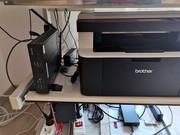
sensors doesn't show anything about CPUs at all:
This is your CPU.
k10temp-pci-00c3
Adapter: PCI adapter
Tctl:         +42.2°C
edge: +47.0°C (crit = +94.0°C, hyst = -273.1°C)the explanation is here: https://unix.stackexchange.com/question … -of-output
and ryzen:
https://www.hwinfo.com/forum/threads/is … yzen.4977/
"That depends on particular model and Tctl=Tdie only if the CPU doesn't use an offset (Tctl_offset).
If you see in sensors a "CPU (Tctl/Tdie)" value, it means they are same. Otherwise there will be 2 values shown Tctl and Tdie."
------------------------------------
@rwyarbrough
Unfortunately, the Karamba is not built on my system compared to before. At least I didn't find a solution.
Offline
#2660 2026-04-09 14:28:12
- loutch
- Member
- Registered: 2015-12-12
- Posts: 1,075
Re: Show us your conky
Hello
Open-meteo.com with new accuweather 2025 icons theme

@+
Linuxmint 22.1 Xia xfce & mageia 9 XFCE on ssd hp pavilion g7
Xubuntu 18.04 lts & 24.04 lts on ASUS Rog STRIX
Offline