![[BunsenLabs Logo]](/img/bl.svg)
You are not logged in.
- Topics: Active | Unanswered
#2581 2026-01-05 10:09:05
- loutch
- Member
- Registered: 2015-12-12
- Posts: 1,075
Re: Show us your conky
Hello
Danke .
---------------------
Tank you
@+
Linuxmint 22.1 Xia xfce & mageia 9 XFCE on ssd hp pavilion g7
Xubuntu 18.04 lts & 24.04 lts on ASUS Rog STRIX
Offline
#2582 2026-01-08 15:32:40
- marens
- Member

- From: World without M$
- Registered: 2023-02-02
- Posts: 1,303
Re: Show us your conky
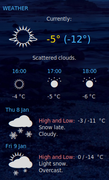
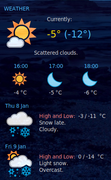
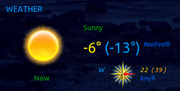
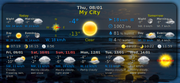
My Conkys (tad + accuweather) and Gis-Weather show a 'beautiful' and sunny day. 
If people would know how little brain is ruling the world, they would die of fear.
Offline
#2583 2026-01-09 11:13:23
- unklar
- Back to the roots 1.9

- From: #! BL
- Registered: 2015-10-31
- Posts: 3,108
Re: Show us your conky
^^debian-hyprland on siduction and wunderground-conky

Offline
#2584 2026-01-09 16:16:53
- Sector11
- Mod Squid Tpyo Knig

- From: Upstairs
- Registered: 2015-08-20
- Posts: 8,432
Re: Show us your conky
^^debian-hyprland on siduction and wunderground-conky
https://i.postimg.cc/CzyCjfHz/Screenshot-09-Jan-12-00-33-777.png
Love that wunderground conky.
Debian 13 Beardog hosted by SoxDog
Still a Conky 1.9er at heart.
Offline
#2585 2026-01-10 11:42:57
- unklar
- Back to the roots 1.9
- From: #! BL
- Registered: 2015-10-31
- Posts: 3,108
Re: Show us your conky
^^absolutely!
Offline
#2586 2026-01-22 15:59:39
- unklar
- Back to the roots 1.9
- From: #! BL
- Registered: 2015-10-31
- Posts: 3,108
Re: Show us your conky
^^With the 'quickshell' (here on hatchery-hyprland') conky is threatened with extinction. 

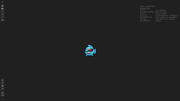
I just 'sniffed around'.
Apparently there is no background image anymore. On the left, that's an .svg image and on the right, my attempt with a .png. e.g. the background will be with the color #202020
defined. In the configuration it looks like this, for example:
ShellRoot {
    id: root

    // Colors
    property color colorFg: "#a7a7a7"
    property color colorBg: "#202020"
    property color color0: "#2d2d2d"
 ...
Top right is wonky.
You read that right, it is a(conky replacement). 
This is defined in the shell configuration like this:
    // Wonky settings (conky replacement)
    property string wonkyFontFamily: "hack"
    property int wonkyFontSize: 16
    property color wonkyColor: "#808080"
...
        //Wonky (conky replacement)
        Rectangle {
            id: wonky
            visible: true
            anchors.top: parent.top
            anchors.right: parent.right
            anchors.topMargin: 60
            anchors.rightMargin: 20
            width: childrenRect.width
            height: childrenRect.height
            color: colorBg
            Column {
                Row {
                    Text {
                        font {
                            family: wonkyFontFamily
                            pixelSize: wonkyFontSize
                        }
                        color: wonkyColor
                        text: "BASIC NAVIGATION"
                    }
                }
                Row {
                    Text {
                        font {
                            family: wonkyFontFamily
                            pixelSize: wonkyFontSize
                        }
                        color: wonkyColor
                        text: " "
                    }
                }
...
That up to the blank line.
A real Conky looks like this on this desktop: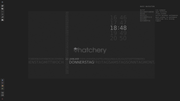
I haven't been able to achieve better transparency.
Of course, as usual with Linux, there will be solutions. I haven't had enough time to deal with widgets, containers, etc. 
Last edited by unklar (2026-01-22 18:28:59)
Offline
#2587 2026-01-26 16:04:22
- loutch
- Member
- Registered: 2015-12-12
- Posts: 1,075
Re: Show us your conky
Hello
Small modifications to my Tahoe's AccuWeather conkys and addition of a sunrise and sunset conky (weather.com)


@+
Linuxmint 22.1 Xia xfce & mageia 9 XFCE on ssd hp pavilion g7
Xubuntu 18.04 lts & 24.04 lts on ASUS Rog STRIX
Offline
#2588 2026-01-31 19:53:36
- loutch
- Member
- Registered: 2015-12-12
- Posts: 1,075
Re: Show us your conky
Hello
Playing a little beat with my Tahoe conkys


@+
Linuxmint 22.1 Xia xfce & mageia 9 XFCE on ssd hp pavilion g7
Xubuntu 18.04 lts & 24.04 lts on ASUS Rog STRIX
Offline
#2589 2026-02-01 01:42:40
- marens
- Member
- From: World without M$
- Registered: 2023-02-02
- Posts: 1,303
Re: Show us your conky
^ Nice light blue wallpapers.
I used one similar about fifteen years ago with Lubuntu (LXDE) and then rediscovered it 6 years ago.
I haven't changed anything since then:
That's why all my conkys are mostly with a 'semi-transparent' blue background.
If people would know how little brain is ruling the world, they would die of fear.
Offline
#2590 2026-02-01 08:59:04
- loutch
- Member
- Registered: 2015-12-12
- Posts: 1,075
Re: Show us your conky
Hello

@+
Linuxmint 22.1 Xia xfce & mageia 9 XFCE on ssd hp pavilion g7
Xubuntu 18.04 lts & 24.04 lts on ASUS Rog STRIX
Offline
#2591 2026-02-06 09:58:33
- loutch
- Member
- Registered: 2015-12-12
- Posts: 1,075
Re: Show us your conky
Hello
I made a script to have the lyrics in conky-spotify wit help from Gemini , for the moment it work .
#!/bin/bash

# --- Votre code existant pour extraire l'artiste et le titre ---
artist=$(dbus-send --print-reply --dest=org.mpris.MediaPlayer2.spotify /org/mpris/MediaPlayer2 org.freedesktop.DBus.Properties.Get string:'org.mpris.MediaPlayer2.Player' string:'Metadata'|grep -E -A 2 "artist"|grep -E -v "artist"|grep -E -v "array"|cut -b 27- |cut -d '-' -f 1 |cut -d '"' -f 1|grep -E -v ^$)
 title=$(dbus-send --print-reply --dest=org.mpris.MediaPlayer2.spotify /org/mpris/MediaPlayer2 org.freedesktop.DBus.Properties.Get string:'org.mpris.MediaPlayer2.Player' string:'Metadata'|grep -E -A 1 "title"|grep -E -v "title"|cut -b 44-|cut -d '-' -f 1 |cut -d '"' -f 1 |cut -d '(' -f 1|grep -E -v ^$)

echo "$artist" > "$HOME/.conky/conky-spotify/chanteur"
echo "$title" >> "$HOME/.conky/conky-spotify/chanteur"

# On encode les variables pour l'URL
url_artist=$(echo "$artist" | sed 's/ /%20/g')
url_title=$(echo "$title" | sed 's/ /%20/g')

# Appel à l'API lyrics.ovh
paroles=$(curl -s "https://api.lyrics.ovh/v1/$url_artist/$url_title" | jq -r '.lyrics')

# Vérification et nettoyage des lignes vides
if [ "$paroles" == "null" ] || [ -z "$paroles" ]; then
    echo "Paroles non trouvées." > "$HOME/.conky/conky-spotify/paroles.txt"
else
    # On utilise sed '/^$/d' pour supprimer toutes les lignes totalement vides
    echo "$paroles" | sed '/^$/d' > "$HOME/.conky/conky-spotify/paroles.txt"
fi
conky-spotify

conky-lyrics

in conky
conky.text = [[SPOTIFY PAROLES
${texeci 2 ~/.conky/conky-spotify/scripts/paroles.sh}
${texeci 2 sed -n 'p' $HOME/.conky/conky-spotify/paroles.txt}
here Beach boys - get around

Beach boys - surfin' U.S.A.

It is no top when in a title there is ?,or ' script don't work .
Is that any way to make better this script & colored the lines who is singing .
tanks
@+
edit
change the API for the moment work better.
#!/bin/bash

# 1. Extraction de l'artiste et du titre (votre code original)
artist=$(dbus-send --print-reply --dest=org.mpris.MediaPlayer2.spotify /org/mpris/MediaPlayer2 org.freedesktop.DBus.Properties.Get string:'org.mpris.MediaPlayer2.Player' string:'Metadata'|grep -E -A 2 "artist"|grep -E -v "artist"|grep -E -v "array"|cut -b 27- |cut -d '-' -f 1 |cut -d '"' -f 1|grep -E -v ^$)
title=$(dbus-send --print-reply --dest=org.mpris.MediaPlayer2.spotify /org/mpris/MediaPlayer2 org.freedesktop.DBus.Properties.Get string:'org.mpris.MediaPlayer2.Player' string:'Metadata'|grep -E -A 1 "title"|grep -E -v "title"|cut -b 44-|cut -d '-' -f 1 |cut -d '"' -f 1 |cut -d '(' -f 1|grep -E -v ^$)

# Sauvegarde pour Conky
echo "$artist" > "$HOME/.conky/conky-spotify/chanteur"
echo "$title" >> "$HOME/.conky/conky-spotify/chanteur"

# 2. Encodage des variables pour l'URL (plus robuste avec jq)
url_artist=$(jq -nr --arg str "$artist" '$str | @uri')
url_title=$(jq -nr --arg str "$title" '$str | @uri')

# 3. Appel à l'API LRCLIB
# On cherche d'abord les paroles simples (plainLyrics)
response=$(curl -s "https://lrclib.net/api/get?artist_name=$url_artist&track_name=$url_title")

# Extraction des paroles avec jq
# On tente d'abord 'plainLyrics', si vide on prend 'syncedLyrics' et on nettoie les tags [00:00.00]
paroles=$(echo "$response" | jq -r 'if .plainLyrics != null and .plainLyrics != "" then .plainLyrics else .syncedLyrics end' | sed 's/\[.*\] //g')

# 4. Vérification et nettoyage
if [ "$paroles" == "null" ] || [ -z "$paroles" ]; then
    echo "Paroles non trouvées." > "$HOME/.conky/conky-spotify/paroles.txt"
else
    # Nettoyage des lignes vides et écriture
    echo "$paroles" | sed '/^$/d' > "$HOME/.conky/conky-spotify/paroles.txt"
fi
Last edited by loutch (2026-02-06 14:34:47)
Linuxmint 22.1 Xia xfce & mageia 9 XFCE on ssd hp pavilion g7
Xubuntu 18.04 lts & 24.04 lts on ASUS Rog STRIX
Offline
#2592 2026-02-06 15:08:02
- loutch
- Member
- Registered: 2015-12-12
- Posts: 1,075
Re: Show us your conky
Re
In Tohoe's conky-spotify

@+
Linuxmint 22.1 Xia xfce & mageia 9 XFCE on ssd hp pavilion g7
Xubuntu 18.04 lts & 24.04 lts on ASUS Rog STRIX
Offline
#2593 2026-02-06 15:36:21
- marens
- Member
- From: World without M$
- Registered: 2023-02-02
- Posts: 1,303
Re: Show us your conky
^ Very nice.
It is no top when in a title there is ?,or ' script don't work .
What does the $HOME/.conky/conky-spotify/paroles.txt file look like in these cases?
I don't have dbus and jq installed.
If people would know how little brain is ruling the world, they would die of fear.
Offline
#2594 2026-02-06 15:54:13
- loutch
- Member
- Registered: 2015-12-12
- Posts: 1,075
Re: Show us your conky
Hello
look like this
Do you remember?
Chalk hearts melting on a playground wall
Do you remember?
Dawn escapes from moon washed college halls
Do you remember?
The cherry blossom in the market square
Do you remember?
I thought it was confetti in our hair
By the way, didn't I break your heart?
Please excuse me, I never meant to break your heart
So sorry, I never meant to break your heart
But you broke mine
Kayleigh, is it too late to say I'm sorry?
And, Kayleigh, could we get it together again?
I just can't go on pretending
That it came to a natural end
Kayleigh, oh I never thought I'd miss you
And, Kayleigh, I thought that we'd always be friends
We said our love would last forever
So how did it come to this bitter end?
(Oh, yeah)
Do you remember?
Barefoot on the lawn with shooting stars
Do you remember?
The loving on the floor in Belsize Park
Do you remember?
Dancing in stilettoes in the snow
Do you remember?
You never understood I had to go
By the way, didn't I break your heart?
Please excuse me, I never meant to break your heart
So sorry, I never meant to break your heart
But you broke mine
Kayleigh, I just want to say I'm sorry
But, Kayleigh, I'm too scared to pick up the phone
To hear you've found another lover
To patch up our broken home
Kayleigh, I'm still trying to write that love song
Kayleigh, it's more important to me, now you're gone
Maybe it will prove that we were right
Or it'll prove that I was wrong
I change this
# Appel à l'API lyrics.ovh
paroles=$(curl -s "https://api.lyrics.ovh/v1/$url_artist/$url_title" | jq -r '.lyrics')
for this
# 3. Appel à l'API LRCLIB
# On cherche d'abord les paroles simples (plainLyrics)
response=$(curl -s "https://lrclib.net/api/get?artist_name=$url_artist&track_name=$url_title")
it same to be better the Beach boys - surfin' U.S.A. have their lyric.

i tkink Lrclib.net/api work better than api.lyrics.ovh.
@+
edit

@+
Last edited by loutch (2026-02-06 15:59:06)
Linuxmint 22.1 Xia xfce & mageia 9 XFCE on ssd hp pavilion g7
Xubuntu 18.04 lts & 24.04 lts on ASUS Rog STRIX
Offline
#2595 2026-02-06 16:04:50
- marens
- Member
- From: World without M$
- Registered: 2023-02-02
- Posts: 1,303
Re: Show us your conky
^ Yes.
The output is different when you change the source.
I know you have an account here:
https://forums.linuxmint.com/viewtopic.php?t=437464
If people would know how little brain is ruling the world, they would die of fear.
Offline
#2596 2026-02-06 16:12:03
- loutch
- Member
- Registered: 2015-12-12
- Posts: 1,075
Re: Show us your conky
Re
Thank you, I had completely forgotten about our friend Logansfury and his conky.
@+
Linuxmint 22.1 Xia xfce & mageia 9 XFCE on ssd hp pavilion g7
Xubuntu 18.04 lts & 24.04 lts on ASUS Rog STRIX
Offline
#2597 2026-02-06 20:59:55
- loutch
- Member
- Registered: 2015-12-12
- Posts: 1,075
Re: Show us your conky
Re
Do the same for radiotray_ng. Here, there is no need for vertical scrolling since the radios do not have timelapses.

@+
Linuxmint 22.1 Xia xfce & mageia 9 XFCE on ssd hp pavilion g7
Xubuntu 18.04 lts & 24.04 lts on ASUS Rog STRIX
Offline
#2598 2026-02-07 00:04:20
- marens
- Member
- From: World without M$
- Registered: 2023-02-02
- Posts: 1,303
Re: Show us your conky
Do the same for radiotray_ng.
Of course.
The same goes for Audacious, VLC... or any player.
You just need to replace the commands:
artist=$(dbus-send ...   )
title=$(dbus-send ...    )
Great job.
EDIT
Add above the line # Sauvegarde pour Conky (it should look like this):
  if [[ "$artist" == "$(sed -n '1p' $HOME/.conky/conky-spotify/chanteur)" && "$title" == "$(sed -n '2p' $HOME/.conky/conky-spotify/chanteur)" ]]; then
      exit 0
  fi

# Sauvegarde pour Conky
echo "$artist" > "$HOME/.conky/conky-spotify/chanteur"
echo "$title" >> "$HOME/.conky/conky-spotify/chanteur"
This will prevent the script from downloading the lyrics every two seconds.
When a new song appears, it is downloaded only once.
I can't test it, but I'm sure the script will be more efficient.
Last edited by marens (2026-02-07 04:54:20)
If people would know how little brain is ruling the world, they would die of fear.
Offline
#2599 2026-02-07 09:30:47
- loutch
- Member
- Registered: 2015-12-12
- Posts: 1,075
Re: Show us your conky
Hello
Oki-doki As well you are the King.
@+
Last edited by loutch (2026-02-07 15:31:41)
Linuxmint 22.1 Xia xfce & mageia 9 XFCE on ssd hp pavilion g7
Xubuntu 18.04 lts & 24.04 lts on ASUS Rog STRIX
Offline
#2600 2026-02-07 15:08:40
- marens
- Member
- From: World without M$
- Registered: 2023-02-02
- Posts: 1,303
Re: Show us your conky
^ I use similar code in my radiotray-ng script to prevent album art from downloading every ten seconds or so:
https://forums.bunsenlabs.org/viewtopic … 38#p140138
About timed lyrics look here:
https://forums.linuxmint.com/viewtopic. … s#p2549477
Good luck!
If people would know how little brain is ruling the world, they would die of fear.
Offline