![[BunsenLabs Logo]](/img/bl.svg)
You are not logged in.
- Topics: Active | Unanswered
#201 2025-12-13 20:28:40
- marens
- Member

- From: World without M$
- Registered: 2023-02-02
- Posts: 1,306
Re: Conky Weather TAD script
Conky TAD script - latest version
You will always have the updated version here *
Instructions for beginners and those who have not used the TAD script before:
1) You can download the script here:
https://workupload.com/file/sTwCCMR6UQH
2) Open ~/Downloads folder > Right click on time_and_date_conky_script.tar.xz > Extract Here
3) Copy/paste the resulting folder into HOME
4) Open the folder and you will get this: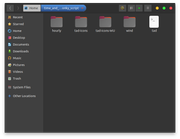
5) Open the tad script (image above) with a text editor and don't forget to change the location (instead of Paris, France):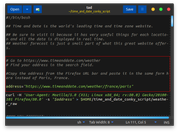
6) First, Copy/Paste the full updated version:
* Those who already use the TAD script will have an updated version here
#!/bin/bash
## Time and Date is the world's leading time and time zone website.
## Be sure to visit it because it has very useful things for each location and all the data is displayed in real time.
## Weather forecast is just a small part of what this great website offers.
# Go to https://www.timeanddate.com/weather
# Find your address in the search field.
#Copy the address from the Firefox URL bar and paste it in the same form here instead of Paris, France.
address="https://www.timeanddate.com/weather/france/paris"
#curl -H 'User-Agent: Mozilla/5.0 (X11; Linux x86_64; rv:80.0) Gecko/20100101 Firefox/80.0' -s "$address" > $HOME/time_and_date_conky_script/weather_raw
wget -O "$HOME/time_and_date_conky_script/weather_raw" --ignore-length --force-html --header="Accept: text/html,application/xhtml+xml,application/xml;q=0.9,*/*;q=0.8" --header="Accept-Language: en-US,en;q=0.9" --header="Connection: keep-alive" --header="Referer: https://www.timeanddate.com/weather/" --header="User-Agent: Mozilla/5.0 (X11; Linux x86_64; rv:147.0) Gecko/20100101 Firefox/147.0" "$address"
#### NOW FORECAST
## Temperature
cat $HOME/time_and_date_conky_script/weather_raw | grep -o '[ ^]class=h2>[^<]*' | sed 's/^/Temperature:/' | sed 's/class=h2>//' | sed 's/ / /' > $HOME/time_and_date_conky_script/now
## Feels Like
cat $HOME/time_and_date_conky_script/weather_raw | grep -o '[F^]eels Like:[^<]*' | sed 's/ / /' >> $HOME/time_and_date_conky_script/now
## Forecast
cat $HOME/time_and_date_conky_script/weather_raw | grep -o '[ ^]title="High and low forecasted temperature today">Forecast: [^ ]*' | awk -F'>' '{print $2}' >> $HOME/time_and_date_conky_script/now
## Text Now
cat $HOME/time_and_date_conky_script/weather_raw | grep -o '[ ^]id=cur-weather class=mtt title="[^"]*' | sed 's/ id=cur-weather class=mtt title="//' >> $HOME/time_and_date_conky_script/now
## Visibility
cat $HOME/time_and_date_conky_script/weather_raw | grep -o '[V^]isibility: [^P]*' | sed 's/<\/th><td>//' | sed 's/ / /' | sed 's/<\/td><\/tr><tr><th>//' >> $HOME/time_and_date_conky_script/now
## Pressure
cat $HOME/time_and_date_conky_script/weather_raw | grep -o '[P^]ressure: [^H]*' | sed 's/<\/th><td>//' | sed 's/<\/td><\/tr><tr><th>//' >> $HOME/time_and_date_conky_script/now
## Humidity
cat $HOME/time_and_date_conky_script/weather_raw | grep -o '[H^]umidity:[^D]*' | sed '$d' | sed 's/<\/th><td>//' | sed 's/<\/td><\/tr><tr><th>//' >> $HOME/time_and_date_conky_script/now
## Dew Point
cat $HOME/time_and_date_conky_script/weather_raw | grep -o '[D^]ew Point: [^ ]*' | sed 's/<\/th><td>//' | sed 's/ / /' | sed 's/<\/td><\/tr><\/tbody><\/table><\/div><div//' >> $HOME/time_and_date_conky_script/now
## Wind
cat $HOME/time_and_date_conky_script/weather_raw | grep -o '[W^]ind: [^<]*' | sed '$d' >> $HOME/time_and_date_conky_script/now
## Wind Direction
echo $(cat $HOME/time_and_date_conky_script/weather_raw | grep -o '[>^] from[^<]*' | sed '$d' | sed 's/> //') >> $HOME/time_and_date_conky_script/now
## Latest Report
cat $HOME/time_and_date_conky_script/weather_raw | grep -o '[L^]atest Report: [^V]*' | sed 's/<\/th><td>//' | sed 's/<\/td><\/tr><tr><th>//' | sed 's/年/\//' | sed 's/月/\//' | sed 's/日 (金)/ /' | sed 's/時/:/' | sed 's/分//' >> $HOME/time_and_date_conky_script/now
## Now Image
cat $HOME/time_and_date_conky_script/weather_raw | grep -o '[ ^]src="//c.tadst.com/gfx/w/svg[^ ]*' | sed '1q;d' | sed 's/ src="/https:/' | sed 's/.$//' > $HOME/time_and_date_conky_script/images
day_0=$(sed -n '1p' $HOME/time_and_date_conky_script/images | awk -F'svg/' '{print $2}' | sed 's/svg/png/')
cp $HOME/time_and_date_conky_script/tad-icons/$day_0 $HOME/time_and_date_conky_script/0.png
> $HOME/time_and_date_conky_script/images
## Wind Direction Image
wd=$(sed -n '10p' $HOME/time_and_date_conky_script/now | sed 's/from //' | sed 's/North/N/g' | sed 's/north/N/g' | sed 's/South/S/g' | sed 's/south/S/g' | sed 's/East/E/g' | sed 's/east/E/g' | sed 's/West/W/g' | sed 's/west/W/g' | sed 's/-//' | sed 's/$/.png/')
## Wind Rose
## 04/12/25
if [[ "$wd" == ".png" ]] || [[ "$wd" == "Wind: N/A .png" ]]; then
cp $HOME/time_and_date_conky_script/wind/CLM.png $HOME/time_and_date_conky_script/wind_0.png
else
cp $HOME/time_and_date_conky_script/wind/$wd $HOME/time_and_date_conky_script/wind_0.png
fi
#### DAILY FORECAST
## Temperatures (Next 7 days)
cat $HOME/time_and_date_conky_script/weather_raw | grep -o '[^ ]*width=60 height=60><p>[^ ]*' | sed 's/width=60 height=60><p>//' | sed 7q > $HOME/time_and_date_conky_script/temperatures
## Images (Next 7 Days)
cat $HOME/time_and_date_conky_script/weather_raw | grep 'Forecast for the next 2 weeks' | grep -o '[ ^]src="//c.tadst.com/gfx/w/svg[^ ]*' | sed -n '1,7p' | sed 's/.$//' | awk -F'svg/' '{print $2}' | sed 's/svg/png/' > $HOME/time_and_date_conky_script/images
## Icons (Next 7 Days)
j=1
for (( i=1; i<=7; i+=1 ))
do
cp $HOME/time_and_date_conky_script/tad-icons/$(sed -n ${i}p $HOME/time_and_date_conky_script/images) $HOME/time_and_date_conky_script/day_$j.png
((j++))
done
## Phrase (Next 7 Days)
cat $HOME/time_and_date_conky_script/weather_raw | grep -o '[ ^]class=mtt title="[^"]*' | sed -n '18,24p' | sed 's/ class=mtt title="//' > $HOME/time_and_date_conky_script/phrase
#### HOURLY FORECAST
## Temperature
cat $HOME/time_and_date_conky_script/weather_raw | grep -o '[ ^]class="h2 soft" [^ ]*' | sed -e 's/<\/td><td>/\n/g' | sed '1,1d' | sed 's/ class="h2 soft" ><td>//' | sed 's/ / /' | sed 's/<\/td><\/tr><\/tbody><\/table><\/div><p//' > $HOME/time_and_date_conky_script/hourly/temperature
## Time
cat $HOME/time_and_date_conky_script/weather_raw | grep -o '[ ^]class=h2 ><td>Now</td><td>[^r]*' | sed -e 's/<\/td><td>/\n/g' | sed '1,1d' | sed 's/<\/td><\/t//' > $HOME/time_and_date_conky_script/hourly/time
## Phrase
cat $HOME/time_and_date_conky_script/weather_raw | grep -o '[ ^]class=mtt title="[^"]*' | sed -n '3,7p' | sed 's/ class=mtt title="//' > $HOME/time_and_date_conky_script/hourly/phrase
## Images
cat $HOME/time_and_date_conky_script/weather_raw | grep -o '[ ^]src="//c.tadst.com/gfx/w/svg[^ ]*' | awk -F'svg/' '{print $2}' | sed -n '3,7p' | sed 's/.$//' | sed 's/svg/png/' > $HOME/time_and_date_conky_script/hourly/images
## Icons
j=1
for (( i=1; i<=5; i+=1 ))
do
cp $HOME/time_and_date_conky_script/tad-icons/$(sed -n ${i}p $HOME/time_and_date_conky_script/hourly/images) $HOME/time_and_date_conky_script/hourly/hourly_$j.png
((j++))
done
#### DAY + DATE (Next 7 Days)
#curl -H 'User-Agent: Mozilla/5.0 (X11; Linux x86_64; rv:80.0) Gecko/20100101 Firefox/80.0' -s "$address/ext" > $HOME/time_and_date_conky_script/date-raw
wget -O "$HOME/time_and_date_conky_script/date_raw" --ignore-length --force-html --header="Accept: text/html,application/xhtml+xml,application/xml;q=0.9,*/*;q=0.8" --header="Accept-Language: en-US,en;q=0.9" --header="Connection: keep-alive" --header="Referer: https://www.timeanddate.com/weather/" --header="User-Agent: Mozilla/5.0 (X11; Linux x86_64; rv:147.0) Gecko/20100101 Firefox/147.0" "$address/ext"
cat $HOME/time_and_date_conky_script/date_raw | grep -o '[,^]"ds":"[^"]*' | sed 's/,"ds":"//g' | sed 's/\.//g' | sed -n '1,7p' > $HOME/time_and_date_conky_script/date
#### WEATHERFONT
## Wind
if [[ "$wd" == ".png" ]]; then
echo CLM > $HOME/time_and_date_conky_script/weatherfont/wind
else
echo $wd | sed 's/.png//' > $HOME/time_and_date_conky_script/weatherfont/wind
fi
wind=$(sed -n 1p $HOME/time_and_date_conky_script/weatherfont/wind)
#function: test_wind
test_wind () {
case $1 in
CLM)
echo \-
;;
S)
echo 1
;;
SSW)
echo 2
;;
SW)
echo 3
;;
WSW)
echo 4
;;
W)
echo 5
;;
WNW)
echo 6
;;
NW)
echo 7
;;
NNW)
echo 8
;;
N)
echo 9
;;
NNE)
echo \:
;;
NE)
echo \;
;;
ENE)
echo \<
;;
E)
echo \=
;;
ESE)
echo \>
;;
SE)
echo \?
;;
SSE)
echo \@
;;
esac
}
echo $(test_wind $wind) > $HOME/time_and_date_conky_script/weatherfont/wind
## Now
cat $HOME/time_and_date_conky_script/weather_raw | grep -o '[ ^]src="//c.tadst.com/gfx/w/svg[^ ]*' | sed '1q;d' | sed 's/ src="/https:/' | sed 's/.$//' | awk -F'svg/' '{print $2}' | sed 's/.svg//' | sed 's/wt-//' > $HOME/time_and_date_conky_script/weatherfont/now
now=$(sed -n 1p $HOME/time_and_date_conky_script/weatherfont/now)
#function: test_image
test_image () {
case $1 in
1|01)
echo a
;;
2|02|3|03|8|08|9|09|12)
echo b
;;
4|04|5|05)
echo c
;;
6|06)
echo d
;;
7|07)
echo e
;;
10)
echo q
;;
11)
echo 6
;;
13)
echo A
;;
14)
echo C
;;
15|16)
echo B
;;
17)
echo D
;;
18)
echo h
;;
19|20)
echo i
;;
21)
echo k
;;
22|23)
echo m
;;
24|27|28)
echo x
;;
25|26)
echo 6
;;
29)
echo o
;;
30)
echo q
;;
31)
echo r
;;
32)
echo 9
;;
33)
echo g
;;
34)
echo G
;;
35)
echo K
;;
*)
echo -
;;
esac
}
echo $(test_image $now) > $HOME/time_and_date_conky_script/weatherfont/now
## Hourly
cat $HOME/time_and_date_conky_script/weather_raw | grep -o '[ ^]src="//c.tadst.com/gfx/w/svg[^ ]*' | awk -F'svg/' '{print $2}' | sed -n '3,7p' | sed 's/.$//' | sed 's/.svg//' | sed 's/wt-//' > $HOME/time_and_date_conky_script/weatherfont/hourly
for (( i=1; i<=5; i+=1 ))
do
im=$(sed -n ${i}p $HOME/time_and_date_conky_script/weatherfont/hourly)
sed -i $i"s/^.*$/$(test_image $im)/" $HOME/time_and_date_conky_script/weatherfont/hourly
done
## Daily
cat $HOME/time_and_date_conky_script/weather_raw | grep -o '[ ^]src="//c.tadst.com/gfx/w/svg[^ ]*' | sed -n '19,25p' | sed 's/ src="/https:/' | sed 's/.$//' | awk -F'svg/' '{print $2}' | sed 's/.svg//' | sed 's/wt-//' > $HOME/time_and_date_conky_script/weatherfont/daily
for (( i=1; i<=7; i+=1 ))
do
im=$(sed -n ${i}p $HOME/time_and_date_conky_script/weatherfont/daily)
sed -i $i"s/^.*$/$(test_image $im)/" $HOME/time_and_date_conky_script/weatherfont/daily
doneDone.
Open a terminal and run the script once:
bash ~/time_and_date_conky_script/tadYou will get a complete weather forecast for your location (Now, Daily, Hourly).
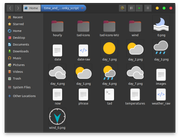
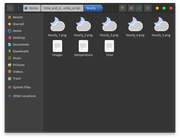
This is what it should look like:
ANNOUNCEMENTS
20/12/2025
1) Replaced icons wt-30.png and wt-31.png within tad-icons-WU
https://forums.bunsenlabs.org/viewtopic … 27#p147927
2) Replaced line ## Wind direction in #### NOW FORECAST
https://forums.bunsenlabs.org/viewtopic … 49#p147949
28/12/2025
1) Added part #### WEATHERFONT:
https://forums.bunsenlabs.org/viewtopic … 77#p148077
* First create the ~/time_and_date_conky_script/weatherfont folder
06/01/2026
1) Added flood icon:
https://forums.bunsenlabs.org/viewtopic … 38#p148238
21/01/2026
1) Added phrases to the hourly forecast:
https://forums.bunsenlabs.org/viewtopic … 15#p148515
10/02/2026
1) Added new TAD icons
https://forums.bunsenlabs.org/viewtopic … 57#p148857
12/03/2026
1) Fixed 'nearby stations' bug
https://forums.bunsenlabs.org/viewtopic … 19#p149519
06/05/2026
1) Fixed access to TAD (CloudFlare)
https://forums.bunsenlabs.org/viewtopic … 11#p150611
07/05/2026
1) Fixed typo
https://forums.bunsenlabs.org/viewtopic … 53#p150653
Last edited by marens (2026-05-07 17:34:21)
If people would know how little brain is ruling the world, they would die of fear.
Offline
#202 2025-12-14 13:44:20
- marens
- Member
- From: World without M$
- Registered: 2023-02-02
- Posts: 1,306
Re: Conky Weather TAD script
How to Replace Icons?
Thanks to @asqwerth who customized the Weather Underground icons it's easy to replace the original icons.
Open the tad script with a text editor and replace tad-icons with tad-icons-WU (in three places).
The fastest way is to use Find and Replace > Replace All: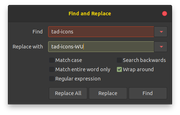
If you want to use your favorite weather icons, add a folder with those icons, but the names must be the same as the original ones (wt-XX.png).
Last edited by marens (2025-12-17 00:38:19)
If people would know how little brain is ruling the world, they would die of fear.
Offline
#203 2025-12-14 20:28:34
- ceeslans
- Member

- Registered: 2015-09-30
- Posts: 233
Re: Conky Weather TAD script
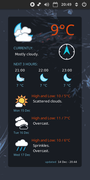
thanks @marens for sharing your wonderful tad script, works like a charm.
and thanks @asqwerth for sharing your conky config file (#169) and WU icons.
Last edited by ceeslans (2025-12-14 20:29:03)
Offline
#204 2025-12-15 13:41:55
- loutch
- Member
- Registered: 2015-12-12
- Posts: 1,076
Re: Conky Weather TAD script
Hello
Hello version from @asqwerth with lua background & drawImage

with clear wallpaper

@+
Linuxmint 22.1 Xia xfce & mageia 9 XFCE on ssd hp pavilion g7
Xubuntu 18.04 lts & 24.04 lts on ASUS Rog STRIX
Offline
#205 2025-12-15 14:50:20
- marens
- Member
- From: World without M$
- Registered: 2023-02-02
- Posts: 1,306
Re: Conky Weather TAD script
^ If you want capital letters in the Day/Date, just change the lines in conky:
$ echo 'lun 15 dec' | sed -r 's/\<./\U&/g'
Lun 15 Dec

$ sed -n '1p' $HOME/time_and_date_conky_script/date | sed -r 's/\<./\U&/g'
Lun 15 Dec
Have you checked the date_and_phrase file?
It will be unusable until tonight.
Now you can remove it, as well as the entire section within the TAD script.
If people would know how little brain is ruling the world, they would die of fear.
Offline
#206 2025-12-15 15:50:20
- marens
- Member
- From: World without M$
- Registered: 2023-02-02
- Posts: 1,306
Re: Conky Weather TAD script
thanks @marens for sharing your wonderful tad script, works like a charm.
and thanks @asqwerth for sharing your conky config file (#169) and WU icons.
I know you are conkyweatherfont user:
https://forums.bunsenlabs.org/viewtopic … 70#p132570
You can easily replace acc_RSS conky.
I made a TAD script to help those who don't have your knowledge and experience.
Enjoy. 
Edit
Link added.
Last edited by marens (2025-12-15 23:26:20)
If people would know how little brain is ruling the world, they would die of fear.
Offline
#207 2025-12-17 00:40:20
- marens
- Member
- From: World without M$
- Registered: 2023-02-02
- Posts: 1,306
Re: Conky Weather TAD script
A few useful details
Frequency: Some weather stations do not report as frequently as others. Some stations transmit their readings every 30 minutes or every hour while others may do so every 2 or 3 hours. Also, some stations are not consistent with the times in which they provide their reports.
Where Does the Weather Data Come From?
https://customweather.com/
I tested the script with the Paris, France location and noticed it updated every half hour.
My location is updated every 3 hours: 07:00, 10:00, 13:00, 16:00 ...
However, the result is good if the data is compared with Accuweather, GisWeather or my conky from a local source which is the most accurate.
The differences are small and acceptable.
If people would know how little brain is ruling the world, they would die of fear.
Offline
#208 2025-12-18 18:14:20
- marens
- Member
- From: World without M$
- Registered: 2023-02-02
- Posts: 1,306
Re: Conky Weather TAD script
Show non-working days in red
I have reiterated many times that the TAD website displays data differently from country to country.
@ceeslans
@loutch
If you're using @asqwerth's version of conky, check here:
https://forums.bunsenlabs.org/viewtopic … 42#p147342
Day_1:
${font monofur:size=10}${if_match "${execi 600 sed -n '1p' $HOME/time_and_date_conky_script/date | awk '{print $1}'}" == "Sat,"}${color FFFF00}\
${else}\
${if_match "${execi 600 sed -n '1p' $HOME/time_and_date_conky_script/date | awk '{print $1}'}" == "Sun,"}${color FFFF00}\
${else}${color5}${endif}${endif}\
@ceeslans should remove the 'comma' for both days (Day_1, Day_2).
@loutch has the names of the days in French + lowercase letters at the beginning.
It is necessary to remove the 'comma' and use French day names (instead of Sat, Sun).
It's also easy to switch to capital letters at the beginning.
https://forums.bunsenlabs.org/viewtopic … 11#p147811
EDIT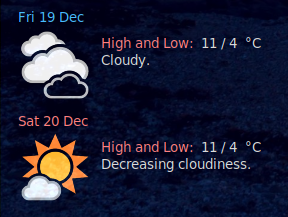
Last edited by marens (2025-12-18 18:30:40)
If people would know how little brain is ruling the world, they would die of fear.
Offline
#209 2025-12-20 01:12:40
- marens
- Member
- From: World without M$
- Registered: 2023-02-02
- Posts: 1,306
Re: Conky Weather TAD script
WU Icons
@asqwerth did a great job with tad-icons-WU, but it takes time to test everything.
Today, the wt-30.png icon appeared in the daily forecast even though it appears as a night icon in tad-icons-WU.
This is easy to fix:
1) Open the tad-icons-WU folder and delete the icons wt-30.png and wt-31.png
2) Then download the new icons here and copy/paste them into tad-icons-WU:


Done.
If people would know how little brain is ruling the world, they would die of fear.
Offline
#210 2025-12-20 01:28:40
- marens
- Member
- From: World without M$
- Registered: 2023-02-02
- Posts: 1,306
Re: Conky Weather TAD script
About resources
The script is very powerful and executes quickly:
$ time bash ~/time_and_date_conky_script/tad

real	0m0.800s
user	0m0.295s
sys	0m0.138s
It takes about one second to get a complete weather forecast for your location (Now, Daily, Hourly).
I recommend running the script from tad-conky every half hour (1800 seconds).
Most weather stations don't report that often:
https://forums.bunsenlabs.org/viewtopic … 37#p147837
If people would know how little brain is ruling the world, they would die of fear.
Offline
#211 2025-12-20 14:12:20
- marens
- Member
- From: World without M$
- Registered: 2023-02-02
- Posts: 1,306
Re: Conky Weather TAD script
Info
Replaced line ## Wind direction in #### NOW FORECAST.
Replace:
## Wind Direction
cat $HOME/time_and_date_conky_script/weather_raw | grep -o '[>^] from[^<]*' | sed '$d' | sed 's/> //' >> $HOME/time_and_date_conky_script/now
With:
## Wind Direction
echo $(cat $HOME/time_and_date_conky_script/weather_raw | grep -o '[>^] from[^<]*' | sed '$d' | sed 's/> //') >> $HOME/time_and_date_conky_script/now
When there is No wind, a bug appears.
Note *
The script has been updated:
https://forums.bunsenlabs.org/viewtopic … 76#p147776
If people would know how little brain is ruling the world, they would die of fear.
Offline
#212 2025-12-20 16:23:43
- marens
- Member
- From: World without M$
- Registered: 2023-02-02
- Posts: 1,306
Re: Conky Weather TAD script
The differences are small and acceptable.
Here I have tad, accuweather and my local conky:
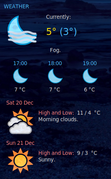
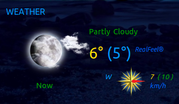
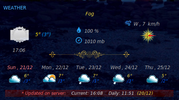
It may sound unusual, but Gis Weather has always been on my desktop for over ten years:
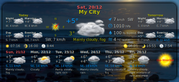
I only need the Conkys to compare results from different sources.
Last edited by marens (2025-12-20 16:30:20)
If people would know how little brain is ruling the world, they would die of fear.
Offline
#213 2025-12-22 16:36:37
- asqwerth
- Member
- Registered: 2015-10-08
- Posts: 82
Re: Conky Weather TAD script
@marens, I haven't had time to check the forum until today. Thanks for sorting out the wt30 and 31 WU-icons. I don't get snow in my area so could not test the snow icons.
Will run the latest script and see if there are any issues.
Offline
#214 2025-12-22 18:18:41
- marens
- Member
- From: World without M$
- Registered: 2023-02-02
- Posts: 1,306
Re: Conky Weather TAD script
^ Everything is OK.
Will run the latest script and see if there are any issues.
It's basically the script we tested together with a few changes.
Thank you again for your contribution to make the script better.
We now have the FINAL version of the TAD script.
If there are any changes, I will post them here (ANNOUNCEMENTS part):
https://forums.bunsenlabs.org/viewtopic … 76#p147776
If people would know how little brain is ruling the world, they would die of fear.
Offline
#215 2025-12-26 03:20:40
- marens
- Member
- From: World without M$
- Registered: 2023-02-02
- Posts: 1,306
Re: Conky Weather TAD script
@asqwerth
@ceeslans
(& @allothers)
I know you both love conkyweatherfont.
I don't use the conkyweather font, but if you give me the appropriate "letters" for the tad-icons (wt-xx.png) I think I can make a better script.
First create the ~/time_and_date_conky_script/weatherfont folder.
Then add at the end of the TAD script:
#### WEATHERFONT

## Wind
  if [[ "$wd" == ".png" ]]; then

      echo CLM > $HOME/time_and_date_conky_script/weatherfont/wind

    else

      echo $wd | sed 's/.png//' > $HOME/time_and_date_conky_script/weatherfont/wind

  fi

  wind=$(sed -n 1p $HOME/time_and_date_conky_script/weatherfont/wind)

	#function: test_wind
	test_wind () {
	    case $1 in
	         CLM)
	           echo \-
	         ;;
	         S)
	           echo 1
	         ;;
	         SSW)
	           echo 2
	         ;;
	         SW)
	           echo 3
	         ;;
	         WSW)
	           echo 4
	         ;;
	         W)
	           echo 5
	         ;;
	         WNW)
	           echo 6
	         ;;
	         NW)
	           echo 7
	         ;;
	         NNW)
	           echo 8
	         ;;
	         N)
	           echo 9
	         ;;
	         NNE)
	           echo \:
	         ;;
	         NE)
	           echo \;
	         ;;
	         ENE)
	           echo \<
	         ;;
	         E)
	           echo \=
	         ;;
	         ESE)
	           echo \>
	         ;;
	         SE)
	           echo \?
	         ;;
	         SSE)
	           echo \@
	         ;;
	    esac
	}

	echo $(test_wind $wind) > $HOME/time_and_date_conky_script/weatherfont/wind

## Now
cat $HOME/time_and_date_conky_script/weather_raw | grep -o '[ ^]src="//c.tadst.com/gfx/w/svg[^ ]*' | sed '1q;d' | sed 's/ src="/https:/' | sed 's/.$//' | awk -F'svg/' '{print $2}' | sed 's/.svg//' | sed 's/wt-//' > $HOME/time_and_date_conky_script/weatherfont/now

now=$(sed -n 1p $HOME/time_and_date_conky_script/weatherfont/now)

#function: test_image
test_image () {
    case $1 in
         1|01)
           echo a
         ;;
         2|02|3|03|8|08|9|09|12)
           echo b
         ;;
         4|04|5|05)
           echo c
         ;;
         6|06)
           echo d
         ;;
         7|07)
           echo e
         ;;
         10)
           echo q
         ;;
         11)
           echo 6
         ;;
         13)
           echo A
         ;;
         14)
           echo C
         ;;
         15|16)
           echo B
         ;;
         17)
           echo D
         ;;
         18)
           echo h
         ;;
         19|20)
           echo i
         ;;
         21)
           echo k
         ;;
         22|23)
           echo m
         ;;
         24|27|28)
           echo x
         ;;
         25|26)
           echo 6
         ;;
         29)
           echo o
         ;;
         30)
           echo q
         ;;
         31)
           echo r
         ;;
         32)
           echo -
         ;;
         33)
           echo g
         ;;
         34)
           echo G
         ;;
         35)
           echo K
         ;;
         *)
	   echo -
		 ;;
	esac
	}

        echo $(test_image $now) > $HOME/time_and_date_conky_script/weatherfont/now

## Hourly
cat $HOME/time_and_date_conky_script/weather_raw | grep -o '[ ^]src="//c.tadst.com/gfx/w/svg[^ ]*' | awk -F'svg/' '{print $2}' | sed -n '3,7p' | sed 's/.$//' | sed 's/.svg//' | sed 's/wt-//' > $HOME/time_and_date_conky_script/weatherfont/hourly

	for (( i=1; i<=5; i+=1 ))
	    do
	        im=$(sed -n ${i}p $HOME/time_and_date_conky_script/weatherfont/hourly)
	        sed -i $i"s/^.*$/$(test_image $im)/" $HOME/time_and_date_conky_script/weatherfont/hourly
	    done

## Daily
cat $HOME/time_and_date_conky_script/weather_raw | grep -o '[ ^]src="//c.tadst.com/gfx/w/svg[^ ]*' | sed -n '19,25p' | sed 's/ src="/https:/' | sed 's/.$//' | awk -F'svg/' '{print $2}' | sed 's/.svg//' | sed 's/wt-//' > $HOME/time_and_date_conky_script/weatherfont/daily


	for (( i=1; i<=7; i+=1 ))
	    do
	        im=$(sed -n ${i}p $HOME/time_and_date_conky_script/weatherfont/daily)
	        sed -i $i"s/^.*$/$(test_image $im)/" $HOME/time_and_date_conky_script/weatherfont/daily
	    done
Next 7 days:
Wind:
EDIT
A couple of small changes.
For example, the wt-32.png icon is a flood.
Replaced with N/A.
Last edited by marens (2025-12-27 19:18:20)
If people would know how little brain is ruling the world, they would die of fear.
Offline
#216 2025-12-26 10:18:54
- unklar
- Back to the roots 1.9

- From: #! BL
- Registered: 2015-10-31
- Posts: 3,127
Re: Conky Weather TAD script
^I think the editor who could do this was kate from kde.
https://forums.bunsenlabs.org/viewtopic … 974#p69974
Offline
#217 2025-12-28 00:16:40
- marens
- Member
- From: World without M$
- Registered: 2023-02-02
- Posts: 1,306
Re: Conky Weather TAD script
Info
Added part #### WEATHERFONT.
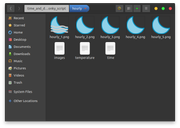
Fans of the ConkyWeather and ConkyWindNESW fonts can test and make suggestions.
If necessary, I will set up the test_image function within the TAD script.
Test conky (Daily/Hourly/Now+Wind):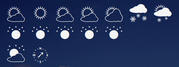
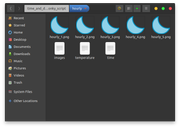
Folders and images: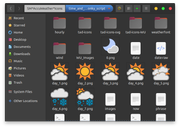
Note *
The script has been updated:
https://forums.bunsenlabs.org/viewtopic … 76#p147776
If people would know how little brain is ruling the world, they would die of fear.
Offline
#218 2025-12-28 02:12:07
- DeepDayze
- Like sands through an hourglass...
- From: In Linux Land
- Registered: 2017-05-28
- Posts: 2,004
Re: Conky Weather TAD script
I recommend running the script from tad-conky every half hour (1800 seconds).
Most weather stations don't report that often:
https://forums.bunsenlabs.org/viewtopic … 37#p147837
That sounds reasonable due to API call limits these services impose.
Real Men Use Linux
Offline
#219 2025-12-28 08:30:45
- asqwerth
- Member
- Registered: 2015-10-08
- Posts: 82
Re: Conky Weather TAD script
Info
Added part #### WEATHERFONT.
Fans of the ConkyWeather and ConkyWindNESW fonts can test and make suggestions.
If necessary, I will set up the test_image function within the TAD script.......Note *
The script has been updated:
https://forums.bunsenlabs.org/viewtopic … 76#p147776
The conkyweather and conkywind font lines in the script appear to be working fine as far as I tell. I compared the weather/wind font characters displayed (in a test conky) to the icons displayed in the tad conkies I'm already using.
Offline
#220 2025-12-28 19:34:20
- marens
- Member
- From: World without M$
- Registered: 2023-02-02
- Posts: 1,306
Re: Conky Weather TAD script
The conkyweather and conkywind font lines in the script appear to be working fine as far as I tell. I compared the weather/wind font characters displayed (in a test conky) to the icons displayed in the tad conkies I'm already using.
Thanks for confirming.
I test by first running tad-conky, and then test-conky without the TAD script.
This test-conky only displays data.
Text:
${voffset 10}${font conkyweather:size=50} ${texeci 600 sed -n '1p' $HOME/time_and_date_conky_script/weatherfont/daily} ${texeci 600 sed -n '2p' $HOME/time_and_date_conky_script/weatherfont/daily} ${texeci 600 sed -n '3p' $HOME/time_and_date_conky_script/weatherfont/daily} ${texeci 600 sed -n '4p' $HOME/time_and_date_conky_script/weatherfont/daily} ${texeci 600 sed -n '5p' $HOME/time_and_date_conky_script/weatherfont/daily} ${texeci 600 sed -n '6p' $HOME/time_and_date_conky_script/weatherfont/daily} ${texeci 600 sed -n '7p' $HOME/time_and_date_conky_script/weatherfont/daily}
${voffset 10} ${texeci 600 sed -n '1p' $HOME/time_and_date_conky_script/weatherfont/hourly} ${texeci 600 sed -n '2p' $HOME/time_and_date_conky_script/weatherfont/hourly} ${texeci 600 sed -n '3p' $HOME/time_and_date_conky_script/weatherfont/hourly} ${texeci 600 sed -n '4p' $HOME/time_and_date_conky_script/weatherfont/hourly} ${texeci 600 sed -n '5p' $HOME/time_and_date_conky_script/weatherfont/hourly}
${voffset 10} ${texeci 600 sed -n '1p' $HOME/time_and_date_conky_script/weatherfont/now}${font conkywindnesw:size=50} ${texeci 600 sed -n '1p' $HOME/time_and_date_conky_script/weatherfont/wind}\
${voffset 20}
Conkys: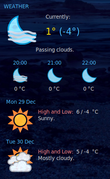
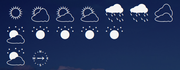
Folders and images: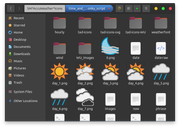
If people would know how little brain is ruling the world, they would die of fear.
Offline