
You are not logged in.
- Topics: Active | Unanswered
#81 2026-11-15 00:44:05
- johnraff
- nullglob

- From: Nagoya, Japan
- Registered: 2015-09-09
- Posts: 13,675
- Website
Re: bunsen-configs-wayland-plugin available for testing
Unfortunately I have to be out all day today, but your symptoms are so similar to what I was getting trying to run Wayland on a qemu VM (switching to QXL video fixed it) that I was sure that's what you were doing. But I haven't yet tested installing to the VM, still playing with live sessions. The plus is that every reboot gives you a fresh start but the minus is that you have to go through the upgrading etc every time.
I'll get back to this tomorrow. But, to repeat, I don't get any issues with the BL Wayland session running on real hardware.
...elevator in the Brain Hotel, broken down but just as well...
( a boring Japan blog (currently paused), now on Bluesky and Mastodon, there's also some GitStuff )
Offline
#82 2026-11-15 09:14:51
- malm
- Wayland Compositor developer
- Registered: 2016-10-13
- Posts: 758
- Website
Re: bunsen-configs-wayland-plugin available for testing
@johnraff. Is Labwc anything to do with BL or just a huge coincidence?
I have enjoyed a simple setup with openbox and tint2 for a long time. Initially I used Arch Linux, but then moved to bunsenlabs as I found enjoyed the community and found the pre-configured setup convenient. I joined the team and was an active contributor to the project.
Then, a few years ago, I wanted to move to Wayland. I found that there weren't many options that didn't require me to re-wire my brain. I have tried tiling managers like i3 many times over the years, but can't quite get used to them. Sometimes I've stuck with them for a month or so, but always reverted back to the stacking paradigm. So, I knew sway wouldn't be right on that basis.
There weren't many options around then. Ignoring a few small hacky projects on top of tinywl (the wlroots example compositor), it fundamentally came down to mutter, kwin, hikari, weston and wayfire.
So, I decided to have a go at re-writing openbox for wayland, and here we are, six years on. Maybe it's just me, but when I'm developing I find I don't have much time for forums and such like. It's not that I'm not interested (cos I am) it's just a choice of where I spend spare time.
Interestingly, I find that there still aren't many options for stacking compositors. If we ignore those that aren't mature enough - or popular enough to be packaged by common distros, and if we ignore kwin and mutter as too integrated with their respective stacks, I think it comes down to labwc, cosmic and wayfire.
Offline
#83 2026-11-15 12:30:18
- hhh
- Hercule Poirot

- From: Belgium
- Registered: 2015-09-17
- Posts: 17,798
- Website
Re: bunsen-configs-wayland-plugin available for testing
@Malm, thanks for the reply! I'm always glad when I see you check in.
re: stacking Wayland compositors, Joey Snedden at omg.ubuntu recently did an article on a new project, Polo, a wayfire rewrite of Marco (MATE). I tested it and offered some feedback, thought you might be interested...
https://github.com/KeremSoke/polo/issues/5
I've been doing some preliminary live-builds for BL Nitrogen using labwc and xfce4-panel, we might offer a second ISO that is Wayland-only. Expect to see me posting some issues on github! 
Why why why why?!!???
Offline
#84 2026-11-15 15:32:53
- malm
- Wayland Compositor developer
- Registered: 2016-10-13
- Posts: 758
- Website
Re: bunsen-configs-wayland-plugin available for testing
@hhh Great to see you too!
I did notice polo the other day. Looks interesting, will have a deeper look.
I think cinnamon have been working on a fork of mutter in a similar sense.
There is another mate spin here using labwc: https://github.com/labwc/labwc/discussions/3791
I think there is a lot to be said for doing a Wayland-only iso.
Offline
#85 2026-11-15 16:39:10
- unklar
- Back to the roots 1.9

- From: #! BL
- Registered: 2015-10-31
- Posts: 3,180
Re: bunsen-configs-wayland-plugin available for testing
I think there is a lot to be said for doing a Wayland-only iso.
+1 Absolutely agree!
Offline
#86 Yesterday 04:47:31
- johnraff
- nullglob
- From: Nagoya, Japan
- Registered: 2015-09-09
- Posts: 13,675
- Website
Re: bunsen-configs-wayland-plugin available for testing
I have tried tiling managers like i3 many times over the years, but can't quite get used to them. Sometimes I've stuck with them for a month or so, but always reverted back to the stacking paradigm.
I was beginning to think I was weird or something for not liking tiling WMs - thanks for that bit of moral support!
I think there is a lot to be said for doing a Wayland-only iso.
Yes maybe there are some advantages, but for users who are trying Wayland for the first time I think there's a lot to be said for being able to log back into an X11 session and fix whatever annoyance it was. There are still a lot of things that don't work smoothly (or work at all) on Wayland. I'm sure they'll all be fixed some day, but till then I for one certainly don't want to throw away X11. It's still my preferred environment, despite having a nicely working Wayland session available.
Could it be that the shift from Trixie to Forky will change this dynamic a bit?
...elevator in the Brain Hotel, broken down but just as well...
( a boring Japan blog (currently paused), now on Bluesky and Mastodon, there's also some GitStuff )
Offline
#87 Yesterday 06:14:08
- johnraff
- nullglob
- From: Nagoya, Japan
- Registered: 2015-09-09
- Posts: 13,675
- Website
Re: bunsen-configs-wayland-plugin available for testing
On a live session right now using QXL video in a qemu VM.
Had to raise the available RAM up to 5GB to get the huge apt upgrade to run without "out of disk space" errors, so my real machine is now seriously starved - I've only got 8GB total.
Pressing Tab usually scrolls focus through different elements of windows
After the upgrade I logged out and back in - the User Setup popups do respond to Tab for me to switch buttons. Arrow keys work too, but there are no Alt accelerators.
Alt accelerators do work on the bl-exit yad window though - they'd have to be coded in for any other yad windows that needed them, though probably not that difficult.
Continuing...
...elevator in the Brain Hotel, broken down but just as well...
( a boring Japan blog (currently paused), now on Bluesky and Mastodon, there's also some GitStuff )
Offline
#88 Yesterday 06:33:45
- johnraff
- nullglob
- From: Nagoya, Japan
- Registered: 2015-09-09
- Posts: 13,675
- Website
Re: bunsen-configs-wayland-plugin available for testing
After another logout/in however:
The XFCE clipboard manager is already running
This needs fixing.
It's because the live session uses its own slightly modified .config/bunsen/autostart to do a couple of things like the "welcome to bunsen live" popup. The bunsen-configs upgrade comments out the xfce4-clipman entry, but not in the live version.
It will be a bit tricky but I'll see if there's a way to edit the live session autostart only after bunsen-configs is installed. Otherwise, just ship the live autostart with xfce4-clipman commented out from the start. (It should appear after the apt upgrade, via the plugin.)
In fact, since the refreshed iso will have the new bunsen-configs OOTB, it might all work right off anyway.
For now, I commented out that line in autostart by hand, and added in the clipboard plugin to xfce4-panel via the config GUI.
Continue...
Last edited by johnraff (Yesterday 06:42:01)
...elevator in the Brain Hotel, broken down but just as well...
( a boring Japan blog (currently paused), now on Bluesky and Mastodon, there's also some GitStuff )
Offline
#89 Yesterday 07:37:11
- johnraff
- nullglob
- From: Nagoya, Japan
- Registered: 2015-09-09
- Posts: 13,675
- Website
Re: bunsen-configs-wayland-plugin available for testing
OK install bunsen-configs-wayland-plugin, log into Wayland and here's that black 5px square that @hhh gets. Right-click on desktop brings up that white menu, but no other keybinds work. 
Exit popup shows from the menu and Alt accelerators and Tab both work.
So why does my bare-metal Wayland session work perfectly?
And why is @hhh's Wayland session messed up exactly the same way as my live VM/QXL session?
Now to try an actual install into the VM (still with QXL video)...
...elevator in the Brain Hotel, broken down but just as well...
( a boring Japan blog (currently paused), now on Bluesky and Mastodon, there's also some GitStuff )
Offline
#90 Yesterday 07:41:09
- johnraff
- nullglob
- From: Nagoya, Japan
- Registered: 2015-09-09
- Posts: 13,675
- Website
Re: bunsen-configs-wayland-plugin available for testing
Installed to VM, did the big apt upgrade.
Interested to notice that black square does briefly appear on login, but for less than a second. I think it might always have been there, come to think of it. Wonder what it is?
But now after install the Tab and arrow keys no longer work on the user-setup popup buttons, just as @hhh reported.
Nor do they work on the bl-exit dialogue, though they did in the live session.
But the regular keyboard shortcuts do work, and the menu is the right colour.
Just about to apply all the user-setup changes...
...elevator in the Brain Hotel, broken down but just as well...
( a boring Japan blog (currently paused), now on Bluesky and Mastodon, there's also some GitStuff )
Offline
#91 Yesterday 07:50:04
- johnraff
- nullglob
- From: Nagoya, Japan
- Registered: 2015-09-09
- Posts: 13,675
- Website
Re: bunsen-configs-wayland-plugin available for testing
After the user-setup changes, have to logout one more time to see the new xfce4-panel with the clipman plugin.
And to run on QXL video I have to comment out the autostart entry that starts picom on each login.
...elevator in the Brain Hotel, broken down but just as well...
( a boring Japan blog (currently paused), now on Bluesky and Mastodon, there's also some GitStuff )
Offline
#92 Yesterday 08:07:26
- johnraff
- nullglob
- From: Nagoya, Japan
- Registered: 2015-09-09
- Posts: 13,675
- Website
Re: bunsen-configs-wayland-plugin available for testing
...after install the Tab and arrow keys no longer work on the user-setup popup buttons, just as @hhh reported.
Nor do they work on the bl-exit dialogue, though they did in the live session.
After a couple more logouts/logins into Wayland and X11, Tab, Alt and arrow keys work on the bl-exit window in X11 sessions.
But on Wayland, it's not good. White menu, black square and no keyboard shortcuts.
Sigh...
Why does it all work perfectly on my actual machine?
...elevator in the Brain Hotel, broken down but just as well...
( a boring Japan blog (currently paused), now on Bluesky and Mastodon, there's also some GitStuff )
Offline
#93 Yesterday 08:12:54
- johnraff
- nullglob
- From: Nagoya, Japan
- Registered: 2015-09-09
- Posts: 13,675
- Website
Re: bunsen-configs-wayland-plugin available for testing
malm wrote:I think there is a lot to be said for doing a Wayland-only iso.
Yes maybe there are some advantages, but for users who are trying Wayland for the first time I think there's a lot to be said for being able to log back into an X11 session and fix whatever annoyance it was.
But agreed, for developers, hackers and advanced users a wayland-only setup looks as if it might be easier to get going.
But I think BunsenLabs should clear the messy stuff out of the way so users can just get on with their work.
Sometimes it's not easy.
...elevator in the Brain Hotel, broken down but just as well...
( a boring Japan blog (currently paused), now on Bluesky and Mastodon, there's also some GitStuff )
Offline
#94 Yesterday 08:15:58
- johnraff
- nullglob
- From: Nagoya, Japan
- Registered: 2015-09-09
- Posts: 13,675
- Website
Re: bunsen-configs-wayland-plugin available for testing
Here is where I first started having issues with Wayland on qemu VMs:
https://forums.bunsenlabs.org/viewtopic … 68#p145768
https://forums.bunsenlabs.org/viewtopic … 66#p145666
...elevator in the Brain Hotel, broken down but just as well...
( a boring Japan blog (currently paused), now on Bluesky and Mastodon, there's also some GitStuff )
Offline
#95 Today 06:45:19
- johnraff
- nullglob
- From: Nagoya, Japan
- Registered: 2015-09-09
- Posts: 13,675
- Website
Re: bunsen-configs-wayland-plugin available for testing
Finally found what the bunsen-configs-wayland-plugin issue was.
It turned out to be a tricky issue with xml comments.
Just before releasing the bunsen-configs packages 13.8 versions I added a section to labwc's rc.xml showing how to enable brightness control with ddcutil for external monitors.
    <!-- For brightness control of external monitors install ddcutil -->
    <!-- See 'ddcutil detect' to find I2C bus number -->
    <!-- sleep-multiplier may need raising to 0.3 or 0.5 if display is slow -->
    <!-- Those two settings speed up the response slightly. -->
<!--
    <keybind key="XF86_MonBrightnessUp">
      <action name="Execute" command="ddcutil --bus 2 --sleep-multiplier 0.2  setvcp 10 + 10" />
    </keybind>
    <keybind key="XF86_MonBrightnessDown">
      <action name="Execute" command="ddcutil --bus 2 --sleep-multiplier 0.2  setvcp 10 - 10" />
    </keybind>
-->
So it's just a commented-out block of code.
But, see the problem? It's those double-hyphens in the ddcutil commands, like "ddcutil --bus 2 --sleep-multiplier 0.2 setvcp 10 + 10". Double-hyphens are not allowed inside xml comments because they confuse the parser. So whatever labwc is using to parse rc.xml it just rejects the file as soon as it hits that bad section, so no theme settings, no keyboard shortcuts, no nothing...
That'll teach me not to upload a package without testing it properly, even if it is only a "trivial" change. 
This is what I replaced that code with, and everything seems to be working now:
    <!-- For brightness control of external monitors install ddcutil -->
    <!-- See 'ddcutil detect' to find I2C bus number -->
    <!-- sleep-multiplier may need raising to 0.3 or 0.5 if display is slow -->
    <!-- Those two settings speed up the response slightly. -->
    <!-- (replace '- -' with two consecutive hyphens when uncommenting the code below; xml commenting issue) -->
<!--
    <keybind key="XF86_MonBrightnessUp">
      <action name="Execute" command="ddcutil - -bus 2 - -sleep-multiplier 0.2  setvcp 10 + 10" />
    </keybind>
    <keybind key="XF86_MonBrightnessDown">
      <action name="Execute" command="ddcutil - -bus 2 - -sleep-multiplier 0.2  setvcp 10 - 10" />
    </keybind>
-->
The other thing that needed fixing was that although wallpaper setting has been handed over to xwwall for some time now, the config file was only shipped by the wayland plugin. Now it goes in by default, which should fix that black screen.
As to xfce4-clipman in the live session's autostart - let's just take it out. Once users upgrade their bunsen-configs packages it will be provided by the xfce4-panel plugin anyway, and once we get the refreshed iso out it will no longer be an issue at all.
...elevator in the Brain Hotel, broken down but just as well...
( a boring Japan blog (currently paused), now on Bluesky and Mastodon, there's also some GitStuff )
Offline
#96 Today 07:41:06
- johnraff
- nullglob
- From: Nagoya, Japan
- Registered: 2015-09-09
- Posts: 13,675
- Website
Re: bunsen-configs-wayland-plugin available for testing
OK bunsen-configs and bunsen-configs-wayland-plugin 13.8.1 are now in the repos.
@hhh I wonder if you could try an apt upgrade and see if it fixes the Wayland session for you?
(Seems OK at this end.)
...elevator in the Brain Hotel, broken down but just as well...
( a boring Japan blog (currently paused), now on Bluesky and Mastodon, there's also some GitStuff )
Offline
#97 Today 14:32:35
- hhh
- Hercule Poirot
- From: Belgium
- Registered: 2015-09-17
- Posts: 17,798
- Website
Re: bunsen-configs-wayland-plugin available for testing
@johnraff, that install was wiped for testing something else, I'll do a fresh install either today or tomorrow. Thanks for all you do!
Why why why why?!!???
Offline
#98 Today 15:51:18
- hhh
- Hercule Poirot
- From: Belgium
- Registered: 2015-09-17
- Posts: 17,798
- Website
Re: bunsen-configs-wayland-plugin available for testing
No time like the present.
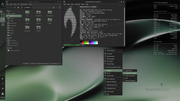
So the pixel square and black background are there on first login, as well as no Super key menu. Accept the User Setup prompt and "Do All", then click the desktop to bring up a very minimal and un-themed labwc menu to exit. Login, presto!
Minor issues; battery percentage is showing and I didn't add the clipman plugin so it's not there (shown in the scrot), we should move the notifications somewhere else, All Applications in the menu is empty, adding gaps would be nice, but this is a great start.
I imagine you might want a break for a bit, so let's leave it here for now? Anyway, I'm upgrading to sid and see what I can see. 
Why why why why?!!???
Offline
#99 Today 16:27:22
- hhh
- Hercule Poirot
- From: Belgium
- Registered: 2015-09-17
- Posts: 17,798
- Website
Re: bunsen-configs-wayland-plugin available for testing
Yeah baby!
This is Carbon-wayland on sid. The gap in the bottom of the panel is the indicator plugin, clipman has appeared, and I disabled the battery percentage readout. labwc-menu-generator was installed as well as gnome-system-monitor, which appears in the All Applications menu above gparted. bl-exit works, xfce4-screenshotter works, I've moved the indicator-plugin's position in the second scrot, lightdm-gtk-greeter has lost its wallpaper. No discussion needed, this a a proof of concept.
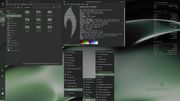

-edit- I see you, black pixel square above the panel in the second scrot. Were you there on trixie and I didn't notice?
-edit 2- pkill conky and the square disappears.
Last edited by hhh (Today 16:58:27)
Why why why why?!!???
Offline