
You are not logged in.
- Topics: Active | Unanswered
Pages: 1
#1 2026-11-11 15:30:40
- marens
- Member

- From: World without M$
- Registered: 2023-02-02
- Posts: 1,333
Gis Weather
Wrong Date
This python script usually works perfectly, but it is currently displaying the wrong date.
The reason is that the source (Gismeteo) now displays dates in a different way.
Locate the gis-weather > services folder.
Open the gismeteo.py file.
The # day of week, date section should look like this.
#### Marens - 11/11/2026
   # day of week, date
    day = re.findall('<day.*? date="(.*?)"', source)
    day.pop(0)
    for i in range(len(day)):
        dt1 = datetime.strptime(day[i], '%Y-%m-%d')
        day[i] = dt1.strftime('%a')
    date = re.findall('<day.*? date=".*?-(.*?)"', source)
    for i in range(len(date)):
        s = date[i].split('-')
        date[i] = s[1]+'.'+s[0]
Done.
Gis Weather: Source: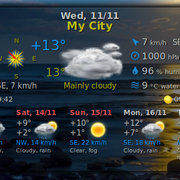
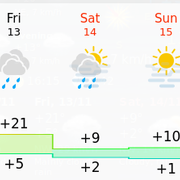
EDIT
Title.
Last edited by marens (2026-11-11 17:22:50)
If people would know how little brain is ruling the world, they would die of fear.
Offline
#2 2026-11-11 17:43:09
- unklar
- Back to the roots 1.9

- From: #! BL
- Registered: 2015-10-31
- Posts: 3,190
Re: Gis Weather
^Thank you, Master, it works.
Offline
Pages: 1