![[BunsenLabs Logo]](/img/bl.svg)
You are not logged in.
- Topics: Active | Unanswered
#461 2026-08-08 13:31:10
- PackRat
- jgmenu user Numero Uno

- Registered: 2015-10-02
- Posts: 3,079
Re: 2026 Screenshot Thread
Soplos; based on Debian Testing

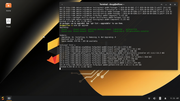
You must unlearn what you have learned.
-- yoda
Offline
#462 2026-08-08 15:05:25
- hhh
- Hercule Poirot

- From: Belgium
- Registered: 2015-09-17
- Posts: 17,543
- Website
Re: 2026 Screenshot Thread
Wow, gorgeous default desktop. Also the website, beautiful...
Are your scrots the Xfce desktop version?
Why why why why?!!???
Offline
#463 2026-08-08 15:55:02
- PackRat
- jgmenu user Numero Uno
- Registered: 2015-10-02
- Posts: 3,079
Re: 2026 Screenshot Thread
^ Yes, that is xfce4 version on my old, indestructible HP.
Laptop is circa 2011 with an old i3 CPU and Intel graphics. Plasma and Gnome really spool up the CPU.
It won't run the ghostty terminal that ships by default, but xfce4-terminal runs no problem.
No office suite by default (good thing in my book). I added the repo and went with OnlyOffice; slightly better compatability with MS documents.
All runs really smooth.
You must unlearn what you have learned.
-- yoda
Offline
#464 2026-08-08 16:40:46
- hhh
- Hercule Poirot
- From: Belgium
- Registered: 2015-09-17
- Posts: 17,543
- Website
Re: 2026 Screenshot Thread
Looks great!
Why why why why?!!???
Offline
#465 2026-08-08 23:27:08
- hhh
- Hercule Poirot
- From: Belgium
- Registered: 2015-09-17
- Posts: 17,543
- Website
Re: 2026 Screenshot Thread
For this month (GNOME)
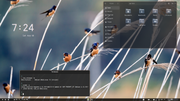
Why why why why?!!???
Offline
#466 2026-08-09 07:47:49
- unklar
- Back to the roots 1.9

- From: #! BL
- Registered: 2015-10-31
- Posts: 3,108
Re: 2026 Screenshot Thread
For this month (GNOME)
https://i.postimg.cc/JyKssQTg/Screenshot-From-2026-08-08-19-24-12.png
+1
wallpaper please 
Offline
#467 2026-08-09 12:14:47
- hhh
- Hercule Poirot
- From: Belgium
- Registered: 2015-09-17
- Posts: 17,543
- Website
Re: 2026 Screenshot Thread
^ My go-to for nature walls...
Why why why why?!!???
Offline
#468 2026-08-09 18:38:54
- ceeslans
- Member

- Registered: 2015-09-30
- Posts: 231
Re: 2026 Screenshot Thread
^Nice birds wall...!
My current bird-themed devuan fluxbox desktop - with a gossiping group of java ricebirds; soooo cute.. 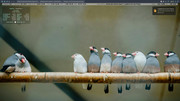
Offline
#469 2026-08-10 01:31:24
- hhh
- Hercule Poirot
- From: Belgium
- Registered: 2015-09-17
- Posts: 17,543
- Website
Re: 2026 Screenshot Thread
^ Very cute!
I have gnome-boxes (GNOME's VM) set up and working, here's debian testing running labwc with xfce4-panel. I've themed it, of course, and that's about all I've done so far...
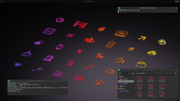
GTK and LabWC themes: Bunsen-Blackish-Remix (bunsen-themes-extra)
Icons: Sweet-Red (requires candy-icons)
https://github.com/EliverLara/Sweet-folders
https://github.com/EliverLara/candy-icons
Wall source: gnome-backgrounds
https://gitlab.gnome.org/GNOME/gnome-ba … type=heads
I downloaded it, opened it with GIMP, Image>Scale to your resolution, Export as a PNG)
Why why why why?!!???
Offline
#470 2026-08-11 00:34:09
- hhh
- Hercule Poirot
- From: Belgium
- Registered: 2015-09-17
- Posts: 17,543
- Website
Re: 2026 Screenshot Thread
^ Left them speechless. Nice scrot, @hhh. 
-edit- the labwc Feature Request I made of a Super+d keybind to ShowDesktop has made it into trixie.
https://www.youtube.com/watch?v=SqqGFoASs9s
Last edited by hhh (2026-08-11 00:56:02)
Why why why why?!!???
Offline
#471 2026-08-12 09:33:27
- darknetmatrix
- Member

- From: /home/labs
- Registered: 2015-09-29
- Posts: 266
- Website
Re: 2026 Screenshot Thread

⢀⣴⠾⠻⢶⣦⠀
⣾⠁⢠⠒⠀⣿⡁ Debian - The universal operating system linux user # 527315
⢿⡄⠘⠷⠚⠋⠀ https://www.debian.org
⠈⠳⣄⠀
Offline
#472 2026-08-12 09:58:03
- unklar
- Back to the roots 1.9
- From: #! BL
- Registered: 2015-10-31
- Posts: 3,108
Re: 2026 Screenshot Thread
^Trisquel12-mini-lxde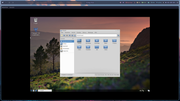
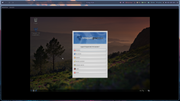
in Qemu on TileOS-niri.
The intention on my part was to show this in Virt-Manager here in TileOS when looking for an LXDE configuration/distribution. I struggled with authorization problems for hours, only to finally fail due to the lack of a network connection in Virt Manager. 
That upsets me! So in the terminal with a plain command in Qemu, took 15 minutes and it works.
qemu-system-x86_64 -L . -enable-kvm -k de -smp 2 -m 2048 -vga std -usbdevice tablet -monitor stdio -snapshot -cdrom trisquel-mini_12.0_amd64.iso -name tris -boot dOffline
#473 2026-08-12 23:15:34
- hhh
- Hercule Poirot
- From: Belgium
- Registered: 2015-09-17
- Posts: 17,543
- Website
Re: 2026 Screenshot Thread
@darknetmatrix, I have to ask... what are your five flatpaks?
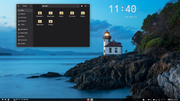
GNOME on trixie...
Last edited by hhh (2026-08-14 03:42:28)
Why why why why?!!???
Offline
#474 2026-08-14 20:43:27
- Sun For Miles
- Member

- Registered: 2017-04-12
- Posts: 282
Re: 2026 Screenshot Thread
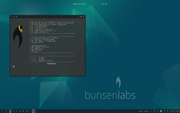
Bought a laptop about a month ago to practice for rounds of tech interviews because my kid sleeps in the room where I keep my desktop. I realized two things: I might be too old for 4 rounds of hackerrank drills, but I am definitely not too old to play around with BunsenLabs and keep it on my mobile worstations, as per my tradition. Feels good having a laptop again after 5-6 years.
Señor Chang, why do you teach Spanish?
Offline
#475 2026-08-14 23:06:56
- hhh
- Hercule Poirot
- From: Belgium
- Registered: 2015-09-17
- Posts: 17,543
- Website
Re: 2026 Screenshot Thread
Nice, and now I know what HackerRank is.
Why why why why?!!???
Offline
#476 2026-08-15 05:58:32
- darknetmatrix
- Member
- From: /home/labs
- Registered: 2015-09-29
- Posts: 266
- Website
Re: 2026 Screenshot Thread
@darknetmatrix, I have to ask... what are your five flatpaks?
GNOME on trixie...
https://i.postimg.cc/349PQt7R/Screenshot-From-2026-08-13-23-41-03.png
Flacon com.github.Flacon 12.0.0 stable system
Mesa org.freedesktop.Platform.GL.default 26.1.5 25.08 system
Mesa (Extra) org.freedesktop.Platform.GL.default 26.1.5 25.08-extra system
Codecs Extra Extension org.freedesktop.Platform.codecs-extra 25.08-extra system
KDE Application Platform org.kde.Platform 5.15-25.08 system
darknetmatrix@bigbeast:~$
⢀⣴⠾⠻⢶⣦⠀
⣾⠁⢠⠒⠀⣿⡁ Debian - The universal operating system linux user # 527315
⢿⡄⠘⠷⠚⠋⠀ https://www.debian.org
⠈⠳⣄⠀
Offline
#477 2026-08-15 07:40:58
- hhh
- Hercule Poirot
- From: Belgium
- Registered: 2015-09-17
- Posts: 17,543
- Website
Offline
#478 2026-08-16 18:43:25
- hhh
- Hercule Poirot
- From: Belgium
- Registered: 2015-09-17
- Posts: 17,543
- Website
Re: 2026 Screenshot Thread
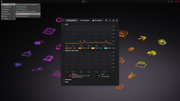
Added menu icons to the labwc VM setup...
Why why why why?!!???
Offline
#479 2026-08-17 02:25:37
- johnraff
- nullglob

- From: Nagoya, Japan
- Registered: 2015-09-09
- Posts: 13,491
- Website
Re: 2026 Screenshot Thread
^That's the auto-generated menu?
Is that "labwc VM setup" based on the BL plugin, or your own creation?
...elevator in the Brain Hotel, broken down but just as well...
( a boring Japan blog (currently paused), now on Bluesky and Mastodon, there's also some GitStuff )
Offline
#480 2026-08-17 02:37:28
- hhh
- Hercule Poirot
- From: Belgium
- Registered: 2015-09-17
- Posts: 17,543
- Website
Re: 2026 Screenshot Thread
^That's the auto-generated menu?
Is that "labwc VM setup" based on the BL plugin, or your own creation?
Auto-generated xfce4-popup-applicationsmenu. The desktop is my own creation, labwc and some other apps installed on trixie inside of gnome-boxes. It's very snappy and smooth with 2G available RAM, I can barely tell it's not the actual OS. File transfers are slow, that's about it.
autostart...
#wlr-randr --output Virtual-1 --mode 1920x1080 &
lxpolkit &
xfce4-notifyd &
swaybg -i ~/Pictures/wall.png &
xfce4-panel &
nm-applet &
Installing gdm3 made the wlr-randr code unnecessary.
menu.xml
<?xml version="1.0" ?>
<openbox_menu>
<menu id="root-menu" label="">
  <item label="System Monitor"><action name="Execute" command="gnome-system-monitor"/></item>
  <item label="Reconfigure"><action name="Reconfigure"/></item>
  <item label="Logout"><action name="Exit"/></item>
</menu>
</openbox_menu>
rc.xml
<?xml version="1.0" ?>
<labwc_config>
  <core>
    <decoration>server</decoration>
    <gap>10</gap>
  </core>

  <placement>
    <policy>cascade</policy>
    <!--
      When <placement><policy> is "cascade", the offset for cascading new
      windows can be overwritten like this:
      <cascadeOffset x="40" y="30" />
    -->
  </placement>

  <theme>
    <name>Bunsen-Blackish-Remix</name>
    <dropShadows>yes</dropShadows>
    <titlebar>
      <layout>:iconify,max,close</layout>
      <showTitle>yes</showTitle>
    </titlebar>
  </theme>

  <keyboard>
    <default />
    <!-- The W- prefix refers to the Super key -->

    <keybind key="W-Tab">
      <action name="NextWindow" />
    </keybind>
    <keybind key="W-S-Tab">
      <action name="PreviousWindow" />
    </keybind>
    <keybind key="W-q">
      <action name="Close" />
    </keybind>
    <keybind key="W-s">
      <action name="Iconify" />
    </keybind>
    <keybind key="W-a">
      <action name="ToggleMaximize" />
    </keybind>
    <keybind key="W-d">
      <action name="ToggleShowDesktop" />
    </keybind>
    <keybind key="W-space">
      <action name="Execute" command="xfce4-popup-applicationsmenu" />
    </keybind>
     <keybind key="A-space">
      <action name="ShowMenu" menu="root-menu" />
    </keybind>
    <keybind key="XF86AudioLowerVolume">
      <action name="Execute" command="pactl set-sink-volume @DEFAULT_SINK@ -5%" />
    </keybind>
    <keybind key="XF86AudioRaiseVolume">
      <action name="Execute" command="pactl set-sink-volume @DEFAULT_SINK@ +5%" />
    </keybind>
    <keybind key="XF86AudioMute">
      <action name="Execute" command="pactl set-sink-mute @DEFAULT_SINK@ toggle" />
    </keybind>
    <keybind key="XF86MonBrightnessUp">
      <action name="Execute" command="brightnessctl set +10%" />
    </keybind>
    <keybind key="XF86MonBrightnessDown">
      <action name="Execute" command="brightnessctl set 10%-" />
    </keybind>

    <keybind key="W-Return">
      <action name="Execute" command="" />
    </keybind>
    <keybind key="W-t">
      <action name="Execute" command="xfce4-terminal" />
    </keybind>
        <keybind key="W-b">
      <action name="Execute" command="firefox" />
    </keybind>
    <keybind key="W-f">
      <action name="Execute" command="thunar" />
    </keybind>
    <keybind key="W-e">
      <action name="Execute" command="gedit" />
    </keybind>
    <keybind key="W-x">
      <action name="Execute">
        <command>systemctl poweroff</command>
      </action>
    </keybind>
  </keyboard>
</labwc_config>
The volume keys work but the brightness keys don't work yet, but brightness is handled by the host anyway.
Why why why why?!!???
Offline