![[BunsenLabs Logo]](/img/bl.svg)
You are not logged in.
- Topics: Active | Unanswered
#401 2026-06-23 12:48:23
- darknetmatrix
- Member

- From: /home/labs
- Registered: 2015-09-29
- Posts: 266
- Website
Re: 2026 Screenshot Thread
Damn, now I want a no-panel niri setup.
@darknetmatrix, on Gnome...
sudo nano /etc/environmentAdd...
GNOME_SHELL_SLOWDOWN_FACTOR=2Reboot and tell me if you like that animations are slower but smoother/less jarring.
Actually, I don't really notice much of a difference; the animations weren't choppy on my systems to begin with.
⢀⣴⠾⠻⢶⣦⠀
⣾⠁⢠⠒⠀⣿⡁ Debian - The universal operating system linux user # 527315
⢿⡄⠘⠷⠚⠋⠀ https://www.debian.org
⠈⠳⣄⠀
Offline
#402 2026-06-23 13:08:20
- chroot
- Member
- Registered: 2024-12-12
- Posts: 178
Re: 2026 Screenshot Thread
Damn, now I want a no-panel niri setup.
@darknetmatrix, on Gnome...
sudo nano /etc/environmentAdd...
GNOME_SHELL_SLOWDOWN_FACTOR=2Reboot and tell me if you like that animations are slower but smoother/less jarring.
On GNOME, you can use https://github.com/paperwm/PaperWM. niri is in fact inspired by paperwm extension.
Offline
#403 2026-06-23 16:18:46
- brontosaurusrex
- Senior Associate, Middle Office

- Registered: 2015-09-29
- Posts: 2,820
- Website
Re: 2026 Screenshot Thread
How about 1,2, or 3 column pager?
Offline
#404 2026-06-24 09:03:50
- ceeslans
- Member

- Registered: 2015-09-30
- Posts: 231
Re: 2026 Screenshot Thread

@unklar That's a great looking conky !
Could you share the conky config (and possibly its specific lua/bash scripts) please? much appreciated...
Offline
#405 2026-06-24 12:44:33
- unklar
- Back to the roots 1.9

- From: #! BL
- Registered: 2015-10-31
- Posts: 3,108
Re: 2026 Screenshot Thread
unklar wrote:@unklar That's a great looking conky !
Could you share the conky config (and possibly its specific lua/bash scripts) please? much appreciated...
 Of course I can. You can find everything here:
https://forums.bunsenlabs.org/viewtopic … 49#p151549
Offline
#406 2026-06-26 12:26:45
- chroot
- Member
- Registered: 2024-12-12
- Posts: 178
Re: 2026 Screenshot Thread
Light color theme

Offline
#407 2026-06-27 01:51:11
- hhh
- Hercule Poirot

- From: Belgium
- Registered: 2015-09-17
- Posts: 17,543
- Website
Re: 2026 Screenshot Thread
^Very elegant, lovely. Wall link, please?
Why why why why?!!???
Offline
#408 2026-06-27 11:21:34
- chroot
- Member
- Registered: 2024-12-12
- Posts: 178
Re: 2026 Screenshot Thread

Offline
#409 2026-06-27 14:36:19
- darknetmatrix
- Member
- From: /home/labs
- Registered: 2015-09-29
- Posts: 266
- Website
Re: 2026 Screenshot Thread
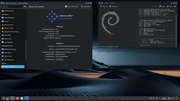
⢀⣴⠾⠻⢶⣦⠀
⣾⠁⢠⠒⠀⣿⡁ Debian - The universal operating system linux user # 527315
⢿⡄⠘⠷⠚⠋⠀ https://www.debian.org
⠈⠳⣄⠀
Offline
#410 2026-06-28 13:07:26
- unklar
- Back to the roots 1.9
- From: #! BL
- Registered: 2015-10-31
- Posts: 3,108
Re: 2026 Screenshot Thread
Very nice!
--------------------------------
Same 'company', siduction-kde-plasma
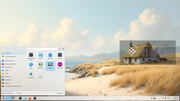
I had assumed that the compositor kwin-wayland could be handled similarly to picom in openbox regarding round corners and shadows around the window.
All the more so because all windows (kate; kwrite; dolphin etc.) have these round corners and the shadow in the default setting of the compositor.
Unfortunately, I haven't even found these basic settings in the depths of the system. So, I do the corners, and a light frame myself using Conky. 
Offline
#411 2026-06-28 13:59:34
- chroot
- Member
- Registered: 2024-12-12
- Posts: 178
Re: 2026 Screenshot Thread
darknetmatrix wrote:Very nice!
--------------------------------
Same 'company', siduction-kde-plasmahttps://i.postimg.cc/CB5L4m1P/Bildschirmfoto-20260628-142058.png
I had assumed that the compositor kwin-wayland could be handled similarly to picom in openbox regarding round corners and shadows around the window.All the more so because all windows (kate; kwrite; dolphin etc.) have these round corners and the shadow in the default setting of the compositor.
Unfortunately, I haven't even found these basic settings in the depths of the system. So, I do the corners, and a light frame myself using Conky.
Try https://github.com/matinlotfali/KDE-Rounded-Corners
I don't use KDE/Plasma, have no idea if it actually works.
Last edited by chroot (2026-06-28 14:48:42)
Offline
#412 2026-06-28 14:25:53
- hhh
- Hercule Poirot
- From: Belgium
- Registered: 2015-09-17
- Posts: 17,543
- Website
Re: 2026 Screenshot Thread
Many walls, many thanks! Lovely. https://raw.githubusercontent.com/notca … 017(1).png
.png)
Why why why why?!!???
Offline
#413 2026-06-29 08:13:37
- unklar
- Back to the roots 1.9
- From: #! BL
- Registered: 2015-10-31
- Posts: 3,108
Re: 2026 Screenshot Thread
unklar wrote:darknetmatrix wrote:Very nice!
--------------------------------
Same 'company', siduction-kde-plasmahttps://i.postimg.cc/CB5L4m1P/Bildschirmfoto-20260628-142058.png
I had assumed that the compositor kwin-wayland could be handled similarly to picom in openbox regarding round corners and shadows around the window.All the more so because all windows (kate; kwrite; dolphin etc.) have these round corners and the shadow in the default setting of the compositor.
Unfortunately, I haven't even found these basic settings in the depths of the system. So, I do the corners, and a light frame myself using Conky.Try https://github.com/matinlotfali/KDE-Rounded-Corners
I don't use KDE/Plasma, have no idea if it actually works.
Thanks!
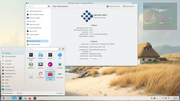
Plasma 6.6.5 is in use. Kwin implements 'round corners' and shadows of the application windows in its default setting. Only the Conky window doesn't benefit from this. I suppose. because it treats that as a widget. The picture clearly shows the condition between the two. The application of your link, in my opinion, would be 'shooting sparrows with cannons'. I'm also afraid that I'll ruin the current state of the system. 
Offline
#414 2026-07-01 02:13:39
- hhh
- Hercule Poirot
- From: Belgium
- Registered: 2015-09-17
- Posts: 17,543
- Website
Re: 2026 Screenshot Thread
https://i.postimg.cc/ykBh5XXf/Bildschirmfoto-20260629-094712.png
This is looking a bit bleached out for me, to be snobby. All that white on the left... too white. Oops, that's mostly the wallpaper, upper left sky gradients hard to white.
Why why why why?!!???
Offline
#415 2026-07-01 13:45:45
- unklar
- Back to the roots 1.9
- From: #! BL
- Registered: 2015-10-31
- Posts: 3,108
Re: 2026 Screenshot Thread
https://i.postimg.cc/ykBh5XXf/Bildschirmfoto-20260629-094712.png
This is looking a bit bleached out for me, to be snobby. All that white on the left... too white. Oops, that's mostly the wallpaper, upper left sky gradients hard to white.
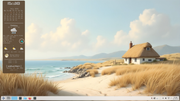
better ?
Offline
#416 2026-07-02 21:03:32
- Nili
- Member

- From: $HOME/♪
- Registered: 2015-09-30
- Posts: 1,306
- Website
Re: 2026 Screenshot Thread
This is looking a bit bleached out for me, to be snobby. All that white on the left... too white. Oops, that's mostly the wallpaper, upper left sky gradients hard to white.
Someone may not easily adapt to white, but white background on a black text is neater than the opposite.
Color Schemes like Catppuccin-Latte to the rescue for soften eyes.
On a White themes fonts looks many times cleaner. A good font like Inter with Color Schemes like Catppuccin-Latte personally i wouldn't find any better.
All my time in Linux i only used dark themes, sitting in a dark room felt about how i had been consumed by darkness.
...But, gone are the days of dark themes for me.
My white theme defense

better ?
Sloppy AI backgrounds ain't better to me. However it is your choice, my opinion have no importance in this regard.
More interesting is it your commitment to the OS, or conky than AI wallpapers.
8810
Offline
#417 2026-07-03 00:56:02
- hhh
- Hercule Poirot
- From: Belgium
- Registered: 2015-09-17
- Posts: 17,543
- Website
Re: 2026 Screenshot Thread
hhh wrote:https://i.postimg.cc/ykBh5XXf/Bildschirmfoto-20260629-094712.png
This is looking a bit bleached out for me, to be snobby. All that white on the left... too white. Oops, that's mostly the wallpaper, upper left sky gradients hard to white.
https://i.postimg.cc/WDDY46Pk/Bildschirmfoto-20260701-153816.png
better ?
You're goddamn right. For the win. Didn't even notice it was siduction before, all that glare.
Now I see a full mocha-chocolate theme with semi-transparent inactive windows. It's always a sea of tweaks, pun intended.
Start with a matching chocolate taskbar and white windows, see how that looks.
Why why why why?!!???
Offline
#418 2026-07-03 01:50:14
- hhh
- Hercule Poirot
- From: Belgium
- Registered: 2015-09-17
- Posts: 17,543
- Website
Re: 2026 Screenshot Thread
Anyway, I haven't done squat for themeing. PaperWM extension that chroot suggested, it's a thing...

That's out of the box and it doesn't play nice with Dash-to-Panel and some other floating-style extensions. Looks cool, I like the default compiz looking border for the active window. The tiling is, of course, predictable, scrolling, and awesome. Messes up GNOME keyboard shortcuts, hopefully I can disable the relevant extension shortcuts. Fortunately disabling it is a toggle away, blah blah blah.
Why why why why?!!???
Offline
#419 2026-07-03 08:47:45
- unklar
- Back to the roots 1.9
- From: #! BL
- Registered: 2015-10-31
- Posts: 3,108
Re: 2026 Screenshot Thread
unklar wrote:hhh wrote:https://i.postimg.cc/ykBh5XXf/Bildschirmfoto-20260629-094712.png
This is looking a bit bleached out for me, to be snobby. All that white on the left... too white. Oops, that's mostly the wallpaper, upper left sky gradients hard to white.
https://i.postimg.cc/WDDY46Pk/Bildschirmfoto-20260701-153816.png
better ?
You're goddamn right. For the win. Didn't even notice it was siduction before, all that glare.
Now I see a full mocha-chocolate theme with semi-transparent inactive windows. It's always a sea of tweaks, pun intended.
Start with a matching chocolate taskbar and white windows, see how that looks.
^^Actually, this was a "byproduct" of proving that Conky on kde-plasma-wayland can have round corners using lua scripts.
In fact, my aim in the siduction forum is to to let the Conky window do this task using the compositor kwin(-wayland), just like picom in BL.
Unfortunately, no user has been able to tell me where the appropriate settings can be found in kwin to display the Conky window like this. Because all program windows (kate, dolphin, kwrite etc.) have rounded corners and shadows.
Do you perhaps have an idea? 
BTW, you shouldn't go so deep, that looks very good to me...
Offline
#420 2026-07-03 09:10:47
- unklar
- Back to the roots 1.9
- From: #! BL
- Registered: 2015-10-31
- Posts: 3,108
Re: 2026 Screenshot Thread
unklar wrote:better ?
Sloppy AI backgrounds ain't better to me. However it is your choice, my opinion have no importance in this regard.
More interesting is it your commitment to the OS, or conky than AI wallpapers.
Thank you for sharing this and thank you for your words.
As a pensioner I have nothing else to do... ha, ha, ha.
Debian is still at 6.6.5
Offline