![[BunsenLabs Logo]](/img/bl.svg)
You are not logged in.
- Topics: Active | Unanswered
#1 2026-06-20 21:31:09
- MarkW
- Member
- Registered: 2024-11-03
- Posts: 570
Looking For New BL Plymouth Theme
@vinzv has made his bunsenlabs plymouth theme private. So I can't install it anymore.
Last edited by MarkW (2026-06-20 21:35:39)
Offline
#2 2026-06-21 06:46:36
- hhh
- Hercule Poirot

- From: Belgium
- Registered: 2015-09-17
- Posts: 17,582
- Website
Re: Looking For New BL Plymouth Theme
It comes up as a public account for me. Maybe a temporary glitch while he was updating the git?
https://github.com/vinzv/bunsen-plymouth
Wow, 8 year old reference...
Why why why why?!!???
Offline
#3 2026-06-21 06:57:45
- Döbbie03
- Resident Metalhead

- From: New Zealand
- Registered: 2015-09-29
- Posts: 4,391
Re: Looking For New BL Plymouth Theme
Yes public account, but the code was last updated 8 years ago. Does it still work? Never used Plymouth so I am unsure of how it has developed.
"All we are is dust in the wind, dude"
- Theodore "Ted" Logan
"Led Zeppelin didn't write tunes that everybody liked, they left that to the Bee Gees."
- Wayne Campbell
Offline
#4 2026-06-21 07:18:11
- hhh
- Hercule Poirot
- From: Belgium
- Registered: 2015-09-17
- Posts: 17,582
- Website
Re: Looking For New BL Plymouth Theme
Does it still work? Never used Plymouth so I am unsure of how it has developed.
I don't know about the BL theme, but Hamara (Plymouth animation) is working beautifully on trixie via the old instructions I linked above. Note: the first step about initramfs-fs/modules, ignore that.
Why why why why?!!???
Offline
#5 2026-06-21 09:23:49
- PackRat
- jgmenu user Numero Uno

- Registered: 2015-10-02
- Posts: 3,087
Re: Looking For New BL Plymouth Theme
@markw
Archived and read only, so no more commits/updates. Still looks to be public though so you should be able to clone the repo and follow the installation instructions.
8 years since last commit, don't be surprised if it no longer works.
You must unlearn what you have learned.
-- yoda
Offline
#6 2026-06-21 18:34:15
- DeepDayze
- Like sands through an hourglass...
- From: In Linux Land
- Registered: 2017-05-28
- Posts: 2,004
Re: Looking For New BL Plymouth Theme
Comes up public to me as well. it's good to see that it still works (with a tweak to the setup steps) on trixie as @hhh mentioned despite being relatively old.
Real Men Use Linux
Offline
#7 2026-06-21 19:08:04
- MarkW
- Member
- Registered: 2024-11-03
- Posts: 570
Re: Looking For New BL Plymouth Theme
Here's what I'm getting
mark@bunsenlabs:~$ cd /usr/share/plymouth/themes/
mark@bunsenlabs:/usr/share/plymouth/themes$ sudo git clone https://github.com/vinzv/bunsen-plymouth-one.git bunsenlabs
Cloning into 'bunsenlabs'...
Username for 'https://github.com':
Offline
#8 2026-06-21 20:55:00
- PackRat
- jgmenu user Numero Uno
- Registered: 2015-10-02
- Posts: 3,087
Re: Looking For New BL Plymouth Theme
His instructions appear to be obsolete now that github has gone the token route; the repo has a different address.
I think you can still install it manually. In the upper right is the green "code" button (see screenshot)
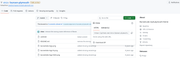
Click on the code button and copy that link. Then use:
git clone https://github.com/vinzv/bunsen-plymouth.git bunsenlabsin a directory you have read-write permissions.
Once you have the repo cloned you can manually install is and set it up as the new Plymouth theme. The other instructions to update-alternatives will hopefully work for you.
You may be able to
sudo git clone https://github.com/vinzv/bunsen-plymouth.git bunsenlabsright into the /usr/share/plymouth/themes/ but I have never used sudo when cloning a repo so I can't vouch for that working.
You must unlearn what you have learned.
-- yoda
Offline
#9 2026-06-22 03:26:10
- Döbbie03
- Resident Metalhead
- From: New Zealand
- Registered: 2015-09-29
- Posts: 4,391
Re: Looking For New BL Plymouth Theme
Here's what I'm getting
mark@bunsenlabs:~$ cd /usr/share/plymouth/themes/
mark@bunsenlabs:/usr/share/plymouth/themes$ sudo git clone https://github.com/vinzv/bunsen-plymouth-one.git bunsenlabs
Cloning into 'bunsenlabs'...
Username for 'https://github.com':
PackRat is correct. If you're asked to login when cloning a repo, it means you have the wrong address.
"All we are is dust in the wind, dude"
- Theodore "Ted" Logan
"Led Zeppelin didn't write tunes that everybody liked, they left that to the Bee Gees."
- Wayne Campbell
Offline
#10 2026-06-22 09:49:07
- MarkW
- Member
- Registered: 2024-11-03
- Posts: 570
Re: Looking For New BL Plymouth Theme
That worked
Cheers
Offline