![[BunsenLabs Logo]](/img/bl.svg)
You are not logged in.
- Topics: Active | Unanswered
#1 2026-05-07 23:29:18
- MarkW
- Member
- Registered: 2024-11-03
- Posts: 471
[RESOLVED] Is Anyone Else Missing A Desktop Folder?
Or just me?
Offline
#2 Yesterday 00:41:50
- PackRat
- jgmenu user Numero Uno

- Registered: 2015-10-02
- Posts: 2,921
Re: [RESOLVED] Is Anyone Else Missing A Desktop Folder?
In a terminal run:
xdg-user-dirs-updateThat should re-create it.
If it doesn't, check the file ~/.config/user-dirs.dirs and make sure $HOME/Desktop is on the list of folders to create.
You must unlearn what you have learned.
-- yoda
Offline
#3 Yesterday 00:44:32
- hhh
- Gaucho

- From: High in the Custerdome
- Registered: 2015-09-17
- Posts: 16,984
- Website
Re: [RESOLVED] Is Anyone Else Missing A Desktop Folder?
I don't get it. What folder is missing?
I don't care what you do at home. Would you care to explain?
Offline
#4 Yesterday 01:07:53
- chroot
- Member
- Registered: 2024-12-12
- Posts: 148
Re: [RESOLVED] Is Anyone Else Missing A Desktop Folder?
In a terminal run:
xdg-user-dirs-updateThat should re-create it.
If it doesn't, check the file ~/.config/user-dirs.dirs and make sure $HOME/Desktop is on the list of folders to create.
Should be there.
Offline
#5 Yesterday 01:18:15
- PackRat
- jgmenu user Numero Uno
- Registered: 2015-10-02
- Posts: 2,921
Re: [RESOLVED] Is Anyone Else Missing A Desktop Folder?
I don't get it. What folder is missing?
~/Desktop
Is that folder typically not made with an openbox setup? I always figured it was, a user just doesn't see any included files as icons on the desktop.
You must unlearn what you have learned.
-- yoda
Offline
#6 Yesterday 01:29:04
- PackRat
- jgmenu user Numero Uno
- Registered: 2015-10-02
- Posts: 2,921
Re: [RESOLVED] Is Anyone Else Missing A Desktop Folder?
PackRat wrote:In a terminal run:
xdg-user-dirs-updateThat should re-create it.
If it doesn't, check the file ~/.config/user-dirs.dirs and make sure $HOME/Desktop is on the list of folders to create.
Should be there.
But it's not; and the live session doesn't have ~/Desktop.
@MarkW - this is the ~/.config/user-dirs.dirs file from my Debian 13 install. Just add that line for $HOME/Desktop to your ~/.config/user-dirs.dirs file and then run xdg-user-dirs-update if you want a ~/Desktop folder.
# This file is written by xdg-user-dirs-update
# If you want to change or add directories, just edit the line you're
# interested in. All local changes will be retained on the next run.
# Format is XDG_xxx_DIR="$HOME/yyy", where yyy is a shell-escaped
# homedir-relative path, or XDG_xxx_DIR="/yyy", where /yyy is an
# absolute path. No other format is supported.
#
XDG_DESKTOP_DIR="$HOME/Desktop"
XDG_DOWNLOAD_DIR="$HOME/Downloads"
XDG_TEMPLATES_DIR="$HOME/Templates"
XDG_PUBLICSHARE_DIR="$HOME/Public"
XDG_DOCUMENTS_DIR="$HOME/Documents"
XDG_MUSIC_DIR="$HOME/Music"
XDG_PICTURES_DIR="$HOME/Pictures"
XDG_VIDEOS_DIR="$HOME/Videos"
You must unlearn what you have learned.
-- yoda
Offline
#7 Yesterday 01:57:30
- hhh
- Gaucho
- From: High in the Custerdome
- Registered: 2015-09-17
- Posts: 16,984
- Website
Re: [RESOLVED] Is Anyone Else Missing A Desktop Folder?
hhh wrote:I don't get it. What folder is missing?
~/Desktop
Is that folder typically not made with an openbox setup? I always figured it was, a user just doesn't see any included files as icons on the desktop.
It's not created in the BunsenLabs session because that's how Philip did it with #!. I'm fairly certain that installing xdg-user-dirs on Debian creates the Desktop folder by default.
BL ~/.config/user-dirs.dirs (on sid, the Projects folder isn't there on stock carbon)...
# This file is written by xdg-user-dirs-update
# If you want to change or add directories, just edit the line you're
# interested in. All local changes will be retained on the next run.
# Format is XDG_xxx_DIR="$HOME/yyy", where yyy is a shell-escaped
# homedir-relative path, or XDG_xxx_DIR="/yyy", where /yyy is an
# absolute path. No other format is supported.
#
XDG_DOWNLOAD_DIR="$HOME/Downloads"
XDG_DOCUMENTS_DIR="$HOME/Documents"
XDG_MUSIC_DIR="$HOME/Music"
XDG_PICTURES_DIR="$HOME/Pictures"
XDG_VIDEOS_DIR="$HOME/Videos"
XDG_DESKTOP_DIR="$HOME/"
XDG_TEMPLATES_DIR="$HOME/Templates"
XDG_PUBLICSHARE_DIR="$HOME/Public"
XDG_PROJECTS_DIR="$HOME/Projects"
To restore the Desktop folder, set XDG_DESKTOP_DIR="$HOME/" to XDG_DESKTOP_DIR="$HOME/Desktop", create a folder named "Desktop" and log out.
I don't care what you do at home. Would you care to explain?
Offline
#8 Yesterday 02:24:32
- hhh
- Gaucho
- From: High in the Custerdome
- Registered: 2015-09-17
- Posts: 16,984
- Website
Re: [RESOLVED] Is Anyone Else Missing A Desktop Folder?
Before

After
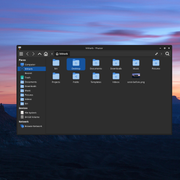
On sid the change happened without even logging out/in, it's probably the same on trixie.
Marking this thread [RESOLVED].
Last edited by hhh (Yesterday 02:25:37)
I don't care what you do at home. Would you care to explain?
Offline
#9 Yesterday 02:37:57
- hhh
- Gaucho
- From: High in the Custerdome
- Registered: 2015-09-17
- Posts: 16,984
- Website
Re: [RESOLVED] Is Anyone Else Missing A Desktop Folder?
labwc on sid adding xfdesktop & to autostart (note: desktop icons)

Fun with desktop icons.

Last edited by hhh (Yesterday 02:51:48)
I don't care what you do at home. Would you care to explain?
Offline
#10 Yesterday 17:01:09
- PackRat
- jgmenu user Numero Uno
- Registered: 2015-10-02
- Posts: 2,921
Re: [RESOLVED] Is Anyone Else Missing A Desktop Folder?
It's not created in the BunsenLabs session because that's how Philip did it with #!.
All these years and I never noticed that.
You must unlearn what you have learned.
-- yoda
Offline
#11 Yesterday 18:08:14
- MarkW
- Member
- Registered: 2024-11-03
- Posts: 471
Re: [RESOLVED] Is Anyone Else Missing A Desktop Folder?
I guess my Ubuntu Desktop folder must have got added when I first installed Boron and restored my home directory. That didn't happen with Carbon because I didn't have time to back up and restore before updating.
Offline
#12 Yesterday 19:11:11
- chroot
- Member
- Registered: 2024-12-12
- Posts: 148
Re: [RESOLVED] Is Anyone Else Missing A Desktop Folder?
hhh wrote:It's not created in the BunsenLabs session because that's how Philip did it with #!.
All these years and I never noticed that.
Me neither. He probably did it intentionally. Desktop directory is actually useless in a WM environment like OB.
Offline
#13 Yesterday 23:46:44
- johnraff
- nullglob

- From: Nagoya, Japan
- Registered: 2015-09-09
- Posts: 13,250
- Website
Re: [RESOLVED] Is Anyone Else Missing A Desktop Folder?
Desktop directory is actually useless in a WM environment like OB.
There was some discussion about it back in the day, but right, unless something is displaying the contents of the desktop folder on the ...desktop (eg pcmanfm or xfdesktop4) then there's no point in having it.
Personally, I modify BL to the point of adding that line to ~/.config/user-dirs.dirs and running xfdesktop4 so I can throw files that need dealing with somewhere in plain sight.
...in practice they end up being forgotten anyway, just like the real desktop where I can barely find the keyboard right now. 
...elevator in the Brain Hotel, broken down but just as well...
( a boring Japan blog (currently paused), now on Bluesky, there's also some GitStuff )
Offline
#14 Today 00:33:45
- PackRat
- jgmenu user Numero Uno
- Registered: 2015-10-02
- Posts: 2,921
Re: [RESOLVED] Is Anyone Else Missing A Desktop Folder?
I guess my Ubuntu Desktop folder must have got added when I first installed Boron and restored my home directory. That didn't happen with Carbon because I didn't have time to back up and restore before updating.
Does IceWm support desktop icons now?
You must unlearn what you have learned.
-- yoda
Offline
#15 Today 01:40:06
- chroot
- Member
- Registered: 2024-12-12
- Posts: 148
Re: [RESOLVED] Is Anyone Else Missing A Desktop Folder?
Curious to check cb++. It doesn't use Desktop directory, either.
live@debian:~$ ls
backup bin documents downloads images music templates tmp videos
live@debian:~$ cat .config/user-dirs.dirs
# This file is written by xdg-user-dirs-update
# If you want to change or add directories, just edit the line you're
# interested in. All local changes will be retained on the next run
# Format is XDG_xxx_DIR="$HOME/yyy", where yyy is a shell-escaped
# homedir-relative path, or XDG_xxx_DIR="/yyy", where /yyy is an
# absolute path. No other format is supported.
#
XDG_DOWNLOAD_DIR="$HOME/downloads"
XDG_DOCUMENTS_DIR="$HOME/documents"
XDG_MUSIC_DIR="$HOME/music"
XDG_PICTURES_DIR="$HOME/images"
XDG_VIDEOS_DIR="$HOME/videos"
XDG_DESKTOP_DIR="$HOME"
XDG_TEMPLATES_DIR="$HOME/templates"
XDG_PUBLICSHARE_DIR="$HOME"
Offline
#16 Today 11:16:24
- MarkW
- Member
- Registered: 2024-11-03
- Posts: 471
Re: [RESOLVED] Is Anyone Else Missing A Desktop Folder?
MarkW wrote:I guess my Ubuntu Desktop folder must have got added when I first installed Boron and restored my home directory. That didn't happen with Carbon because I didn't have time to back up and restore before updating.
Does IceWm support desktop icons now?
Not exactly. It has an option to iconify your windows to the desktop. But, otherwise, no desktop shortcuts.
Of course, when I started on BL I used the standard OB WM Which doesn't even do that,
Offline