![[BunsenLabs Logo]](/img/bl.svg)
You are not logged in.
- Topics: Active | Unanswered
#1 2026-03-21 03:26:05
- dbickin
- Member
- Registered: 2015-09-30
- Posts: 94
MS Paint alternative in bunsen
I have a need to edit a jpg file. Basically erase some text from the image and replace it with new text.
Since trying to update it with MS Paint on Windows 11 managed to destory my work multiple times... I hate Windows 11!
I googled for what software I should use on Linux and it came up with recommendations to install Pinta or KolourPaint. The former doesn't appear to be in Debian (stable), and the latter wanted to pull in a crap ton of KDE files. Desperate, I did the latter on a test install, and while it worked and I got the immediate task done, but the program was missing the graphics on most of the control buttons and all of the help files. So I had to guess what to press to do what I needed to do. It took forever.
Can you recommend a simple program that will get the job done without pulling in a ton of dependencies? (I've never used Gimp but everything I have seen is that it is overkill for what I need to do.)
Thanks,
David
Offline
#2 2026-03-21 09:34:38
- PackRat
- jgmenu user Numero Uno

- Registered: 2015-10-02
- Posts: 3,087
Re: MS Paint alternative in bunsen
Have a look at mypaint and mtpaint.
You must unlearn what you have learned.
-- yoda
Offline
#3 2026-03-21 11:22:19
- Sector11
- Mod Squid Tpyo Knig

- From: Upstairs
- Registered: 2015-08-20
- Posts: 8,450
Re: MS Paint alternative in bunsen
Package: drawing
Version: 1.0.2-1
State: installed
Automatically installed: no
Priority: optional
Section: graphics
Maintainer: Andrej Shadura <andrewsh@debian.org>
Architecture: amd64
Uncompressed Size: 5,135 k
Depends: gir1.2-gtk-3.0 (>= 3.24.0), python3-gi-cairo (>= 3.30.0),
         dconf-gsettings-backend | gsettings-backend, python3:any
Description: simple drawing application for the GNOME desktop
 Drawing is a simple image editor similar to MS Paint and designed for the
 GNOME desktop environment. It includes a set of image manipulation tools for
 every day basic image editing needs.
Homepage: https://maoschanz.github.io/drawing/
Debian 13 Beardog hosted by SoxDog
Still a Conky 1.9er at heart.
Offline
#4 2026-03-21 13:36:40
- marens
- Member

- From: World without M$
- Registered: 2023-02-02
- Posts: 1,306
Re: MS Paint alternative in bunsen
@dbickin
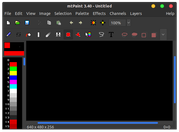
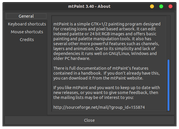
mtPaint graphic editor
If people would know how little brain is ruling the world, they would die of fear.
Offline
#5 2026-03-21 22:25:01
- dbickin
- Member
- Registered: 2015-09-30
- Posts: 94
Re: MS Paint alternative in bunsen
Thanks all.
I ended up going with mtpaint. At first I couldn't figure out how to use the darn thing, so I had to RTFM, and following step by step, nothing was happening that the manual said was supposed to happen. But in the end, I was able to figure it out. In the end, my only problem was that I couldn't match the existing text, but then I couldn't in MS Paint either. And on Windows, 72 points was slightly smaller than the existing text, but with mtpaint (and drawing) 72 points was considerably smaller. But still close enough!
With drawing, I had an easier time doing everything except for placing the new text where I wanted it to go.
Thanks,
David
Offline
#6 2026-03-22 00:06:20
- marens
- Member
- From: World without M$
- Registered: 2023-02-02
- Posts: 1,306
Re: MS Paint alternative in bunsen
^ mtPaint is great for simple things, but it has plenty of options for more complex editing.
I've been using it for years for editing icons, quickly converting formats (e.g. SVG to PNG)...
With drawing, I had an easier time doing everything except for placing the new text where I wanted it to go.
1) MenuBar > Edit > Paste Text (Free Type)
2) Choose Font, Style, Size
3) Enter the desired text
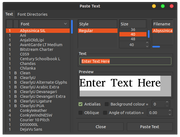
4) Click the Paste Text button
5) Use the arrows (up, down, left, right) to choose where to place the text
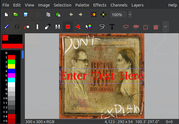
6) Press the Enter button (keyboard)
7) Save As...
Done.
Last edited by marens (2026-03-22 00:22:20)
If people would know how little brain is ruling the world, they would die of fear.
Offline
#7 2026-03-27 10:24:58
- Jimbo_G
- Member

- From: France
- Registered: 2017-05-12
- Posts: 360
Re: MS Paint alternative in bunsen
For really basic stuff, LibreOffice Draw might be enough
Offline
#8 2026-04-21 21:33:32
- dbvolvox
- Member

- From: England
- Registered: 2015-09-29
- Posts: 125
- Website
Re: MS Paint alternative in bunsen
For really basic stuff, LibreOffice Draw might be enough
Or fotocx does simples.
Obviously GIMP will do it but its a minefield for the occasional user. Recently I have had success with GIMP by searching first "how to do xyz in GIMP" and following the advice given.
volvox.biz a very tedious daily account of life during covid,
Offline