![[BunsenLabs Logo]](/img/bl.svg)
You are not logged in.
- Topics: Active | Unanswered
#1 2026-02-23 12:01:39
- greenjeans
- Member

- Registered: 2025-01-18
- Posts: 388
- Website
Basic local password manager
Hey guys, so i've been working on a new project, a dirt-simple no-frills
local password manager, had the idea a while back after making a note-taking
app as it seemed like I could re-use about 90% of the code, just needed to
add encryption. As it turned out I only used about 40-50% of it, lol, but
that's okay because it still saved me a lot of time and the skeleton for it
was very simple and robust. Been pounding on it hard for the last 3 days and
I think i'm at an alpha-testing stage now.
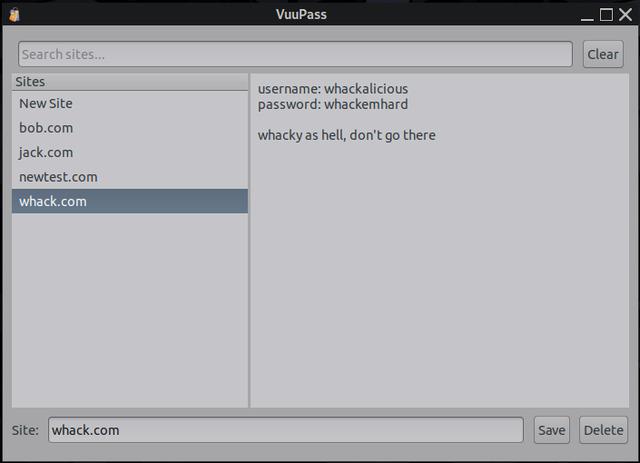
Nothing fancy, so basic it hurts, no autofill or anything like that, basically
just a sort of text-editor with encryption. You have to manually enter all your
info, to use it you'll need to copy/paste info into whatever browser you're using.
Only depends are GTK and libsodium, and it's tiny, one binary that's just
under 45 kb. It stores everything in an encrypted text file so no need for
sqlite and such.
If anyone is interested in giving it a try, let me know and i'll post the
source code and compile instructions, or if you don't feel like compiling
i'll probably post it up on my Sourceforge, maybe if i'm not too lazy today
i'll actually package it even. 
Please be sure to always backup first, everybody should really have a hard
copy pen+paper backup of sensitive files like passwords. When testing just
start with dummy entries, there could be bugs but I can't find any more
right now, it's such a tiny script there's not much to go wrong.
Offline
#2 2026-02-23 12:31:50
- Sector11
- Mod Squid Tpyo Knig

- From: Upstairs
- Registered: 2015-08-20
- Posts: 8,450
Re: Basic local password manager
OH I do like the looks of that.
IF I forget the "master password" would uninstall, re-install start it fresh or does a file hide someplace on the system?
Can passwords be changed/edited?
Debian 13 Beardog hosted by SoxDog
Still a Conky 1.9er at heart.
Offline
#3 2026-02-23 12:55:15
- greenjeans
- Member
- Registered: 2025-01-18
- Posts: 388
- Website
Re: Basic local password manager
Hi! So if you forget the master password to unlock the vault, you're hosed, there's no retrieving that data. This is by design, it's a simple app but hardcore. That's why you should definitely have it written down somewhere. The master password once set, cannot be changed unless you delete the vault and start over with a new first run, but the old vault cannot be retrieved so you would need to start fresh and enter all your data. Your master password is not stored anywhere on your machine. There is also no multiple attempts while the app is open to submit a password, if you enter the wrong one you get an error message that you have to click to close, and then the app closes, and you'll need to re-open it to try again, VERY good reason for this. Like I said, it's pretty hardcore.
All the entries you make are 100% editable, site name, passwords, and content.
Offline
#4 2026-02-23 23:21:52
- Sector11
- Mod Squid Tpyo Knig
- From: Upstairs
- Registered: 2015-08-20
- Posts: 8,450
Re: Basic local password manager
That I think answers my question.
I forgot the master password ....
Delete the program and start over.
but the old vault cannot be retrieved so you would need to start fresh and enter all your data
is the "old vault" deleted when the program is deleted OR over written when the program is re-installed and I start recreating my data from my $1.99 paper notepad.
EDIT: I like everything I'm reading about this.
Debian 13 Beardog hosted by SoxDog
Still a Conky 1.9er at heart.
Offline
#5 2026-02-24 19:17:48
- greenjeans
- Member
- Registered: 2025-01-18
- Posts: 388
- Website
Re: Basic local password manager
Cool! So let me go into a little detail to answer your questions:
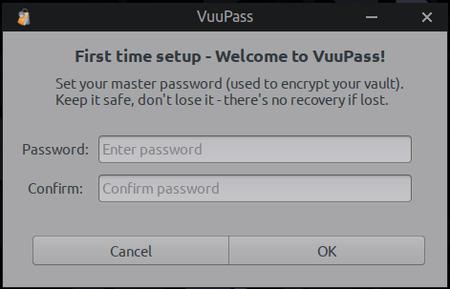
When the app first starts it first checks for the existence of the vault and it's directory, and if not present it creates the directory and a generic vault with no entries in the users home and throws up the first-run dialog shown in the pic where you create your master password. Path for the new vault: ~/.local/share/VuuPass/vuupass.vault
But if the app finds that file on first check, it throws up the login dialog, and if the password you entered is correct (based upon it trying the password you provided, using the apps specified encrypt/decrypt method) then it opens the app's gui for you to use.
So if you delete the vault file (~/.local/share/VuuPass/vuupass.vault), then open the app, your data will be gone and VuuPass runs the first-run dialog for you to create a new vault.
If you remove VuuPass the app (which will be just the one script and a .desktop), but don't delete the vault file, the info will still be in there, but it can only be un-encrypted using the specific password for it AND the specific logic it was created with, which is unique to this app as it is all such apps. So if you then subsequently re-installed the same VuuPass you used to previously create the file and have left the .vault file intact, then the app will see it and give you the login-dialog instead, and if correct open it right up.
Libsodium is amazing, it's crazy complex yet very dev-friendly, they tell you right on their quickstart/FAQ page exactly how to set up a single-file local encryption, you just have to figure out the exact methods for your application as there are a lot to choose from.
Even groovier: If you compile yourself I can tell you how to change one little thing before you compile that will make your version of VuuPass's encryption unique to you for even more hardcore security. I can also tell you how to make it even more painful for crack-apps but it does affect useability on low-spec machines, if you have a new machine with a lot of ram though you can create a real beast.
That being said it's overkill for a local user, this app as written is overkill, lol, but what can I say, I wanted to make a pit-bull.
Last edited by greenjeans (2026-02-24 19:29:09)
Offline
#6 2026-02-24 22:34:06
- greenjeans
- Member
- Registered: 2025-01-18
- Posts: 388
- Website
Re: Basic local password manager
Oh man, the things you find buried in docs that they should have led with. Just figured one tiny thing that was wrong (but it all worked anyway), and in fixing it discovered a way to really increase the hardness. Dang it was actually pretty self-evident, should have been on that one from the get-go.
Offline
#7 2026-02-25 02:43:20
- WizardofCOR
- Member

- From: Somewhere in the Desert
- Registered: 2023-07-28
- Posts: 100
Re: Basic local password manager
I think my only concern about this is:
The master password once set, cannot be changed unless you delete the vault and start over with a new first run...
So after you set it, can you ever change it afterwards provided you're able to login? Or is it a one-time dealio?
I'm really liking this project, btw - kinda like a personal Keepass.
Aside from picking your own encryption schema upon compiling, might you be able to store the data file somewhere and then call to it from from a front-end?
So have the encrypted date file stored in a secured network location, and the front-end app can load it?
This would of course allow access to the same vault from multiple devices from the network.
Or perhaps I'm getting waaaay ahead of myself.
Regardless, love this project, greenjeans - absolutely brilliant, sir.
Just a dude playing a dude, disguised as another dude...
Offline
#8 2026-02-25 03:49:31
- greenjeans
- Member
- Registered: 2025-01-18
- Posts: 388
- Website
Re: Basic local password manager
Great questions @WizardofCOR and thank you! Answers:
1. No changing the master password after entered, one-time deal only.
2. Storing the data file: actually I was thinking if you really want to be hardcore, re-compile with your own salt, save the binary on a USB stick and delete local copies of the binary and source off the machine. That way the binary and it's data including your custom salt does not live on the partition at all, but instead you mount the USB stick when you login and decrypt the vault, enter passwords as needed. So the .vault file still lives on your machine (but is nigh-on impossible to de-crypt to start with), but the the custom salt is not stored anywhere on your machine, thus making it almost impossible to crack when not active. The script as it is now supports this, if you wanted to have it save the vault too on the USB thus making it all air-gapped-ish then it would would take some small mods to the script.
Offline
#9 2026-02-25 04:52:49
- WizardofCOR
- Member
- From: Somewhere in the Desert
- Registered: 2023-07-28
- Posts: 100
Re: Basic local password manager
Oh wow, really liking point #2, sir. That's an excellent path that adds a layer of security as well as bestowing portability.
I will say that #1 does admittedly bring a little trepidation, as having to recreate everything from scratch if you ever want to change the master password may be considered a drawback (at least for some.)
IMO, certainly not a show-stopper per se - as should anyone obtain your master password you've most likely got other issues at that point, right? And dare I say anyone re-using passwords/phrases is kinda asking for it, anyway.
Like I said, I'm really into this - security's always been my kinda thing, and so I'm going to take the opportunity to jump on this. Impressive to say the least, my friend.
And hey, if you're ever looking for enhancement suggestions, I'm all in.
Gimme gimme gimme - I wanna snag it and play.
Last edited by WizardofCOR (2026-02-25 04:54:26)
Just a dude playing a dude, disguised as another dude...
Offline
#10 2026-02-25 15:57:12
- greenjeans
- Member
- Registered: 2025-01-18
- Posts: 388
- Website
Re: Basic local password manager
Cool man! Really appreciate you being willing to test/mod, i'm almost there, going through line by line now optimizing, added two really good commits yesterday, and just got done with another one a few minutes ago, I should have it ready by tomorrow and will get that code out to ya soon after.
I also still need to finish the documentation but i'm halfway done with that, i'll provide the build deps and compile code, and also point out exactly what to change for your own custom script. It's actually very easy, this script is so tiny it's simple to find what you're looking for, and easy to audit too.
Offline
#11 2026-02-25 17:47:00
- DeepDayze
- Like sands through an hourglass...
- From: In Linux Land
- Registered: 2017-05-28
- Posts: 2,004
Re: Basic local password manager
Loving this little password manager like the ALSA app. Nice work!
Real Men Use Linux
Offline
#12 2026-02-25 18:21:28
- greenjeans
- Member
- Registered: 2025-01-18
- Posts: 388
- Website
Re: Basic local password manager
Okay, so I love this version, and it is quasi-portable in that you can drop the executable onto a usb stick, plug it in and use it normally (vault directory and vault file in users home.)
But being even more portable intrigued me and I didn't want to do a hybrid, so I made a second version, and all this does is change where the vault directory and files are kept, to the same directory the executable is located in (on your usb stick), so it's all contained on the stick, and once you unplug that stick there is no trace of it on your computer. So the only time it might be vulnerable is when you have the stick plugged in.
This is actually waaaay overkill, the real protection is in the encryption and a strong password, these are just speed-bumps and roadblocks that make it a lot more difficult. For me i'll probably just use the regular version, it's plenty hardcore.
Give me just a little more time guys and i'll get both versions posted, and thanks so much for the kind words!
ETA: Working the edge-cases now and going through it all line by line, found a couple more areas to improve.
Last edited by greenjeans (2026-02-25 23:40:57)
Offline
#13 2026-02-26 14:07:00
- Sector11
- Mod Squid Tpyo Knig
- From: Upstairs
- Registered: 2015-08-20
- Posts: 8,450
Re: Basic local password manager
I was hoping to be able to pick a place.
Like:
/media/5/.VuuPass/vuupass.vault
That way 2 installs of Linux could read the same /vuupass.vault
- using the same master password as my machine is local
Reason:
Current install is /dev/sda1 = / and /dev/sda2 = /home
Personal data files, images, conkys, documents are all on:
/dev/sda3 (media/5) 4 (media/10) and 6 (media/11)
Next version of Debian will be on sda7 = / and sda8 = /home
- at which time the old install will be a "OOPS" backup 
Debian 13 Beardog hosted by SoxDog
Still a Conky 1.9er at heart.
Offline
#14 2026-02-26 18:07:29
- greenjeans
- Member
- Registered: 2025-01-18
- Posts: 388
- Website
Re: Basic local password manager
I was hoping to be able to pick a place.
Wow, groovy setup I must say! But as for VuuPass, supporting custom vault paths across wildly different partition/mount setups would add a ton of complexity and fragility (not to mention a lot of code and likely additional deps) that i'm trying to avoid here to keep VuuPass dead-simple, rock-solid, and with the tiniest attack-surface possible. The portable version on a USB stick does pretty much what you’re after: same vault file usable on any system you plug into, no config needed!
The VuuPass basic password manager is now up on my Sourceforge, I decided to just make a compressed file and put it there for easy access rather than posting a lot of code to forums or replying to the e-mails i've gotten about it, I have not made a .deb package yet, this is just for preliminary testing and includes the binaries and source for both the standard and portable versions, and a readme.txt (also displayed on the download page) with instructions for use and also for compiling your own custom version.
Note that I included a .desktop for the standard version in case you want to do a full manual install, but there's not one for the portable version, it doesn't need one, just drop the binary on a USB stick and click it to run, it will do the rest.
It probably goes without saying but you need gtk3 and libsodium onboard to run it.
https://sourceforge.net/projects/vuu-do … s/VuuPass/
Remember, this is first test of experimental software, test only with dummy data for now until more test results come in.
Last edited by greenjeans (2026-02-26 19:37:08)
Offline
#15 2026-02-26 20:16:44
- Sector11
- Mod Squid Tpyo Knig
- From: Upstairs
- Registered: 2015-08-20
- Posts: 8,450
Re: Basic local password manager
Thank you had that style of setup since my early Linux days.
OH not going to stop me. I'll just copy
~/.VuuPass/vuupass.vault
to the new system before installing VuuPass on it.
I like the "dead simple" aspect and I hate KISS (Keep It Simple Stupid) that implies someone's intelligence level as a not so bright.
I prefer KISS (Keep it Stupidly Simple) which requires a lot of intelligence. 
Debian 13 Beardog hosted by SoxDog
Still a Conky 1.9er at heart.
Offline
#16 2026-03-01 06:58:35
- WizardofCOR
- Member
- From: Somewhere in the Desert
- Registered: 2023-07-28
- Posts: 100
Re: Basic local password manager
Having some issues with the Standard install - probably my n00bness, but here's what is being experienced.
It works if using the executable from where it was extracted (i.e. the Downloads dir and subdirs), but the .desktop file doesn't work (cannot execute child process error), and the only way to open it (to see the correct vault) is by using the vuupass executable file.
Renaming a symlink breaks it and adds difficulty adding it to the menu system.
But I'm admittedly and probably missing something or two?
Guess I'm looking for a way for an easier menu integration, as the .desktop file doesn't seem to work.
EDITED: Figured it out - Migrate all files to the intended dir: /home/{username}/.local/share/VuuPass/
Even though the paths may show correctly on the .desktop file Properties, I needed to reconfirm them all manually because the error being received about the child process was referencing "Vuupass" in the path - so I had a case sensitivity issue that wasn't reflected in Properties - weird.
Using "Edit Launcher" to reconfirm all dir's and exe's corrected the pathing issue, and I was then able to add it to /usr/share/applications.
Subsequently editing that .desktop entry I was able to add categorizations (Internet, Accessories, etc.) to make it show up and work properly in the menu.
Works perfectly now.
Last edited by WizardofCOR (2026-03-01 07:42:47)
Just a dude playing a dude, disguised as another dude...
Offline
#17 2026-03-01 15:47:43
- greenjeans
- Member
- Registered: 2025-01-18
- Posts: 388
- Website
Re: Basic local password manager
I probably should have just made a .deb or at least clarified further, the executable needs to go in your $PATH (I typically use /usr/local/bin) for the .desktop launcher to work, as it just simply calls "vuupass".
To be clear:
/usr/local/bin : vuupass
/usr/share/applications: vuupass.desktop
/home/(username)/.local/share/VuuPass : This is where the vault file and any backup will go, the app will create this directory on first run, nothing else goes in here.
I'll make a .deb today.
Offline
#18 2026-03-01 20:43:00
- WizardofCOR
- Member
- From: Somewhere in the Desert
- Registered: 2023-07-28
- Posts: 100
Re: Basic local password manager
Ah, that makes sense - and I feel like I should've known. I'll chalk it up to my own excitement. LOL
The .deb sounds great, and that layout description is exactly what I'd look for.
Thanks, greenjeans! Gonna play with the portable now... woot!
Just a dude playing a dude, disguised as another dude...
Offline
#19 2026-03-02 02:40:20
- greenjeans
- Member
- Registered: 2025-01-18
- Posts: 388
- Website
Re: Basic local password manager
Ah, that makes sense - and I feel like I should've known. I'll chalk it up to my own excitement. LOL
The .deb sounds great, and that layout description is exactly what I'd look for.Thanks, greenjeans! Gonna play with the portable now... woot!
Dude I totally understand, sorry I wasn't more clear about it, I was just excited about it and wanted to get it out there for people like you who like to experiment in hopes that they would would find things I couldn't to make it better, thank you big-time for trying it and reporting back so I could work on it and try to make it better!
Offline