![[BunsenLabs Logo]](/img/bl.svg)
You are not logged in.
- Topics: Active | Unanswered
#21 2026-01-17 01:39:24
- johnraff
- nullglob

- From: Nagoya, Japan
- Registered: 2015-09-09
- Posts: 13,478
- Website
Re: Carbon RC2 bugs
johnraff wrote:That message is OK. The first time bl-conky-session runs it generates that file.
^That's right.
However, after removing the check mark in the CM and clicking 'apply', the file is generated again and the default conky appears again and again.
OK I need to have a close look at this. Hopefully it's nothing complicated.
...elevator in the Brain Hotel, broken down but just as well...
( a boring Japan blog (currently paused), now on Bluesky and Mastodon, there's also some GitStuff )
Offline
#22 2026-01-17 05:16:10
- johnraff
- nullglob
- From: Nagoya, Japan
- Registered: 2015-09-09
- Posts: 13,478
- Website
Re: Carbon RC2 bugs
johnraff wrote:That message is OK. The first time bl-conky-session runs it generates that file.
^That's right.
However, after removing the check mark in the CM and clicking 'apply', the file is generated again and the default conky appears again and again.
I've found where this is happening. The tricky aspect is that an empty Conky Default Session file is meaningless: people who don't want to run Conky should comment out "bl-conky-session &" from ~/.config/bunsen/autostart.
But if you temporarily want to stop all conkys, that ought to be possible, yes.
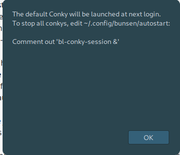
The fix is: if zero conkys are selected, kill them all and leave the loop without editing the default session file, but put up a warning about the next login, when Conky will be back, and hint to edit autostart to stop all conkys. The conky manager dialogue window now comes up empty, as it should.
@Unklar, if you have the inclination, you could try copying in this new bl-conky-manager to ~/bin/, make it executable and see if the behaviour now seems reasonable:
#!/bin/bash
#
# bl-conky-manager: BunsenLabs Conky selection and switcher script
# Copyright (C) 2015-2019 damo <damo@bunsenlabs.org>
# 2019-2026 John Crawley <john@bunsenlabs.org>
#
# This program is free software: you can redistribute it and/or modify
# it under the terms of the GNU General Public License as published by
# the Free Software Foundation, either version 3 of the License, or
# (at your option) any later version.
#
# This program is distributed in the hope that it will be useful,
# but WITHOUT ANY WARRANTY; without even the implied warranty of
# MERCHANTABILITY or FITNESS FOR A PARTICULAR PURPOSE. See the
# GNU General Public License for more details.
#
# You should have received a copy of the GNU General Public License
# along with this program. If not, see <http://www.gnu.org/licenses/>.
#
########################################################################
#
# Written by damo <damo@bunsenlabs.org> for BunsenLabs Linux, April 2015
# Beta tested and stamped "zen" by <Sector11>
#
########################################################################
#
# Conkys must be in $CONKYPATH
# The name must end with "conky", conkyrc or be "*conky*.conf"
#
# When the dialog opens, any running conkys will be checkmarked.
#
# Click "OK" and all running conkys are stopped, and all checkmarked
# conkys are started
#
# To stop a conky just uncheck it, and "OK"
#
# Running conkys are saved to a session file, and can be run with
# the "bl-conky-session" script. To start the default conky session at
# login, add the following line to autostart:
#
# bl-conky-session &
#
# Different saved-session files can be created by running the script with:
#
# bl-conky-manager -f sessionfilename
# bl-conky-manager -z (opens gui entry dialog for filepath)
#
########################################################################
CONKYPATH="$HOME/.config/conky"
STARTSESSION="$CONKYPATH/conky-startup-session" # symlink to chosen startup session (DEFAULTSESSFILE by default)
DEFAULTSESSFILE="$CONKYPATH/conky-sessionfile"
SESSIONS="$CONKYPATH/saved-sessions" # list of saved sessions to be used by a pipemenu
CONKYDEFAULT="$CONKYPATH/conky.conf"
BLDEFAULT=$(readlink -f "$CONKYPATH/BL-Default-conky.conf") # BL-Default-conky.conf is a symlink to this release's default conky
USAGE1='
USAGE: bl-conky-manager [OPTION]...FILES
With no command option the script runs the gui
-h,--help : The full USAGE help
-f,--file <FILENAME> : specify file to save session to
-z,--choose-sessfile : run filename entry dialog for new saved session
-s,--choose-startup : choose session file to run at startup
'
USAGE2='bl-conky-manager is a Conky selection and switcher script
which uses yad to generate a graphical user interface.
Usage: bl-conky-manager [OPTION]...FILES
With no command option the script runs the gui
Optional arguments:
-h,--help : This USAGE help
-f,--file <FILENAME> : specify file to save session to
-z,--choose-sessfile : run gui filename entry dialog for new saved session
(user also has the option of setting this session as startup)
-s,--choose-startup : choose session file to run at startup
Filenames are considered relative to ~/.config/conky/
When the dialog opens, any running conkys will be checkmarked.
Click "OK" and all running conkys are stopped, and all
checkmarked conkys are started.
To stop a conky just uncheck it, and click "OK"
Examples:
Save session to a new saved-session file with:
bl-conky-manager -f sessionfile-name
To start the default conky session at login, add the
following line to autostart:
bl-conky-session &
'
# look for a help option somewhere, then exit
for i in "$@"
do
case "$i" in
-h|--help)
echo "$USAGE2"
exit 0
;;
esac
done
BL_COMMON_LIBDIR='/usr/lib/bunsen/common'
if ! . "$BL_COMMON_LIBDIR/bl-includes" 2> /dev/null; then
echo $"Error: Failed to locate bl-includes in $BL_COMMON_LIBDIR" >&2
exit 1
fi
# pangoEscape() for yad text display of filenames
# is provided in bl-includes
if [ ! -f "$DEFAULTSESSFILE" ] ; then
echo "$0: Failed to locate ${DEFAULTSESSFILE}, generating default..." >&2
echo "$BLDEFAULT" > "$DEFAULTSESSFILE"
fi
if [[ ! -f $STARTSESSION ]]; then
echo "$0: generating missing symlink $STARTSESSION to $DEFAULTSESSFILE"
ln -s "$DEFAULTSESSFILE" "$STARTSESSION" || echo "$0: WARNING: failed to create symlink $STARTSESSION"
fi
### DIALOG VARIABLES
DLG="yad --center --undecorated --borders=20 "
DLGDEC="yad --center --borders=20 "
TITLE="BunsenLabs Conky Manager"
WINICON="--window-icon=distributor-logo-bunsenlabs"
OK="--button=OK:0"
APPLY="--button=Apply:0"
CANCEL="--button=gtk-cancel:1"
CLOSE="--button=Close:1"
########## FUNCTIONS ###################################################
CPATH_REGEX='.*(conky.*\.conf|conky|conkyrc)'
# populates global array runningConkys
getRunning(){
unset runningConkys
local pid command CPATH
declare -g -A runningConkys
while read -r pid; do
mapfile -d '' -t command < "/proc/${pid}/cmdline" # use NULL delimiter to split cmdline into array 'command'
[[ ${command[0]} = 'conky' ]] || {
echo "$0: pgrep parsing failed: command is not 'conky'" >&2
continue
}
for i in "${!command[@]}"; do
[[ ${command[i]} = '-c' ]] && { CPATH="${command[i+1]}"; break;}
[[ ${command[i]} = '--config='* ]] && { CPATH="${command[i]#--config=}"; break;}
done
[[ -z $CPATH ]] && CPATH="$CONKYDEFAULT"
[[ $CPATH = /* ]] || CPATH="$HOME/$CPATH" # assume path is relative to $HOME
[[ -f $CPATH ]] || {
echo "$0: pgrep conky parsing failed: $CPATH is not a file" >&2
continue
}
runningConkys["$CPATH"]=1
done < <(pgrep -x 'conky' -u "$USER")
}
# $1 holds full path to config file
# returns 0 if a running conky is using that file
isRunning(){
local file=$1
[[ ${runningConkys["$file"]} = 1 ]] && return 0
return 1
}
findConkys(){
getRunning
LISTCONKY=() # global
local file name check
shopt -s globstar
for file in "$CONKYPATH"/**;do
[[ -f $file ]] || continue
[[ $file =~ ${CPATH_REGEX}$ ]] || continue # ignore other than conky config files
name=${file#$CONKYPATH/}
if isRunning "$file"; then
check='TRUE'
else
check='FALSE'
fi
LISTCONKY+=("$check" "$(pangoEscape "$name")" "$file")
done
shopt -u globstar
}
# makes global array "CONKY_CONF"
parseConkyfile(){
[[ -f $1 ]] || { echo "$1 is not a file." >&2;return 1;}
unset CONKY_CONF
declare -Ag CONKY_CONF
local line parse=false comment=false conkyconf name value
while read -r line
do
if [[ $line =~ ^[[:blank:]]*'--[[' ]]
then
comment=true # ignore comment blocks
continue
else
line=${line%%--*} # remove inline comments
fi
if [[ $comment = true ]]
then
if [[ $line = *']]'* ]]
then
comment=false
line=${line#*]]}
else
continue
fi
fi
[[ $line ]] || continue
if [[ $line =~ ^[[:blank:]]*'conky.config'[[:blank:]]*(=[[:blank:]]*'{'(.*))?$ ]]
then
parse=true
conkyconf=${BASH_REMATCH[2]}
continue
fi
if [[ $parse = true ]]
then
if [[ $line =~ ([^}]*)'}' ]]
then
conkyconf+=${BASH_REMATCH[1]}
break
else
conkyconf+=$line
fi
fi
done < "$1"
entry_regex="([[:alnum:]_]+)[[:blank:]]*=[[:blank:]]*([[:alnum:]-]+|'[^']+'|\"[^\"]+\")"
while [[ $conkyconf =~ $entry_regex ]]
do
name=${BASH_REMATCH[1]}
value=${BASH_REMATCH[2]#[\'\"]} # strip quotes
value=${value%[\'\"]}
CONKY_CONF["${name}"]="${value}"
conkyconf=${conkyconf#*${BASH_REMATCH[0]}}
done
}
# for version 1.09 conky files
# makes global array "CONKY_CONF"
parseConkyfile_1.09(){
[[ -f $1 ]] || { echo "$1 is not a file." >&2;return 1;}
unset CONKY_CONF
declare -Ag CONKY_CONF
local name value
while read -r name value
do
[[ $name ]] || continue
[[ $name = TEXT* ]] && break
CONKY_CONF["$name"]="$value"
done < <(sed 's/\#.*$//' "$1")
}
# usage: parseConky <file>
# creates array CONKY_CONF
# echo "Value of key $key is: ${CONKY_CONF[$key]}"
parseConky(){
local path=$1
if ! grep -Eq '(^|[[:blank:]])conky\.config[[:blank:]]*=?' "$path"
then
#yad_info "This conky uses v1.09 syntax.\nIt is recommended to convert the conky to v1.10 syntax.\nSee: https://forums.bunsenlabs.org/viewtopic.php?id=3983"
parseConkyfile() {
parseConkyfile_1.09 "$@"
}
fi
parseConkyfile "$path"
}
# determine stickiness of conkyfile
# usage isSticky <file>
isSticky(){
parseConky "$1"
[[ ${CONKY_CONF[own_window]} != true ]] && return 0
[[ ${CONKY_CONF[own_window_type]+X} = X ]] && [[ ${CONKY_CONF[own_window_type]} != normal ]] && return 0
[[ ${CONKY_CONF[own_window_hints]} = *sticky* ]] && return 0
return 1
}
# usage: chooseDesktop [<path>]
# will use <path> in message, if known
chooseDesktop(){
local path dtplst desktop a b c d e f g h name choice
[[ -n $1 ]] && path=$1
dtplst=(TRUE "Current Desktop" "x")
# shellcheck disable=SC2034
while read -r desktop a b c d e f g h name
do
dtplst+=(FALSE "$(pangoEscape "$name")" "$desktop")
done < <( wmctrl -d )
choice=$($DLGDEC $WINICON --list --title="$TITLE" \
--text="Choose a desktop for $(pangoEscape "${path##*/}"):" \
--radiolist --width=300 --height=400 \
--column=Select:RD --column="Desktop Name:TEXT" --column=desktop:HD \
"${dtplst[@]}" --separator='' --print-column=3 "$OK" ) || return 1
[[ $choice = x || -z $choice ]] && return 1
printf '%s' "$choice"
}
chooseStartup(){
local file chk name sflst choice
type bl-conky-session >/dev/null 2>&1 || { "$0: '--choose-startup' option uses bl-conky-session" >&2; return 1;}
while read -r file;
do
if [[ $file = *\ \* ]]; then # current startup filepath has appended ' *'
file=${file% \*}
chk=TRUE
else
chk=FALSE
fi
name=${file#$CONKYPATH/}
sflst+=("$chk" "$(pangoEscape "$name")" "$file")
done < <(bl-conky-session --list)
choice=$($DLGDEC $WINICON --list --title="$TITLE" \
--text="Choose the startup Conky session:" \
--radiolist --width=300 --height=400 \
--column=Select:RD --column="Session File:TEXT" --column="Filepath:HD" \
"${sflst[@]}" --separator='' --print-column=3 "$OK" "$CANCEL") || return 1
[[ -z $choice ]] && return 1
bl-conky-session --set-startup "$choice" || return 1
}
setStartupDlg(){
[[ "$SESSIONFILE" = "$STARTSESSION" ]] && return 0
if $DLG $WINICON --title="Conky sessionfile" --text="Set ${SESSIONFILE}\n as default startup session?" --button='Yes':0 --button='No':1 ; then
bl-conky-session --set-startup "$SESSIONFILE" || return 1
fi
}
loadDialog() {
local choice retval desktop
## Populate dialog from array, get chosen conky(s)
choice=$($DLGDEC $WINICON --list --title="$TITLE" \
--text="Session will be saved to:\n <b>$SESSIONFILE</b>" \
--checklist --width=400 --height=500 \
--column="Select:CHK" --column="Conky Name:TEXT" --column=path:HD "${LISTCONKY[@]}" \
--separator='' --print-column=3 \
$APPLY --button='Apply+Close':2 $CLOSE \
)
retval=$?
if (( retval == 1 )); then # close button pressed
# if session file is empty restore previous saved-sessions file
if [[ ! -s "$SESSIONFILE" ]];then
#rm -f "$SESSIONFILE"
if [[ -f $SESSIONS.bkp ]]; then
mv "$SESSIONS.bkp" "$SESSIONS"
fi
fi
setStartupDlg
exit
fi
if [[ -z $choice ]];then # No conkys chosen
MSG="Nothing chosen.\n\nKill all running Conkys?"
$DLG $WINICON --title="$TITLE" --text="$MSG" $OK --button='Try Again':1
if [[ $? = 1 ]];then
return
fi
if pgrep -x -u "$USER" conky >/dev/null;then
pkill -x -u "$USER" conky
sleep 0.5 # make sure killed conkys are not running at next iteration of getRunning()
fi
MSG="The default Conky will be launched at next login.\nTo stop all conkys, edit ~/.config/bunsen/autostart:\n\nComment out 'bl-conky-session &'"
$DLG $WINICON --title="$TITLE" --text="$MSG" $OK
return 0
fi
:> "$SESSIONFILE" # Create/overwrite empty session file
if type bl-conky-session >/dev/null 2>&1 ; then # bl-conky-session comes in the same package as bl-conky-manager
# Find the chosen conkys, add them to SESSIONFILE, then load it.
while read -r path
do
[[ -n $path ]] || continue
if isSticky "$path"; then
echo "${path#$HOME/}" >> "$SESSIONFILE" # put HOME-relative paths in sessionfile for better compatibility with BLOB
else
if desktop=$( chooseDesktop "$path" ); then
echo "D[${desktop}] ${path#$HOME/}" >> "$SESSIONFILE"
else
echo "${path#$HOME/}" >> "$SESSIONFILE"
fi
fi
done <<< "$choice"
bl-conky-session --kill-running "$SESSIONFILE" # bl-conky-session can handle desktops too
else # this code should seldom be needed
# kill all conkys
if pgrep -x -u "$USER" conky >/dev/null;then
killall -u "$USER" conky
sleep 0.5 # make sure killed conkys are not running at next iteration of getRunning()
fi
# Find the chosen conkys, launch them and add them to SESSIONFILE.
while read -r path
do
[[ -n $path ]] || continue
echo "${path#$HOME/}" >> "$SESSIONFILE"
set -m # enable job control so forked conky is immune to signals
# start the conky (adjust the sleep time if required)
conky -c "$path" >/dev/null 2>&1 &
disown
set +m
sleep 0.5s
done <<< "$choice"
fi
# if there is a button that returns 2, it will apply changes and exit
(( retval == 2 )) && { setStartupDlg; exit;}
}
######## END FUNCTIONS #################################################
SESSIONFILE=$STARTSESSION
SFNAME=''
# get args passed to script (session can be saved to a different file)
while [[ -n $1 ]];do
case "$1" in
# -h|--help)
# echo -e "$USAGE2"
# exit 0
# ;;
-f|--file)
if [[ -n $2 ]];then
SFNAME="$2" # sessionfile has been specified
NEWSESSFILE="$CONKYPATH/$SFNAME"
break
else
echo "$0: No session file name specified" >&2
exit 1
fi
;;
-z|--choose-sessfile)
while true
do
SFNAME=$($DLGDEC $WINICON --entry \
--title="Save Conky sessionfile" \
--entry-label="New saved session file:" \
--text="File to be saved in <b>$CONKYPATH/</b>\n\n" \
$OK $CANCEL \
) || exit 0
if [[ -z $SFNAME ]];then # entry was empty
if $DLG $WINICON --title="Conky sessionfile" --text="No file specified for new saved session\n\nTry again?" $OK $CLOSE; then
continue
else
exit 1
fi
fi
NEWSESSFILE="$CONKYPATH/$SFNAME"
if [[ -e "$NEWSESSFILE" ]];then # sessionfile exists
if ! $DLG $WINICON --title="Conky sessionfile" --text="Filename already exists\n\nOverwrite it?" $OK --button='Try Again':1; then
continue
fi
fi
break
done
break
;;
-s|--choose-startup)
chooseStartup
exit
;;
*)
echo "$0: $1: unknown option"$'\n'
echo -e "$USAGE1"
exit 1
;;
esac
shift
done
if [[ -n "$NEWSESSFILE" ]]; then
SESSIONFILE="$NEWSESSFILE"
if grep -qx "$SESSIONFILE" "$SESSIONS";then
echo "$0: session \"$SFNAME\" is already in saved sessions"
else
cp "$SESSIONS" "$SESSIONS.bkp"
echo "$SESSIONFILE" >> "$SESSIONS"
fi
fi
while true;do
findConkys
loadDialog
done...elevator in the Brain Hotel, broken down but just as well...
( a boring Japan blog (currently paused), now on Bluesky and Mastodon, there's also some GitStuff )
Offline
#23 2026-01-17 08:32:53
- unklar
- Back to the roots 1.9

- From: #! BL
- Registered: 2015-10-31
- Posts: 3,101
Re: Carbon RC2 bugs
^@johnraff, you are the best!
This works perfectly.
Thanks go to @titan who found the error.
Offline
#24 2026-01-17 13:42:45
- deadface
- Member

- From: Ann Arbor, MI
- Registered: 2016-04-16
- Posts: 21
Re: Carbon RC2 bugs
Everything installed without any issues on my workstation.
Offline
#25 2026-01-17 23:57:52
- hhh
- Hercule Poirot

- From: Belgium
- Registered: 2015-09-17
- Posts: 17,527
- Website
Re: Carbon RC2 bugs
^ Nice. Same here on my Intel Ideapad.
Why why why why?!!???
Offline
#26 2026-01-18 01:24:25
- johnraff
- nullglob
- From: Nagoya, Japan
- Registered: 2015-09-09
- Posts: 13,478
- Website
Re: Carbon RC2 bugs
This works perfectly.
Thanks go to @titan who found the error.
https://i.postimg.cc/VS1Nprz3/CM-2026-01-17-09-24-54.png
Thanks for testing it!
I'll upload a new bunsen-utilities in a couple of days - when we're sure there are no other fixes to add.
...elevator in the Brain Hotel, broken down but just as well...
( a boring Japan blog (currently paused), now on Bluesky and Mastodon, there's also some GitStuff )
Offline
#27 2026-01-18 05:33:02
- johnraff
- nullglob
- From: Nagoya, Japan
- Registered: 2015-09-09
- Posts: 13,478
- Website
Re: Carbon RC2 bugs
This thread is now closed because having multiple bug reports mixed up together was too confusing. Please post any new bugs related to the Carbon RC2 iso in individual threads, adding a tag [Carbon RC2]. I have split off the two remaining unresolved discussions in this way:
https://forums.bunsenlabs.org/viewtopic.php?id=9662
https://forums.bunsenlabs.org/viewtopic.php?id=9664
...elevator in the Brain Hotel, broken down but just as well...
( a boring Japan blog (currently paused), now on Bluesky and Mastodon, there's also some GitStuff )
Offline