![[BunsenLabs Logo]](/img/bl.svg)
You are not logged in.
- Topics: Active | Unanswered
#1 2026-01-14 04:15:14
- johnraff
- nullglob

- From: Nagoya, Japan
- Registered: 2015-09-09
- Posts: 13,459
- Website
[Carbon RC2] battery icons in xfce4-panel
Two battery monitor icons showing. One for xfce4-power-manager and the battery monitor plugin:
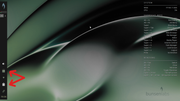
The battery icons - I put them both in. They're two different things - one is from xfce4-power-manager and the other is a separate utility that has better handling of low battery with optional alarms etc. Hoping for some user feedback.
We could:
1) disable display of the x-p-m icon, and have access to its settings via the menu only
2) drop the battery monitor plugin
3) keep them both
Last edited by johnraff (2026-01-22 07:27:00)
...elevator in the Brain Hotel, broken down but just as well...
( a boring Japan blog (currently paused), now on Bluesky and Mastodon, there's also some GitStuff )
Offline
#2 2026-01-14 04:19:56
- hhh
- Hercule Poirot

- From: Belgium
- Registered: 2015-09-17
- Posts: 17,480
- Website
Re: [Carbon RC2] battery icons in xfce4-panel
2 for me (keep the old power manager applet, x-p-m) if we're shipping xfce4-panel, but that icon needs taming. The bar applet is confusing after all the panel battery icons we've had going back to the first #!.
Why why why why?!!???
Online
#3 2026-01-14 04:31:26
- hhh
- Hercule Poirot
- From: Belgium
- Registered: 2015-09-17
- Posts: 17,480
- Website
Re: [Carbon RC2] battery icons in xfce4-panel
Proof of concept...

Why why why why?!!???
Online
#4 2026-01-14 05:24:58
- johnraff
- nullglob
- From: Nagoya, Japan
- Registered: 2015-09-09
- Posts: 13,459
- Website
Re: [Carbon RC2] battery icons in xfce4-panel
Oh right - I remember now - the x-p-m icon doesn't have its own plugin, it comes in the Status Tray Plugin (or possibly the Indicator Plugin), if it's enabled in x-p-m.
BTW annoying that we need both Status Tray Plugin and Indicator Plugin, but it seems some apps use one, and some the other. This is Progress. 
...elevator in the Brain Hotel, broken down but just as well...
( a boring Japan blog (currently paused), now on Bluesky and Mastodon, there's also some GitStuff )
Offline
#5 2026-01-22 07:20:02
- johnraff
- nullglob
- From: Nagoya, Japan
- Registered: 2015-09-09
- Posts: 13,459
- Website
Re: [Carbon RC2] battery icons in xfce4-panel
Anyway - remove the self-standing battery monitor plugin?
I liked that it could be set to run any command (popup, audible beep...) when the battery got down to some low %
In general, it's more flexible than the x-p-m icon.
It seems the only thing you can't access via x-p-m's "Power Management" on the menu is "Presentation Mode". I couldn't find it anyway. So that's an argument for keeping the x-p-m icon I guess - and dropping the battery plugin.
Last edited by johnraff (2026-01-22 07:23:33)
...elevator in the Brain Hotel, broken down but just as well...
( a boring Japan blog (currently paused), now on Bluesky and Mastodon, there's also some GitStuff )
Offline
#6 2026-01-22 07:25:55
- johnraff
- nullglob
- From: Nagoya, Japan
- Registered: 2015-09-09
- Posts: 13,459
- Website
Re: [Carbon RC2] battery icons in xfce4-panel
...that icon needs taming
What needs doing?
...elevator in the Brain Hotel, broken down but just as well...
( a boring Japan blog (currently paused), now on Bluesky and Mastodon, there's also some GitStuff )
Offline
#7 2026-01-23 01:42:43
- johnraff
- nullglob
- From: Nagoya, Japan
- Registered: 2015-09-09
- Posts: 13,459
- Website
Re: [Carbon RC2] battery icons in xfce4-panel
Maybe the simplest solution for now would be to keep both battery indicators - they're both useful - but switch off display of one of them.
eg keep the xfce4-power-manager icon because it offers "Presentation Mode", and turn off the icon and bar display in the battery monitor plugin. The low battery alarms etc would still be available from the settings via panel preferences > items > Battery Monitor. Maybe a reasonable payoff if those settings aren't going to be changed often.
The counter-option would be to switch off the x-p-m icon and access its settings via the menu "Power Management", keeping the Battery Monitor icon instead. That would lose access to x-p-m's Presentation Mode though.
...elevator in the Brain Hotel, broken down but just as well...
( a boring Japan blog (currently paused), now on Bluesky and Mastodon, there's also some GitStuff )
Offline
#8 2026-01-23 13:02:14
- PackRat
- jgmenu user Numero Uno

- Registered: 2015-10-02
- Posts: 3,045
Re: [Carbon RC2] battery icons in xfce4-panel
The counter-option would be to switch off the x-p-m icon and access its settings via the menu "Power Management", keeping the Battery Monitor icon instead. That would lose access to x-p-m's Presentation Mode though.
In the properties for the battery monitor plugin, there should be a switch to "Show Presentation Mode Indicator". That will add the presentation mode toggle button to the plugin menu.
Edit - I take it back. The plugin version shipped with trixie doesn't have that option.
You would need to use a key bind or menu entry ( https://forums.bunsenlabs.org/viewtopic.php?id=1922 ) until the plugin update.
You must unlearn what you have learned.
-- yoda
Offline
#9 2026-01-23 13:40:27
- PackRat
- jgmenu user Numero Uno
- Registered: 2015-10-02
- Posts: 3,045
Re: [Carbon RC2] battery icons in xfce4-panel
My mistake and sorry for the confusion.
There are actually two plugins for the battery.
There is the battery monitor plugin which ships with BL and is on the panel by default showing battery percent graph.
There is also the xfce4-power-manager-plugins ( https://packages.debian.org/search?keyw … ection=all ) which is not installed.
The xfce4-power-manager-plugins is the one I use. In the properties section for it there is the switch so that the presentation mode toggle is displayed. Also, it's icon can be scaled with the css setting.
Screenshot of BL live session after I installed and configured xfce4-power-manager-plugins. Disable the system tray icon for xfce4-power-manager:
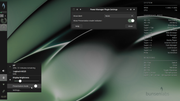
The plugin icon is scaled with:
#xfce4-power-manager-plugin * {
    -gtk-icon-transform: scale(.3);
}
in the ~/.config/gtk-3.0/gtk.css for this laptop's 1366x768 resolution. The css I posted in the screenshot thread is for 1920x1080.
The xfce4-power-manager-plugins replaces the system tray icon for xfce4-power-manager. You'll have access to presentation mode and the power manager settings from the plugin.
I recommend xfce4-power-manager-plugins for default and disabling the system tray icon for xfce4 power manager.
You must unlearn what you have learned.
-- yoda
Offline
#10 2026-01-24 04:35:09
- johnraff
- nullglob
- From: Nagoya, Japan
- Registered: 2015-09-09
- Posts: 13,459
- Website
Re: [Carbon RC2] battery icons in xfce4-panel
There are actually two plugins for the battery.
There is the battery monitor plugin which ships with BL and is on the panel by default showing battery percent graph.
There is also the xfce4-power-manager-plugins ( https://packages.debian.org/search?keyw … ection=all ) which is not installed.
As far as I can tell, xfce4-power-manager-plugins isn't directly connected with the battery. The package description says "This package contains the brightness plugin" - if I install it on my VM it automatically turns off the x-p-m default icon and replaces it with something that looks almost the same. It's possible to turn the x-p-m icon back on from the settings dialogue, but it goes away if you refresh the panel. That's fine because the plugin offers the same "Presentation Mode" and "Settings", and also it's scalable via GTK css as PackRat found. For my 1280x800 VM I found 0.4 to be the right size, compared with PackRat's 0.3 for 1366x768 and 0.6 for 1920x1080 so anyway it looks as if users will have to tweak those icon scalings to suit their own display. (Something else for the Release Notes.)
GTK css for those two icons on my VM:
#xfce4-power-manager-plugin * { -gtk-icon-transform: scale(0.4); }

#battery-14 * { -gtk-icon-transform: scale(0.6); }
/* adjust the "#14" to match the widget ID of your battery plugin */
The xfce4-power-manager-plugins is the one I use. In the properties section for it there is the switch so that the presentation mode toggle is displayed. Also, it's icon can be scaled with the css setting.
...Disable the system tray icon for xfce4-power-manager
I found the x-p-m icon got disabled automatically as soon as xfce4-power-manager-plugins was added.
The name is a bit deceptive because it only seems to add one plugin, ie the brightness. And my machine seems to have no access to brightness control either on bare metal or the VM, so I can't test it. I seem to remember seeing that on a previous computer though.
The xfce4-power-manager-plugins replaces the system tray icon for xfce4-power-manager. You'll have access to presentation mode and the power manager settings from the plugin.
Right, and it's scalable, unlike the x-p-m icon itself. And for most people probably allows brightness adjustment too.
I recommend xfce4-power-manager-plugins for default and disabling the system tray icon for xfce4 power manager.
OK sounds good, but I'd still like to have the battery plugin too - it has a lot of useful feedback about the battery state that the regular power manager doesn't. The icon size can be controlled with the css selector 'battery-14' (as in the code above). That looks a bit fragile to be honest, but right now 14 does seem to be that plugin's ID. (Of course, those without a battery would want to just uninstall it.)
We could enable the battery plugin with the icon switched off, so users would have to access the settings via the panel preferences. That might be OK if the low level alarm settings aren't going to be changed so often. The alternative would be to put up with having two power icons, as in the screenshot above.
...elevator in the Brain Hotel, broken down but just as well...
( a boring Japan blog (currently paused), now on Bluesky and Mastodon, there's also some GitStuff )
Offline
#11 2026-01-24 10:27:54
- PackRat
- jgmenu user Numero Uno
- Registered: 2015-10-02
- Posts: 3,045
Re: [Carbon RC2] battery icons in xfce4-panel
Sounds good.
And the brightness control is available on my laptops (HP and Dell).
You must unlearn what you have learned.
-- yoda
Offline
#12 2026-01-24 16:59:54
- hhh
- Hercule Poirot
- From: Belgium
- Registered: 2015-09-17
- Posts: 17,480
- Website
Re: [Carbon RC2] battery icons in xfce4-panel
^ The battery icon in PackRat's scrot looks good, I don't know what I was on about.
Why why why why?!!???
Online
#13 2026-01-24 18:09:26
- PackRat
- jgmenu user Numero Uno
- Registered: 2015-10-02
- Posts: 3,045
Re: [Carbon RC2] battery icons in xfce4-panel
^ The battery icon in PackRat's scrot looks good, I don't know what I was on about.
It's confusing. There are 3 battery icons for the xfce4 panel.
Xfce4 Power manager system tray icon --> depricated, code frozen. Have to edit the icon theme for decent aesthetics
Battery Monitor plugin icon with bar graphs --> can be changed with css
xfce4-power-manager-plugins --> the replacement (per xfce4 devs) for system tray icon; has the brightness controls etc ... Can also be changed with css.
You must unlearn what you have learned.
-- yoda
Offline
#14 2026-01-24 20:03:05
- hhh
- Hercule Poirot
- From: Belgium
- Registered: 2015-09-17
- Posts: 17,480
- Website
Re: [Carbon RC2] battery icons in xfce4-panel
hhh wrote:^ The battery icon in PackRat's scrot looks good, I don't know what I was on about.
It's confusing. There are 3 battery icons for the xfce4 panel.
Xfce4 Power manager system tray icon --> depricated, code frozen. Have to edit the icon theme for decent aesthetics
Battery Monitor plugin icon with bar graphs --> can be changed with css
xfce4-power-manager-plugins --> the replacement (per xfce4 devs) for system tray icon; has the brightness controls etc ... Can also be changed with css.
So, xfce4-power-manager-plugins please?
Why why why why?!!???
Online
#15 2026-01-24 20:06:37
- PackRat
- jgmenu user Numero Uno
- Registered: 2015-10-02
- Posts: 3,045
Re: [Carbon RC2] battery icons in xfce4-panel
^ Yes.
That is the recommended plugin to replace the power manager system tray icon.
Basically the same functionality.
From what I understand reading the xfce4 FAQs etc ...., Xfce4 is moving to plugins rather than system tray icons for any of their apps. Other than the power-manager, I don't know what used the system tray, but I'm not a Xfce4 power user.
You must unlearn what you have learned.
-- yoda
Offline
#16 2026-01-24 20:16:59
- hhh
- Hercule Poirot
- From: Belgium
- Registered: 2015-09-17
- Posts: 17,480
- Website
Re: [Carbon RC2] battery icons in xfce4-panel
Music player plugins, for one, like iconify/close to tray for Audacious. All of that is being dropped by GNOME, that's fine by me.
Why why why why?!!???
Online
#17 2026-01-25 00:42:04
- johnraff
- nullglob
- From: Nagoya, Japan
- Registered: 2015-09-09
- Posts: 13,459
- Website
Re: [Carbon RC2] battery icons in xfce4-panel
OK I'll add xfce4-power-manager-plugins to the package lists, enable it in the xfce4-panel settings and turn off the icon for Battery Monitor plugin, but leave it activated. Also add the GTK css icon resizing for those two plugins. For now I only have my VM to test on, so we'll just have to guess that the resize factors of 0.4 and 0.6 are good enough. If necessary a post-release upgrade of bunsen-configs would fix it.
---
What I'd be happy to see from this point is no more changes to the xfce4-panel settings. Every time the default Carbon panel is changed I also have to change the panel configs that get shipped with the Carbon BLOB to keep it in sync with the default, meaning an upgrade to bunsen-blobs as well as bunsen-configs.
...elevator in the Brain Hotel, broken down but just as well...
( a boring Japan blog (currently paused), now on Bluesky and Mastodon, there's also some GitStuff )
Offline
#18 2026-01-25 07:10:50
- hhh
- Hercule Poirot
- From: Belgium
- Registered: 2015-09-17
- Posts: 17,480
- Website
Re: [Carbon RC2] battery icons in xfce4-panel
What I'd be happy to see from this point is no more changes to the xfce4-panel settings. Every time the default Carbon panel is changed I also have to change the panel configs that get shipped with the Carbon BLOB to keep it in sync with the default, meaning an upgrade to bunsen-blobs as well as bunsen-configs.
Make it so, put the panel wherever and ship it.  The RC2 is very good.
Why why why why?!!???
Online
#19 2026-01-25 10:24:47
- PackRat
- jgmenu user Numero Uno
- Registered: 2015-10-02
- Posts: 3,045
Re: [Carbon RC2] battery icons in xfce4-panel
johnraff wrote:What I'd be happy to see from this point is no more changes to the xfce4-panel settings. Every time the default Carbon panel is changed I also have to change the panel configs that get shipped with the Carbon BLOB to keep it in sync with the default, meaning an upgrade to bunsen-blobs as well as bunsen-configs.
Make it so, put the panel wherever and ship it.
+1
You must unlearn what you have learned.
-- yoda
Offline