![[BunsenLabs Logo]](/img/bl.svg)
You are not logged in.
- Topics: Active | Unanswered
Pages: 1
#1 2025-12-13 20:14:17
- MetalChris
- New Member
- Registered: 2025-12-07
- Posts: 4
Notifications Location
Apologies if there's already a thread about this (I couldn't find one) or if this is in the wrong place.
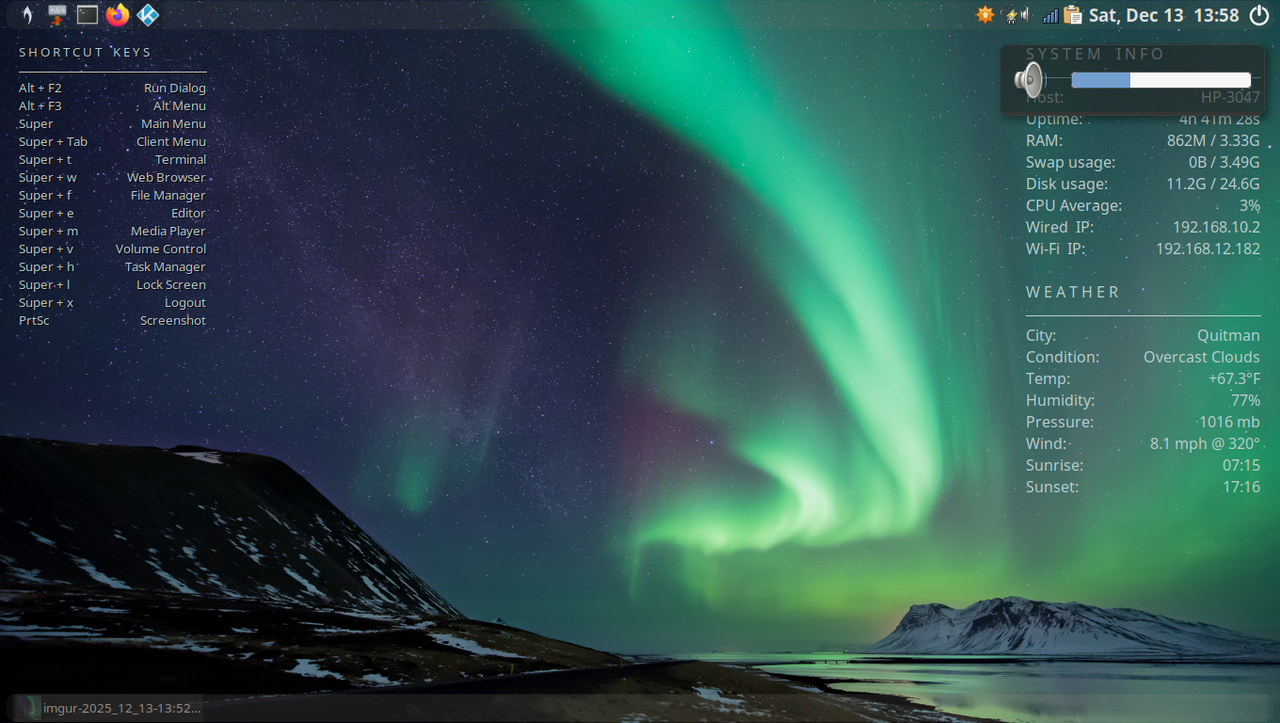
I'm trying to figure out if there's a way to reposition the notifications, specifically the volume notification.
Offline
#2 2025-12-14 00:46:53
- johnraff
- nullglob

- From: Nagoya, Japan
- Registered: 2015-09-09
- Posts: 13,567
- Website
Re: Notifications Location
Hi Chris, sure "GUI & Applications" is a good place for queries like this.
Try:
menu > User Settings > Notifications
Default Position can be in one of the four corners.
...elevator in the Brain Hotel, broken down but just as well...
( a boring Japan blog (currently paused), now on Bluesky and Mastodon, there's also some GitStuff )
Online
#3 2025-12-14 04:37:49
- MetalChris
- New Member
- Registered: 2025-12-07
- Posts: 4
Re: Notifications Location
Hi Chris, sure "GUI & Applications" is a good place for queries like this.
Try:
menu > User Settings > Notifications
Default Position can be in one of the four corners.
Thanks, that's helpful.
Any way to further customize the position? I was hoping to center the notification. Is there a file that can be modified to achieve this?
Last edited by MetalChris (2025-12-14 04:38:14)
Offline
#4 2025-12-14 05:01:10
- johnraff
- nullglob
- From: Nagoya, Japan
- Registered: 2015-09-09
- Posts: 13,567
- Website
Re: Notifications Location
^Sorry, not that I know of.
...elevator in the Brain Hotel, broken down but just as well...
( a boring Japan blog (currently paused), now on Bluesky and Mastodon, there's also some GitStuff )
Online
#5 2025-12-15 01:25:11
- hhh
- Hercule Poirot

- From: Belgium
- Registered: 2015-09-17
- Posts: 17,636
- Website
Re: Notifications Location
It would take hacking the source code, I think. https://forum.xfce.org/viewtopic.php?pid=78213#p78213
You could use another notification system that allows that instead of xfce4-notifyd. Maybe dunst? I've never used it. @Dobbie? @PackRat? https://packages.debian.org/search?keywords=dunst
On wayland, mako-notifier is very customizable. https://packages.debian.org/search?suit … words=mako
Why why why why?!!???
Online
#6 2025-12-15 01:58:24
- PackRat
- jgmenu user Numero Uno

- Registered: 2015-10-02
- Posts: 3,112
Re: Notifications Location
Yes, dunst accepts x,y offsets, box dimensions etc ....
You must unlearn what you have learned.
-- yoda
Offline
#7 2025-12-15 08:20:37
- mcarni
- Member
- Registered: 2015-09-29
- Posts: 36
Re: Notifications Location
one more option...
if on wayland you might want to try to use wob
i use it for volume notification
it is very minimal ;-) and it works great
https://github.com/francma/wob
M
Offline
#8 2025-12-16 00:12:20
- marens
- Member

- From: World without M$
- Registered: 2023-02-02
- Posts: 1,316
Re: Notifications Location
@MetalChris
The gtk.css file you need is usually located in the xfce-notify-4.0 folder within the theme you are using.
Since you want to change the position for all themes, try doing it in ~/.config/gtk-3.0/gtk.css:
#XfceNotifyWindow {
   margin-top: 200px;
   margin-right: 200px;
}
Just switch to another gtk theme and check.
If it works, adjust the position as you wish.
If people would know how little brain is ruling the world, they would die of fear.
Offline
Pages: 1