![[BunsenLabs Logo]](/img/bl.svg)
You are not logged in.
- Topics: Active | Unanswered
#261 2025-11-08 03:52:39
- greenjeans
- Member

- Registered: 2025-01-18
- Posts: 371
- Website
Re: Carbon Bugs
^I'm talking about the splash screen that the installer displays, which as you know has a size limit. ("grub-pc" is a bit bigger than syslinux at 800x600.)
We ship a grub boot image for the installed system which is 1024x765.
I'm pretty sure grub was unable to show anything bigger than that in the past, but you say it will now accept a fullsized wallpaper?
EDIT I found this: https://shallowsky.com/blog/linux/grub-splashimage.html
Use 640x480 at least initially. I think it's supposed to be possible to use other resolutions, but I haven't explored that yet. (Update: in 2025 I have successfully used a 1920 x 1200 image either as PNG or JPEG.)
^^Yep, been using a 1920x1200 in testing for a while now, I think you could go even larger if you like. The extra res is nice on desktop machines with larger monitors, and looks nice and sharp on laptops. I don't know when that changed but it looks nice and doesn't cost a lot in extra space.
Last edited by greenjeans (2025-11-08 04:26:04)
Offline
#262 2025-11-08 04:51:03
- micko01
- void main()

- From: Queensland, Australia
- Registered: 2024-04-07
- Posts: 578
- Website
Re: Carbon Bugs
On a different subject xwwall had some small bugs that are now fixed at github, xwwall-debian is updated too.
#!/bin/sh
echo '#include <stdio.h>\nvoid main() { printf("Hi, bunsenlabs\\n"); return; }' > bunsen.c
gcc bunsen.c -o bunsen
./bunsen
Offline
#263 2025-11-08 05:03:58
- micko01
- void main()
- From: Queensland, Australia
- Registered: 2024-04-07
- Posts: 578
- Website
Re: Carbon Bugs
Here's a tweaked sage 1024x768. I tweaked the logo marginally, and it may be a tiny bit crisper.

#!/bin/sh
echo '#include <stdio.h>\nvoid main() { printf("Hi, bunsenlabs\\n"); return; }' > bunsen.c
gcc bunsen.c -o bunsen
./bunsen
Offline
#264 2025-11-08 06:00:07
- johnraff
- nullglob

- From: Nagoya, Japan
- Registered: 2015-09-09
- Posts: 13,449
- Website
Re: Carbon Bugs
OK in order:
been using a 1920x1200 in testing for a while now
I thought "why not also throw in a 1920x1200 for those who want it?" and fired up Gimp to scale the sage image. Unfortunately it's a different aspect ratio - wider - and would mean a Graphics Guy deciding how to crop or stretch the existing image, so let's leave it for now.
xwwall had some small bugs that are now fixed at github, xwwall-debian is updated too
Thanks! I'll get the updated package built and uploaded today.
EDIT: I see that bunsenlabs xwwall and xwwall-debian have only "main" not "carbon" branches. My local fork's branch is "carbon" though, so I guess you renamed the branches to "main" at some point? Considering noone outside BL is likely to want "carbon" in their changelog, maybe you'd consider putting the bunsen-specific stuff in a carbon branch, at least for xwwall-debian?
Also, xwwall-debian on BL is ahead of the Micko repo, while BL xwwall is behind the Micko repo.
I'll wait till it settles down before building/uploading. 
Here's a tweaked sage 1024x768
Thanks for that too. Agree that the logo is a bit clearer.
Also noticed that the background is slightly squeezed horizontally (intentional?) and the filesize is slightly down.
...elevator in the Brain Hotel, broken down but just as well...
( a boring Japan blog (currently paused), now on Bluesky and Mastodon, there's also some GitStuff )
Offline
#265 2025-11-08 07:49:37
- micko01
- void main()
- From: Queensland, Australia
- Registered: 2024-04-07
- Posts: 578
- Website
Re: Carbon Bugs
^ with xwall-debian I'll delete it on my github. AFAIK there was only the main branch on on BL github. Anyway that is moot really as far as a build is concerned. The only change was running dch to update the changelog. There was no carbon branch on 01micko/xwall-debian or my local copy.
--
Synced bunsenlabs/xwwall with 01micko/xwwall so should be good to go.
Details 

#!/bin/sh
echo '#include <stdio.h>\nvoid main() { printf("Hi, bunsenlabs\\n"); return; }' > bunsen.c
gcc bunsen.c -o bunsen
./bunsen
Offline
#266 2025-11-09 07:20:41
- johnraff
- nullglob
- From: Nagoya, Japan
- Registered: 2015-09-09
- Posts: 13,449
- Website
Re: Carbon Bugs
^No, indeed the "carbon" branch was a local one I added to do the packaging on so I could leave the upstream commit history clean. Sorry about the noise there.
Anyway, the new xwwall is safely up in the package repository now.
Last time I built it by copying out the contents of the debian/ directory in xwwall-debian, pasting it into xwwall carbon branch, committing the change: "Update debian/ directory from xwwall-debian package" and building. That works fine but felt a bit dirty somehow.
Did some research, learned about git submodules and worktrees, pulled xwwall-debian into a submodule of xwwall, "packaging" branch, put that branch in a separate worktree so the submodule directory wouldn't interfere with the upstream code when checking out "main". Now you can fetch the debian contents and merge it with xwwall and all the history is intact, while the upstream commits are in a separate "upstream" branch. OK looks good, but didn't build because of the extra xwwall-debian directory in the source. 
Had to rename the submodule's directory .xwwall-debian so it was ignored - then it built.  (Also needed a symlink from .xwwall-debian/debian to debian in the source root.)
Anyone interested in the details, I listed up the commands so I wouldn't have to spend 3~4 hours searching the internet next time I had to do something like this:
If debian packaging is in a different git repo from the app itself,
put it in a submodule, and move that to a new worktree to keep the packaging
from dirtying the upstream code:
(on software repo, "main" branch)

git checkout -b packaging
git submodule add git@github.com:BunsenLabs/xwwall-debian.git .xwwall-debian
git commit -m 'Add debian submodule from git@github.com:BunsenLabs/xwwall-debian.git in hidden directory .xwwall-debian'
ln -s .xwwall-debian/debian debian
(because debian/ is a subfolder, not root of xwwall-debian)
git commit -m 'add symlink "debian" to .xwwall-debian/debian/ '
git submodule set-branch --branch packaging -- xwwall-debian
git commit -m 'set xwwall-debian submodule to packaging branch'
git worktree add ../xwwall-packaging packaging
(now "packaging" branch is inside ../xwwall-packaging and
submodule contents are in ./xwwall-debian on "packaging" branch)
cd .xwwall-debian
git fetch origin
(refresh upstream data)
git checkout -b upstream origin/main
git checkout main
git merge upstream

Now "packaging" branch is in its own worktree "xwwall-packaging",
xwwall-debian submodule:
    packaging work and commits in "main"
    clean upstream history in "upstream".

"xwwall-packaging" is still linked to the base "xwwall" repo.
"main" branch only available in xwwall
"packaging" branch only in xwwall-packaging
NB: but don't forget the submodule in .xwwall-debian/ also has its own "main" branch.

Do 'git pull' in main "xwwall" repo to update software.

To update debianization,
in xwwall-packaging directory:
    'git merge main' to pull software upgrades from the separated-off xwwall's "main" branch
    'cd .xwwall-debian' (now in submodule)
    'git checkout upstream'
    'git pull'
    'git checkout main' (submodule's main)
    'git merge upstream'
    cd ../ (back in parent repo's "packaging" branch)

Now can do package build in  xwwall-packaging/
Maybe there's an easier way to do this...
Last edited by johnraff (2025-11-10 06:27:53)
...elevator in the Brain Hotel, broken down but just as well...
( a boring Japan blog (currently paused), now on Bluesky and Mastodon, there's also some GitStuff )
Offline
#267 2025-11-09 08:50:41
- micko01
- void main()
- From: Queensland, Australia
- Registered: 2024-04-07
- Posts: 578
- Website
Re: Carbon Bugs
^Nice!
Maybe there's an easier way to do this...
Maybe, but some clever scripting could make it less cumbersome.
#!/bin/sh
echo '#include <stdio.h>\nvoid main() { printf("Hi, bunsenlabs\\n"); return; }' > bunsen.c
gcc bunsen.c -o bunsen
./bunsen
Offline
#268 2025-11-10 06:44:18
- johnraff
- nullglob
- From: Nagoya, Japan
- Registered: 2015-09-09
- Posts: 13,449
- Website
Re: Carbon Bugs
Maybe there's an easier way to do this...
Maybe, but some clever scripting could make it less cumbersome.
In fact only the last few commands would need to be scripted, so it wouldn't be that hard:
cd xwwall
git branch
echo 'only "main" branch is available here
"packaging" branch is in ../xwwall-packaging'
git pull
cd ../xwwall-packaging
echo 'only the "packaging" branch is available here'
echo 'pulling in any software upgrades from the separated-off xwwall "main" branch...'
git merge main
cd .xwwall-debian
echo 'Now in xwwall-debian submodule'
git checkout upstream
git pull
git checkout main
git merge upstream
cd ../
echo 'now back in xwwall-packaging "packaging" branch'
echo "now you can build the package"
It would be good to add some error-checking...
And I suppose the whole git repo setup process could be scripted too.
...elevator in the Brain Hotel, broken down but just as well...
( a boring Japan blog (currently paused), now on Bluesky and Mastodon, there's also some GitStuff )
Offline
#269 2025-11-18 07:51:38
- unklar
- Back to the roots 1.9

- From: #! BL
- Registered: 2015-10-31
- Posts: 3,081
Re: Carbon Bugs
^@johnraff, have you seen this bug? (1920x1080)
https://forums.bunsenlabs.org/viewtopic … 05#p146705
Last edited by unklar (2025-11-18 08:01:03)
Offline
#270 2025-11-18 08:05:15
- johnraff
- nullglob
- From: Nagoya, Japan
- Registered: 2015-09-09
- Posts: 13,449
- Website
Re: Carbon Bugs
^Sorry I overlooked the upper part of that post .
I have to close down now, but I'll have a look soon. Thank you!
...elevator in the Brain Hotel, broken down but just as well...
( a boring Japan blog (currently paused), now on Bluesky and Mastodon, there's also some GitStuff )
Offline
#271 2025-11-19 04:21:30
- johnraff
- nullglob
- From: Nagoya, Japan
- Registered: 2015-09-09
- Posts: 13,449
- Website
Re: Carbon Bugs
I just installed the alpha on my wife's new Linux ASUS Vivobook.
The USER opens a system file with Geany (e.g., fstab). Then, “Open with root” is selected in the menu. After entering the root password, Geany is “superimposed” over the USER's Geany. There is no color difference(!). Only moving it with the mouse reveals the risk of root editing.
Yes, a new - USER permissions - text editor window opens right on top, with a temporary copy of the file to be edited. When closed, changes to the file will be written as root to the original file, and the temorary file removed.
This is the sudoedit work flow, which we introduced to replace pkexec for text files.
Previous discussions:
https://forums.bunsenlabs.org/viewtopic … 01#p143401 ("Editing text files as root" section)
https://forums.bunsenlabs.org/viewtopic … 42#p144442
https://forums.bunsenlabs.org/viewtopic … 417#p67417
But I was wondering what the user reaction to this change would be.
*) The sudoedit way is safer because no GUI app's code is run as root, only a system command to write a file.
*) But the pkexec way brings up a text editor window which is visually different - at least with geany - so USER is well aware they are working as root. I think this is more comfortable for most people.
The pkexec configuration for bl-text-editor is still present in Carbon, so it would be quite easy to go back to that if most of the community preferred it.
...elevator in the Brain Hotel, broken down but just as well...
( a boring Japan blog (currently paused), now on Bluesky and Mastodon, there's also some GitStuff )
Offline
#272 2025-11-19 10:14:42
- unklar
- Back to the roots 1.9
- From: #! BL
- Registered: 2015-10-31
- Posts: 3,081
Re: Carbon Bugs
^Thank you for taking the trouble. 
My thought was that there should be a better color distinction.
I'm probably wrong about using a different editor.
e.g.
user - root 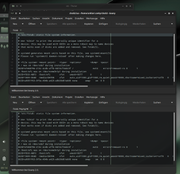 better user - root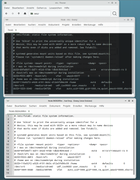
Offline
#273 2025-11-20 00:58:43
- johnraff
- nullglob
- From: Nagoya, Japan
- Registered: 2015-09-09
- Posts: 13,449
- Website
Re: Carbon Bugs
^yes I quite agree that it's better for usability to have a root window styled differently from a user-owned window.
But the thing with sudoedit is that the text editor is not owned by root - it's a regular user-owned process and so gets the regular user styling. The only root process is when the edited temporary file gets copied to the system file.
Right now I don't know if there's any way to use a different style for the text editor when it's being run by sudoedit, as it's still a user process.
EDIT: It might be possible though... perhaps setting an environment variable... I'll have another look at it.
The other annoyance with sudoedit is that the file name gets presented as some random number, because it's just a temporary file.
Please see those previous discussions for a bit more on this topic.
Anyway, as I said, going back to pkexec is not out of the question...
Last edited by johnraff (2025-11-20 01:22:31)
...elevator in the Brain Hotel, broken down but just as well...
( a boring Japan blog (currently paused), now on Bluesky and Mastodon, there's also some GitStuff )
Offline
#274 2025-11-20 05:31:06
- johnraff
- nullglob
- From: Nagoya, Japan
- Registered: 2015-09-09
- Posts: 13,449
- Website
Re: Carbon Bugs
I quite agree that it's better for usability to have a root window styled differently from a user-owned window.
...
Right now I don't know if there's any way to use a different style for the text editor when it's being run by sudoedit, as it's still a user process.EDIT: It might be possible though... perhaps setting an environment variable... I'll have another look at it.
@unklar, how about this workaround?
Open (as root) /usr/bin/sudoedit.wrapper and add this line near the top (eg just after 'export SUDO_ASKPASS...'):
export GTK_THEME="Adwaita"Now the text editor will come up white, in the GTK Adwaita theme that root usually gets.
A slight irritation is that the password entry box is also styled Adwaita.
...elevator in the Brain Hotel, broken down but just as well...
( a boring Japan blog (currently paused), now on Bluesky and Mastodon, there's also some GitStuff )
Offline
#275 2025-11-20 09:40:39
- unklar
- Back to the roots 1.9
- From: #! BL
- Registered: 2015-10-31
- Posts: 3,081
Re: Carbon Bugs
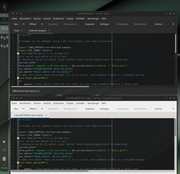
^the content of the window itself would maintain the user's theme.
That should be enough to get the attention you need.
Offline
#276 2025-11-20 09:58:02
- johnraff
- nullglob
- From: Nagoya, Japan
- Registered: 2015-09-09
- Posts: 13,449
- Website
Re: Carbon Bugs
the content of the window itself would maintain the user's theme.
I'm not sure whether or not the GTK theme should affect the actual window content - isn't that under the control of the editor?
But anyway, as you say it should be enough to get the user's attention.
...elevator in the Brain Hotel, broken down but just as well...
( a boring Japan blog (currently paused), now on Bluesky and Mastodon, there's also some GitStuff )
Offline
#277 2025-11-20 14:51:46
- greenjeans
- Member
- Registered: 2025-01-18
- Posts: 371
- Website
Re: Carbon Bugs
unklar wrote:the content of the window itself would maintain the user's theme.
I'm not sure whether or not the GTK theme should affect the actual window content - isn't that under the control of the editor?
But anyway, as you say it should be enough to get the user's attention.
I don't know about geany, but in pluma the interior style is not set by the gtk theme, it's controlled by whatever "style" config you set in the gui itself, and those files are kept in /usr/share/gtksourceview-4/styles. I use the "classic" theme in mine but I modded it a fair bit to be more inline with my gtk theme. Of course that's a global setting so root looks the same. Don't know if that's helpful or not but thought i'd share the info. If geany does something similar, perhaps you can plugin a custom interior theme with your wrapper or exec command?
Last edited by greenjeans (2025-11-20 15:04:25)
Offline
#278 2025-11-20 15:46:20
- marens
- Member

- From: World without M$
- Registered: 2023-02-02
- Posts: 1,297
Re: Carbon Bugs
I don't know about Geany, but Gedit has the option to change the Color Scheme in Preferences.
I have many themes in ~/.local/share/gedit/styles.
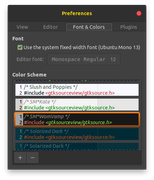
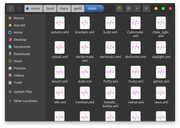
I recently had to modify an existing theme (style) to make the background visible in screenshots (postimages).
Before:
https://postimg.cc/Yvk7FSNz
If people would know how little brain is ruling the world, they would die of fear.
Offline
#279 2025-12-04 08:32:44
- unklar
- Back to the roots 1.9
- From: #! BL
- Registered: 2015-10-31
- Posts: 3,081
Re: Carbon Bugs
When setting up a network printer via the carbon setup dialog, the user's (sudo) password is not recognized at the end.
I have checked everything, everything is correct with ‘sudo’; ‘lp’ etc., where $USER is listed.
The strange thing is that the printer dialog must first be “unlocked” with sudo, which works.
Then, when you click the “Apply” button, the sudo password is requested again and fails.
Offline
#280 2025-12-04 10:40:18
- micko01
- void main()
- From: Queensland, Australia
- Registered: 2024-04-07
- Posts: 578
- Website
Re: Carbon Bugs
When setting up a network printer via the carbon setup dialog, the user's (sudo) password is not recognized at the end.
I have checked everything, everything is correct with ‘sudo’; ‘lp’ etc., where $USER is listed.
The strange thing is that the printer dialog must first be “unlocked” with sudo, which works.
Then, when you click the “Apply” button, the sudo password is requested again and fails.
I just set up my printer on my old dell laptop (which is stock standard Carbon alpha/X11 and very little installed), after reading your issues.
From the menu >system settings >printers, I got the terminal asking to input password and such but at this point I had failure because of the new Trixie point release..
What I should have done is apt update/upgrade before hand.
Following the same procedure after a reboot, the necessary packages were installed and then the printer was found and all went well as a the cups printer dialog box popped up with my printer listed. I tested with a simple libreoffice document and it printed. My printer is a wireless networked epson 4200xp, and I've always had a liking for epson printers and seiko watches (same company). IDK if that has anything to do with it but they always 'just work' in any linux I've used from Puppy, Slackware, Debian, FatDog and BunsenLabs.
#!/bin/sh
echo '#include <stdio.h>\nvoid main() { printf("Hi, bunsenlabs\\n"); return; }' > bunsen.c
gcc bunsen.c -o bunsen
./bunsen
Offline