![[BunsenLabs Logo]](/img/bl.svg)
You are not logged in.
- Topics: Active | Unanswered
#1 2025-10-24 00:16:17
- micko01
- void main()

- From: Queensland, Australia
- Registered: 2024-04-07
- Posts: 578
- Website
Carbon menu icons
If anyone notices a missing menu icon in jgmenu please report it in this thread and I'll attempt to add a suitable icon in the Carbon icon themes so that we can cover anything missing. Icon requests are also allowed. The themes attempt to follow the freedesktop icon theme specification
Love the menu icons. Nice! There are a few missing in the Settings section of the Applications Menu. All the rest are good to go.
@sleekmason can you recall what icons are missing? I can fix those by either a symlink or creating a new one.
EDIT0: I see an obvious one "emblem-favorite" that might be better fixed in .config/jgmenu/prepend.csv. with "starred" or something as the emblems are all shared between the different colors of icon themes. Or I can creat a themed "heart" icon.
I also see a few application icons missing, I'll note theme here:
file roller
gtkhash
hardinfo
gigolo
Should we start a separate thread? Users may have requests also. (THIS IS THE THREAD!)
Last edited by micko01 (2025-10-24 07:01:35)
#!/bin/sh
echo '#include <stdio.h>\nvoid main() { printf("Hi, bunsenlabs\\n"); return; }' > bunsen.c
gcc bunsen.c -o bunsen
./bunsen
Offline
#2 2025-10-24 00:33:19
- sleekmason
- zoom

- Registered: 2018-05-22
- Posts: 1,163
- Website
Re: Carbon menu icons
@micko01 Yep! These three mystery entries here.
floating xfce
pop art squares
slideshow
What they are associated with, I do not know. I don't believe they were in /usr/share/applications.
Edit* checking...
1. Looks like floating xfce is "floaters" based on the title name.
2. pop art squares is "popsquares" based on the title name.
3. slideshow pulls up a terminal sized slideshow of the wallpapers..
Last edited by sleekmason (2025-10-24 00:40:55)
Offline
#3 2025-10-24 00:47:04
- micko01
- void main()
- From: Queensland, Australia
- Registered: 2024-04-07
- Posts: 578
- Website
Re: Carbon menu icons
@micko01 Yep! These three mystery entries here.
floating xfce
pop art squares
slideshowWhat they are associated with, I do not know. I don't believe they were in /usr/share/applications.
Edit* checking...
1. Looks like floating xfce is "floaters" based on the title name.
2. pop art squares is "popsquares" based on the title name.
3. slideshow pulls up a terminal sized slideshow of the wallpapers..
Thanks, yeah I was editing^^ while you were posting and found some more.
Thanks for those. I'll find appropriate replacements or design new ones.
#!/bin/sh
echo '#include <stdio.h>\nvoid main() { printf("Hi, bunsenlabs\\n"); return; }' > bunsen.c
gcc bunsen.c -o bunsen
./bunsen
Offline
#4 2025-10-24 05:28:19
- johnraff
- nullglob

- From: Nagoya, Japan
- Registered: 2015-09-09
- Posts: 13,513
- Website
Re: Carbon menu icons
Love the menu icons. There are a few missing in the Settings section of the Applications Menu.
Are we talking about the auto-generated "All Applications" menu here? If so, then the icons are defined in the .desktop files in /usr/share/applications - but I guess you both know that. So the problem is that our selected icon theme doesn't provide those icons? Maybe @micko can fix that for us. 
Icons set in prepend.csv are for the hard-coded items. I just chose things that actually appeared and were vaguely related to the item but any suggestions for improvement there will be put in right away.
...elevator in the Brain Hotel, broken down but just as well...
( a boring Japan blog (currently paused), now on Bluesky and Mastodon, there's also some GitStuff )
Offline
#5 2025-10-25 01:53:36
- micko01
- void main()
- From: Queensland, Australia
- Registered: 2024-04-07
- Posts: 578
- Website
Re: Carbon menu icons
@johnraff I've commited a fix for the missing 'favorite' icon so no need to mess with the jgmenu csv config. Because labbe-icons* are at the top they get priority over the emblems I would expect.
Also for labwc-tweaks (the qt version) if we ever decide to use it.
https://github.com/BunsenLabs/labbe-ico … f8a1bf1d6c
The missing File Roller icon et al can be links in the Suru themes, quite easy to do. Actually just did File Roller but won't push until I've done the ones that we know about.
Last edited by micko01 (2025-10-25 01:57:20)
#!/bin/sh
echo '#include <stdio.h>\nvoid main() { printf("Hi, bunsenlabs\\n"); return; }' > bunsen.c
gcc bunsen.c -o bunsen
./bunsen
Offline
#6 2025-10-25 02:39:41
- johnraff
- nullglob
- From: Nagoya, Japan
- Registered: 2015-09-09
- Posts: 13,513
- Website
Re: Carbon menu icons
^@Micko many thanks!
As long as the icon theme is updated by the time I do the final iso build we'll be good to go.
That won't be till various other tweaks* are done, and we've checked with @hhh if there are any theming changes, so a while yet...
*Actually, some are quite big, like re-writing the image upload scripts to use something other than imgur. 
Last edited by johnraff (2025-10-25 02:44:14)
...elevator in the Brain Hotel, broken down but just as well...
( a boring Japan blog (currently paused), now on Bluesky and Mastodon, there's also some GitStuff )
Offline
#7 2025-10-25 04:05:52
- micko01
- void main()
- From: Queensland, Australia
- Registered: 2024-04-07
- Posts: 578
- Website
Re: Carbon menu icons
Ok the xfce apps that @sleekmason mentioned , floaters, popsquares, and slideshow are all in a sub-folder of /usr/share/applications, all have Hidden=true and none have an Icon= key.
Does jgmenu have a blacklist for entries we don't need/want? Knowing @malm I would guess so because labwc-menu-generator does.
--
I'm almost done with what I have so far.
labbe has added a favorite icon as stated above, also added a nice one for org.xfce.gigolo
labbe is all committed with a version bump in the changelog.
suru is almost done too. I'll do a dch soon and push
#!/bin/sh
echo '#include <stdio.h>\nvoid main() { printf("Hi, bunsenlabs\\n"); return; }' > bunsen.c
gcc bunsen.c -o bunsen
./bunsen
Offline
#8 2025-10-26 14:50:39
- unklar
- Back to the roots 1.9

- From: #! BL
- Registered: 2015-10-31
- Posts: 3,132
Re: Carbon menu icons
Just a minor detail.
The logo in the top left corner says “distributor-logo-bunsenlabs-dark” on the ISO and on metal.
Changing it to “bunsen” would look better.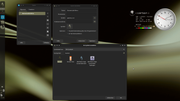
Tint2 Manager and Tint2 Editor could be removed.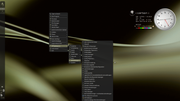
Offline
#9 2025-10-26 17:16:15
- malm
- Wayland Compositor developer
- Registered: 2016-10-13
- Posts: 756
- Website
Re: Carbon menu icons
@micko01 There is no blacklist in jgmenu-apps, but it would be relatively easy to create one.
Questions to consider:
1. You can create desktop entries in $HOME/.local/share/applications with NoDisplay=true to hide entries. That would hide them in other clients too like Thunar, so depends on what you want. You can even use the helpful "jgmenu_run hide-app" command for this.
2. Do we run trixie's version of jgmenu or do we still package it ourselves? If the former, do we understand trixie policy on tracking releases. I'm close to doing another release, so would be interesting to know.
3. Depending on the answers to the first two, would anyone be interested in leading on a blacklist design, build and test. I can help as much as needed, but find it's generally better when the ones wanting a feature do most of the thinking and shaping.
Offline
#10 2025-10-27 02:22:14
- johnraff
- nullglob
- From: Nagoya, Japan
- Registered: 2015-09-09
- Posts: 13,513
- Website
Re: Carbon menu icons
labbe is all committed with a version bump in the changelog.
suru is almost done too. I'll do a dch soon and push
Great!
Should I wait till the material-solarized-suruplusplus icons are ready, or is it OK to build and upload labbe-icons-bark and labbe-icons-sage now?
...elevator in the Brain Hotel, broken down but just as well...
( a boring Japan blog (currently paused), now on Bluesky and Mastodon, there's also some GitStuff )
Offline
#11 2025-10-27 02:57:37
- johnraff
- nullglob
- From: Nagoya, Japan
- Registered: 2015-09-09
- Posts: 13,513
- Website
Re: Carbon menu icons
Just a minor detail.
The logo in the top left corner says “distributor-logo-bunsenlabs-dark” on the ISO and on metal.
Changing it to “bunsen” would look better.
https://i.postimg.cc/QV8rh2dK/Bildschirmfoto-2025-10-26-15-09-54.png
Tint2 Manager and Tint2 Editor could be removed.
https://i.postimg.cc/LnJws2dw/Bildschirmfoto-2025-10-26-14-44-34.png
Hi unklar I can't view the full-sized images for some reason.
But I was able to download them from the postimg page, so never mind. (I hope postimg doesn't often mess up like this - that would take it off the shortlist of imgur replacements.)
This “distributor-logo-bunsenlabs-dark” looks like a filename in Thunar, but I don't see it on the desktop.
The Tint2 entries are gone from the main menu already, replaced with xfce4-panel config, but the utilities remain, just in case someone wants to use tint2 again. So they still appear in the auto-generated "All Applications" menu. This is an example of why we encourage people to use the hard-coded sections of the menu (in this case "User Settings") and leave "All Applications" as a last resort.
...elevator in the Brain Hotel, broken down but just as well...
( a boring Japan blog (currently paused), now on Bluesky and Mastodon, there's also some GitStuff )
Offline
#12 2025-10-27 03:35:04
- micko01
- void main()
- From: Queensland, Australia
- Registered: 2024-04-07
- Posts: 578
- Website
Re: Carbon menu icons
I get what @unklar is saying. Each labbe theme has a 'bunsen.svg' icon. Doing a search in the menu properties for 'bunsen' shows it and you then have the option to set it. Looks better 
Labbe and suru are both pushed so can be built, but won't solve the problem I mentioned to @malm. I'm going to try the relevent .desktop files in ~/.local/share/applications shortly.
#!/bin/sh
echo '#include <stdio.h>\nvoid main() { printf("Hi, bunsenlabs\\n"); return; }' > bunsen.c
gcc bunsen.c -o bunsen
./bunsen
Offline
#13 2025-10-27 04:38:06
- micko01
- void main()
- From: Queensland, Australia
- Registered: 2024-04-07
- Posts: 578
- Website
Re: Carbon menu icons
@malm
1. You can create desktop entries in $HOME/.local/share/applications with NoDisplay=true to hide entries. That would hide them in other clients too like Thunar, so depends on what you want. You can even use the helpful "jgmenu_run hide-app" command for this.
This doesn't seem to be working. For a start the relevant files have NoDisplay=true at the end of each file,
/usr/share/applications/screensavers/{xfce-floaters.desktop,xfce-personal-slideshow.desktop,xfce-popsquares.desktop}Each entry works and shows the relevant screensaver preview.
I tried copying them to ~/.local/share/applications/ and they still show and work.
I guess @johnraff the inclusion of xfce4-screensaver has been in bunsen for a while?
EDIT:
Ah so that little command
jgmenu_run hide-app xfce-personal-slideshow.desktopdoes the job niceley 
So @johnraff if you want them hidden they could easily be shipped, or copy over the whole files and add and icon field if you want them shown.
This is what the command above creates: (relative to what .desktop file name you gave)
[Desktop Entry]
Type=Application
NoDisplay=true
which I'm gueussing is all the jgmenu expects, that's why copying over the whole file, even though the last line is the same doesn't work. Neat! Can you tell I'm a jgmenu noob? 
Last edited by micko01 (2025-10-27 05:18:13)
#!/bin/sh
echo '#include <stdio.h>\nvoid main() { printf("Hi, bunsenlabs\\n"); return; }' > bunsen.c
gcc bunsen.c -o bunsen
./bunsen
Offline
#14 2025-10-27 05:24:48
- johnraff
- nullglob
- From: Nagoya, Japan
- Registered: 2015-09-09
- Posts: 13,513
- Website
Re: Carbon menu icons
I guess @johnraff the inclusion of xfce4-screensaver has been in bunsen for a while?
Not at all - it went in only a month or so ago, replacing the buggy light-locker. Is there a problem with xfce4-screensaver?
So @johnraff if you want them hidden they could easily be shipped, or copy over the whole files and add and icon field if you want them shown.
Sorry, I'm totally lost here. What's this discussion about again?
...elevator in the Brain Hotel, broken down but just as well...
( a boring Japan blog (currently paused), now on Bluesky and Mastodon, there's also some GitStuff )
Offline
#15 2025-10-27 05:34:26
- hhh
- Hercule Poirot

- From: Belgium
- Registered: 2015-09-17
- Posts: 17,594
- Website
Re: Carbon menu icons
Sorry, I'm totally lost here. What's this discussion about again?
1) Emma Watson's breast cup. Not OT, but everybody is interested, for some reason.
2) Carbon menu icons, which I guess just means icons (although jgmenu icons can be set separately)
I'll post this here with apologies to @mick0... the labbe icons are wonky as all get out, I hate them.
Hate hate hate. What happened to Yaru for the home folders?
Why why why why?!!???
Online
#16 2025-10-27 05:41:22
- micko01
- void main()
- From: Queensland, Australia
- Registered: 2024-04-07
- Posts: 578
- Website
Re: Carbon menu icons
^ah all good
My lappy has stock alpha carbon, and it's there so that's fine. Just trying to work out what to do with those missing icons that @sleekmason is talking about https://forums.bunsenlabs.org/viewtopic … 76#p146376
So we can:
hide the menu entries thanks to @malm
ship alternative .desktop files to show an appropriate icon
Making some sense now?
#!/bin/sh
echo '#include <stdio.h>\nvoid main() { printf("Hi, bunsenlabs\\n"); return; }' > bunsen.c
gcc bunsen.c -o bunsen
./bunsen
Offline
#17 2025-10-27 05:43:57
- hhh
- Hercule Poirot
- From: Belgium
- Registered: 2015-09-17
- Posts: 17,594
- Website
Re: Carbon menu icons
No.
Install Papirus icons.
Enjoy the panel icon uniformity.
Color the icons via a script or two.
Profit, leave labbe icons behind.
Why why why why?!!???
Online
#18 2025-10-27 05:45:13
- hhh
- Hercule Poirot
- From: Belgium
- Registered: 2015-09-17
- Posts: 17,594
- Website
Re: Carbon menu icons
Seriously, and I'm sorry, I think those xdg-dirs icons suck. The sizing is terrible.
Why why why why?!!???
Online
#19 2025-10-27 05:51:29
- micko01
- void main()
- From: Queensland, Australia
- Registered: 2024-04-07
- Posts: 578
- Website
Re: Carbon menu icons
Carbon menu icons, which I guess just means icons (although jgmenu icons can be set separately)
I'll post this here with apologies to @mick0... the labbe icons are wonky as all get out, I hate them.
Hate hate hate. What happened to Yaru for the home folders?
No need to apologise . Hate is hate! It's only the folders and a few application icons in labbe, it inherits Suru++ for the rest. Can use Yaru icons if you want, jgmenu is TK independent and can use any icon theme.
jgmenu can't set the icons in the .desktop files for the 'All Applications' menu, that's a given.
#!/bin/sh
echo '#include <stdio.h>\nvoid main() { printf("Hi, bunsenlabs\\n"); return; }' > bunsen.c
gcc bunsen.c -o bunsen
./bunsen
Offline
#20 2025-10-27 05:57:24
- hhh
- Hercule Poirot
- From: Belgium
- Registered: 2015-09-17
- Posts: 17,594
- Website
Re: Carbon menu icons
Yeah, my brief assessment was harsh. Apologies for that.
Why why why why?!!???
Online