![[BunsenLabs Logo]](/img/bl.svg)
You are not logged in.
- Topics: Active | Unanswered
#1 2026-04-27 19:03:24
- ghorvath
- Member
- Registered: 2015-10-01
- Posts: 170
Cannot resize xfce4-terminal to original size after maximized?
Hi Team!
I love Bunsenlabs Carbon on my shiny new Framework laptop 13. On my previous laptop, I used urxvt to save on resources, but on this new laptop I thought I will live a little, and gave the default Bunsen terminal a go! :-D
However, I experience a weird behaviour, and I am not sure if this is only me, or this is expected. When I maximize the xfce4-terminal (let it be with the icon, or with ALT+F6), afterwards I can not find a way to resize the terminal to its original size. If I hit the maximize button again on the upper-right corner, the button loses the highlighting, but the terminal does not go back to its pre-maximized size, nor to its original place on the desktop. It stays where it is, essentially filling up the screen, maybe moves a few pixels to some direction.
This seems to be an issue with xfce4-terminal specifically, because for example firefox behaves as expected: after maximized, when I hit the maximize button again, it moves the firefox window back to its original size and place on the desktop.
Anyone experienced this before? Is this a known limitation, or is my system screwed up in some way?
Not sure what are the relevant information here, but happy to provide details. I'm using the kernel and firmware from backports, but otherwise using the stable debian and bunsen repos.
Last edited by ghorvath (2026-04-30 20:15:57)
Offline
#2 2026-04-28 00:37:29
- johnraff
- nullglob

- From: Nagoya, Japan
- Registered: 2015-09-09
- Posts: 13,565
- Website
Re: Cannot resize xfce4-terminal to original size after maximized?
Hi ghorvath - this seems to be something with your system.
On my recently upgraded Carbon system I can toggle xfce4-terminal's maximization OK, either with the icon or with Alt+F6.
Have you found any other apps with the same problem?
Are you using a backported xfce4-terminal or the standard 1.1.4-1 from the Trixie repository?
EDIT I do now remember getting some similar maximize behaviour when using lxde-terminal on a qemu Trixie VM. Sometimes after maximizing if you try to return to normal size, the terminal window looks the same, but it's not maximized, it's a very big normal window. In that state you can resize it by grabbing a window edge. Does that sound familiar? I've no idea what's behind it though (and it's not xfce4-terminal).
Last edited by johnraff (2026-04-28 00:44:05)
...elevator in the Brain Hotel, broken down but just as well...
( a boring Japan blog (currently paused), now on Bluesky and Mastodon, there's also some GitStuff )
Offline
#3 2026-04-28 08:38:08
- unklar
- Back to the roots 1.9

- From: #! BL
- Registered: 2015-10-31
- Posts: 3,140
Re: Cannot resize xfce4-terminal to original size after maximized?
In BL, F11 to maximize and minimize has always worked for me (xfce4; lxterminal; terminator).
However, the window must NOT have any Frame at this point!
Offline
#4 2026-04-28 19:37:17
- ghorvath
- Member
- Registered: 2015-10-01
- Posts: 170
Re: Cannot resize xfce4-terminal to original size after maximized?
@johnraff
Yes, I just checked and I have 1.1.4-1 from trixie stable. Doesn't even give me any other versions from backports, though.
And yes, the behaviour is exactly as you describe, I can grab the window edge to resize, but can't find a way to resize it easily to the original window size.
@unklar
F11 maximizes the window, and top frame (everything above the words "File", "Edit", etc) disappears. They probably are over the desktop border. Then hitting F11 again makes it a normal window, but more or less the same size, and moves it downwards, so the frame above "File", "Edit", etc becomes visible, but the bottom few lines disappear below the desktop border.
Any ideas what to try? Happy to provide any info on my system. Not sure if this is relevant: in ~/.Xresources I changed
Xft.dpi: 96to
Xft.dpi: 160to be able to cope with the huge resolution of the screen.
Offline
#5 2026-04-29 12:56:33
- unklar
- Back to the roots 1.9
- From: #! BL
- Registered: 2015-10-31
- Posts: 3,140
Re: Cannot resize xfce4-terminal to original size after maximized?
^A picture says more than a thousand words 
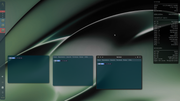
xfce4-terminal
-left, F11 zooms in AND zooms out the terminal back
-Middle, F11 zooms in AND zooms out the terminal back
-right, F11 enlarges the terminal. It does not return to its original size
Offline
#6 2026-04-29 21:33:36
- ghorvath
- Member
- Registered: 2015-10-01
- Posts: 170
Re: Cannot resize xfce4-terminal to original size after maximized?
Ok, so after reboot I tried F11 on one terminal in the "left virtual screen", and it didn't return it to its original size. However, when I tried one terminal on the "right virtual screen", it did return it. I tried it again, and returned again. I tried a third time, and it didn't return it, anymore. If I opened a new one, then it did not return it again, no matter whether I closed the first or not.
Further, F11 in all cases maximized in a way that the top of the frame disappeared as in the middle on the picture from @unklar.
I tried it again a few minutes later (while I was typing this message), and worked again the same way. Twice managed to get it back to its original size, third time it did not work, anymore.
Same behaviour with ALT+F6.
It might also be worth mentioning that I have my tint horizontally on the top, because I don't like the vertical layout.
I am at a loss of what is going on here. Sometimes it feels like when it restores from a maximized position, it hits the right size for a split second (because I see the terminal in the middle of the screen), but then it moves it quickly to a close to maximized size. But even this behaviour I do not always observe, in many cases it just moves to the final, almost maximized state.
Offline
#7 2026-04-30 01:52:06
- hhh
- Hercule Poirot

- From: Belgium
- Registered: 2015-09-17
- Posts: 17,630
- Website
Re: Cannot resize xfce4-terminal to original size after maximized?
^ Just xfce4-terminal?
If it was my box, I'd delete ~/.config/xfce4/xfconf/xfce-perchannel-xml/xfce4-terminal.xml and logout/login. Nothing to lose.
If that didn't work, I'd trash the OS and do a fresh install with a new ISO download (via torrent), but that's on my setup. 
Why why why why?!!???
Offline
#8 2026-04-30 19:25:40
- ghorvath
- Member
- Registered: 2015-10-01
- Posts: 170
Re: Cannot resize xfce4-terminal to original size after maximized?
Don't think I noticed with anything else. Though, with most of my other stuff I prefer a particularly sized window, and don't open multiple of them, and don't really maximize them. With Firefox I tried it a few times just now, and it works fine.
(Edit: vlc also works fine, and so does rxvt-unicode terminal)
@hhh Your comment on ditching the OS gave me an idea: I booted into the 64 bit live Bunsenlab Carbon OS, and guess what! The problem exists there already! Same symptoms, sometimes only second or third try, but sometimes already the first try shows the problem.
So this would be some sort of fundamental xfce4-terminal (or other?) bug that only comes up with specific systems? Maybe a kernel or driver issue with how display is handled? Where would I continue the debugging, with a debian xfce4 live image, maybe?
Or, I vaguely recall that the new compositor needs 3d acceleration, and maybe there is a problem with that, potentially? Is there some way to try that?
Last edited by ghorvath (2026-04-30 20:28:25)
Offline
#9 2026-04-30 23:44:18
- PackRat
- jgmenu user Numero Uno

- Registered: 2015-10-02
- Posts: 3,112
Re: Cannot resize xfce4-terminal to original size after maximized?
Further, F11 in all cases maximized in a way that the top of the frame disappeared as in the middle on the picture from @unklar.
F11 is a builtin key binding (shortcut) in xfce4-terminal for fullscreen so the titlebar and borders are not shown.
This appears to be a known bug in xfce4-terminal; users on other forums are having scaling issues with xfce4-terminal. I can reproduce this with the BL live session, but have not reproduced it on my Debian trixie install or my Void install.
In xfce4-terminal what is the output of:
xfce4-terminal -VIn trixie the version is 1.1.4, in Void it is 1.2.0
@ghorvath - you may wan to go with another terminal until an xfce4-terminal update comes through. You can also check the xfce4-terminal bug report page and/or the xfce4 forum to see if there is a work around for the behavior.
You must unlearn what you have learned.
-- yoda
Online
#10 2026-04-30 23:47:17
- PackRat
- jgmenu user Numero Uno
- Registered: 2015-10-02
- Posts: 3,112
Re: Cannot resize xfce4-terminal to original size after maximized?
Or, I vaguely recall that the new compositor needs 3d acceleration, and maybe there is a problem with that, potentially? Is there some way to try that?
Kill picom and see if the behavior persists.
You must unlearn what you have learned.
-- yoda
Online
#11 2026-05-01 03:56:05
- hhh
- Hercule Poirot
- From: Belgium
- Registered: 2015-09-17
- Posts: 17,630
- Website
Re: Cannot resize xfce4-terminal to original size after maximized?
^ I almost posted that this might be a picom issue.
Why why why why?!!???
Offline
#12 2026-05-01 04:10:25
- hhh
- Hercule Poirot
- From: Belgium
- Registered: 2015-09-17
- Posts: 17,630
- Website
Re: Cannot resize xfce4-terminal to original size after maximized?
@gorvath, I can confirm that using the maximize button or Fn11 does not return the xfce4-terminal window to it's original size most of the time. This is on carbon upgraded to sid. F11 usually instantly borks, the maximize toggle usually borks later than that, but within a half dozen toggles.
Disabling picom makes no difference. I'm tempted to file a bug report. More testing.
-edit- Working fine with labwc on sid and GNOME wayland on trixie, so I'm not sure what to think. Xfce4-terminal, Openbox or X11 bug?
Last edited by hhh (2026-05-01 04:17:05)
Why why why why?!!???
Offline
#13 2026-05-01 10:48:34
- PackRat
- jgmenu user Numero Uno
- Registered: 2015-10-02
- Posts: 3,112
Re: Cannot resize xfce4-terminal to original size after maximized?
^ It might be an openbox (window manager) issue/tie in.
There are bug reports about this behavior going back to 2019 at least. The dev thought it may have been an openbox (non xfwm in general) issue and attempted a patch.
You must unlearn what you have learned.
-- yoda
Online
#14 2026-05-02 18:57:24
- PackRat
- jgmenu user Numero Uno
- Registered: 2015-10-02
- Posts: 3,112
Re: Cannot resize xfce4-terminal to original size after maximized?
Installed openbox on Debian trixie and recreated this issue. So this appears to be an openbox (all non-xfwm?) issue.
Tested vte3 terminals lxterminal and sakura. LXterminal has the same issue. Have not reproduced the issue with sakura.
Tested xterm - no issues (ALT-F11 for fullscreen in xterm).
You must unlearn what you have learned.
-- yoda
Online