![[BunsenLabs Logo]](/img/bl.svg)
You are not logged in.
- Topics: Active | Unanswered
#2721 2026-07-09 03:46:26
- WizardofCOR
- Member

- From: Somewhere in the Desert
- Registered: 2023-07-28
- Posts: 100
Re: Show us your conky
Afaik the conky at the right is called 'MX-CoreBlue' ; dunno the author, but this conky has been in the MX-Linux collection since 2014.
The standard width is based on only two CPU meters; @Yamato must have added three more in the 'clock1_rings.lua' script.Fwiw, I've configured and customized the conkyrc and lua-script for use in devuan6, to humbly fit on my 10y old poor-man's hardware.
I'll gladly share the relevant conkyrc and lua script, should you be interested.No clue what the center conky is called - nor where available...
Oh wow, thank you! That's 2/3 components - a solid win, IMO. 
Yeah ceeslans, I'll take it if you have it handy - if not I should be able to perform a search, so no worries.
Can't wait to dig into this - hopefully this weekend, we'll see.
Again, appreciate the help, guys - you rock!
Just a dude playing a dude, disguised as another dude...
Offline
#2722 2026-07-09 07:03:56
- ceeslans
- Member

- Registered: 2015-09-30
- Posts: 233
Re: Show us your conky
@WizardofCOR : I later found where you can download the updated MX-CoreBlue conky files, updated for the (trixie-based) MX-25 release:
https://github.com/MX-Linux/mx-conky-da … X-CoreBlue
That version uses the 'eth0/wlan0' network interface (adapt the conkyrc2core config-file to those applicable in your system)
The version I customized for Devuan Excalibur (which is also trixie-based but without systemd) uses the 'gw_iface' variable to display the default network interface. You may well need to check the .conkyrc file for any paths, execi commands etc to be modified and matching your own preferences. The selected fonts are pretty common and should be available in your bunsenlabs setup.
~/.conky/CoreBlue.conkyrc
-----------------
-- CoreBlue --
-----------------

conky.config = {

update_interval = 1,
cpu_avg_samples = 2,
net_avg_samples = 2,
double_buffer = true,
no_buffers = true,
text_buffer_size = 2048,
short_units = true,
temperature_unit = 'celsius',
top_name_width = 12,

background 	= false,
own_window 	= true,
own_window_type = 'normal',

own_window_transparent = false,
own_window_argb_visual = true,
own_window_argb_value = 0,

own_window_hints = 'undecorated,below,sticky,skip_taskbar,skip_pager',
own_window_colour = '000000',
own_window_class = 'Conky',
own_window_title = 'CoreBlueConky',

draw_shades = false,
draw_outline = false,
draw_borders = false,
draw_graph_borders = true,
border_inner_margin = 0,
border_outer_margin = 15,

use_xft = true,
override_utf8_locale = true,
font = 'DejaVu Sans:size=9',
xftalpha = 0.5,
uppercase = false,

minimum_width = 250,
maximum_width = 250,
		-- minimum_height = 300,

gap_x = 40,
gap_y = 60,
alignment = 'top_right',

default_color = 'FFFFFF',	--## white
color1  = '0ABFFF',			--## blue
color2	= 'BBBBBB',			--## offwhite

-- ## Lua Load ##
-- ##############
    lua_load = '~/.conky/LUA/coreblue_rings.lua',
    lua_draw_hook_pre = 'clock_rings',

};

conky.text = [[
###------------
# Time and date     #### initial font for below DATE was: Radio Space
###------------
${voffset 2}${font DejaVu Sans:size=16}${color1}${time %A}${font}${color}${font DejaVu Sans:size=38}${alignr 10}${voffset -8} ${time %e}${font}
${font DejaVu Sans:size=16}${voffset -28}${time %B}${font}${voffset -3} ${font DejaVu Sans:size=20}${color1}${time %Y}${font} ${hr 1}
###-------------
# Battery Circle
###-------------
${voffset 2}\
${color}${goto 208}${voffset 45}${battery_short BAT0}${color}
${color1}${voffset -2}${goto 208}${voffset 1}BAT${color}
###------
# Uptime
###------
${voffset 100}\
${color1}${voffset 6}${alignr 5}Uptime: ${color}${uptime}
###--------
# CPU usage
###--------
${color1}${hr 1}${color}
${color1}${voffset 5}Temp: ${color} ${hwmon coretemp temp 1}
${color1}${voffset 5}Processes:${color} ${processes}
${color1}${voffset 5}Running: ${color} ${running_processes}${goto 126}${voffset -5}${cpu cpu0}% ${color1}${goto 126}${voffset 14}CPU1${color}${goto 201}${voffset -14}${cpu cpu1}% ${color1}${goto 201}${voffset 14}CPU2${color}
${color #0ABFFF}${voffset -3}Freq:${color} ${freq}MHz
${color #0ABFFF}${voffset 5}Load:${color} ${loadavg}
###-------
# Network
###------
${color1}${voffset 1}${hr 1}
${color1}${voffset 7}Interface: ${color}${alignr 5}${gw_iface}
#${color1}${voffset 3}Current: ${color}${alignr 5}${execi 10 /sbin/iwconfig wlan0|grep Rate|cut -d"M" -f1|cut -b20-24}Mbits/sec
#${color1}${voffset 3}SSID: ${color}${alignr 5}${wireless_essid $gw_iface}
${color1}${voffset 3}Signal: ${color}${alignr 5}${wireless_link_qual_perc $gw_iface}%
${color1}${voffset 3}IP local: ${color}${alignr 5}${addr $gw_iface}
${color1}${voffset 6}Down : ${color}${downspeed $gw_iface}/s ${alignr 5}${color}Up : ${color}${upspeed $gw_iface}/s
${color2}${downspeedgraph $gw_iface 25,115 000000 0ABFFF} ${alignr 5}${upspeedgraph $gw_iface 25,115 000000 0ABFFF}${color}${voffset -2}
${color1}Total Down:${color} ${totaldown $gw_iface}${alignr 5}${color}Total Up:${color} ${totalup $gw_iface}
###------------------
# DISK/RAM/SWAP usage
###------------------
${color1}${voffset 1}${hr 1}${voffset 2}
${color}${goto 19}${voffset 37}${memperc}%
${color1}${goto 19}MEM
${color1}${goto 82}${voffset -45}used
${color}${goto 81}${voffset 0}${legacymem}
${color}${goto 128}${voffset -15}${fs_used_perc /}%
${color1}${goto 128}DISK
${color}${goto 202}${voffset -30}${fs_used_perc /mnt/DATA}%
${color1}${goto 202}DATA
###----------------
# Running processes
###----------------
${color1}${voffset 5}${hr 1}
${color1}${voffset 5}NAME${goto 125}PID${goto 170}CPU%${goto 222}MEM%${color}${voffset 5}
${top name 1}${goto 110}${top pid 1}${goto 170}${top cpu 1}${goto 222}${top mem 1}
${top name 2}${goto 110}${top pid 2}${goto 170}${top cpu 2}${goto 222}${top mem 2}
${top name 3}${goto 110}${top pid 3}${goto 170}${top cpu 3}${goto 222}${top mem 3}
${top name 4}${goto 110}${top pid 4}${goto 170}${top cpu 4}${goto 222}${top mem 4}
#${top name 5}${goto 110}${top pid 5}${goto 170}${top cpu 5}${goto 222}${top mem 5}
#${top name 6}${goto 110}${top pid 6}${goto 170}${top cpu 6}${goto 222}${top mem 6}
#${top name 7}${goto 110}${top pid 7}${goto 170}${top cpu 7}${goto 222}${top mem 7}
#${top name 8}${goto 110}${top pid 8}${goto 170}${top cpu 8}${goto 222}${top mem 8}
###------------
# Computer info
###------------
${color1}${voffset 5}${hr 1}
#${voffset 5}${color1}Distro:${color} ${alignr 5}${execi 86400 (. /etc/os-release; echo ${ID:?} ${VERSION:?})}  |  ${if_existing /run/systemd/system}Systemd${else}SysVinit${endif}
${voffset 5}${color1}Distro:${color} ${alignr 5}${execi 86400 (. /etc/os-release; echo ${ID:?} ${VERSION:?})} | ${execi 300 ps --no-headers -o comm 1}
${voffset 2}${color1}Session:${color} ${alignr 5}${execi 86400 printenv XDG_SESSION_DESKTOP}
${voffset 2}${color1}Kernel:${color}${alignr 5}${kernel}
${voffset 2}${color1}CPU:${color}${alignr 5}${exec cat /proc/cpuinfo | grep 'model name' | sed -e 's/model name.*: //'| uniq | cut -c 1-26}
#${voffset 2}${color1}CPU:${color}${alignr 5}${execi 86400 inxi -x -C | awk '/Info/ {print $5,$6,$7}'}
###----------
# Audioplayer
###----------
${if_running audacious}${color1}${voffset 5}${hr 1}
${color1}${voffset 5}Audacious ${font}${alignr 5}Now:  ${color2}${exec audtool --playback-status}
${voffset 8}${color1}Title: ${color}${alignr 5}${exec audtool --current-song-tuple-data title| cut -c1-35}
${voffset 2}${color1}Artist: ${color}${alignr 5}${exec audtool --current-song-tuple-data artist| cut -c1-34}
${voffset 2}${color1}Album: ${color}${alignr 5}${exec audtool --current-song-tuple-data album| cut -c1-33}
${voffset 2}${color1}Track nr:  ${exec audtool --current-song-tuple-data track-number} ${color}${alignr 5}${exec audtool --current-song-output-length} | ${exec audtool --current-song-length}${voffset 15}${endif}
${voffset -45}
]];
~/.conky/LUA/coreblue_rings.lua
--[[
# Clock Rings by Linux Mint (2012) reEdited by Altin.
#
# This script draws percentage meters as rings, and also draws clock hands if you want! It is fully customisable; all options are described in the script.
# This script is based off a combination of my clock.lua script and my rings.lua script.
#
# IMPORTANT: If you are using the 'cpu' function, it will cause a segmentation fault if it tries to draw a ring straight away.
#                     The if statement on line 324 uses a delay to make sure that this doesn't happen.
#                     It calculates the length of the delay by the number of updates since Conky started.
#                     Generally, a value of 5s is long enough, so if you update Conky every 1s,
#                     use update_num>5 in that if statement (the default).
#                     If you only update Conky every 2s, you should change it to update_num>3;
#                     conversely if you update Conky every 0.5s, you should use update_num>10.
#                     ALSO, if you change your Conky, is it best to use "killall conky; conky" to update it,
#                     otherwise the update_num will not be reset and you will get an error.
#
# To call this script in Conky, use the following in your conkyrc:
#
#	lua_load ~/.conky/clock01_rings.lua
#	lua_draw_hook_pre clock_rings
#
# Changelog:
#   * v1.0 -->  Original release (30.09.2009)
#   * v1.1p -->   Jpope edit londonali1010 (05.10.2009)
#   * vX 2011mint --> reEdit despot77 (18.02.2011)
#   * vX 2012 --> Altin reEdit (22.07.2012)
# 	* Added weather function (Accu Weather)
# 	* Added battery monitoring
# 	* Syslog monitoring
# 	* Running processes monitoring
# 	* Rearanged rings
# 	* Exctra network functions/monitoring
# 	* Changed Fonts
]]

--[[
        -- "name" is the type of stat to display; you can choose from 'cpu', 'memperc', 'fs_used_perc', 'battery_used_perc'.
        -- "arg" is the argument to the stat type, e.g. if in Conky you would write ${cpu cpu0}, 'cpu0' would be the argument.
        -- "max" is the maximum value of the ring. If the Conky variable outputs a percentage, use 100.
        -- "bg_colour" is the colour of the base ring.
        -- "bg_alpha" is the alpha value of the base ring.
        -- "fg_colour" is the colour of the indicator part of the ring.
        -- "fg_alpha" is the alpha value of the indicator part of the ring.
        -- "x" and "y" are the x and y coordinates of the centre of the ring, relative to the top left corner of the window.
        -- "radius" is the radius of the ring.
        -- "thickness" is the thickness of the ring, centred around the radius.
        -- "start_angle" is the starting angle of the ring, in degrees, clockwise from top. Can be either positive or negative.
        -- "end_angle" is the ending angle of the ring, in degrees, clockwise from top.
        --   can be either positive or negative, but must be larger than start_angle.
]]

settings_table = {

	{
        name='time',
        arg='%I.%M',
        max=12,
        bg_colour=0xffffff,
        bg_alpha=0.15,
        fg_colour=0x0ABFFF,
        fg_alpha=0.3,
        x=100, y=180,
        radius=50,
        thickness=5,
        start_angle=0,
        end_angle=360
    },
    {
        name='battery_percent',
        arg='',
        max=100,
        bg_colour=0xffffff,
        bg_alpha=0.2,
        fg_colour=0x0ABFFF,
        fg_alpha=0.6,
        x=235, y=120,
        radius=25,
        thickness=3,
        start_angle=-90,
        end_angle=180
    },
        {
        name='battery_percent',
        arg='',
        max=100,
        bg_colour=0xffffff,
        bg_alpha=0.2,
        fg_colour=0xffffff,
        fg_alpha=0.2,
        x=235, y=120,
        radius=22,
        thickness=2,
        start_angle=-90,
        end_angle=180
    },

    {
        name='time',
        arg='%M.%S',
        max=60,
        bg_colour=0xffffff,
        bg_alpha=0.1,
        fg_colour=0x0ABFFF,
        fg_alpha=0.4,
        x=100, y=180,
        radius=66,
        thickness=5,
        start_angle=0,
        end_angle=360
    },
    {
        name='time',
        arg='%S',
        max=60,
        bg_colour=0xffffff,
        bg_alpha=0.1,
        fg_colour=0x0ABFFF,
        fg_alpha=0.6,
        x=100, y=180,
        radius=72,
        thickness=5,
        start_angle=0,
        end_angle=360
    },
    {
        name='time',
        arg='%d',
        max=31,
        bg_colour=0xffffff,
        bg_alpha=0.1,
        fg_colour=0x0ABFFF,
        fg_alpha=0.8,
        x=100, y=180,
        radius=80,
        thickness=5,
        start_angle=-90,
        end_angle=90
    },
    {
        name='time',
        arg='%m',
        max=12,
        bg_colour=0xffffff,
        bg_alpha=0.1,
        fg_colour=0x0ABFFF,
        fg_alpha=1,
        x=100, y=180,
        radius=86,
        thickness=5,
        start_angle=-90,
        end_angle=90
    },
    {
        name='cpu',
        arg='cpu0',
        max=100,
        bg_colour=0xffffff,
        bg_alpha=0.3,
        fg_colour=0x0ABFFF,
        fg_alpha=0.8,
        x=160, y=325,
        radius=25,
        thickness=5,
        start_angle=-90,
        end_angle=180
    },
    {
        name='cpu',
        arg='cpu1',
        max=100,
        bg_colour=0xffffff,
        bg_alpha=0.3,
        fg_colour=0x0ABFFF,
        fg_alpha=0.8,
        x=235, y=325,
        radius=25,
        thickness=5,
        start_angle=-90,
        end_angle=180
    },
    {
        name='memperc',
        arg='',
        max=100,
        bg_colour=0xffffff,
        bg_alpha=0.2,
        fg_colour=0x0ABFFF,
        fg_alpha=0.8,
        x=50, y=590,
        radius=25,
        thickness=5,
        start_angle=-90,
        end_angle=180
    },
    {
        name='fs_used_perc',
        arg='/',
        max=100,
        bg_colour=0xffffff,
        bg_alpha=0.2,
        fg_colour=0x0ABFFF,
        fg_alpha=0.8,
        x=160, y=590,
        radius=25,
        thickness=5,
        start_angle=-90,
        end_angle=180
    },
    {
        name='fs_used_perc',
        arg='/mnt/DATA',
        max=100,
        bg_colour=0xffffff,
        bg_alpha=0.2,
        fg_colour=0x0ABFFF,
        fg_alpha=0.8,
        x=235, y=590,
        radius=25,
        thickness=5,
        start_angle=-90,
        end_angle=172
    },
}

	-- Use these settings to define the origin and extent of your clock.

clock_r=65

	-- "clock_x" and "clock_y" are the coordinates of the centre of the clock, in pixels, from the top left of the Conky window.

clock_x=100
clock_y=175

show_seconds=true -- Change to true if you want the seconds hand

require 'cairo'
pcall(function() require('cairo_xlib') end)

function rgb_to_r_g_b(colour,alpha)
    return ((colour / 0x10000) % 0x100) / 255., ((colour / 0x100) % 0x100) / 255., (colour % 0x100) / 255., alpha
end

function window_background(colour,alpha)
    return ((colour / 0x10000) % 0x100) / 255., ((colour / 0x100) % 0x100) / 255., (colour % 0x100) / 255., alpha
end

function draw_ring(cr,t,pt)
    local w,h=conky_window.width,conky_window.height

    local xc,yc,ring_r,ring_w,sa,ea=pt['x'],pt['y'],pt['radius'],pt['thickness'],pt['start_angle'],pt['end_angle']
    local bgc, bga, fgc, fga=pt['bg_colour'], pt['bg_alpha'], pt['fg_colour'], pt['fg_alpha']

    local angle_0=sa*(2*math.pi/360)-math.pi/2
    local angle_f=ea*(2*math.pi/360)-math.pi/2
    local t_arc=t*(angle_f-angle_0)

    -- Draw background ring

    cairo_arc(cr,xc,yc,ring_r,angle_0,angle_f)
    cairo_set_source_rgba(cr,rgb_to_r_g_b(bgc,bga))
    cairo_set_line_width(cr,ring_w)
    cairo_stroke(cr)

    -- Draw indicator ring

    cairo_arc(cr,xc,yc,ring_r,angle_0,angle_0+t_arc)
    cairo_set_source_rgba(cr,rgb_to_r_g_b(fgc,fga))
    cairo_stroke(cr)
end

function draw_clock_hands(cr,xc,yc)
    local secs,mins,hours,secs_arc,mins_arc,hours_arc
    local xh,yh,xm,ym,xs,ys

    secs=os.date("%S")
    mins=os.date("%M")
    hours=os.date("%I")

    secs_arc=(2*math.pi/60)*secs
    mins_arc=(2*math.pi/60)*mins+secs_arc/60
    hours_arc=(2*math.pi/12)*hours+mins_arc/12

    -- Draw hour hand

    xh=xc+0.76*clock_r*math.sin(hours_arc)
    yh=yc-0.72*clock_r*math.cos(hours_arc)
    cairo_move_to(cr,xc,yc)
    cairo_line_to(cr,xh,yh)

    cairo_set_line_cap(cr,CAIRO_LINE_CAP_ROUND)
    cairo_set_line_width(cr,5)
    cairo_set_source_rgba(cr,1.0,1.0,1.0,0.9)
    cairo_stroke(cr)

    -- Draw minute hand

    xm=xc+0.98*clock_r*math.sin(mins_arc)
    ym=yc-1.02*clock_r*math.cos(mins_arc)
    cairo_move_to(cr,xc,yc)
    cairo_line_to(cr,xm,ym)

    cairo_set_line_width(cr,3)
    cairo_stroke(cr)

    -- Draw seconds hand

    if show_seconds then
        xs=xc+1.1*clock_r*math.sin(secs_arc)
        ys=yc-clock_r*math.cos(secs_arc)
        cairo_move_to(cr,xc,yc)
        cairo_line_to(cr,xs,ys)

        cairo_set_line_width(cr,1)
        cairo_stroke(cr)
    end
end

function conky_clock_rings()
    local function setup_rings(cr,pt)
        local str=''
        local value=0

        str=string.format('${%s %s}',pt['name'],pt['arg'])
        str=conky_parse(str)

        value=tonumber(str)
        pct=value/pt['max']

        draw_ring(cr,pct,pt)
    end

    -- Check that Conky has been running for at least 5s

    if conky_window==nil then return end
    local cs=cairo_xlib_surface_create(conky_window.display,conky_window.drawable,conky_window.visual, conky_window.width,conky_window.height)

    local cr=cairo_create(cs)

    local updates=conky_parse('${updates}')
    update_num=tonumber(updates)

    if update_num>5 then
        for i in pairs(settings_table) do
            setup_rings(cr,settings_table[i])
        end
    end

    draw_clock_hands(cr,clock_x,clock_y)
end
Last edited by ceeslans (2026-07-09 07:36:13)
Offline
#2723 2026-07-11 21:26:20
- WizardofCOR
- Member
- From: Somewhere in the Desert
- Registered: 2023-07-28
- Posts: 100
Re: Show us your conky
@ceeslans
Thank you so much! I snagged all of it, and hope to tweak it to spec soon.
Of course, once I have something presentable I'll assuredly post it.
Gratuitous thanks again!
Just a dude playing a dude, disguised as another dude...
Offline
#2724 2026-07-11 21:47:36
- Sector11
- Mod Squid Tpyo Knig

- From: Upstairs
- Registered: 2015-08-20
- Posts: 8,442
Re: Show us your conky
Were here to help if you have questions as well.
Good luck looking forward to a screenshot.
Debian 13 Beardog hosted by SoxDog
Still a Conky 1.9er at heart.
Offline
#2725 2026-07-24 05:47:51
- WizardofCOR
- Member
- From: Somewhere in the Desert
- Registered: 2023-07-28
- Posts: 100
Re: Show us your conky
Ok, a few quick script-mods and MX-CoreBlue is up on my laptop.
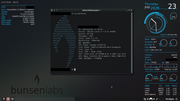
I'll be expanding the code a bit for my primary workstation, but so far I gotta say I'm happy with the layout.
PS: If/when Audacious is up and playing, a conky status for it shows on the left as well - bonus!
PPS: Just noticed the "Total Up" needed color adjustment - fixed - not worth uploading another screenie, but done nonetheless. Consistency. lolz
Last edited by WizardofCOR (2026-07-24 06:37:23)
Just a dude playing a dude, disguised as another dude...
Offline
#2726 2026-07-24 13:01:54
- unklar
- Back to the roots 1.9

- From: #! BL
- Registered: 2015-10-31
- Posts: 3,116
Re: Show us your conky
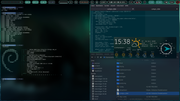
Ok, a few quick script-mods and MX-CoreBlue is up on my laptop.
https://i.postimg.cc/QKHcHtpq/Laptop-Desktop.png
I'll be expanding the code a bit for my primary workstation, but so far I gotta say I'm happy with the layout.
PS: If/when Audacious is up and playing, a conky status for it shows on the left as well - bonus!
PPS: Just noticed the "Total Up" needed color adjustment - fixed - not worth uploading another screenie, but done nonetheless. Consistency. lolz
Congratulations! 
----------------------------------------------------
Last edited by unklar (2026-07-24 13:48:15)
Offline
#2727 2026-07-24 14:22:58
- ceeslans
- Member
- Registered: 2015-09-30
- Posts: 233
Re: Show us your conky
^^ Clever split to accomodate on a 1366x768 screen. Well done!
Offline
#2728 2026-08-01 15:48:21
- marens
- Member

- From: World without M$
- Registered: 2023-02-02
- Posts: 1,305
Re: Show us your conky
It is terribly hot outside.
Yesterday we received an SMS alert from the National Weather Service with some general advice.
The highest temperatures (over 40 degrees) are expected between August 5th and 7th.
Right time to test conkys.
TAD MF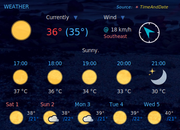
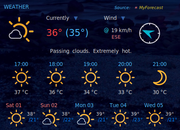
Accuweather conky and Gis Weather widget show similar weather conditions:
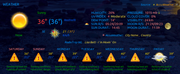
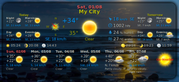
National Weather Service (my local source for conky):
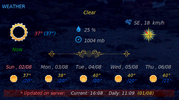
The testing was successful; now we have to wait for August 10th. 
If people would know how little brain is ruling the world, they would die of fear.
Offline
#2729 2026-08-06 14:44:20
- marens
- Member
- From: World without M$
- Registered: 2023-02-02
- Posts: 1,305
Re: Show us your conky
^ I noticed a difference in the date display for TAD and MyForecast conky.
The TAD website provides the format:
cat $HOME/time_and_date_conky_script/date
Thu 6 Aug
Fri 7 Aug
Sat 8 Aug
Sun 9 Aug
...
I like to see a leading zero for dates from 1-9:
$ sed -n '1p' $HOME/time_and_date_conky_script/date | awk '{print $2}' | awk '{printf("%02.0f", $1)}'
06
I edited the TAD conky and this is what it looks like now (for day_1):
${texeci 90 sed -n '1p' $HOME/time_and_date_conky_script/date | awk '{print $1}'} ${texeci 90 sed -n '1p' $HOME/time_and_date_conky_script/date | awk '{print $2}' | awk '{printf("%02.0f", $1)}'}Conky:
If people would know how little brain is ruling the world, they would die of fear.
Offline
#2730 2026-08-23 15:00:50
- marens
- Member
- From: World without M$
- Registered: 2023-02-02
- Posts: 1,305
Re: Show us your conky
RadioTray-NG Conky - SACAD
After checking, it appears that the latest version of SACAD is still 3.0.1:
https://forums.bunsenlabs.org/viewtopic … 83#p150583
However, the author has made several improvements in the meantime:
https://github.com/desbma/sacad
https://github.com/desbma/sacad/releases/tag/3.0.1
I downloaded and installed the updated version:
$ sacad --version
sacad 3.0.1
First impression?
I don't notice a big difference, but the images look a bit sharper now (IMO).
Lately I've mostly been listening to the oldies genre and I think album covers look better:

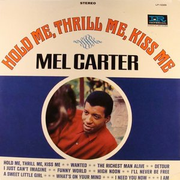

You can find the radiotray-ng-sacad script here:
https://forums.bunsenlabs.org/viewtopic … 42#p149742
If people would know how little brain is ruling the world, they would die of fear.
Offline
#2731 2026-08-25 19:08:46
- loutch
- Member
- Registered: 2015-12-12
- Posts: 1,076
Re: Show us your conky
Hello
AD in my audacious-clic three buttons below preview play & next button
first launch & kill conky play list
second launch & kill conky lyrics
third change the playlist
Must just ad now launcher for equalizer
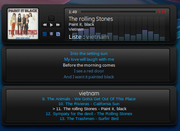
@+
Linuxmint 22.1 Xia xfce & mageia 9 XFCE on ssd hp pavilion g7
Xubuntu 18.04 lts & 24.04 lts on ASUS Rog STRIX
Offline
#2732 2026-08-26 04:45:07
- Döbbie03
- Resident Metalhead

- From: New Zealand
- Registered: 2015-09-29
- Posts: 4,382
Re: Show us your conky
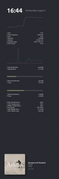
Still a work in progress
"All we are is dust in the wind, dude"
- Theodore "Ted" Logan
"Led Zeppelin didn't write tunes that everybody liked, they left that to the Bee Gees."
- Wayne Campbell
Online
#2733 2026-09-08 07:32:18
- unklar
- Back to the roots 1.9
- From: #! BL
- Registered: 2015-10-31
- Posts: 3,116
Re: Show us your conky
^@Sector11
Hello, my friend.
I've made good progress with the reconstruction. I followed your advice to split it into two Conky models.
First I always got a) and then b) as the result:
a)  b)
b) 
The trick was once again the minus sign for the Northern Hemisphere:
## Northern = ↑ ↓ Southern always -
SET $LatDeg 50
SET $LatMin 45
SET $LatSec 23
## Eastern = ← → Eastern always -
SET $LongDeg -12
SET $LongMin -37
SET $LongSec -48
As far as I can tell from comparing it to Moongiant, it seems to be true.
I remember that I had difficulties with it even back then, and you helped me. I also remember that only the first line of the output was centered.
${alignc}${execpi 86400 remind -q -r ~/.reminders.moon.v.unklar | sed -e "/.*(today):/d" -e '/^$/d'}Maybe I'll remember it again, or maybe not.
I liked the compass rose in the second version because of its degree markings. However, that's the minimum size; otherwise, it becomes unreadable.
Lacking wind direction arrows, I used the familiar ones from Teo's images.
The data is also not up-to-date because the script is missing.
All in all, the "overall Conky" will probably be oversized, and I'm not sure about leaving the compass rose in there.
Offline
#2734 2026-09-08 17:31:26
- Sector11
- Mod Squid Tpyo Knig
- From: Upstairs
- Registered: 2015-08-20
- Posts: 8,442
Re: Show us your conky
True: ${alignc] will work only on the first line in a text file.
However .... fornat it in the reminder file:
My conky calls the sun info with:
${pre_exec remind -q -r ~/.reminders.sun.v | sed -e "/.*(today):/d" -e '/^$/d'}## Western
{}snip
MSG Dawn: [dawn()]
MSG Sunrise: [sunrise()]
MSG Solar noon: [noon_solar($T)]
MSG Sunset: [sunset()]
MSG Dusk: [dusk()]
MSG ·
MSG Daylight: [_light_len($T)] Min
MSG Moonlight: [_dark_len($T)] Minand moon data with
${pre_exec remind -q -r ~/.reminders.moon.v | sed -e "/.*(today):/d" -e '/^$/d'}{snip}
MSG Next New Moon
MSG [moondate(0)] at [moontime(0)]
MSG Next 1st Quarter
MSG [moondate(1)] at [moontime(1)]
MSG Next Full Moon
MSG [moondate(2)] at [moontime(2)]
MSG Next 3rd Quarter
MSG [moondate(3)] at [moontime(3)]I actually stoll have yours here as well
SUN -
${alignc}Moon Phases
${alignc}Nächster Neumond
${alignc}2026-09-08 um 22:22
${execpi 86400 remind -q -r ~/.reminders.moon.v.unklar | sed -e "/.*(today):/d" -e '/^$/d'}
Open the text file ~/.reminders.moon.v.unklar and physically add/subtract spaces to line up with the two test ${alignc} lines above. When done rermove them:
${alignc}Nächster Neumond
${alignc}2026-09-08 um 22:22Repeat for SUN INFO
Debian 13 Beardog hosted by SoxDog
Still a Conky 1.9er at heart.
Offline
#2735 2026-09-08 17:40:52
- Sector11
- Mod Squid Tpyo Knig
- From: Upstairs
- Registered: 2015-08-20
- Posts: 8,442
Re: Show us your conky
Dishes - be back later.
Debian 13 Beardog hosted by SoxDog
Still a Conky 1.9er at heart.
Offline
#2736 2026-09-09 08:59:55
- unklar
- Back to the roots 1.9
- From: #! BL
- Registered: 2015-10-31
- Posts: 3,116
Re: Show us your conky
Thanks for your help.
The file from my archive (and yours too) already has a structure corresponding to the colon. I didn't save it like that back then just because it wasn't centered(?).
Never mind.
Since I had to resize the window anyway, I removed 'alignc' altogether and reduced the window size by 100 pixels, to 180 pixels. At the same time, I transformed the order in the file into this chaos, and this is what came out:
MSG       Dämmerung       : [dawn()]
MSG   Sonnenaufgang    : [sunrise()]
MSG    Mittagssonne        : [noon_solar($T)]
MSG Sonnenuntergang  : [sunset()]
MSG  Abenddämmerung: [dusk()]
MSG           ·
MSG      Tageslicht: [_light_len($T)] Min
MSG      Nachtlicht: [_dark_len($T)] Min
Absolutely tedious, and that doesn't even take daylight/nightlight into account.
This is on conkyV1.22.1
I suspect it also has something to do with the formatting of the two remind files. And, if only I had learned Vim when I was younger... 
When I feel like it again, I'll undo the changes and hope that, as you wrote, he's swallowed it.
Offline
#2737 2026-09-09 17:52:55
- unklar
- Back to the roots 1.9
- From: #! BL
- Registered: 2015-10-31
- Posts: 3,116
Re: Show us your conky
When I feel like it again, I'll undo the changes and hope that, as you wrote, he's swallowed it.
^^He didn't!
I'm now trying it with -DD.░▒▓ …/.config/conky/mx-test 19:37 ❯ conky -c reminderrc -DD & [1] 23310 ░▒▓ …/.config/conky/mx-test 19:37 ❯ DEBUG(0) [./src/conky.cc:1982]: reading contents from config file 'reminderrc' DEBUG(0) [./src/output/x11.cc:247]: enter init_x11() DEBUG(0) [./src/output/x11.cc:368]: Fixed xinerama area to: 0 0 1920 1080 DEBUG(0) [./src/output/x11.cc:291]: leave init_x11() DEBUG(0) [./src/output/x11.cc:486]: enter x11_init_window() DEBUG(0) [./src/output/x11.cc:368]: Fixed xinerama area to: 0 0 1920 1080 conky: desktop window (0x49d) is root window conky: window type - normal DEBUG(0) [./src/output/x11.cc:693]: hint - undecorated DEBUG(0) [./src/output/x11.cc:704]: hint - below DEBUG(0) [./src/output/x11.cc:770]: hint - skip taskbar DEBUG(0) [./src/output/x11.cc:783]: hint - skip pager conky: drawing to created window (0x3e00001) DEBUG(0) [./src/output/x11.cc:902]: leave x11_init_window() conky: drawing to double buffer DEBUG(1) [./src/core.cc:2109]: no templates to replace conky: forked to background, pid is 23324 DEBUG(0) [./src/output/display-output.cc:39]: HTTP display output disabled. Enable by recompiling with 'BUILD_HTTP' flag enabled. conky: FOUND: wayland conky: FOUND: x11 conky: FOUND: file conky: FOUND: ncurses conky: FOUND: console DEBUG(1) [./src/output/display-output.cc:101]: Testing display output 'wayland'... DEBUG(1) [./src/output/display-output.cc:101]: Testing display output 'x11'... DEBUG(1) [./src/output/display-x11.cc:233]: Display output 'x11' enabled in config. DEBUG(1) [./src/output/display-output.cc:103]: Detected display output 'x11'... DEBUG(1) [./src/lua/fonts.cc:64]: setting up fonts DEBUG(1) [./src/lua/fonts.cc:84]: loading fonts DEBUG(1) [./src/lua/fonts.cc:64]: setting up fonts DEBUG(0) [./src/output/display-output.cc:111]: Initialized display output 'x11'... DEBUG(1) [./src/output/display-output.cc:101]: Testing display output 'file'... DEBUG(1) [./src/output/display-output.cc:101]: Testing display output 'ncurses'... DEBUG(1) [./src/output/display-output.cc:101]: Testing display output 'console'... conky: 'bunsenlabs' x11 session running 'BunsenLabs:XFCE' desktop DEBUG(1) [./src/output/display-x11.cc:816]: Processing 22 X11 events... DEBUG(1) [./src/output/display-x11.cc:837]: Done processing 22 events. DEBUG(1) [./src/lua/fonts.cc:64]: setting up fonts DEBUG(1) [./src/core.cc:2109]: no templates to replace DEBUG(1) [./src/lua/fonts.cc:84]: loading fonts DEBUG(1) [./src/conky.cc:684]: evaluated ' Dämmerung: 06:01 Sonnenaufgang: 06:34 Mittagssonne: 13:05 Sonnenuntergang: 19:37 Abenddämmerung: 20:11 · Tageslicht: 783 Min Nachtlicht: 657 Min' to ' Dämmerung: 06:01 Sonnenaufgang: 06:34 Mittagssonne: 13:05 Sonnenuntergang: 19:37 Abenddämmerung: 20:11 · Tageslicht: 783 Min Nachtlicht: 657 Min' DEBUG(1) [./src/core.cc:2109]: no templates to replace DEBUG(1) [./src/lua/fonts.cc:84]: loading fonts DEBUG(1) [./src/conky.cc:684]: evaluated ' Nächster Neumond 2026-09-11 um 05:27 Nächstes 1.Viertel 2026-09-18 um 22:44 Nächster Vollmond 2026-09-26 um 18:50 Nächstes 3.Viertel 2026-10-03 um 15:26' to ' Nächster Neumond 2026-09-11 um 05:27 Nächstes 1.Viertel 2026-09-18 um 22:44 Nächster Vollmond 2026-09-26 um 18:50 Nächstes 3.Viertel 2026-10-03 um 15:26' DEBUG(1) [./src/lua/fonts.cc:84]: loading fonts{snip}
What do you think? Clean and tidy (the terminal)
OUCH! I blame me and conky >v1.9 and using depreciated commands.
And of course I'll take the blame.
AHAA! The old the "disk destroyer", “data definition”, “disk dump”, or "disk duplicator" trick!
We can now add Terminal Destroyer to the list.
I have a bottle of Terminal Spray Cleaner here id you need it. 
Last edited by unklar (2026-09-11 16:11:58)
Offline
#2738 2026-09-09 18:51:29
- Sector11
- Mod Squid Tpyo Knig
- From: Upstairs
- Registered: 2015-08-20
- Posts: 8,442
Re: Show us your conky
OK between RL events and RL events I've been squeezing time in and:
What version of remind do you have? Mine is OLD:
Version: 04.02.03-4
and that's a newer version than that conky was based on:
Man page says:
$Latitude (STRING type)
The latitude of your location, expressed as a string that is a floating-point number. Because Remind does not have a native floating-point type, we need to express it as a string. $Latitude can range from "-90.0" to "90.0", with positive numbers representing points north of the equator and negative numbers representing south. Note that regardless of your locale, $Latitude is always interpreted in the "C" locale and as such, the decimal point must be a period (".").$Longitude (STRING type)
The longitude of your location, expressed as a string that is a floating-point number. Because Remind does not have a native floating-point type, we need to express it as a string. Longitude can range from "-180.0" to "180.0", with positive numbers representing points east of the Greenwich Meridian and negative numbers representing west. Note that regardless of your locale, $Longitude is always interpreted in the "C" locale and as such, the decimal point must be a period (".").For example, the coordinates of the Statue of Liberty in New York City are approximately set by:
SET $Latitude "40.68933"
SET $Longitude "-74.04454"$LatDeg, $LatMin, $LatSec (DEPRECATED)
These specify the latitude of your location. $LatDeg can range from −90 to 90, and the others from −59 to 59. Northern latitudes are positive; southern ones are negative. For southern latitudes, all three components should be negative. These three variables are deprecated; you should use $Latitude instead.$Location (STRING type)
This is a string specifying the name of your location. It is usually the name of your town or city. It can be set to whatever you like, but good style indicates that it should be kept consistent with the latitude and longitude system variables.$LongDeg, $LongMin, $LongSec (DEPRECATED)
These specify the longitude of your location. $LongDeg can range from −180 to 180. Western longitudes are positive; eastern ones are negative. Note that all three components should have the same sign: All positive for western longitudes and all negative for eastern longitudes. Note that for historical reasons, the sign for longitude is different from the usual convention! If you find the longitude of your location from a search engine, you will most likely need to invert the sign to have it work correctly with Remind. These three variables are deprecated; you should use $Longitude instead. Note also that $Longitude uses the standard convention of negative for western longitudes and positive for eastern ones.The latitude and longitude information is required for the functions sunrise() and sunset(). Default values can be compiled into Remind, or you can SET the correct values at the start of your
reminder scripts.Note: that setting any of $LongDec, $LongMin and $LongSec updates $Longitude correspondingly, and setting $Longitude updates $LongDeg, $LongMin and $LongSec. Similar rules apply to $Latitude, $LatDeg, $LatMin and $LatSec.
So I think a change is in store
Debian 13 Beardog hosted by SoxDog
Still a Conky 1.9er at heart.
Offline
#2739 2026-09-10 09:05:13
- unklar
- Back to the roots 1.9
- From: #! BL
- Registered: 2015-10-31
- Posts: 3,116
Re: Show us your conky
What version of remind do you have? Mine is OLD:
REMIND 05.03.07 Copyright (C) 1992-2025 Dianne Skoll❯ apt policy remind
remind:
Installiert: 05.03.07-1+deb13u1
Installationskandidat: 05.03.07-1+deb13u1
Versionstabelle:
*** 05.03.07-1+deb13u1 500
500 https://deb.debian.org/debian trixie/main amd64 Packages
100 /var/lib/dpkg/statusI've checked the output data several times now. It's fine for my location. There are no errors.
The apparent 'messiness' of the alignment based on the colon is, in my opinion, unrelated. 
Offline
#2740 2026-09-10 17:06:06
- Sector11
- Mod Squid Tpyo Knig
- From: Upstairs
- Registered: 2015-08-20
- Posts: 8,442
Re: Show us your conky
I've checked the output data several times now. It's fine for my location. There are no errors.
The apparent 'messiness' of the alignment based on the colon is, in my opinion, unrelated.
Does it clear up if you remove the colon?
MSG       Dämmerung [dawn()]
MSG   Sonnenaufgang [sunrise()]
MSG    Mittagssonne [noon_solar($T)]
MSG Sonnenuntergang [sunset()]
MSG  Abenddämmerung [dusk()]
MSG
MSG   Tageslicht [_light_len($T)] Min
MSG   Nachtlicht [_dark_len($T)] Min
Debian 13 Beardog hosted by SoxDog
Still a Conky 1.9er at heart.
Offline