![[BunsenLabs Logo]](/img/bl.svg)
You are not logged in.
- Topics: Active | Unanswered
#2441 2025-10-03 14:13:22
- loutch
- Member
- Registered: 2015-12-12
- Posts: 1,075
Re: Show us your conky
Re
Oki-doki
Many tanks
I have it
I'm not going to do any more, otherwise it will be too much.
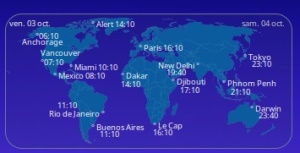
@+
Linuxmint 22.1 Xia xfce & mageia 9 XFCE on ssd hp pavilion g7
Xubuntu 18.04 lts & 24.04 lts on ASUS Rog STRIX
Offline
#2442 2025-10-03 15:12:14
- Sector11
- Mod Squid Tpyo Knig

- From: Upstairs
- Registered: 2015-08-20
- Posts: 8,432
Re: Show us your conky
I'm not going to do any more, otherwise it will be too much.
https://thumbs2.imgbox.com/b1/b1/qE1Xx5d5_t.png
@+
Oui, je comprends.
Je me souviens de la première. Trop de villes, avec les degrés maximum et minimum, l'heure et la couverture nuageuse en temps réel. C'était incroyable.
Bonne chance
Yeah, I understand.
Remember that first one. WAY to many Cities, with High/Low° and time and real time cloud cover. That was wild.
Good Luck
Debian 13 Beardog hosted by SoxDog
Still a Conky 1.9er at heart.
Offline
#2443 2025-10-04 09:55:23
- unklar
- Back to the roots 1.9

- From: #! BL
- Registered: 2015-10-31
- Posts: 3,108
Re: Show us your conky
Yeah, I understand.
Remember that first one. WAY to many Cities, with High/Low° and time and real time cloud cover. That was wild.

“Irma” on September 7 and 9, 2017, on Mageia 5, indescribable! 


Offline
#2444 2025-10-04 13:07:01
- loutch
- Member
- Registered: 2015-12-12
- Posts: 1,075
Re: Show us your conky
Hello
Just for fun
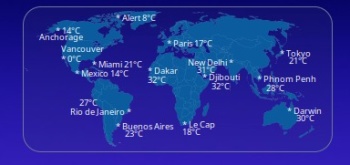
@+
Linuxmint 22.1 Xia xfce & mageia 9 XFCE on ssd hp pavilion g7
Xubuntu 18.04 lts & 24.04 lts on ASUS Rog STRIX
Offline
#2445 2025-10-04 14:55:01
- unklar
- Back to the roots 1.9
- From: #! BL
- Registered: 2015-10-31
- Posts: 3,108
Re: Show us your conky
@loutch, mes températures sont différentes. 


Utilise donc le
conky.text = [[${texeci 600 curl -s 'wttr.in/{Honululu,Vancouver,New_York,Buenos_Aires,London,Berlin,Kastoria,Moscow,Beijing,Tokyo,Melbourne,Auckland}?format=1' > ~/TEST/Orte}
${color6}${alignc}${font monofur:size=12}${tztime Pacific/Honolulu %d. %B %Y} «--${color3}|||${color}--» ${tztime Pacific/Kiritimati %d. %B %Y}${color6}${font}
${goto 35}${if_match ${tztime Pacific/Honolulu %d} == ${tztime Pacific/Kiritimati %d}}${color}Honolulu ${tztime Pacific/Honolulu %R}${color6}${else}Honolulu ${tztime Pacific/Honolulu %R}${endif} \
| ${if_match ${tztime America/Vancouver %d} == ${tztime Pacific/Kiritimati %d}}${color}Vancouver ${tztime America/Vancouver %R} ${color6}${else}Vancouver ${tztime America/Vancouver %R}${endif} \
| ${if_match ${tztime America/New_York %d} == ${tztime Pacific/Kiritimati %d}}${color}New York ${tztime America/New_York %R}${color6}${else} New York ${tztime America/New_York %R}${endif} \
| ${if_match ${tztime America/Argentina/Buenos_Aires %d} == ${tztime Pacific/Kiritimati %d}}${color}Buenos Aires ${tztime America/Argentina/Buenos_Aires %R}${color6}${else}Buenos Aires ${tztime America/Argentina/Buenos_Aires %R}${endif} \
| ${if_match ${tztime Europe/London %d} == ${tztime Pacific/Kiritimati %d}}${color}London ${tztime Europe/London %R}${color6}${else}London ${tztime Europe/London %R}${endif} \
| ${if_match ${tztime Europe/Berlin %d} == ${tztime Pacific/Kiritimati %d}}${color}Berlin ${tztime Europe/Berlin %R}${color6}${else}Berlin ${tztime Europe/Berlin %R}${endif} \
| ${if_match ${tztime Europe/Athens %d} == ${tztime Pacific/Kiritimati %d}}${color}Kastroria ${tztime Europe/Athens %R}${color6}${else}Kastoria ${tztime Europe/Athens %R}${endif} \
| ${if_match ${tztime Europe/Moscow %d} == ${tztime Pacific/Kiritimati %d}}${color}Moscow ${tztime Europe/Moscow %R}${color6}${else}Moscow ${tztime Europe/Moscow %R}${endif} \
| ${if_match ${tztime Asia/Shanghai %d} == ${tztime Pacific/Kiritimati %d}}${color}Beijing ${tztime Asia/Shanghai %R}${color6}${else}Beijing ${tztime Asia/Shanghai %R}${endif} \
| ${if_match ${tztime Asia/Tokyo %d} == ${tztime Pacific/Kiritimati %d}}${color}Tokyo ${tztime Asia/Tokyo %R}${color6}${else}Tokyo ${tztime Asia/Tokyo %R}${endif} \
| ${if_match ${tztime Australia/Melbourne %d} == ${tztime Pacific/Kiritimati %d}}${color}Melbourne ${tztime Australia/Melbourne %R}${color6}${else}Melbourne ${tztime Australia/Melbourne %R}${endif} \
| ${if_match ${tztime Pacific/Auckland %d} == ${tztime Pacific/Kiritimati %d}}${color}Auckland ${tztime Pacific/Auckland %R}${color6}${else}Auckland ${tztime Pacific/Auckland %R}${endif}

${voffset -10}${goto 40}${font Symbola:size=12}${execpi 60 sed -n '1p' ~/TEST/Orte}${goto 160}${execpi 60 sed -n '2p' ~/TEST/Orte}\
${goto 290}${execpi 60 sed -n '3p' ~/TEST/Orte}${goto 410}${execpi 60 sed -n '4p' ~/TEST/Orte}\
${goto 555}${execpi 60 sed -n '5p' ~/TEST/Orte}${goto 660}${execpi 60 sed -n '6p' ~/TEST/Orte}\
${goto 765}${execpi 60 sed -n '7p' ~/TEST/Orte}${goto 885}${execpi 60 sed -n '8p' ~/TEST/Orte}\
${goto 985}${execpi 60 sed -n '9p' ~/TEST/Orte}${goto 1098}${execpi 60 sed -n '10p' ~/TEST/Orte}\
${goto 1200}${execpi 60 sed -n '11p' ~/TEST/Orte} ${goto 1325}${execpi 60 sed -n '12p' ~/TEST/Orte}${font}
]];
------------------------
My temperatures look different
Last edited by unklar (2025-10-04 15:01:18)
Offline
#2446 2025-10-04 15:20:10
- loutch
- Member
- Registered: 2015-12-12
- Posts: 1,075
Re: Show us your conky
Re
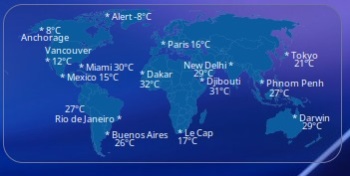
Ja, ich weiß, ich habe mich ein wenig verheddert, aber jetzt denke ich, dass es passt.
Script ist mit openweatherAPI free
----------------------------------------------------------------
Yes, I know I got a bit confused, but now I think it's fine.
Script use openweather API Free
Script
#!/bin/bash

# Loutch 02-10-2025
# This script is to get weather data from openweathermap.com in the form of a json file
# so that conky will still display the weather when offline even though it doesn't up to date

# you can use this or replace with yours
api_key=axxxxxxxxxxxxxxxxxxxxxxxxxxxxxxxxxxxxxxxx
# get your city id at https://openweathermap.org/find and replace
city_id1=6121522 #Resolute, CA
city_id2=5879400 #Anchorage ,Alaska
city_id3=2988507 #Paris ,FR
city_id4=6173331 #vancouver,CA
city_id5=1850147 #Tokio ,JP
city_id6=4164138 #Miami,US
city_id7=1261481 #New delhi ,IN
city_id8=3530597 #Mexico city MX
city_id9=2073124 #Darwin,AU
city_id10=3369157 #La cap ,ZA
city_id11=3435910 #Buenos Aires ,AR
city_id12=2253354 #Dakar ,SE
city_id13=223817  #Djibouti ,DJ
city_id14=1821306 #Phnom Penh ,KH
city_id15=3451190 #Rio de Janeiro ,BR

url1="api.openweathermap.org/data/2.5/weather?id=${city_id1}&appid=${api_key}&cnt=5&units=metric&lang=fr"
curl ${url1} -s -o ~/.cache/weather1.json

url2="api.openweathermap.org/data/2.5/weather?id=${city_id2}&appid=${api_key}&cnt=5&units=metric&lang=fr"
curl ${url2} -s -o ~/.cache/weather2.json

url3="api.openweathermap.org/data/2.5/weather?id=${city_id3}&appid=${api_key}&cnt=5&units=metric&lang=fr"
curl ${url3} -s -o ~/.cache/weather3.json

url4="api.openweathermap.org/data/2.5/weather?id=${city_id4}&appid=${api_key}&cnt=5&units=metric&lang=fr"
curl ${url4} -s -o ~/.cache/weather4.json

url5="api.openweathermap.org/data/2.5/weather?id=${city_id5}&appid=${api_key}&cnt=5&units=metric&lang=fr"
curl ${url5} -s -o ~/.cache/weather5.json

url6="api.openweathermap.org/data/2.5/weather?id=${city_id6}&appid=${api_key}&cnt=5&units=metric&lang=fr"
curl ${url6} -s -o ~/.cache/weather6.json

url7="api.openweathermap.org/data/2.5/weather?id=${city_id7}&appid=${api_key}&cnt=5&units=metric&lang=fr"
curl ${url7} -s -o ~/.cache/weather7.json

url8="api.openweathermap.org/data/2.5/weather?id=${city_id8}&appid=${api_key}&cnt=5&units=metric&lang=fr"
curl ${url8} -s -o ~/.cache/weather8.json

url9="api.openweathermap.org/data/2.5/weather?id=${city_id9}&appid=${api_key}&cnt=5&units=metric&lang=fr"
curl ${url9} -s -o ~/.cache/weather9.json

url10="api.openweathermap.org/data/2.5/weather?id=${city_id10}&appid=${api_key}&cnt=5&units=metric&lang=fr"
curl ${url10} -s -o ~/.cache/weather10.json

url11="api.openweathermap.org/data/2.5/weather?id=${city_id11}&appid=${api_key}&cnt=5&units=metric&lang=fr"
curl ${url11} -s -o ~/.cache/weather11.json

url12="api.openweathermap.org/data/2.5/weather?id=${city_id12}&appid=${api_key}&cnt=5&units=metric&lang=fr"
curl ${url12} -s -o ~/.cache/weather12.json
#jq --raw-output . $HOME/.cache/weather12.json | jq '.main.temp' | awk '{print int($1+0.5)}' >> $HOME/.conky/Tahoe/monde/raws/rawcurrent

url13="api.openweathermap.org/data/2.5/weather?id=${city_id13}&appid=${api_key}&cnt=5&units=metric&lang=fr"
curl ${url13} -s -o ~/.cache/weather13.json

url14="api.openweathermap.org/data/2.5/weather?id=${city_id14}&appid=${api_key}&cnt=5&units=metric&lang=fr"
curl ${url14} -s -o ~/.cache/weather14.json

url15="api.openweathermap.org/data/2.5/weather?id=${city_id15}&appid=${api_key}&cnt=5&units=metric&lang=fr"
curl ${url15} -s -o ~/.cache/weather15.json

exit
conkyrc
${execi 3600 ~/.conky/Tahoe/monde/scripts/openweather.sh}
${voffset -12}${goto 102}* Alert ${texeci 1800 cat $HOME/.cache/weather1.json | jq '.main.temp' | awk '{print int($1+0.5)}'}°C

${voffset -12}${goto 36}* ${texeci 1800 cat $HOME/.cache/weather2.json | jq '.main.temp' | awk '{print int($1+0.5)}'}°C
 ${voffset -6}${goto 18}Anchorage

${goto 158}${voffset -19}* Paris ${texeci 1800 cat $HOME/.cache/weather3.json | jq '.main.temp' | awk '{print int($1+0.5)}'}°C

${voffset -20}${goto 42}Vancouver
 ${voffset -2}${goto 42}* ${texeci 1800 cat $HOME/.cache/weather4.json | jq '.main.temp' | awk '{print int($1+0.5)}'}°C

${voffset -32}${goto 282}* Tokyo
 ${voffset -5}${goto 292}${texeci 1800 cat $HOME/.cache/weather5.json | jq '.main.temp' | awk '{print int($1+0.5)}'}°C

${voffset -22}${goto 76}* Miami ${texeci 1800 cat $HOME/.cache/weather6.json | jq '.main.temp' | awk '{print int($1+0.5)}'}°C

${voffset -28}${goto 181}New Delhi *
 ${voffset -5}${goto 191}${texeci 1800 cat $HOME/.cache/weather7.json | jq '.main.temp' | awk '{print int($1+0.5)}'}°C

${voffset -22}${goto 57}* Mexico ${texeci 1800 cat $HOME/.cache/weather8.json | jq '.main.temp' | awk '{print int($1+0.5)}'}°C

${voffset 15}${goto 290}* Darwin
${voffset -5}${goto 300}${texeci 1800 cat $HOME/.cache/weather9.json | jq '.main.temp' | awk '{print int($1+0.5)}'}°C

${voffset -19} ${goto 175}* Le Cap
 ${voffset -5} ${goto 175}${texeci 1800 cat $HOME/.cache/weather10.json | jq '.main.temp' | awk '{print int($1+0.5)}'}°C

${voffset -32}${goto 102}* Buenos Aires
 ${voffset -5}${goto 112}${texeci 1800 cat $HOME/.cache/weather11.json | jq '.main.temp' | awk '{print int($1+0.5)}'}°C

${voffset -95}${goto 137}* Dakar
 ${voffset -3}${goto 137}${texeci 1800 cat $HOME/.cache/weather12.json | jq '.main.temp' | awk '{print int($1+0.5)}'}°C

${voffset -29}${goto 197}* Djibouti
 ${voffset -3}${goto 207}${texeci 1800 cat $HOME/.cache/weather13.json | jq '.main.temp' | awk '{print int($1+0.5)}'}°C

${voffset -34}${goto 257}* Phnom Penh
 ${voffset -3}${goto 267}${texeci 1800 cat $HOME/.cache/weather14.json | jq '.main.temp' | awk '{print int($1+0.5)}'}°C

${voffset -10}${goto 62}${texeci 1800 cat $HOME/.cache/weather15.json | jq '.main.temp' | awk '{print int($1+0.5)}'}°C
 ${voffset -3}${goto 52}Rio de Janeiro *

${lua fDrawImage $HOME/.conky/Tahoe/monde/monde.png 0 5 320 149}
@+
Last edited by loutch (2025-10-04 15:28:01)
Linuxmint 22.1 Xia xfce & mageia 9 XFCE on ssd hp pavilion g7
Xubuntu 18.04 lts & 24.04 lts on ASUS Rog STRIX
Offline
#2447 2025-10-04 18:26:02
- loutch
- Member
- Registered: 2015-12-12
- Posts: 1,075
Re: Show us your conky
Hello
Noch einfacher
Verwendung der Syntax meines alten Conky wttrl
Für die nicht gefundene Stadt habe ich die nächstgelegene genommen.
${voffset -12}${goto 102}* Alert ${texeci 3600 curl fr.wttr.in/Pond_Inlet?format=%t}

${voffset -12}${goto 36}* ${texeci 3600 curl fr.wttr.in/Anchorage?format=%t}
 ${voffset -6}${goto 18}Anchorage

${goto 158}${voffset -19}* Paris ${texeci 3600 curl fr.wttr.in/Paris?format=%t}

${voffset -20}${goto 42}Vancouver
 ${voffset -2}${goto 42}* ${texeci 3600 curl fr.wttr.in/Vancouver?format=%t}

${voffset -32}${goto 282}* Tokyo
 ${voffset -5}${goto 292}${texeci 3600 curl fr.wttr.in/Tokyo?format=%t}

${voffset -22}${goto 76}* Miami ${texeci 3600 curl fr.wttr.in/Miami?format=%t}

${voffset -28}${goto 181}New Delhi *
 ${voffset -5}${goto 191}${texeci 3600 curl fr.wttr.in/New_Delhi?format=%t}

${voffset -22}${goto 57}* Mexico ${texeci 3600 curl fr.wttr.in/Mexico?format=%t}

${voffset 15}${goto 290}* Darwin
${voffset -5}${goto 300}${texeci 3600 curl fr.wttr.in/Darwin?format=%t}

${voffset -19} ${goto 175}* Le Cap
 ${voffset -5} ${goto 175}${texeci 3600 curl fr.wttr.in/Cap+Town?format=%t}

${voffset -32}${goto 102}* Buenos Aires
 ${voffset -5}${goto 112}${texeci 3600 curl fr.wttr.in/Buenos_Aires?format=%t}

${voffset -95}${goto 137}* Dakar
 ${voffset -3}${goto 137}${texeci 3600 curl fr.wttr.in/Dakar?format=%t}

${voffset -29}${goto 197}* Djibouti
 ${voffset -3}${goto 207}${texeci 3600 curl fr.wttr.in/Djibouti?format=%t}

${voffset -34}${goto 257}* Phnom Penh
 ${voffset -3}${goto 267}${texeci 3600 curl fr.wttr.in/Phnom_Penh?format=%t}

${voffset -10}${goto 62}${texeci 3600 curl fr.wttr.in/Rio_de_Janeiro?format=%t}
 ${voffset -3}${goto 52}Rio de Janeiro *

${lua fDrawImage $HOME/.conky/Tahoe/monde/monde.png 0 5 320 149}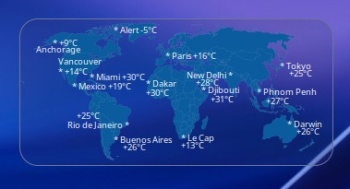
-------------------------------------------------------------------
Even simpler
Using the syntax of my old conky wttrl
For the city not found, I took the nearest one
@+
Linuxmint 22.1 Xia xfce & mageia 9 XFCE on ssd hp pavilion g7
Xubuntu 18.04 lts & 24.04 lts on ASUS Rog STRIX
Offline
#2448 2025-10-04 18:50:49
- Sector11
- Mod Squid Tpyo Knig
- From: Upstairs
- Registered: 2015-08-20
- Posts: 8,432
Re: Show us your conky
Sector11 wrote:Yeah, I understand.
Remember that first one. WAY to many Cities, with High/Low° and time and real time cloud cover. That was wild.https://i.imgur.com/bzvii0g.png
“Irma” on September 7 and 9, 2017, on Mageia 5, indescribable!
https://i.imgur.com/kFjTosjt.jpeg https://i.imgur.com/JxDBDsMt.jpeg
And I totally forgot about the "real time" day/night light/shadow as well.
Thank you unklar for the trip down memory lane.
Debian 13 Beardog hosted by SoxDog
Still a Conky 1.9er at heart.
Offline
#2449 2025-10-04 18:52:18
- Sector11
- Mod Squid Tpyo Knig
- From: Upstairs
- Registered: 2015-08-20
- Posts: 8,432
Re: Show us your conky
Hello
Noch einfacher
Verwendung der Syntax meines alten Conky wttrl
Für die nicht gefundene Stadt habe ich die nächstgelegene genommen.
--- {snip snip} -------------------------------------------------------
Even simpler
Using the syntax of my old conky wttrl
For the city not found, I took the nearest one
@+
BEAUTIFUL!!!!
Debian 13 Beardog hosted by SoxDog
Still a Conky 1.9er at heart.
Offline
#2450 2025-10-05 09:43:41
- unklar
- Back to the roots 1.9
- From: #! BL
- Registered: 2015-10-31
- Posts: 3,108
Re: Show us your conky
Thank you unklar for the trip down memory lane.
For you, always!
Offline
#2451 2025-10-05 13:01:14
- loutch
- Member
- Registered: 2015-12-12
- Posts: 1,075
Re: Show us your conky
Hello
“Irma” on September 7 and 9, 2017, on Mageia 5, indescribable!
https://i.imgur.com/kFjTosjt.jpeg https://i.imgur.com/JxDBDsMt.jpeg
Ah, Mageia 5 KDE, was für Erinnerungen!
Ein Wunderwerk , KDE ein Traum (keine komplizierte Angelegenheit wie Plasma), es lief wunderbar auf meinem HP, der kein Blitzlichtgewitter war, und was soll man zu Conky in Version 1.09 sagen, Lua-Funktion top und Conky-Klick funktional.
Nostalgie, wenn du uns packst...
---------------------------------------------
Ah, Mageia 5 KDE, what memories!
A marvel, KDE a dream (not complicated like Plasma), it ran beautifully on my HP, which was no flash in the pan, and what can one say about Conky in version 1.09, Lua function top notch and Conky click functional.
Nostalgia, when you get hold of us...
Made this :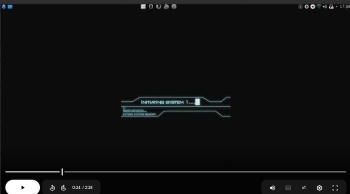
Video here
https://drive.google.com/file/d/18VYUZg … sp=sharing
@+
Last edited by loutch (2025-10-05 13:18:24)
Linuxmint 22.1 Xia xfce & mageia 9 XFCE on ssd hp pavilion g7
Xubuntu 18.04 lts & 24.04 lts on ASUS Rog STRIX
Offline
#2452 2025-10-05 16:06:20
- marens
- Member

- From: World without M$
- Registered: 2023-02-02
- Posts: 1,303
Re: Show us your conky
What do you think, could this be a background image in Conky (world clock/temperature)?
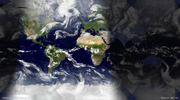
$ curl "http://images.opentopia.com/sunlight/world_sunlight_map_rectangular.jpg" > "$HOME/sunlight.jpg"Then:
$ convert $HOME/sunlight.jpg $HOME/sunlight.pngJust run commands every 30 minutes in Conky or create a script.
Change the paths as you wish, I tested in the HOME folder.
If people would know how little brain is ruling the world, they would die of fear.
Offline
#2453 2025-10-05 18:30:20
- marens
- Member
- From: World without M$
- Registered: 2023-02-02
- Posts: 1,303
Re: Show us your conky
More details:
Conky is very good at reducing image size, but the aspect ratio must be preserved.
The original image size is 1600x887.
If you want a width of 400px then you have to set the corresponding height.
Example:
1600/4=400
887/4=221.75
Conky:
${image $HOME/path/to/sunlight.png -p 0,0 -s 400x222}You can also do this using ImageMagick:
$ curl "http://images.opentopia.com/sunlight/world_sunlight_map_rectangular.jpg" > "$HOME/sunlight.jpg"

$ convert -geometry 400x $HOME/sunlight.jpg $HOME/sunlight.png
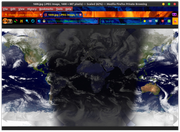
Result (mtPaint):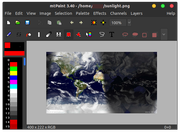
EDIT
Or if you need an image height of 180px:
$ convert -geometry x180 $HOME/sunlight.jpg $HOME/sunlight.pngYou will get an image of size 325x180px because ImageMagick calculates the required width itself.
* Note:
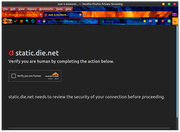
The image cannot be downloaded at the old address because verification is required and I don't know how to bypass it using the curl command:
https://static.die.net/earth/mercator/1600.jpg

Last edited by marens (2025-10-05 23:28:40)
If people would know how little brain is ruling the world, they would die of fear.
Offline
#2454 2025-10-06 14:26:53
- unklar
- Back to the roots 1.9
- From: #! BL
- Registered: 2015-10-31
- Posts: 3,108
Re: Show us your conky
What do you think, could this be a background image in Conky (world clock/temperature)?
https://i.postimg.cc/563y2v4J/sunlight.png
$ curl "http://images.opentopia.com/sunlight/world_sunlight_map_rectangular.jpg" > "$HOME/sunlight.jpg"Then:
$ convert $HOME/sunlight.jpg $HOME/sunlight.pngJust run commands every 30 minutes in Conky or create a script.
Change the paths as you wish, I tested in the HOME folder.
Thank you so much, @marens!
In 2017, this Chinese university's service discontinued the world map for our Conky. We searched for a replacement for a long time, but couldn't find anything.
How did you manage to find this site?
Offline
#2455 2025-10-06 15:22:22
- loutch
- Member
- Registered: 2015-12-12
- Posts: 1,075
Re: Show us your conky
Hello
@ marens
Great like unklar i have another question
is that possible to have this image whitout cloud cover is the same every day , no?
& i think that is probably to much in conky
clouds
town name
hours
@+
Last edited by loutch (2025-10-06 15:25:00)
Linuxmint 22.1 Xia xfce & mageia 9 XFCE on ssd hp pavilion g7
Xubuntu 18.04 lts & 24.04 lts on ASUS Rog STRIX
Offline
#2456 2025-10-06 18:20:40
- marens
- Member
- From: World without M$
- Registered: 2023-02-02
- Posts: 1,303
Re: Show us your conky
@unklar
@loutch
I found the links in my archive.
I was looking for a wallpaper where it was possible to see sunlight in real time.
I don't remember ever using it, but I always save interesting things because I might need them later.
I start with cloudless images of the earth during the day (from a pair of NASA satellites) and night (from a DoD program to map city lights). Every day, I download a composite cloud image based on data from weather satellites all over the world. And every half hour, these images are composited and mapped onto a sphere by xplanet according to the relative position of the sun.
https://www.die.net/earth/how.html
The site opentopia.com downloads the original image and you can see source: die.net (bottom right).
The image is always updated and currently looks like this: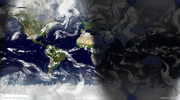
Gis Weather shows Sunrise/Sunset: 06:45 / 18:11 for my location and I see that the image sunlight.png is OK.
EDIT
& i think that is probably to much in conky
clouds
town name
hours
I can agree, but the sunlight.png image can be used as a separate conky without anything.
It's interesting to see in conky where it is currently day/night.
Just set it to the size as the other conkys on your desktop.
Above is an examples for a height/width with ImageMagick.
P.S.
Your desktop is full, but I think you forgot the moon (in real time). 
Last edited by marens (2025-10-06 23:24:20)
If people would know how little brain is ruling the world, they would die of fear.
Offline
#2457 2025-10-07 09:37:09
- loutch
- Member
- Registered: 2015-12-12
- Posts: 1,075
Re: Show us your conky
Hello
Now I think it's good
if we put more I think it would be too busy

@+
Linuxmint 22.1 Xia xfce & mageia 9 XFCE on ssd hp pavilion g7
Xubuntu 18.04 lts & 24.04 lts on ASUS Rog STRIX
Offline
#2458 2025-10-07 10:40:20
- marens
- Member
- From: World without M$
- Registered: 2023-02-02
- Posts: 1,303
Re: Show us your conky
^ Yes.
The world map with sunlight (Conky) looks very nice.
And the moon Conky too.
I know you have my yellow moon and real-time moonlight plugin.
I think it would look nicer.
You've aligned all the conkys perfectly.
Anyway, great job!
If people would know how little brain is ruling the world, they would die of fear.
Offline
#2459 2025-10-07 12:18:38
- unklar
- Back to the roots 1.9
- From: #! BL
- Registered: 2015-10-31
- Posts: 3,108
Re: Show us your conky
I remember that the last time I worked with this image, rediscovered by @marens, was under kernel 5.14.5-2 in siduction(lxde).
The aim was to display the ground track of the International Space Station (ISS) on the desktop.


At first, I didn't believe in the “red pixel”, but it did move with conky.
Last edited by unklar (2025-10-07 12:24:17)
Offline
#2460 2025-10-08 13:22:02
- Sector11
- Mod Squid Tpyo Knig
- From: Upstairs
- Registered: 2015-08-20
- Posts: 8,432
Re: Show us your conky
Yea, that's exactly what we had back in '17. The combination real time cloud cover and day night 'light/shadow' affect. Plus the Chinese site that had current weather for world cities, until they changed their format.
I spent weeks getting it all lined up because I had to wait for time when there was no cloud cover over cities. Places like Buenos Aires were best done on cloudless nights as the city lights help pin point the place.
die.net has been a favourite Conky related go to site for years along with timeanddate,com
It was a joint effort! My conky starts like this:
# pkill -xf "conky -c /media/5/Conky/S11_WTD.conky" &
# Idea stolen from: ragamatrix and Habitual
# weather script by TeoBigusGeekus
# tweaked 2017-09-02 - Sector11
# --------------------------------
# Daylight map.
# Written by Habitual)
# 09/10/2010 07:37:21 AM
# Conky 1.8.0
# Remote image(s) is/are updated twice an hour on http://static.die.net and there are only 4 available.
# http://static.die.net/earth/mercator/640.jpg is 640x355
# http://static.die.net/earth/mercator/800.jpg is 800x444
# http://static.die.net/earth/mercator/1024.jpg is 1024x568
# http://static.die.net/earth/mercator/1280 .jpg 1280px × 710px (scaled to 1148px × 637px)

# Use ~/bin/daylight.sh to retrieve the remote image of your choice/size.

# Completely (re)written by John Jones on 09/01/2010
# from other people's code, but it's MY layout, so there.
# ---------------------------------
###  Begin Window Settings  ##################################################
Still have /home/sector11/bin/Daylight.map.txt and /home/sector11/bin/daylight.sh
Those were the days.
Debian 13 Beardog hosted by SoxDog
Still a Conky 1.9er at heart.
Offline