![[BunsenLabs Logo]](/img/bl.svg)
You are not logged in.
- Topics: Active | Unanswered
#41 2026-01-23 03:18:42
- PackRat
- jgmenu user Numero Uno

- Registered: 2015-10-02
- Posts: 3,045
Re: 2026 Screenshot Thread
PackRat wrote:BunsenLabs Carbon RC2
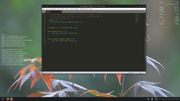
Reconfigured the panel; otherwise default desktop:You moved the CPU/RAM indicator down - did you change anything else on the panel? Anything you'd recommend making default?
The only other changes I made to the panel were to make it 100% in length. I also reconfigured xfce4-power-manager not to show the battery icon while reconfiguring the battery plugin to show the battery icon instead of the graph. Now there is just the one graphic for the battery. There are pop-up notifications for low percentage etc ...
The only default recommendation I would make is the reconfigurations of xfce4-power-manager and battery plugin so that there is only the one graphic on the panel for the battery. A while back I read on the xfce site that the xfcee-power-manager icon wasn't going to be re-coded to look better. They recommended using the plugin.
The size of the plugins can be controlled with css. On my Void system, I have this in the ~/.config/gtk-3.0/gtk.css file:
#pulseaudio-button * {
    -gtk-icon-transform: scale(.6);
}

#xfce4-power-manager-plugin * {
    -gtk-icon-transform: scale(.6);
}
to size those icons:
You must unlearn what you have learned.
-- yoda
Offline
#42 2026-01-23 06:36:29
- johnraff
- nullglob

- From: Nagoya, Japan
- Registered: 2015-09-09
- Posts: 13,459
- Website
Re: 2026 Screenshot Thread
johnraff wrote:...did you change anything else on the panel? Anything you'd recommend making default?
I also reconfigured xfce4-power-manager not to show the battery icon while reconfiguring the battery plugin to show the battery icon instead of the graph. Now there is just the one graphic for the battery. There are pop-up notifications for low percentage etc ...
The only default recommendation I would make is the reconfigurations of xfce4-power-manager and battery plugin so that there is only the one graphic on the panel for the battery. A while back I read on the xfce site that the xfce-power-manager icon wasn't going to be re-coded to look better. They recommended using the plugin.
I raised this very question on another thread, last post here: https://forums.bunsenlabs.org/viewtopic … 44#p148544 considering which of the two icons to go on displaying. I think I also prefer the option of displaying the plugin and hiding x-p-m's icon. x-p-m settings are easily found on the BL menu anyway.
The size of the plugins can be controlled with css. On my Void system, I have this in the ~/.config/gtk-3.0/gtk.css file:
#pulseaudio-button * {
    -gtk-icon-transform: scale(.6);
}

#xfce4-power-manager-plugin * {
    -gtk-icon-transform: scale(.6);
}
We've got this in Carbon's default gtk.css:
/* pulseaudio button is much too big */
#pulseaudio-button > box > image { -gtk-icon-transform: scale(0.6); }

/* in trixie x-p-m is no longer a plugin, and this does not affect the icon size */
/* #xfce4-power-manager-plugin > box > image { -gtk-icon-transform: scale(0.7); } */
The audio icon setting looks identical to yours - I don't think the extra selection > box > image makes much difference in this case.
About the x-p-m icon size though - it didn't seem to shrink the icon for me. Did you get a reduction in size with that 0.7 on Trixie? Maybe that worked with an earlier xfce system? I think I found some reference to it somewhere, that applying css would no longer work, so I added a note and commented it out.
...elevator in the Brain Hotel, broken down but just as well...
( a boring Japan blog (currently paused), now on Bluesky and Mastodon, there's also some GitStuff )
Offline
#43 2026-01-23 10:44:25
- PackRat
- jgmenu user Numero Uno
- Registered: 2015-10-02
- Posts: 3,045
Re: 2026 Screenshot Thread
^ No, the x-p-m icon is unaffected. That's hard coded into the application, ad I recall, so a user would have to edit the icon set or source code.
I don't really keep up with xfce development, but from what little I've read, they seem to be moving towards plugins and css themeing.
You must unlearn what you have learned.
-- yoda
Offline
#44 2026-01-24 00:39:27
- johnraff
- nullglob
- From: Nagoya, Japan
- Registered: 2015-09-09
- Posts: 13,459
- Website
Re: 2026 Screenshot Thread
More battery icon discussion here: https://forums.bunsenlabs.org/viewtopic.php?id=9670
...elevator in the Brain Hotel, broken down but just as well...
( a boring Japan blog (currently paused), now on Bluesky and Mastodon, there's also some GitStuff )
Offline
#45 2026-01-24 18:16:01
- PackRat
- jgmenu user Numero Uno
- Registered: 2015-10-02
- Posts: 3,045
Re: 2026 Screenshot Thread
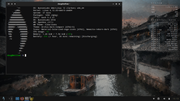
Added network info to conky and moved panel to bottom. Theme and icons for a bit higher contrast:
You must unlearn what you have learned.
-- yoda
Offline
#46 2026-01-25 00:51:49
- johnraff
- nullglob
- From: Nagoya, Japan
- Registered: 2015-09-09
- Posts: 13,459
- Website
Re: 2026 Screenshot Thread
Added network info to conky and moved panel to bottom.
My preferred panel position too.
For years I've had network data and CPU/RAM at the top of my dashboard, just next to the buttons of fullsized windows: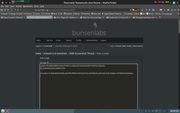
...elevator in the Brain Hotel, broken down but just as well...
( a boring Japan blog (currently paused), now on Bluesky and Mastodon, there's also some GitStuff )
Offline
#47 2026-01-25 01:21:33
- PackRat
- jgmenu user Numero Uno
- Registered: 2015-10-02
- Posts: 3,045
Re: 2026 Screenshot Thread
^ nice, clean setup.
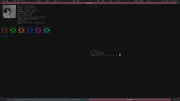
Have run a single line conky as "own_window_type panel" at top of screen in fluxbox since the #! days:
You must unlearn what you have learned.
-- yoda
Offline
#48 2026-01-25 01:31:46
- johnraff
- nullglob
- From: Nagoya, Japan
- Registered: 2015-09-09
- Posts: 13,459
- Website
Re: 2026 Screenshot Thread
^I have two separate conkys up there so they occupy minimum space and can each be moved independently to keep clear of the window decorations.
BTW mine are both "own_window_type = 'normal'"
I've never used "own_window_type panel" - what does it do?
...elevator in the Brain Hotel, broken down but just as well...
( a boring Japan blog (currently paused), now on Bluesky and Mastodon, there's also some GitStuff )
Offline
#49 2026-01-25 01:48:15
- PackRat
- jgmenu user Numero Uno
- Registered: 2015-10-02
- Posts: 3,045
Re: 2026 Screenshot Thread
The setting makes the conky window act like a panel so maximized windows will not cover or overlap the conky (full screen windows still cover it). End result, the information is always visible. From conky man page:
panel windows are similar to dock windows, but they also
reserve space along a workarea edge (like taskbars),
preventing maximized windows from overlapping them.  The edge
is chosen based on final conky position and size, and workarea
dimensions, to ensure normal windows have most free space
available.  For WMs that “cut out” entirely covered screens
from reserved area, the edge will be chosen based on alignment
setting.
I used to use "own_window_type dock" so that the conky window would be like a dockapp and reside in the fluxbox slit (openbox dock), but that setting has gotten a bit wonky.
You must unlearn what you have learned.
-- yoda
Offline
#50 2026-01-25 02:25:01
- johnraff
- nullglob
- From: Nagoya, Japan
- Registered: 2015-09-09
- Posts: 13,459
- Website
Re: 2026 Screenshot Thread
^These are the own window settings I'm using for those two conkys:
	own_window = true,
	own_window_type = 'normal',
	own_window_transparent = false,
	own_window_argb_visual = true,
	own_window_argb_value = 0,
	own_window_hints = 'undecorated,above,sticky,skip_taskbar,skip_pager',
	own_window_class = 'Conky',
So they don't reserve space, but sit on top of maximized windows. It depends on there being enough empty space between the decorations in the corner and the title in the middle, so sometimes there is a bit of overlap, but usually it's OK.
...elevator in the Brain Hotel, broken down but just as well...
( a boring Japan blog (currently paused), now on Bluesky and Mastodon, there's also some GitStuff )
Offline
#51 2026-01-25 07:36:11
- hhh
- Hercule Poirot

- From: Belgium
- Registered: 2015-09-17
- Posts: 17,479
- Website
Re: 2026 Screenshot Thread
Staying with Rothko for now.

Why why why why?!!???
Offline
#52 2026-01-25 19:15:09
- PackRat
- jgmenu user Numero Uno
- Registered: 2015-10-02
- Posts: 3,045
Re: 2026 Screenshot Thread
Too cold outside to do much, so back inside to spam the screenshot thread:
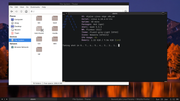
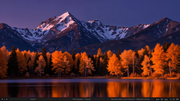
installed Alpine to kill some time.
You must unlearn what you have learned.
-- yoda
Offline
#53 2026-01-25 19:48:27
- MarkW
- Member
- Registered: 2024-11-03
- Posts: 547
Re: 2026 Screenshot Thread
I see Quick Screenshot's been updated 

Offline
#54 2026-01-26 15:23:05
- PackRat
- jgmenu user Numero Uno
- Registered: 2015-10-02
- Posts: 3,045
Re: 2026 Screenshot Thread
dwm version 6.7 released 2026-1-10
Using BL bark theme hilight color.


You must unlearn what you have learned.
-- yoda
Offline
#55 2026-01-26 18:36:45
- unklar
- Back to the roots 1.9

- From: #! BL
- Registered: 2015-10-31
- Posts: 3,090
Re: 2026 Screenshot Thread
^Nice!
Moscow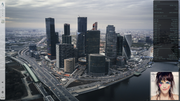
Online
#56 2026-01-27 05:41:52
- Döbbie03
- Resident Metalhead

- From: New Zealand
- Registered: 2015-09-29
- Posts: 4,347
Re: 2026 Screenshot Thread
dwm version 6.7 released 2026-1-10
Using BL bark theme hilight color.
I'll wait for dwm-flexipatch to update. Gone are the days of manually patching dwm.
"All we are is dust in the wind, dude"
- Theodore "Ted" Logan
"Led Zeppelin didn't write tunes that everybody liked, they left that to the Bee Gees."
- Wayne Campbell
Offline
#57 2026-01-28 16:01:16
- hhh
- Hercule Poirot
- From: Belgium
- Registered: 2015-09-17
- Posts: 17,479
- Website
Re: 2026 Screenshot Thread

Why why why why?!!???
Offline
#58 2026-01-28 17:37:29
- PackRat
- jgmenu user Numero Uno
- Registered: 2015-10-02
- Posts: 3,045
Re: 2026 Screenshot Thread
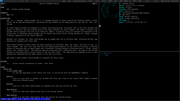
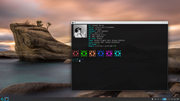
Sound with Endeavor was acting up so switched to the latest release CachyOS -
You must unlearn what you have learned.
-- yoda
Offline
#59 2026-01-28 17:57:38
- hhh
- Hercule Poirot
- From: Belgium
- Registered: 2015-09-17
- Posts: 17,479
- Website
Re: 2026 Screenshot Thread
^ Looks sweet, Cachy has been getting good press.
https://www.linuxcompatible.org/story/c … -released/
BTW, pipewire sound? Weird, it's bulletproof on Debian.
Why why why why?!!???
Offline
#60 2026-01-28 18:47:42
- PackRat
- jgmenu user Numero Uno
- Registered: 2015-10-02
- Posts: 3,045
Re: 2026 Screenshot Thread
BTW, pipewire sound? Weird, it's bulletproof on Debian.
Yes, pipewire.
Most applications are bulletproof on Debian - particularly Debian stable. That's the advantage of using it or a derivative.
I could not get pipewire or alsa working on Alpine; so abandoned it.
Endeavor is pretty solid; I don't know if I did something to bork the sound or if a recent update broke it. Rather than mess around trying to fix it, I installed the new release of CachyOS. Released on the 24th, I think.
You must unlearn what you have learned.
-- yoda
Offline