![[BunsenLabs Logo]](/img/bl.svg)
You are not logged in.
- Topics: Active | Unanswered
#121 2025-11-26 11:40:20
- marens
- Member

- From: World without M$
- Registered: 2023-02-02
- Posts: 1,303
Re: Conky Weather TAD script
OK, I did a web search for areas experiencing floods right now, the news said Hat Yai in Thailand, and wt-32 was used to indicate flash floods in that region.
Awesome.
I don't mean the floods, but the way you found a solution. 
If people would know how little brain is ruling the world, they would die of fear.
Offline
#122 2025-11-27 02:56:50
- marens
- Member
- From: World without M$
- Registered: 2023-02-02
- Posts: 1,303
Re: Conky Weather TAD script
@asqwerth
Try this in tad-conky (High and Low part):
${goto 100}${color ff8080}High and Low:${color}  ${execpi 90 sed -n '1p' $HOME/time_and_date_conky_script/temperatures}  °C
${execpi 90 sed -n '1p' $HOME/time_and_date_conky_script/date_and_phrase | sed 's/[^ ]* *//' | sed 's/\.*$//' | sed -e 's/\./\n/g' | sed -e 's/^[ \t]*//g' | { N=24; perl -pe "s/^/' 'x$N/e" ; } | sed 's/.*/&./'}
Just set 'N=24' to get proper spacing at the beginning.
This is what it looks like in the terminal:
$ sed -n '1p' $HOME/time_and_date_conky_script/date_and_phrase | sed 's/[^ ]* *//' | sed 's/\.*$//' | sed -e 's/\./\n/g' | sed -e 's/^[ \t]*//g' | { N=24; perl -pe "s/^/' 'x$N/e" ; } | sed 's/.*/&./'
                        Sprinkles late.
                        Overcast.
EDIT
My tad-conky is now much more compact.
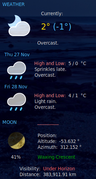
The cut or "fmt -w XX" commands are no longer needed.
Everything is done in one line of code, the output is the same as on the website and the result is perfect alignment.
Last edited by marens (2025-11-27 03:38:40)
If people would know how little brain is ruling the world, they would die of fear.
Offline
#123 2025-11-27 09:41:52
- unklar
- Back to the roots 1.9

- From: #! BL
- Registered: 2015-10-31
- Posts: 3,115
Re: Conky Weather TAD script
^ I've since edited the post, but you probably didn't see it.
marens wrote:EDIT
This is a public forum and nothing is hidden, but let them at least try to find it themselves.I'll try to explain it to you:
Some people from GitHub come here, copy/paste my fixes, and publish them as their own work on the script.They don't leave a link to this forum anywhere, even though they found the solution here.
If they promoted BL forums, I wouldn't mind.I always help everyone, but I don't want to help people like that.
P.S.
You decide what you will do.
I just asked you to think about it.EDIT
unklar wrote:I don't understand it because your name doesn't appear anywhere. It's @TBG's script, which some people, including me, have mangled, bent and straightened.
Ah.
We're not talking about the same accuweather script???
I meant the one that has been saved for the last 45 months without @TBG:marens wrote:My latest updates still work, and for those who use hourly forecast, I made my own version that also works (for now).
Anyway, you and I can be proud of our contributions here since @TBG left (about 45 months ago).
https://forums.bunsenlabs.org/viewtopic … 23#p146923
https://forums.bunsenlabs.org/viewtopic … 31#p128131
https://forums.bunsenlabs.org/viewtopic … 73#p132573
https://forums.bunsenlabs.org/viewtopic … 74#p132574
https://forums.bunsenlabs.org/viewtopic … 32#p145932
...I'd love to see that accuweather script where my name doesn't appear anywhere.
Link?
I think you were a little hasty with your assumption. That's why I wrote: 'the accuweather script I use and the conkyrc'.
I activated the link again. You are welcome to take a look at the script. 
Offline
#124 2025-11-27 10:19:42
- loutch
- Member
- Registered: 2015-12-12
- Posts: 1,075
Re: Conky Weather TAD script
Hello
I don't understand, for me in my AccuWeather Conky and script, Marens is clearly mentioned.
${execi 600 sed -n '1p' $HOME/Accuweather_conky_script/marens_hourly/time}\in the script
#### Marens Hourly

#Time
        cat $HOME/Accuweather_conky_script/hourly | grep -A 1 'class="date"' | grep 'div' | sed 's/^[ \t]*//' | sed -r 's/.{5}//' | sed -r 's/.{6}$//' > $HOME/Accuweather_conky_script/marens_hourly/time
& this
####### modifié par marens du forum Bounsenlabs pour les heures en juillet 2024 ############
@+
Last edited by loutch (2025-11-27 10:23:48)
Linuxmint 22.1 Xia xfce & mageia 9 XFCE on ssd hp pavilion g7
Xubuntu 18.04 lts & 24.04 lts on ASUS Rog STRIX
Online
#125 2025-11-27 12:46:19
- unklar
- Back to the roots 1.9
- From: #! BL
- Registered: 2015-10-31
- Posts: 3,115
Re: Conky Weather TAD script
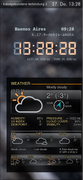
A attempt on wayland/wayfire with the accuweather-script
https://i.postimg.cc/mcvLKC8z/20251125-13h55m59s-grim.png https://i.postimg.cc/FdXf3Mtw/20251125-13h54m09s-grim.png Original https://i.postimg.cc/GHd5qtJ1/2023-03-21-16-43-48-scrot.png
-I excluded the sun and moon, as well as the hourly edition.
-So far I haven't been able to put a dark background behind the conky window. Neither with lua-scripte nor with the 'home remedies' from conky.the accuweather script I used and the conkyrc
https://workupload.com/file/YadfSGJYepB
It also works with Conky's 'home remedies'. 
this
conky.config = {
--https://forums.bunsenlabs.org/viewtopic.php?pid=1545#p1545
-- pkill -xf "conky -c /home/unklar/accuweather-wind/conkyrc9" &
-- realization, Script and Conky_V1.10  TeoBigusGeekus
-- accessories Sector11
-- modification, compilation unklar 15-10-2016,29-11-2019 and 25-11-2025(wayfire)
-- Create own window instead of using desktop (required in nautilus)
	background = true,
	own_window = true,
	own_window_type = 'override',--normal',
	own_window_transparent = false,--true,
	own_window_class = 'Conky',
	own_window_colour = '#000000',
	own_window_argb_visual = true,
	own_window_argb_value = 200,
	own_window_hints = 'undecorated,below,skip_taskbar,skip_pager',
--out_to_wayland = true,

	double_buffer = true,

	use_spacer = 'right',

	update_interval = 1,

	minimum_width = 300, minimum_height = 300,-- w|h
	maximum_width = 300,

	override_utf8_locale = true,

	draw_shades = false,--true, --<
	default_shade_color = '#000000',--<

	draw_outline = true,
	draw_borders = false,

	use_xft = true,
	font = 'Arial:size=9',
	uppercase = false,

	stippled_borders = 3,

	border_inner_margin = 9,
	border_outer_margin = 0,
	border_width = 10,

-- Default colors and also border colors, grey90 == #e5e5e5
	default_color = '#cbcbcb',
	color1 = '#ffe595',
	color2 = '#ff8c00',

--alignment = 'top_left',
--alignment = 'top_right',
alignment = 'middle_right',
--alignment = 'bottom_left',
--alignment = 'bottom_right',

	gap_x = 5,
	gap_y = 10,

	imlib_cache_size = 0,
...
Offline
#126 2025-11-27 15:32:00
- marens
- Member
- From: World without M$
- Registered: 2023-02-02
- Posts: 1,303
Re: Conky Weather TAD script
@unklar
This is my first accuweather script fix and of course I found it in "your" script:
https://forums.bunsenlabs.org/viewtopic … 38#p125938
I won't waste time looking for more.
I also know why your Sun/Moon part doesn't work.
But the script is "yours" and my name is not mentioned anywhere and let it stay that way.
If people would know how little brain is ruling the world, they would die of fear.
Offline
#127 2025-11-27 15:34:00
- marens
- Member
- From: World without M$
- Registered: 2023-02-02
- Posts: 1,303
Re: Conky Weather TAD script
I don't understand, for me in my AccuWeather Conky and script, Marens is clearly mentioned.
Just look here and everything will be clearer to you:
https://forums.bunsenlabs.org/viewtopic … 31#p128131
If people would know how little brain is ruling the world, they would die of fear.
Offline
#128 2025-11-27 16:31:31
- loutch
- Member
- Registered: 2015-12-12
- Posts: 1,075
Re: Conky Weather TAD script
Re
Oki-doki
@+
Linuxmint 22.1 Xia xfce & mageia 9 XFCE on ssd hp pavilion g7
Xubuntu 18.04 lts & 24.04 lts on ASUS Rog STRIX
Online
#129 2025-11-27 18:34:20
- marens
- Member
- From: World without M$
- Registered: 2023-02-02
- Posts: 1,303
Re: Conky Weather TAD script
More fun details about my post here:
https://forums.bunsenlabs.org/viewtopic … 05#p147305
Just a few posts before my first fix to the accuweather script, some people reported that the script was not working.
Who are these people?
@weatherman, @morfik and @UNKLAR.
@morfik's screenshot from that time shows that the current conditions section is unusable.
@unklar, you copied/pasted my fix and now (about three years later) you say:
I don't understand it because your name doesn't appear anywhere. It's @TBG's script, which some people, including me, have mangled, bent and straightened.
If anyone has a list of people who have worked on saving the accuweather script for the last 45 months (besides @il.harun and me), please post it.
Just one link is enough.
Thanks in advance.
Last edited by marens (2025-11-27 23:14:00)
If people would know how little brain is ruling the world, they would die of fear.
Offline
#130 2025-11-27 19:36:44
- loutch
- Member
- Registered: 2015-12-12
- Posts: 1,075
Re: Conky Weather TAD script
Re
HÉ LES GARS ARRÊTEZ ÇA , LÀ ÇA PART EN CACAHUÈTES.
@+
Last edited by loutch (2025-11-30 08:12:50)
Linuxmint 22.1 Xia xfce & mageia 9 XFCE on ssd hp pavilion g7
Xubuntu 18.04 lts & 24.04 lts on ASUS Rog STRIX
Online
#131 2025-11-27 23:16:40
- marens
- Member
- From: World without M$
- Registered: 2023-02-02
- Posts: 1,303
Re: Conky Weather TAD script
^ Why, @loutch?
We just exchanged opinions and arguments.
If we disagree, that's okay.
P.S.
My last post has been slightly edited.
I can understand you, @loutch.
If people would know how little brain is ruling the world, they would die of fear.
Offline
#132 2025-11-28 00:24:51
- marens
- Member
- From: World without M$
- Registered: 2023-02-02
- Posts: 1,303
Re: Conky Weather TAD script
@loutch
I looked at your screenshot here:
https://imgbox.com/oAZLr2Lo
This line (script) at the beginning is unnecessary:
date +%T > $HOME/Accuweather_conky_script/actualizationIt just wastes resources.
It is much better to use the same command in conky:
${texeci 600 date +%T}You can now also remove the file ~/Accuweather_conky_script/actualization.
If people would know how little brain is ruling the world, they would die of fear.
Offline
#133 2025-11-28 07:21:41
- asqwerth
- Member
- Registered: 2015-10-08
- Posts: 82
Re: Conky Weather TAD script
@asqwerth
Try this in tad-conky (High and Low part).....
The cut or "fmt -w XX" commands are no longer needed.
Everything is done in one line of code, the output is the same as on the website and the result is perfect alignment.
Interesting code. It works on my 2-day weather condition text (with ${goto xx} command removed for that line and N set to 14). However, when I tried both this code and the fmt command on the "now" file for the current weather (I was using | cut ....) , the first word was not displayed.
...
When you've tested your icons enough and set everything right, post them here:
https://workupload.comJust compress the folder tad-icons2 as .tar.xz .....
Meanwhile, for anyone who's interested, here is a link to the Weather Underground icons (with some modifications and additions) renamed to work with the T_A_D script.
https://workupload.com/file/yKC7X3j5J4v
Disclaimer and notes:
1. original icons were included as part of the Weather Underground script by TBG.
2. previously I had modified a few icons so I could use the set with openweathermap conkies. For T_A_D, I modified a few more. The modded icons are pretty rough when magnified as my GIMP skills are limited. However, at the normal size of weather conky icons, they should be passable.
3. I borrowed a few icons from other places. For example, wt-10 and 32 are from the original T_A_D icons
You could replace the icons in the "tad-icons" subdirectory with these icons, but I prefer to rename that sub-directory as "tad-icons-old" and then rename the WU icon subdirectory as "tad-icons". That way I can switch between the 2 icon sets.
Offline
#134 2025-11-28 08:06:09
- loutch
- Member
- Registered: 2015-12-12
- Posts: 1,075
Re: Conky Weather TAD script
Hello
^ Why, @loutch?
We just exchanged opinions and arguments.
If we disagree, that's okay.P.S.
My last post has been slightly edited.
I can understand you, @loutch.
Oki-doki .
@+
Linuxmint 22.1 Xia xfce & mageia 9 XFCE on ssd hp pavilion g7
Xubuntu 18.04 lts & 24.04 lts on ASUS Rog STRIX
Online
#135 2025-11-28 14:18:40
- marens
- Member
- From: World without M$
- Registered: 2023-02-02
- Posts: 1,303
Re: Conky Weather TAD script
@asqwerth
Very nice.
I added your icons as tad-icons-WU and modified the TAD script (in 3 places).
The result is excellent.
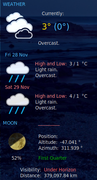
However, when I tried both this code and the fmt command on the "now" file for the current weather (I was using | cut ....) , the first word was not displayed.
Yes.
A small code change is required.
Terminal:
$ echo 'Partly sunny. Light rain' | sed -e 's/\./\n/g' | sed -e 's/^[ \t]*//g' | { N=24; perl -pe "s/^/' 'x$N/e" ; } | sed 's/.*/&./'
                        Partly sunny.
                        Light rain.
Conky:
${execpi 90 sed -n '4p' $HOME/time_and_date_conky_script/now | sed -e 's/\./\n/g' | sed -e 's/^[ \t]*//g' | { N=24; perl -pe "s/^/' 'x$N/e" ; } | sed 's/.*/&./'}I like to show Saturday and Sunday in red.
This is what it looks like in my tad-conky (day_1):
${if_match "${execi 600 sed -n '1p' $HOME/time_and_date_conky_script/date | awk '{print $1}'}" == "Sat"}${color ff8080}\
${else}\
${if_match "${execi 600 sed -n '1p' $HOME/time_and_date_conky_script/date | awk '{print $1}'}" == "Sun"}${color ff8080}\
${else}${color 48bcff}${endif}${endif}\
${execpi 90 sed -n '1p' $HOME/time_and_date_conky_script/date}${color}
If people would know how little brain is ruling the world, they would die of fear.
Offline
#136 2025-11-29 02:35:40
- marens
- Member
- From: World without M$
- Registered: 2023-02-02
- Posts: 1,303
Re: Conky Weather TAD script
@asqwerth
I think I managed to improve the ## Daily Date + Phrase - Next 7 Days section.
Instead of seven cat commands, just one is enough.
First, make a copy of the TAD script, then replace the entire section with:
## Daily Date + Phrase - Next 7 Days

cat $HOME/time_and_date_conky_script/weather_raw | grep -o '[ ^]src="//c.tadst.com/gfx/w/svg[^ ]*' | sed -n '19,25p' | sed 's/ src="/https:/' | sed 's/.$//' | awk -F'svg/' '{print $2}' | sed 's/svg/png/' > $HOME/time_and_date_conky_script/images

  j=1

    for (( i=1; i<=7; i+=1 ))

      do

        cp $HOME/time_and_date_conky_script/tad-icons/$(sed -n ${i}p $HOME/time_and_date_conky_script/images) $HOME/time_and_date_conky_script/day_$j.png

  ((j++))

  done
EDIT
Your tad-icons-WU looks great so far.
Also, Saturday and Sunday are shown in red.

Last edited by marens (2025-11-29 02:56:40)
If people would know how little brain is ruling the world, they would die of fear.
Offline
#137 2025-11-29 05:26:27
- asqwerth
- Member
- Registered: 2015-10-08
- Posts: 82
Re: Conky Weather TAD script
@marens, just a note that in order for the Sat/Sun code to work for me, I had to add the comma that comes after the day of the week in the "date" file --
${if_match "${execi 600 sed -n '2p' $HOME/time_and_date_conky_script/date | awk '{print $1}'}" == "Sat,"}${color FFFF00}\Did I overlook you changing your tad script to remove the comma?
Offline
#138 2025-11-29 10:37:44
- unklar
- Back to the roots 1.9
- From: #! BL
- Registered: 2015-10-31
- Posts: 3,115
Re: Conky Weather TAD script
@unklar
This is my first accuweather script fix and of course I found it in "your" script:
https://forums.bunsenlabs.org/viewtopic … 38#p125938I won't waste time looking for more.
I also know why your Sun/Moon part doesn't work.But the script is "yours" and my name is not mentioned anywhere and let it stay that way.
For the third and final time
A attempt on wayland/wayfire with the accuweather-script
https://i.postimg.cc/mcvLKC8z/20251125-13h55m59s-grim.png https://i.postimg.cc/FdXf3Mtw/20251125-13h54m09s-grim.png Original https://i.postimg.cc/GHd5qtJ1/2023-03-21-16-43-48-scrot.png
-I excluded the sun and moon, as well as the hourly edition.
-So far I haven't been able to put a dark background behind the conky window. Neither with lua-scripte nor with the 'home remedies' from conky.the accuweather script I used and the conkyrc
https://workupload.com/file/YadfSGJYepB
It was not my intention at all to display sun/moon or hourly weather data in this Conky. That's why I chose a script from TBG that came closest to these ideas.
If this goes against “your ideas,” I apologize and wish you health.
Offline
#139 2025-11-29 12:52:21
- marens
- Member
- From: World without M$
- Registered: 2023-02-02
- Posts: 1,303
Re: Conky Weather TAD script
@asqwerth
Yes.
I mentioned that the data listed in the "date" file is local and varies from country to country.
I had to translate everything into English.
If you want, the comma can be easily removed:
$ echo 'Sat, 29 Nov' | sed s'/,//'
Sat 29 Nov
If people would know how little brain is ruling the world, they would die of fear.
Offline
#140 2025-11-29 13:30:20
- marens
- Member
- From: World without M$
- Registered: 2023-02-02
- Posts: 1,303
Re: Conky Weather TAD script
@unklar
@TBG hasn't been here in a long time and there is no accuweather script that works without my (and @il.harun's) fixes.
My code was immediately found in your script:
This is my first accuweather script fix and of course I found it in "your" script:
https://forums.bunsenlabs.org/viewtopic … 38#p125938I won't waste time looking for more.
https://forums.bunsenlabs.org/viewtopic … 05#p147305
Thanks to @loutch I removed this part from my post:
Someone whose name I will never mention again copied/pasted my fix and now (about three years later) says:
---
I'm activating it now.
Also, I wish you health.
If people would know how little brain is ruling the world, they would die of fear.
Offline